In a low-key move, Microsoft has finally confirmed and started fixing several serious problems that have been affecting users of Windows 11 version 24H2, following multiple mandatory updates rolled out in recent months. The confirmation came not through a major announcement, but via update documentation attached to an optional patch—leaving many users unaware of the changes unless they specifically went looking.
This comes at a critical time, as Microsoft has recently gone on record stating that Windows 11 is the “most reliable version of Windows ever.” However, user reports and technical issues over the past few months seem to contradict that marketing claim.
Troublesome Updates: KB5060842 and KB5063060
The problems trace back to the June 2025 cumulative updates:
- KB5060842
- KB5063060
These updates were pushed as part of Microsoft’s regular Patch Tuesday cycle and were mandatory for all supported Windows 11 users. However, instead of improving system performance or fixing known bugs, many users found themselves facing new errors and glitches that had not been seen in earlier builds.
Common Installation Errors Reported
Many users trying to install the June updates reported seeing one or more of the following error codes:
- 0x800f0922 – A common installation failure usually tied to network or partition issues.
- 0x80070002 – Indicates a file is missing or not found.
- 0x80070306 – Suggests problems with update file integrity.
- 0x800f0991 – Often points to component store corruption or incomplete system configuration.
These error codes caused confusion and frustration, especially because they weren’t being addressed directly by Microsoft at the time. Users were left scouring forums like Reddit and Microsoft’s own support channels for potential workarounds.
System Performance Took a Hit for Many Users
Once the updates were installed—either manually or automatically—system stability began to degrade for some users, especially gamers and professionals who rely on consistent performance.
Real-World Problems Observed
According to a detailed report from Windows Latest, a credible independent site that covers Microsoft updates, users have faced the following issues after installing the June 2025 updates:
- Games like Fortnite randomly restarted or crashed without warning.
- Windows Taskbar would sometimes freeze or become completely unresponsive, requiring a reboot.
- Frame rates (FPS) dropped significantly in several games, including Counter-Strike: Global Offensive (CS:GO), Valorant, and Apex Legends.
- Incorrect firewall behavior, especially Event 2042 logs in Windows Event Viewer, showing the message: “Config Read Failed – More data is available.”
These issues weren’t just isolated incidents. Dozens of similar complaints began to appear across tech communities, forums, and social media, with users begging Microsoft for an explanation or a solution.
Microsoft Quietly Confirms the Issues in Update KB5062660
Microsoft’s response came quietly and somewhat indirectly. Instead of a blog post or official announcement, confirmation was buried in the changelog for an optional preview update, KB5062660, which is currently available for manual installation.
In the update notes, Microsoft confirmed the following two major issues:
1. [System Stability Issue]
This update addresses an issue observed in rare cases after installing the May 2025 security update and subsequent updates causing devices to experience stability issues. Some devices became unresponsive and stopped responding in specific scenarios.”
This is Microsoft’s way of acknowledging that updates released in May and June had unintended side effects, including freezing and unresponsive behavior, which many users had already documented online.
2. [Windows Firewall Logging Issue]
“This update addresses an issue found in Event Viewer as Event 2042 for Windows Firewall with Advanced Security. The event appears as ‘Config Read Failed’ with the message ‘More data is available.’”
This firewall-related error was not just a cosmetic problem. For IT administrators and security professionals, firewall event logs are critical. Misleading or broken logs can hinder troubleshooting and raise false alarms, especially in enterprise environments.
Microsoft has provided additional documentation for this fix in its Windows Health Dashboard, where the problem is now officially listed under known issues and resolutions.
Update KB5062660: Not Yet Automatic, Manual Installation Required
While Microsoft has provided a fix, it has not yet rolled out automatically to all users. As of now, KB5062660 remains an optional preview update, meaning users need to manually download and install it if they are experiencing any of the mentioned problems.
How to Install Update KB5062660
There are two official ways to install the update if you’re encountering issues:
| Method | Steps |
| Windows Update Settings | Open Settings → 2. Go to Windows Update → 3. Click Check for Updates → 4. Scroll down to Optional Updates and install KB5062660. |
| Microsoft Update Catalog | Go to the Microsoft Update Catalog → Search for KB5062660 → Download the update installer file matching your Windows version (x64 or ARM64). |
Microsoft has confirmed that KB5062660 will be included in the August 2025 Patch Tuesday update, which means all compatible systems will receive it automatically next month. But for those already affected, waiting could mean weeks of continued system instability.
A Pattern of Patch-Triggered Problems?
This isn’t the first time Windows 11 updates have introduced new problems. Over the past year, Microsoft has come under scrutiny for releasing cumulative updates that cause performance drops, particularly on gaming PCs and machines with custom hardware configurations.
Despite boasting about better reliability, Microsoft is facing increasing criticism for its update management process, especially in enterprise and gaming communities. Some users are now delaying or pausing updates entirely until new versions have been tested in real-world scenarios.
Microsoft’s Pledge for Better Update Quality
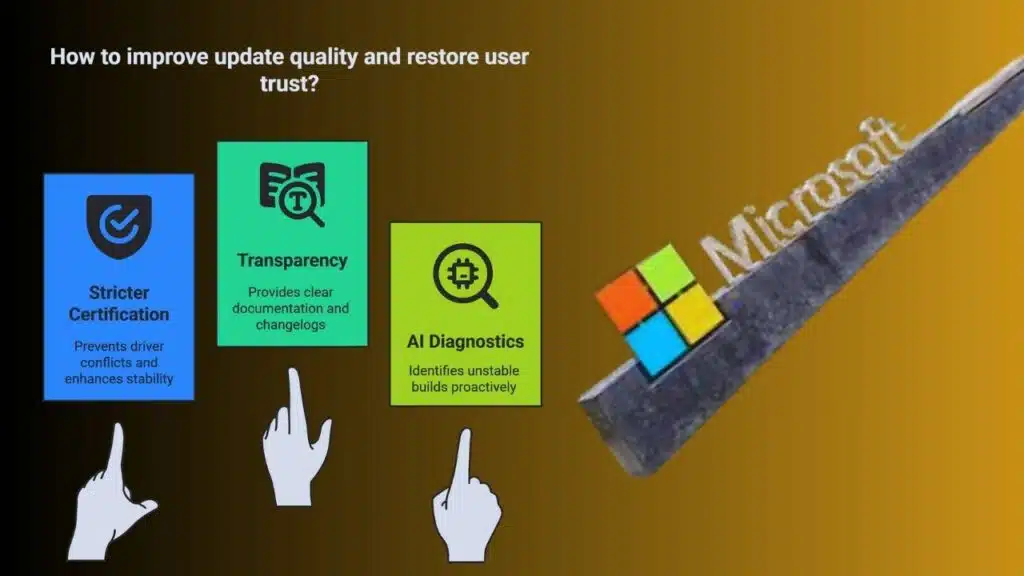
In light of these ongoing issues, Microsoft has promised to improve the quality of future updates and driver stability. Their roadmap includes:
- Stricter driver certification programs to prevent driver conflicts.
- More transparency via changelogs and update documentation.
- Continued investment in AI-powered diagnostics to pre-emptively identify unstable builds.
Still, many users feel the damage to trust has already been done, and the company has to work harder to match its promises with real-world stability.
Should You Install KB5062660?
If your system has been crashing, freezing, or showing error messages since the May or June updates, installing KB5062660 is highly recommended. While Microsoft has not detailed the exact root causes, the update clearly targets the key problems reported by users.
- KB5062660 is a voluntary update (for now) but will be part of the August 2025 automatic rollout.
- It fixes critical stability issues and a Windows Firewall logging error.
- It can be downloaded via Windows Update or the Microsoft Update Catalog.
As always, before installing a major update, back up your important files and consider creating a restore point to roll back if needed.
Let’s hope Microsoft’s future updates truly live up to their reliability claims—and don’t end up causing more problems than they fix.