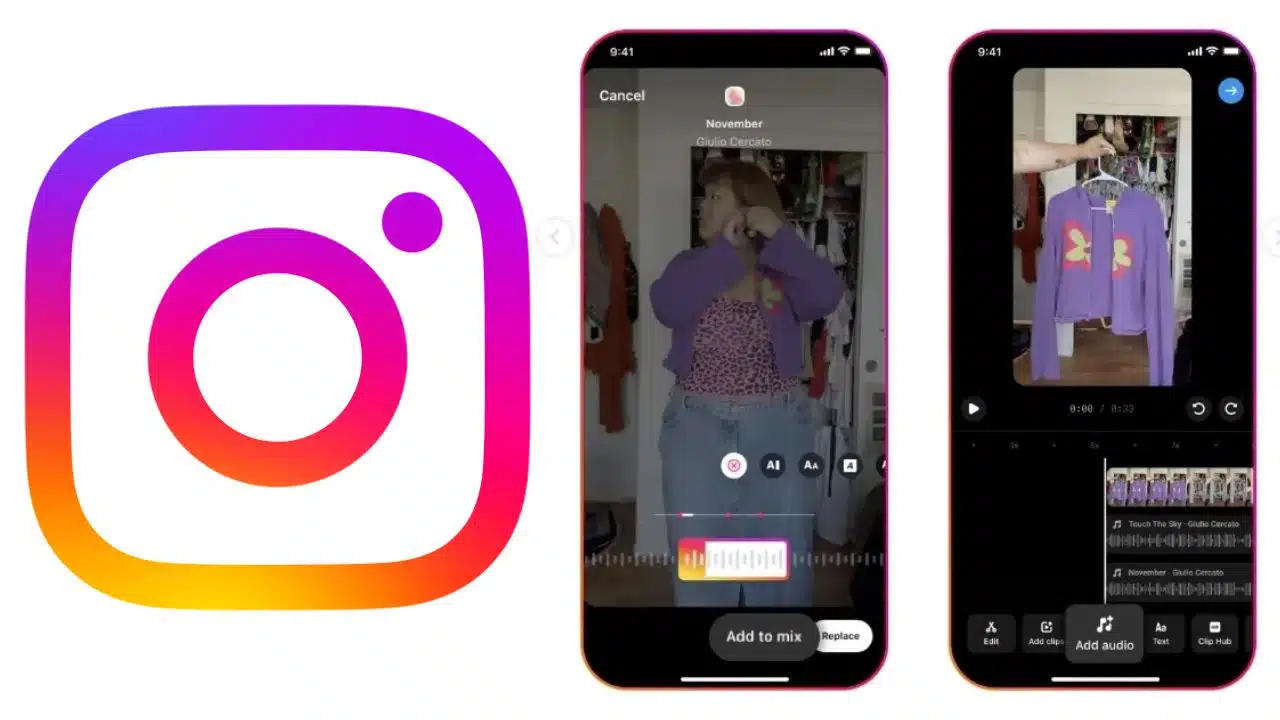
Instagram’s new multi-audio track feature transforms how creators make Reels by allowing up to 20 audio tracks in a single video. This innovation offers greater creative freedom, enabling users to overlay multiple audio elements, synchronize sounds with specific visuals, and create unique mashups and remixes.
As Instagram continues to evolve from a photo-sharing platform to a video-centric one, this feature provides an exciting new tool for enhancing content. Whether you are a seasoned content creator or just getting started, understanding how to use this feature can significantly elevate the quality and engagement of your Reels.
This comprehensive guide will walk you through the steps to master Instagram’s multi-audio track feature and unlock its full potential for your creative projects.
1. Update Your Instagram App
Before experimenting with the multi-audio track feature, ensure your Instagram app is updated to the latest version. Regular updates often include new features, bug fixes, and improvements.
Check for updates in your device’s app store (App Store for iOS or Google Play Store for Android) and install the latest version to access all the new functionalities Instagram offers.
Keeping your app updated ensures you have the best user experience and access to the latest tools for content creation. With the latest updates, you can explore new creative possibilities and ensure your content stays relevant and engaging.
2. Create or Edit a Reel
Once your app is updated, open Instagram and create a new Reel or select an existing one to edit. To create a new Reel, tap on the “+” icon at the bottom center of the screen, select “Reel,” and begin recording or uploading your video clips.
If you’re editing an existing Reel, navigate to your profile, choose the Reel you want to edit, and tap the three-dot menu to find the edit option. This flexibility allows you to enhance new and existing content with multiple audio tracks.
By starting from scratch or improving an existing Reel, you can utilize the multi-audio track feature to make your videos more dynamic and engaging.
3. Find the “Add to Mix” Option
Look for the “Add to Mix” option in the Reel editor. This feature allows you to add multiple audio tracks to your video.
By tapping “Add to Mix,” you will be directed to Instagram’s music library, where you can browse and select audio tracks to enhance your Reel. This option is crucial for accessing the multi-audio track functionality.
The “Add to Mix” button makes it easy to start layering different sounds and music, opening up new creative possibilities for your content. This step is critical to making the most of Instagram’s new audio capabilities, allowing you to transform your Reels with layered soundscapes.
4. Select Your Tracks
Choose up to 20 audio tracks in the music library to include in your Reel. Instagram’s extensive library offers a variety of songs and sound effects, allowing you to find the perfect tracks for your content.
Once you select a track, you can trim it to include only the portion of audio you want. This flexibility helps in aligning the audio perfectly with your visual elements.
Selecting the right tracks is crucial as it sets the tone and mood of your Reel, making it more engaging and appealing to your audience. With the ability to pick from a vast selection of tracks, you can ensure that your audio complements your visuals seamlessly.
5. Customize Your Audio Mix
After selecting your tracks, you can customize your audio mix by adjusting each track track, timing, and placement. This feature allows you to create a seamless blend of audio elements, enhancing the overall appeal of your Reel.
You can overlap different tracks to create unique audio effects or synchronize them with specific parts of your video to match the visuals perfectly. The customization options provide high creative control, ensuring your content stands out.
Instagram also includes a fade effect for overlapping audio clips, ensuring smooth transitions and professional sound quality in your Reels. Customizing your audio mix lets you create a polished and engaging final product that stands out.
6. Adjusting Volume and Timing
To fine-tune your audio mix, you can adjust the volume levels of each track to ensure they blend well together. This is particularly useful when background music needs to complement the primary audio, such as dialogue or a voiceover.
You can also set the timing for each track to start and end at specific points in the video, which is essential for synchronizing audio with key visual elements. These adjustments help create a polished, engaging reel that captures the viewerviewer’stion.
Proper volume and timing control are crucial for creating a balanced and harmonious audio experience.
7. Placement and Overlapping
Placement refers to positioning each audio track in your Reel timeline. You can decide where each track begins and ends, allowing you to overlap multiple tracks for creative effects.
For instance, start with a mellow background music track and gradually introduce sound effects or additional music tracks as your video progresses. Overlapping tracks can create a rich, layered experience that enhances your Storytelling.
This feature is perfect for creating dynamic content that keeps viewers engaged from start to finish. Strategic placement and overlapping ensure a cohesive and immersive audio-visual experience.
8. Publish Your Reel
Once you are satisfied with your audio mix and overall video content, it’s time to publish your Reel. Review your creation to ensure everything aligns as desired, then tap the “Share” butt”n.
Your Reel will be posted to your profile, and your followers will be able to enjoy your innovative use of the multi-audio track feature. This new way of integrating multiple audio tracks can significantly enhance the engagement and creativity of your content.
Publishing your Reel allows you to share your creative efforts with your audience, potentially increasing your reach and engagement on the platform. Sharing your Reel showcases your creativity and invites your followers to engage with your content in new and exciting ways.
Additional Tips for Using Multi-Audio Tracks
1. Experiment with Different Combinations
Try different combinations of audio tracks to find unique and engaging mixes. Experimentation can lead to discovering new creative possibilities. Don’t be afraid to mix genres or use unconventional sound effects.
This can make your Reels stand out and catch the attention of a wider audience. The flexibility of the multi-audio track feature encourages creativity, allowing you to push the boundaries of traditional content creation.
Experimenting with various audio combinations helps you find the perfect mix that enhances your video.
2. Create Mashups and Remixes
Use the feature to create mashups or remixes of popular songs. This can make your content more appealing and trendy. By blending different tracks, you can create a unique sound that differentiates your Reels from others.
Mashups and remixes are particularly popular in the music and entertainment niches, where creativity in audio can significantly enhance the visual experience.
Leveraging this feature can help you tap into trending sounds and increase your content and functionality on the platform. Creating mashups and remixes can attract a larger audience and increase engagement on your Reels.
3. Align Audio with Visual Elements
Ensure that your audio tracks align well with the visual elements in your Reel. This synchronization creates a more cohesive and professional look.
For example, match the beats of your music with transitions or actions in your video to create a rhythmic and engaging experience.
Aligning audio with visuals enhances the overall impact of your Reel, making it more memorable for viewers. This attention to detail can elevate the quality of your content, making it more likely to be shared and appreciated by your audience. Proper alignment of audio and visuals ensures a smooth and engaging viewer experience.
4. Use the Fade Effect
InstagInstagram’s audio track feature includes a fade effect for overlapping audio clips. Utilize this to ensure smooth transitions within your content. The fade effect helps blend different audio tracks seamlessly, preventing abrupt changes that can be jarring to the viewer.
Smooth transitions contribute to a more professional and polished final product. The fade effect is beneficial when you want to transition from one music track to another or layering sound effects over a background track.
This feature enhances the auditory experience of your Reels, making them more enjoyable to watch. Using the fade effect ensures that your audio transitions are smooth and professional.
5. Keep Your Audience in Mind
Always consider what your audience enjoys and expects from your content. Tailor your audio mixes to match their preferences and trends. Understanding your audience can help create more engaging and relevant Reels.
Pay attention to feedback and analytics to see what works best and adjust your content strategy accordingly. Keeping your audience in mind ensures that your Reels resonate with them, increasing the likelihood of engagement and shares.
This approach not only helps in growing your follower base but also in building a loyal and interactive community. Catering to your audience’s interests enhances engagement and viewer satisfaction.
Global Rollout and Future Potential
Instagram has rolled out the multi-audio track feature globally, making it available to a broader audience in phases. If you have noticed the feature, ensure your app is updated to the latest version.
This feature encourages more short-form content creation, aligning with Instagram’s strategy to connect people with friends and provide a platform for creative expression. This feature’s global rollout underscores InstagInstagram’stment to enhance user experience and provide advanced tools for content creation.
As the feature becomes more widely available, creators can expect even more innovative and engaging content on the platform.
The introduction of the multi-audio track feature marks a significant step in InstagInstagram’s transformation from a photo-sharing app to a video-first platform. With the ability to add multiple tracks, creators can now produce more dynamic and engaging Reels.
This development enhances the user experience and empowers creators to push the boundaries of their creativity. InstagInstagram’s short-form content reflects its understanding of user behavior and preferences, positioning the platform as a leader in the social media landscape.
The future potential of this feature includes more advanced audio editing tools and further integration with other creative features on the platform.
Takeaway
Instagram’s audio track feature provides creators with expanded creative flexibility, enabling them to produce more engaging and personalized Reels. Following the steps outlined in this guide, you can make the most of this feature and elevate your content.
Whether you use multiple audio tracks, synchronize audio with visuals, or create unique mashups, this tool offers endless possibilities for creative expression. Update your app, explore the feature, and create Reels that captivate and entertain your audience.
The new multi-audio track feature is a game-changer for content creators, offering new ways to engage and connect with their followers. Embrace this feature to unlock your creative potential and make your Reels stand out in the crowded social media.
By leveraging the multi-audio track feature, you can enhance the quality and creativity of your Reels, leading to increased engagement and a stronger connection with your audience.