With the new Wondershare UniConverter 14, video converter speeds can go up by up to 50%, and 4K and 8K HDR video full-process GPU acceleration can go up by up to 50%. Video editors will be happy with these changes, especially since these are just the beginning of the changes that are coming.
Wondershare also makes it easy for people who don’t know much about video editing to do things that people with more experience can do. This includes things like converting and compressing videos, editing, recording, saving, and merging videos, and burning videos to permanent media like DVDs, among many other things.
Wondershare UniConverter 14 supports Apple Mac M1 native acceleration for the new M1-powered Apple products out there. It also has multi-threaded GPU acceleration for Intel, AMD, and NVIDIA GPUs. UniConverter 14 can work with encoders for VP9, AV1, and HEVC (H.265). Video editors will be happy to hear that Wondershare can also output videos in WEBM and MP4 format with an alpha channel.

Wondershare Uniconverter is a set of video tools that includes a Video Converter, Editor, Recorder, Transfer, and Compressor. The new version has much better functions for converting videos, compressing videos, and other things. It also has a function for editing audio. UniConverter is better than other video processing tools on the market because it can handle a wide range of video and audio tasks and is easy to use.
Wondershare UniConverter is more than just a converter. In fact, calling it just a converter would be an understatement since it works like several programs in one. But if we had to list the most important things about it, they would be the following:
- Audio & video compressor
- Audio & video converter
- Audio & video editor
- CD & DVD burner
- A recorder for the screen, and more
The software can be downloaded, and all of the tools are accessible from a single menu. This means that it can be used on its own and is not part of a larger software suite with separate tools.
Speaking of which, the interface of UniConverter just got a makeover. It now looks more modern and compact than ever before, so users of all skill levels can use it to its full potential and maybe even enjoy it.
Introducing the Main Features of UniConverter 14
Convert Videos
UniConverter is a free video converter that can change video, audio, and image files to over 1000 different formats. It also works with a wide range of formats for both input and output.
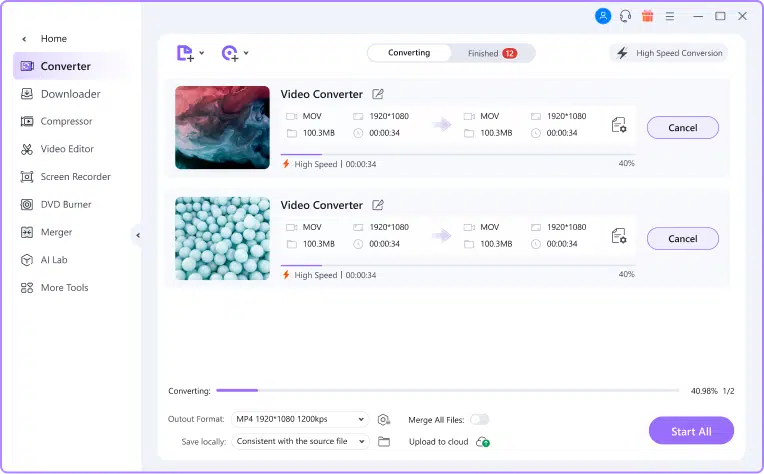
1. Conversion speed is expected to increase by 50%
When WonderShare UniConverter 14 comes out, users can expect a big speed boost when converting files. The new version is 50% faster than the old one, making it the fastest converter on the market. The new multi-core processing technology in the latest version is the reason for this speed boost. This technology lets software use all the cores in a processor, which makes the conversion speed much faster.
2. Support 4K/8K HDR HD video full-process GPU acceleration
The best way to convert, edit, and compress 4K/8K HDR HD videos is with WonderShare UniConverter. Its advanced GPU acceleration technology can help you convert files up to 6 times faster. With WonderShare UniConverter, you can easily convert your 4K/8K HDR HD videos to any popular format or even compress them without losing quality. It also comes with a video editor that makes it easy to change your videos.
3. Support web, mp4 format video with alpha channel output
Video editors will be happy to hear that WonderShare UniConverter can now output videos in mp4 format for the web with an alpha channel. This means that you can now make videos with transparent backgrounds, which is great for making special effects or putting multiple videos on top of each other. To use this new feature, just convert your video and choose “WEBM with Alpha” or “MP4 with Alpha” as the output type. WonderShare UniConverter will make a video file with a transparent background that can be used in any video editing software.
4. Support Mac M1 native acceleration
The new Mac M1 native acceleration feature in WonderShare UniConverter 14 lets you use the power of the Mac M1 processor to its fullest. You can convert videos up to 5 times faster with this feature than on a regular Mac. This means you can convert your video files in a fraction of the time it would take on a regular Mac.
5. Support VP9, AV1, HEVC (H.265) encoder (new MP4 (CFHD)/MOV (HEVC)/MKV (AV1)/Webm (VP9/AV1)
One of the most popular media converters is UniConverter. It is known for having a lot of features and being able to work with many different formats. In UniConverter 14, support for VP9, AV1, and HEVC (H.265) encoding has been added. You can now convert your videos to these newer formats, which have better quality and smaller file sizes. VP9 and AV1 are both new video codecs that are made to compress high-quality video. HEVC is a newer video codec that can compress videos even better than VP9 and AV1. UniConverter 14 works with the new file types MP4 (CFHD) and MOV (HEVC). These formats are made so that the Apple TV 4K and the new MacBook Pro can play high-quality videos. Last but not least, UniConverter 14 supports the new file types MKV (AV1) and WebM (VP9/AV1).
6. Support multi-threaded GPU acceleration, including Intel/AMD/NVIDIA
WonderShare UniConverter 14 still works with Intel, AMD, and NVIDIA’s multi-threaded GPU acceleration. The update also fixes a few bugs and makes the system more stable. With this update, UniConverter is now faster and more reliable than ever.
Compress Video
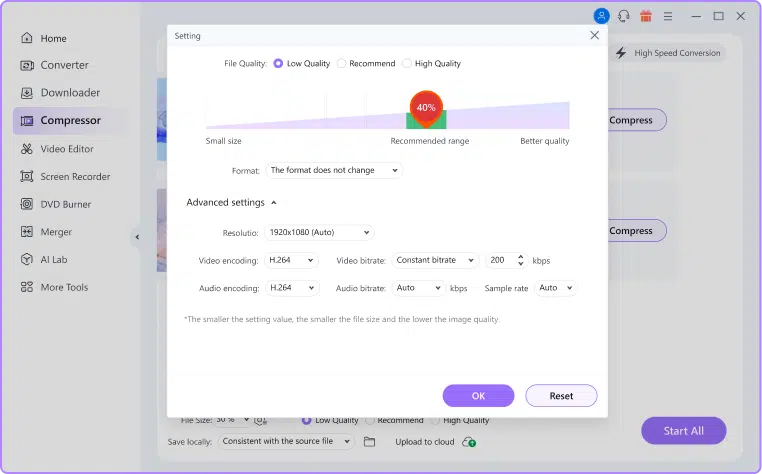
1. Added support for lossless compression of audio files
WonderShare UniConverter is software for converting video files that also lets you compress audio files without losing any quality. Users can now compress audio files without losing any sound quality thanks to this new feature. This is perfect for people who want to save space on their devices or upload large audio files to the internet without worrying about compression loss.
2. The compression quality is increased by 80%, and the compression is reduced to 90% without loss of quality.
You can easily reduce the size of your video files by up to 80% without losing any quality when you use WonderShare UniConverter. This is a great way to save space on your hard drive or make sure your videos are small enough to upload online. Plus, the built-in video converter makes it easy to convert your videos to any popular format so you can watch them on any device.
3. Multiple compression modes are added to meet the compression requirements of multiple scenarios
Wondershare UniConverter has different ways to compress files to meet the needs of different situations. You can choose the compression mode based on what you want to do.
Play Video
1. The player is an independent process and supports playing 1000+ format videos
The player works on its own and can play videos in more than 1000 different formats. It can also be used to download videos from the Internet and convert them to any format you want.
2. The playback effect is basically the same as that of the VLC professional player
UniConverter is a video converter that can convert between more than 1000 different formats. It can change, edit, compress, download, and burn videos. UniConverter also has a built-in video player that works like VLC Media Player when it comes to playing videos.
3. Support 4K/8K HD video playback, GPU playback is smoother
WonderShare UniConverter is a powerful video converter that can play back 4K and 8K HD videos. With its advanced GPU acceleration, high-definition videos can be played back more smoothly. UniConverter can also download videos, change them, and burn them to DVD. It’s a one-stop shop for all your video needs.
AI Audio Function
- Noise Remover:
UniConverter makes it easy to get rid of noise from audio and video recordings. The software can be used for things like recording meetings, letting video editors edit videos, and recording podcast audio. The noise removal feature of UniConverter is powered by AI, so it can get rid of all background noise from your recordings. Select “Noise Removal” from the main interface of UniConverter to get rid of the noise. Then, just drag and drop your audio or video file into the software. UniConverter will analyze the file automatically and get rid of all kinds of background noise. You can also change the volume and save the file in a format of your choice.
2. Vocal Remover:
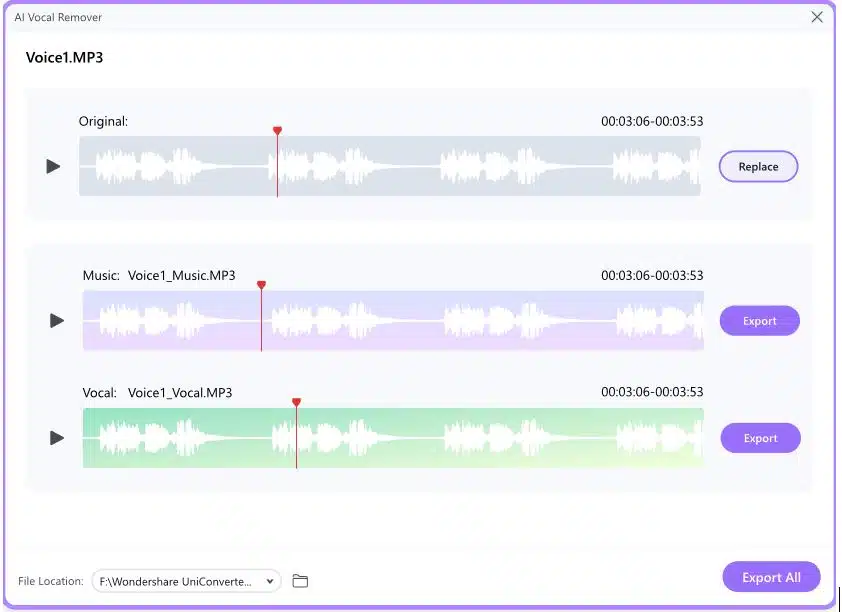
With its vocals remover feature, the Wondershare UniConverter program can help with a wide range of issues in advanced music production. The feature lets you take out a song’s vocals while keeping the instrumental scratch. The function is supported by a very smart AI algorithm that does the vocal extraction job.
The parts that were taken out can be saved separately and used in many different ways, such as DJ mixing, making karaoke songs, etc. You can get the software for free or you can pay for it. But you can only use the free version for a limited time.
Plans and Pricing
The Wondershare UniConverter program has a trial version that you can use for a limited time. After that, you have to pay for a subscription to keep using it. There are three different plans for the program that you can choose from based on your needs. Let’s look at each of the possible plans in the next section:
1. Annual Plan
The annual plan costs $39.99 and is good for one year on systems that work with Windows. When you buy this plan for Mac devices, you have to pay $49.99. If you sign up for the plan, you can use the updates and new features of UniConverter for a year. This plan is a Standard subscription, and it gives users access to six cool features. These tools are Smart Trimmer, Watermark Editor, Subtitle Editor, Auto Reframe, AI Portrait, Intro, and Outro. Most video editors will be able to use the plan.
2. Perpetual Plan
For $79.99, you can buy a lifetime subscription to the program that works on both Windows and Mac computers. With this subscription, you can use all of the tool’s features, including those in the annual plan, for as long as you want. With the perpetual subscription, you don’t have to worry about renewing it. Customer reviews show that this is the most popular plan for people who use UniConverter often. The program can also be subscribed to for two years for $55.99. This plan has all the same tools and features as the one-year plan. This is an option for users who are less interested in buying the perpetual plan.
Final Verdict
Wondershare UniConverter is a good choice if you need a fast, reliable video converter that can handle almost any video file format. It’s very easy to use, it can handle 4K, 3D, and VR video, and it has a few simple video editing tools built in so you can make changes while it’s converting.
Some of the extra features are useful, but others aren’t finished yet, even in this latest version 10. They don’t really give UniConverter much of an edge over some of its cheaper competitors. It would be nice if the developers tested these features more before putting them in the public versions of the software, but if you buy it, you get free updates for life, so you’ll benefit from them more as the software gets better.