These days, Zoom meetings have become a big part of our professional and personal lives. Whether for work, online classes, webinars, or virtual gatherings with friends and family, Zoom allows us to connect from anywhere. However, sometimes you need to record those important meetings for future reference or to share with others who couldn’t attend live.
That’s where the Wondershare DemoCreator Zoom screen recorder comes in. It’s a handy tool that lets you easily record Zoom meetings with just a few clicks. More than just a basic screen recorder, DemoCreator has powerful features to capture high-quality video, audio, webcam footage, and more during Zoom sessions. With editing tools, effects, and simple sharing options, it’s the complete package for recording and sharing your Zoom meetings like a pro.
First Impressions and Setup
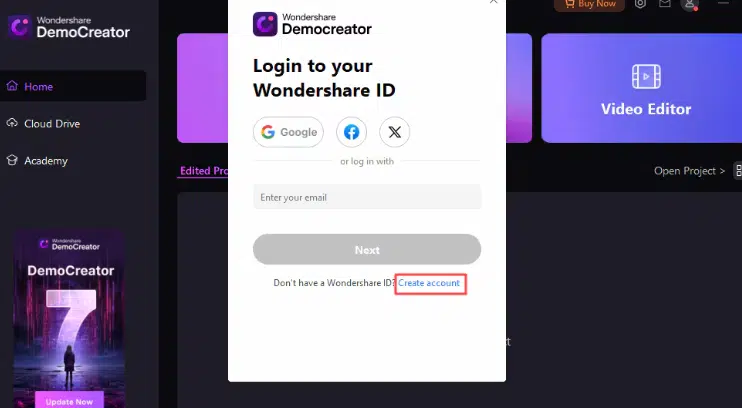
DemoCreator zoom screen recorder, from installation to the GUI, is user-friendly and designed for ease of use. The important thing is that the latest design allows you to have a clear view of all the multiple different recording modes and editing tools. Despite the wide variety of features, the software is not too confusing or overcomplicated for new users.
The process of starting with DemoCreator is easy. Once the software is downloaded, you are then asked to either sign up for a new Wondershare account or to log in if you have one already. The free account helps you receive updates and change settings on any of your devices.
If you want to capture Zoom meetings in particular, there are not many steps to go through, and you just need to adjust the options within the DemoCreator preferences directly. You can choose to pick Zoom and make adjustments such as toggle system-level or microphone audio recording. The “Camera & Screen” mode is an excellent option for recording the image from your webcam along with your Zoom meeting window and the feed’s audio.
Recording Features and Quality
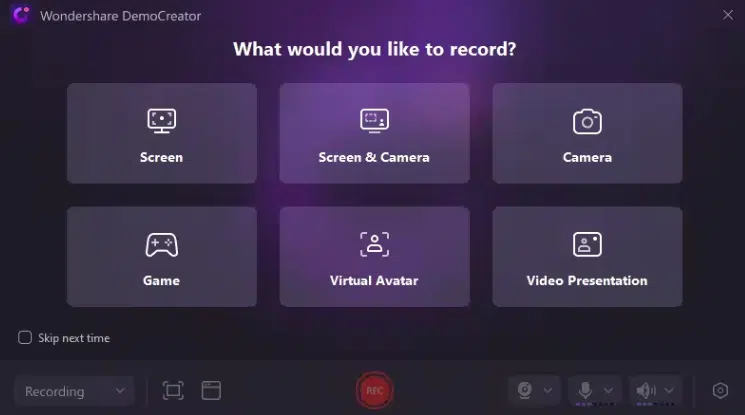
Wondershare DemoCreator Zoom recorder app provides a robust set of recording capabilities explicitly tailored for capturing Zoom meetings:
- Video & Audio Capture: The “Screen & Camera” mode allows you to simultaneously record your Zoom meeting window, webcam feed, microphone audio, and system audio in a single track. This ensures you don’t miss any crucial video or audio elements.
- Screen Annotations: While recording, you can use DemoCreator’s screen drawing tools to mark up your screen with pen annotations, highlights, spotlights, and more. This is useful for drawing attention to specific details when presenting over Zoom.
- Webcam Recording: The ability to capture your webcam feed alongside the Zoom meeting video is invaluable, especially for instructors, presenters, or webinar hosts needing screen and camera views.
- Video Clarity: Recordings looked crisp and clear at up to 4K/8K resolution. There was no noticeable blurring or pixelation, even when zooming in on smaller Zoom windows.
- Audio Sync: Audio from the various sources (mic, Zoom audio, system audio) remained in perfect sync throughout the recordings with no discernible drift or lag.
Post-Recording Editing and Usability
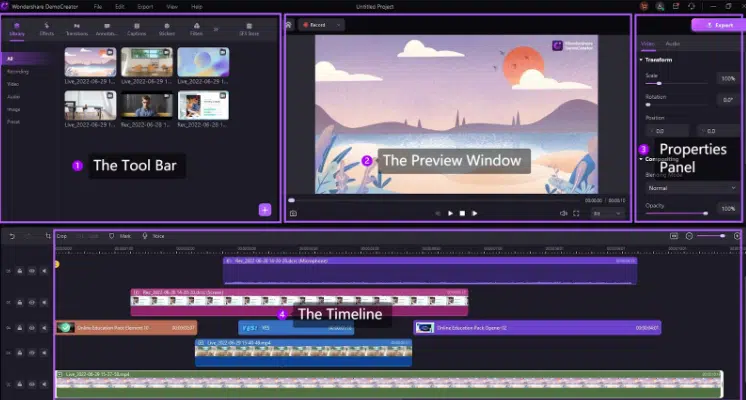
DemoCreator Zoom recording software provides a full-featured video editing suite right within the software, making it easy to polish up your Zoom recordings before sharing or re-watching.
In terms of editing the recorded Zoom meetings, it offers the following features:
- Precise trimming to cut out any unwanted footage from the start/end
- Adding captions automatically or manually for accessibility
- Highlighting key moments by drawing on the timeline or video itself
- Picture-in-Picture mode to overlay webcam on top of screen recording
- Transitions, filters, and stickers to stylize your video
- AI-powered dubbing to add voiced narration from text
The editing interface is well-organized into different modules for media importing, basic editing, advanced tools, and exporting. Most common editing needs are easily accessible.
While the editing suite is powerful, DemoCreator has a moderate learning curve, especially for users new to video editing. The sheer number of options and tools can seem overwhelming initially.
However, the software does a decent job of easing new users in with tutorial pop-ups and tips when you first use certain features. The interface language is also easy to understand for the most part. With some patience, even editing novices should be able to get comfortable and take advantage of the critical features needed to polish up Zoom recordings.
Value for Money
For individuals or businesses that need to routinely record and share high-quality Zoom meetings, webinars, etc., DemoCreator offers excellent bang for the buck. The perpetual $79.99 license provides unlimited access to all the advanced recording/editing capabilities.
Even the $59.99 annual subscription can be worthwhile if you just need it for a year’s worth of projects. The ability to record, touch up, and polish Zoom videos in one seamless workflow is precious.
So, while not the cheapest option, Wondershare DemoCreator packs in enough features and performance value to justify its pricing for Zoom recording power users. The cost savings over piecing together multiple tools also help make it a wise investment.
Conclusion
Wondershare DemoCreator is a comprehensive and important tool for recording and editing Zoom meetings and webinars. While Zoom-based granularity is the cornerstone of the product, the feature set still meets the needs of the usage scenario. It provides Zoom video and audio sources along with useful annotation tools. The built full-fledged video editor enables you to trim, caption, stylize, and enhance your work effortlessly.
DemoCreator’s screen recorder for zoom high performance, optimized recording formats, and various exporting options are other highlights. At first, this editing panel may look complicated and may not be equipped with all advanced editing facilities. Still, DemoCreator provides a good Zoom recording and post-production workflow through the all-in-one solution.