

Do you struggle with slow remote work on your Windows PC? You’re juggling tasks from home, but laggy apps and scattered files eat up your time like a hungry monster. It hits hard when deadlines loom, and your setup feels like wading through mud.
Remote workers often face this mess, chasing better task management and real-time collaboration without the right tools.
One key fact stands out: remote desktop software and team chat apps form the backbone of smooth remote work. They boost workflow automation and keep teams connected, no matter the distance.
This post rounds up 15 top Windows productivity apps to fix that. You’ll find gems for file sharing, project management, time tracking, and more, all geared to supercharge your day.
Think of them as your secret weapons against chaos.
Ready to get started?
Key Takeaways
- The article lists 15 best Windows productivity apps for 2025 to speed up remote work.
- Microsoft Teams, Slack, and Zoom stand out as essential communication tools for team collaboration and real-time chats.
- Project management apps like Trello, Asana, and Monday.com help track tasks and automate workflows.
- File sharing tools include Google Drive, Dropbox, and Microsoft OneDrive for secure cloud storage.
- Time tracking with Toggl and scheduling with Calendly are part of 8 productivity apps that save time.
Essential Communication Tools for Remote Work
Remote work throws curveballs, like missed chats or fuzzy meetings, that can trip up your day. Pick Windows apps.
Using Microsoft Teams for Team Collaboration
Microsoft Teams acts as a top collaboration tool for remote workers. It blends team chat apps with real-time collaboration features. You can chat, share files, and hold video calls all in one spot.
Think of it like a digital office hub that keeps everyone on the same page, no matter where they sit. Remote desktop software and team chat apps like this prove essential for remote work, as the remote worker’s toolkit demands them for smooth flow.
Teams ties into Office 365, letting you edit documents together without a hitch. Plus, it supports screen sharing for quick brainstorms.
Folks love how Teams boosts team collaboration with ease of use. Set up channels for project management or task management. Integrate it with Outlook for seamless scheduling, much like syncing with Google Calendar.
For security, it offers multi-factor authentication to guard passwords. Imagine juggling work from home; Teams makes it feel like a walk in the park. There are 15 best Windows productivity apps for 2025, and this one supercharges your workflow.
It even links with tools like Microsoft OneNote for digital note-taking during meetings.
Streamlining Chats with Slack
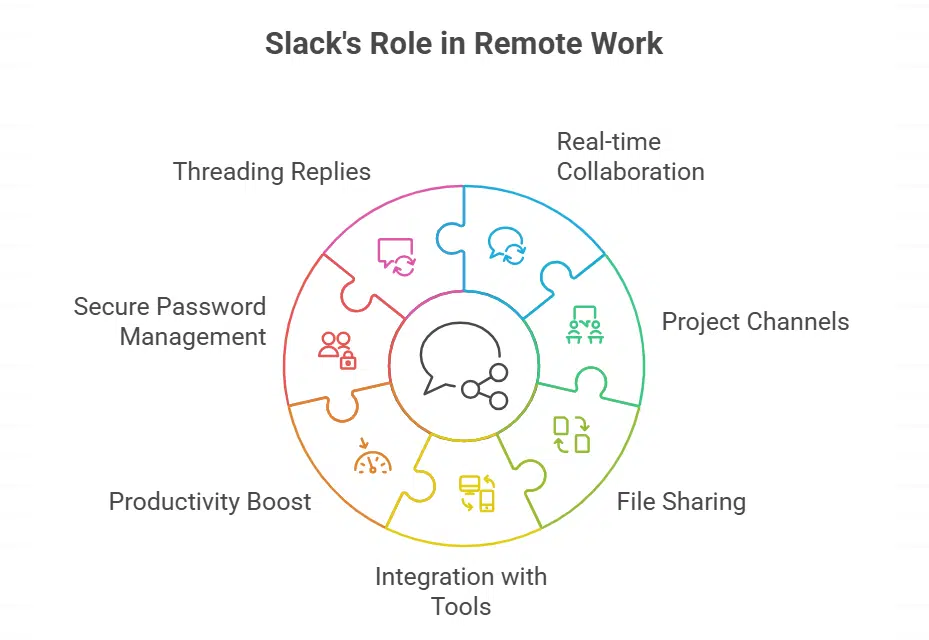
Slack stands out as a key team chat app in the remote worker’s toolkit. It helps remote workers connect fast and stay on top of tasks. You’re juggling messages from your team, and Slack turns that chaos into smooth sailing.
This app supports real-time collaboration, making it easy to share ideas without delays. Team collaboration thrives here, with channels for specific projects and quick file sharing.
Remote desktop software pairs well with it for deeper access, but Slack keeps chats simple and focused. Many call it essential for remote work, just like a stable mobile hotspot keeps you online.
Folks love how Slack integrates with tools like Google Drive for seamless file sharing. Imagine chatting about a project, then dropping a link to cloud storage right in the conversation.
It boosts productivity for remote workers, cutting down on email clutter. Use it on Windows, and you’ll see why it’s in the top Windows productivity apps. Password management stays secure too, as Slack handles team logins with care.
Try threading replies to keep talks organized, like herding cats into neat groups. This setup saves time, letting you track tasks without switching apps constantly.
Enhancing Virtual Meetings with Zoom
Zoom boosts your remote work game with easy screen sharing and real-time collaboration. You get clear video calls that feel like face-to-face chats, even from your home office. Remote workers love how it supports webinars and team huddles without a hitch.
Pair it with a mobile hotspot for that stable connection, and you’re set, no more dropped calls messing up your flow. Think of it as your virtual conference room, always ready in the remote worker’s toolkit.
This app fits right into project management software and team collaboration tools. Use it alongside remote desktop software for seamless access to your Windows PC. Remote access lets you share files during meetings, keeping everyone on the same page.
With features like virtual private networks for security, Zoom helps you stay focused and finish tasks. It’s one of those 8 productivity apps that save time, making remote work a breeze on multiple platforms.
Effective Project Management Tools
Remote work often feels like herding cats, but the right apps tame that chaos with smart task tracking and smooth workflow setups. Picture juggling deadlines without dropping a ball—tools like visual boards and assignment trackers make it happen, pulling your team together in.
Organize Projects with Trello
Trello acts as a top project management software in the remote worker’s toolkit. You create boards for tasks, like a digital bulletin board full of sticky notes. Drag cards between lists to track progress, and add labels for quick scans.
This windows productivity app supercharges your workflow, one of the 15 best for 2025. Imagine juggling balls in the air; Trello catches them all without a drop. Remote workers love its real-time collaboration features.
Team members comment on cards, attach files, and update statuses instantly. It supports task management with deadlines and checklists.
Pair Trello with team chat apps for seamless updates. Efficiency tools like this make your Windows PC run faster by cutting clutter. Disable startup programs, then explore Trello’s user-friendly interface.
Right software on your laptop boosts productivity, plain and simple. Remote work demands stable internet, so use mobile hotspots if needed. Think of Trello as your project’s traffic cop, directing flow without chaos.
Collaboration tools like this keep everyone on the same page.
Track Tasks with Asana
Asana helps you track tasks in remote work. This project management software keeps your team on the same page. You assign jobs, set deadlines, and watch progress in real time. Imagine your workflow as a smooth river, no more rocks blocking the way.
Remote workers love it for task management and collaboration tools. It fits right into Windows productivity apps. Think of it as your digital sidekick, juggling all those to-dos without dropping a ball.
One fact stands out, Asana is part of the 15 best Windows productivity apps for 2025 that supercharge your workflow. You integrate it with time tracking features to stay efficient.
Team collaboration shines here, with real-time updates like team chat apps. For remote workers, it pairs well with mobile hotspots for stable connections. Hey, it’s like having a remote worker’s toolkit in your pocket.
Workflow automation makes repetitive tasks vanish, freeing you up. Students even use it on laptops for studies, proving its value across the board.
Manage Workflows with Monday.com
Monday.com helps you handle project management like a pro. This tool lets teams track tasks and automate workflows on Windows. Imagine your team chatting in real time, sharing updates without missing a beat.
It fits right into the remote worker’s toolkit, boosting efficiency for everyone. You can organize boards for clear views of progress, much like a digital whiteboard that keeps things moving.
Remote workers love how it supercharges workflows, just as the 15 best Windows productivity apps for 2025 promise.
Pair Monday.com with team collaboration features to streamline remote work. Think of it as your command center for file sharing and task management. Efficiency tools like this make your Windows PC run faster by cutting clutter.
Remote desktop software pairs well here, supporting secure connections for smooth sessions. Plus, it ties into cloud storage options, letting you centralize documents easily. Your team stays focused, finishes tasks, and saves time, all while working from laptops or PCs.
Google Drive acts like a trusty sidekick for remote workers, letting you store and share files in the cloud without a hitch. Imagine tossing documents into a digital backpack that everyone on your team can grab from anywhere.
This cloud storage tool ties right into Google Workspace, making real-time collaboration a breeze for tasks like editing slides or spreadsheets together. Remote desktop software pairs well with it too, as you access files during sessions.
Plus, with a stable internet from your mobile hotspot, you keep things moving fast. Team chat apps love it for quick file sharing, boosting your workflow automation on Windows.
Folks often overlook how Google Drive handles online backups, keeping your work safe like a vigilant guard dog. You upload files from your laptop, and boom, they’re ready for secure sharing with links or folders.
Think of it as your personal file cabinet in the sky, perfect for project management and team collaboration. Remote workers swear by it to dodge email clutter, especially when juggling note-taking apps or time tracking tools.
Grab it from the app store, and watch your productivity soar in 2025 with these Windows productivity apps. Just log into your account, and you’re set for smooth, efficient days.
Secure File Transfers with Dropbox
Dropbox shines as a top cloud storage tool for remote workers. You upload files fast and share them with your team. Think of it like passing notes in class, but way safer and quicker.
This app fits right into the remote worker’s toolkit, supporting file sharing without hiccups. TeamViewer boosts this by handling file transfers during remote sessions, adding secure connections for peace of mind.
Remote desktop software like that pairs well with Dropbox for smooth workflows. Plus, it’s one of the 15 best Windows productivity apps for 2025 that supercharge your day. Grab a mobile hotspot to keep your internet stable, and you’re set for real-time collaboration.
No more lost files or slow uploads, just easy access from any Windows PC.
Password management ties in too, since Dropbox uses strong security for transfers. Compare it to OneDrive or Google Drive, but Dropbox stands out for encrypted shares. Remote workers love how it centralizes docs, much like iCloud Drive on other operating systems.
You can even use it with Google Chrome extensions for quicker file handling. It’s simple to set up on your laptop, ensuring productivity spikes. Imagine juggling tasks from home, and Dropbox acts as your trusty sidekick, keeping everything in sync.
Tools like this make remote work feel less like a chore and more like a breeze.
Centralize Documents with Microsoft OneDrive
Microsoft OneDrive acts as your central hub for documents in remote work. You store files in the cloud storage, and access them from any Windows PC or laptop. Team members collaborate in real time, editing Microsoft Office Online docs together.
This tool fits into the remote worker’s toolkit, boosting efficiency like those 15 best Windows productivity apps for 2025. Imagine sharing a report; everyone sees changes instantly, no emails needed.
Remote workers love how OneDrive handles file sharing without hassle. It pairs well with project management software for smooth workflows. Think of it as your digital filing cabinet, keeping everything organized.
You speed up tasks by syncing files across devices, even on tablets or Android phones. This setup supports team collaboration, much like essential remote desktop software and team chat apps.
Tools for Time Management and Scheduling
Ever feel like time slips through your fingers, like sand in an hourglass, during those endless remote workdays? Grab hold of apps that track every minute and set up meetings without the back-and-forth emails, turning chaos into smooth sailing, and hey, who knows, you might even squeeze in that coffee break you’ve been craving.
Track Time with Toggl
Toggl stands out as one of the 15 best Windows productivity apps for 2025. It supercharges your workflow with simple time tracking. You click start on a task, and it logs every second.
Remote workers love this tool in their toolkit. It helps you stay focused, finish tasks, and save time, just like those 8 productivity apps that boost efficiency. Imagine you’re juggling projects, but Toggl shows where hours go, like a detective on your screen.
Load Toggl on your laptop for that edge in remote work. It pairs well with task management, letting you see real-time progress. Disable startup programs on your Windows PC first, then let Toggl run smooth.
This app fits right into the remote worker’s toolkit, supporting productivity and efficiency. Hey, it’s like having a personal hotspot for your time, keeping everything stable and connected.
No more guessing on billable hours; Toggl tracks it all with ease.
Schedule Meetings Easily with Calendly
You know that feeling when scheduling meetings turns into a back-and-forth email chain? Calendly fixes that mess in a snap. This tool lets you share your availability with a simple link.
People pick times that work for them, and boom, the meeting books itself. It fits right into the remote worker’s toolkit, full of apps that support effective remote work. Think of it as your personal assistant, handling the calendar chaos so you focus on real tasks.
Remote workers love how it saves time, much like those 8 productivity apps that help you stay focused and finish jobs fast. Plus, it plays nice with Windows productivity apps, making your laptop setup more efficient.
You need the right software on your laptop for top productivity, and Calendly delivers that punch.
Imagine dodging endless “When are you free?” questions; Calendly steps in like a trusty sidekick. Set up your preferences, integrate with calendars like Google apps or G Suite, and let it automate the workflow.
It ties into time tracking and task management, keeping everything smooth for remote work. Don’t forget, mobile hotspots keep your internet stable, so you connect without hiccups during those virtual slots.
Team collaboration gets a boost too, as it handles real-time scheduling across time zones. Folks in coding or project management swear by its shortcuts for quick setups. It’s all about streamlining your day, turning potential headaches into easy wins.
Top Note-Taking and Organization Tools
Organize Thoughts with Notion
Notion acts as a powerhouse for digital note-taking in remote work. Remote workers love it for organizing ideas like a pro. This app turns chaos into order, much like sorting a messy desk into neat piles.
It fits right into the remote worker’s toolkit, packed with tools that boost efficiency. As one of the 15 best Windows productivity apps for 2025, Notion helps you capture thoughts fast.
You build databases, pages, and lists with ease. Imagine jotting down project notes while chatting in team collaboration sessions; it flows seamlessly. Plus, it pairs well with task management for smoother workflows.
Efficiency tools like Notion make your Windows PC run faster by cutting clutter. Disable those startup programs, and watch your focus sharpen. Among the 8 productivity apps that keep you on track, Notion stands out for finishing tasks and saving time.
Remote workers, you know the drill, staying productive means having the right software on your laptop. It supports real-time collaboration too, so share notes without a hitch. Think of it as your brain’s best friend, always ready to help.
For note-taking apps, this one shines for remote work.
Capture Ideas with Evernote

Evernote grabs your thoughts fast, like a trusty net for fleeting ideas. Remote workers love this note-taking app on Windows, it fits right into your toolkit for staying sharp. Picture jotting down a spark during a team chat, no fuss.
This digital note-taking champ supercharges your workflow, one of those 15 best Windows productivity apps for 2025. You clip web pages, scan docs with its built-in scanner, and organize everything in notebooks.
Efficiency tools like this make your PC run faster, disable startup clutter and watch ideas flow. Team collaboration feels smoother when you share notes in real-time.
Hey, feeling scattered? Evernote acts as your brain’s sidekick, capturing wild concepts before they vanish. Remote work demands such apps to finish tasks and save time, think of it as your personal cloud storage for brilliance.
Password management stays secure too, lock notes with ease. Eight productivity apps, including this gem, help you focus amid distractions. Windows users, integrate it with project management software for seamless wins.
Your laptop thrives with right software, Evernote boosts that remote hustle every day.
Focus and Distraction Management Applications
Staring at screens all day can drain your energy, like a marathon without breaks, but apps like f.lux adjust your display’s color to match daytime light, easing eye strain so you stay sharp.
Reduce Screen Glare with F.lux
F.lux adjusts your screen’s color to match the daytime light. This windows productivity app cuts down on glare that tires your eyes during long remote work sessions. Imagine staring at a bright display late into the night, like a moth to a flame, but F.lux steps in like a helpful friend.
It warms up the blues to oranges, easing strain so you stay focused and finish tasks. Remote workers love how it boosts concentration, saving time in your daily grind.
Pair F.lux with tips to speed up your Windows PC, like disabling startup programs for quicker loads. This tool fits right into the 15 best windows productivity apps for 2025, supercharging your workflow.
Think of it as part of your remote worker’s toolkit, one of those 8 productivity apps that help you stay sharp. Efficiency tools like this make a big difference on laptops, keeping things smooth for real-time collaboration without the eye ache.
Boost Concentration with Forest
Forest helps you stay focused during remote work. This app turns concentration into a game. You plant a virtual tree when you start a task. The tree grows if you avoid distractions.
But if you check your phone, the tree dies. Ouch, right? It’s like having a tiny forest that cheers you on. Remote workers love it for blocking out noise. Pair it with time tracking to finish tasks faster.
Think of it as your focus buddy in the remote worker’s toolkit.
Eight productivity apps, including Forest, save time and boost efficiency. They fit right into Windows productivity apps for 2025. Disable startup programs on your PC first. Then use Forest to supercharge your workflow.
Imagine telling distractions, “Not today!” It works with team collaboration tools too. Stay on point for virtual meetings. Your laptop needs this software for top productivity.
Security and Privacy Tools for Remote Work
Manage Passwords with 1Password
Remote work demands strong security, and 1Password steps up as a top password manager for Windows users. This tool stores all your login details in one safe spot, like a trusty vault that keeps hackers out.
Imagine juggling dozens of passwords for team collaboration apps and project management software; 1Password generates strong ones and fills them in automatically. It fits right into the remote worker’s toolkit, supporting real-time collaboration without the hassle of forgotten codes.
Plus, with features like single sign-on, you save time and stay focused on tasks.
Folks often struggle with password management in their daily grind, but 1Password makes it a breeze. It syncs across devices, even if you’re on a Windows PC or tethering via mobile hotspot for that stable connection.
As one of the 15 best Windows productivity apps for 2025, it supercharges your workflow by handling secure logins for cloud storage and file sharing. Think of it as your digital bodyguard, protecting online privacy during remote sessions.
Remote workers, you get peace of mind, knowing your data stays encrypted and ready.
Protect Online Privacy with NordVPN
NordVPN shields your online moves during remote work. It hides your IP address, like a cloak in a crowded street. Remote workers face risks from open networks, but this tool blocks them.
Pair it with mobile hotspots for a stable internet connection. That setup keeps data safe. Think of it as a trusty guard dog for your digital life. Team chat apps and remote desktop software become essentials in your toolkit.
They help you connect without worry.
TeamViewer offers file transfer and secure connections for safe sessions. NordVPN adds extra layers to that. It stops snoops on public Wi-Fi. Remote workers, you know the drill, staying private means peace of mind.
Use it for real-time collaboration without leaks. Password management fits right in here too. Your workflow automation stays protected. Imagine chatting on Slack while NordVPN runs in the background.
No one peeks at your project management details.
Automate Tasks with Zapier
Zapier stands out in the remote worker’s toolkit, folks. This app connects your favorite tools, like Google Drive and Slack, for smooth workflow automation. Imagine your emails triggering tasks in Trello without lifting a finger, that’s the magic here.
It fits right into those 15 best Windows productivity apps for 2025 that supercharge your workflow. You save time on repetitive chores, letting you focus on real work. Remote desktop software and team chat apps pair well with it, boosting efficiency on your laptop.
Think of it as your digital sidekick, handling robotic process automation so you finish tasks faster.
Got a busy day ahead? Zapier automates file sharing and task management across apps, keeping remote work humming. It integrates with cloud storage options, making secure connections a breeze.
Envision this: you set up a zap, and boom, your calendar updates from a simple chat message. Efficiency tools like this make your Windows PC run faster by cutting startup clutter. Team collaboration thrives when automation handles the grunt work.
Remote workers, grab this to stay focused and save time, just like those 8 productivity apps that help you crush goals.
Streamline Connections with Integrately
Integrately acts as your secret weapon for workflow automation on Windows. Imagine linking your favorite apps without coding headaches, like connecting Slack for team collaboration with Google Drive for file sharing.
Remote workers love how it saves time by automating tasks, such as syncing project updates from Asana to Microsoft Teams in real time. This tool fits right into the remote worker’s toolkit, making connections smooth and efficient.
You set up zaps, er, integrations fast, boosting your productivity on Windows 11.
Envision this: you’re juggling remote desktop software and team chat apps, essential for any setup. Integrately steps in to streamline those links, handling everything from password management tools to cloud storage.
It supports secure, automated flows that speed up your day, much like disabling startup programs to make your PC run faster. As one of the 15 best Windows productivity apps for 2025, it helps you stay focused, finish tasks, and save time, even on a laptop with the right software.
Hey, it’s like having a robotic process automation buddy in your menu bar, keeping remote work humming along.
Takeaway
You’ve seen how tools like Microsoft Teams and Slack boost team collaboration, while Trello and Asana handle task management with ease. These Windows apps make file sharing through Google Drive or Dropbox a breeze, keeping your remote work smooth and fast.
Envision your day flowing like a well-oiled machine, no more hiccups in cloud storage or real-time chats. Hey, I once juggled projects without them and felt like I was herding cats, but adding Zoom for meetings changed everything.
Explore resources like the official Windows app store for more gems on workflow automation. Go ahead, grab these apps today, and watch your productivity soar like a rocket.
FAQs on Windows Apps To Speed Up Remote Work
1. Hey, what Windows apps help with task management for remote work?
You know, tools like project management software make it a breeze to track tasks, and they tie in real-time collaboration so your team stays on the same page. Imagine juggling balls without dropping any, that’s what these apps do for remote workers. Plus, they often blend in time tracking to keep everything humming along.
2. Can file sharing speed up my remote setup?
Absolutely, file sharing through cloud storage like GDrive lets you swap files fast with team collaboration in mind. It’s like passing notes in class but way more efficient, and it cuts down on those endless email chains.
3. What’s the deal with screen sharing in Windows productivity apps?
Screen sharing via tools like ConnectWise ScreenConnect allows you to show your remote computer screen in real time. This boosts workflow automation, especially when explaining tricky stuff over a call.
4. How do password managers fit into remote work on Windows?
Password management apps keep your logins safe and sound, using encryption like an encrypted disk to guard against slips. They’re a lifesaver for remote workers juggling multiple accounts, and they even handle spell-checking in notes if needed.
5. Are there apps for digital note-taking that help with collaboration?
Sure thing, note-taking apps on Windows support digital note-taking with real-time collaboration features. They work great alongside Macs or even WatchOS devices for cross-platform vibes, making ideas flow like a river during team huddles.
6. Does artificial intelligence play a role in these Windows apps?
Oh yeah, artificial intelligence powers things like robotic process automation (RPA) in project management, helping predict and automate workflows. It’s context-aware too, adapting to your keyboard shortcuts or icons in the menubar for that extra speed boost. Think of it as your smart sidekick, turning chaos into smooth sailing for remote teams.































