Hey there, are you tired of worrying about hackers getting into your accounts? Data breaches happen way too often, with millions of passwords stolen every year. I’ve got you covered with 10 easy ways to boost your login security, like using strong passwords and multi-factor authentication, without making logins a hassle.
Stick around to keep your info safe!
Key Takeaways
- Use strong passwords with at least 12 characters, mixing letters, numbers, and symbols to stop hackers.
- Add Multi-Factor Authentication (MFA) as an extra lock, protecting over 5.4 billion internet users as of May 15, 2024.
- Try passwordless options like facial recognition or magic links with tools like Authgear for easy, safe logins.
- Limit login attempts and use account lockout policies to block brute-force attacks.
- Set up login notifications for odd activity to catch suspicious logins fast and keep data safe.
Enforce Strong Password Policies
Let’s talk about making passwords tougher to crack. Strong password policies can stop cybercriminals in their tracks. Aim for a minimum of 12 characters in your passwords or passphrases.
That extra length makes guessing a real headache for hackers. Also, mix in letters, numbers, and symbols to keep things tricky.
On top of that, blacklists are a smart move to block common passwords. Think of it as a bouncer at a club, kicking out the usual suspects. Pair this with secure password storage using hashing tools like bcrypt or Argon2.
These methods add salts to hashes, blocking rainbow table attacks. Stick with these rules, and your data security gets a solid boost.
Implement Multi-Factor Authentication (MFA)
Hey there, readers, let’s chat about a solid way to boost your login security with multi-factor authentication, or MFA. It’s like adding an extra lock to your front door. Even if someone guesses your password, they can’t get in without that second key, like a text code or a fingerprint scan.
MFA adds a tough security layer by asking for more than one type of proof to verify it’s really you. With over 5.4 billion internet users as of May 15, 2024, this step is a must to cut down on unauthorized access risks.
Think of MFA as your trusty sidekick against cyber threats like phishing attacks. A discussion on June 13, 2025, highlighted how it stands strong against such tricks. Tools like security keys or one-time passwords via SMS make it work smoothly.
Plus, companies like ITonDemand team up with Duo to offer MFA solutions that also help meet data protection rules. So, add this extra shield, and keep those pesky hackers at bay!
Offer Passwordless Authentication Options
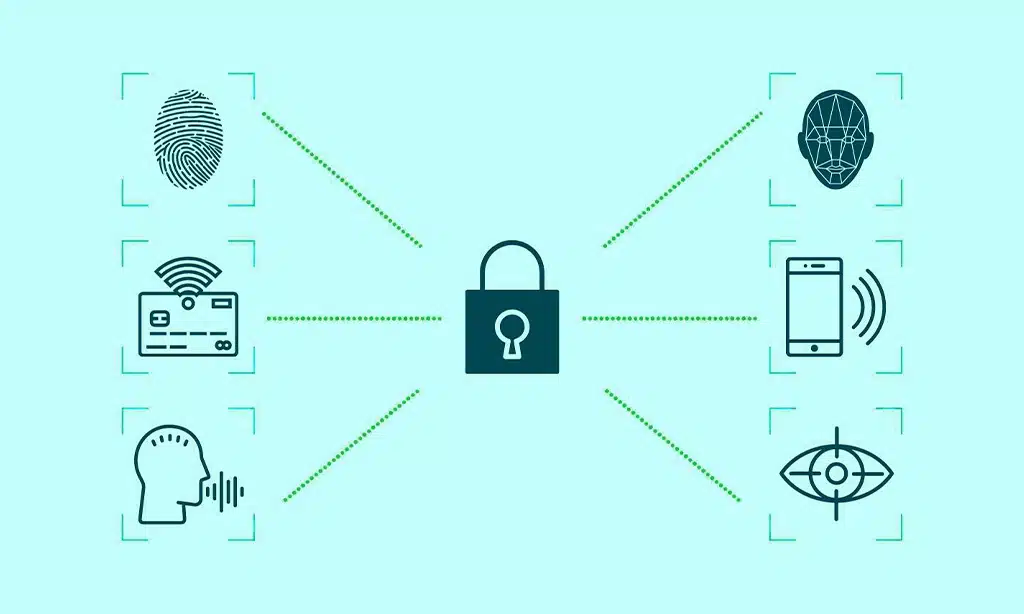
Get rid of the trouble of keeping track of passwords, everyone! Passwordless authentication is a revolutionary approach that reduces the dangers of password theft. Picture logging in with a swift scan of your face through facial recognition, or a simple touch of your fingerprint with biometric input.
Other neat alternatives, like magic links, push notifications, QR codes, and hardware security keys, make the process effortless. Even smart cards and behavioral patterns can contribute.
Most importantly, these techniques enhance your security and protect against phishing attacks.
Now, consider how simple life becomes without the need to recall complex passcodes. Solutions like Authgear support these passwordless methods, providing options such as one-time passwords (OTPs) and mobile device verifications.
This significantly strengthens digital security while complying with data protection standards. So, why deal with the frustration of password resets when you can access your accounts seamlessly and remain safe from cyber threats?
Use Secure Communication Protocols (e. g. , HTTPS)
Hey there, let’s chat about keeping your online info safe with secure communication protocols like HTTPS. This nifty tool encrypts sensitive data using an SSL/TLS certificate, making sure no sneaky hackers can grab your details during transit.
It’s like locking your letters in a steel box before mailing them. Without this shield, man-in-the-middle attacks can easily mess with your stuff.
On top of that, using HTTPS boosts user trust and even helps your site rank better on search engines like Google. Think of it as a shiny badge that says, “Hey, I’m legit!” Plus, it stops data breaches by securing every bit of info on the web.
So, stick with HTTPS, and keep your digital world safe and sound.
Employ Strong Password Hashing Techniques
Dig into password security with me, folks. Strong hashing turns your password into a jumbled mess that hackers can’t crack easily. We’re talking about top-notch algorithms like Argon2id, scrypt, bcrypt, and PBKDF2.
Guess what? Argon2id stands out because it fights brute-force attacks better than bcrypt. It’s like a tough lock on a heavy door, keeping the bad guys out.
Also, hashing alone isn’t enough, so we add salting. This trick stops nasty rainbow table attacks dead in their tracks. Argon2id even adjusts to modern hardware by tweaking memory usage and iterations.
You can balance security and performance with its settings. Oh, and never hide secrets or backdoors in production setups, got it? That’s just asking for trouble from cyber threats.
Stick with these methods to keep data breaches at bay.
Limit Login Attempts and Implement Account Lockout Policies
Hey there, let’s chat about keeping your accounts safe with a smart trick. Limiting login attempts is like putting a lock on your front door that only lets someone try the key a few times before it jams.
If a hacker keeps guessing your password, this stops them cold. It cuts down the risk of unauthorized access by shutting out brute-force attacks, those pesky tries where bad guys test endless password combos.
Now, think of account lockout policies as your trusty guard dog. After a set number of failed logins, the system locks the door tight, keeping out anyone with malicious intent. This simple step, paired with solid tools like access controls, blocks cyber threats before they can sneak in.
Stick with this, and you’ve got a strong shield against password cracking!
Enable Biometric Authentication Options
Let’s chat about biometric authentication, folks. This cool tech uses your personal traits, like fingerprints, facial recognition, and iris scans, to let you log in. No more juggling tricky passwords that slip your mind.
It’s fast, safe, and a top pick for many, with 28% of people in surveys saying they love it over other methods.
How neat is that? Biometric options cut down on phishing tricks and wipe out old-school password risks. Plus, they mesh well with data protection rules, keeping your info secure. You don’t need to memorize a thing, so logging in feels like a breeze.
Stick with this, and watch cyber threats shrink while your user experience gets a big boost.
Provide Login Notifications for Unusual Activity
Hey there, got a quick tip for you to boost your login security. Setting up login notifications for unusual activity is a smart move. It alerts you right away if someone tries to sneak into your account.
Think of it as a watchdog, barking loud when something fishy happens. This adds a solid layer of protection, keeping you in the loop about suspicious logins.
Now, picture getting a fast alert through push notifications if a login looks odd. You can jump into action pronto if it’s not you. This kind of transparency builds trust, showing you that security is a top priority.
Plus, it fits right into your existing systems, making alerts smooth and easy. Stay safe from cyber threats with this simple step, and keep data breaches at bay.
Use CAPTCHA to Prevent Automated Attacks
Let’s chat about a cool trick to keep your login safe from sneaky bots. CAPTCHA is like a gatekeeper that checks if you’re a real person or just a pesky robot trying to sneak in. It stops automated attacks dead in their tracks, making sure no script can takeover accounts with ease.
Plus, it boosts your app’s shield against cyber threats.
Now, here’s the neat part, folks. CAPTCHA helps cut down risks of data breaches by blocking those crafty bots. You can pick less annoying types to keep usability high for real users.
Just make sure to refresh your CAPTCHA setup often to outsmart evolving bots. This small step goes a long way in guarding your login space!
Ensure Regular Security Updates and Patches
Keeping your systems safe is like locking your front door every night, folks. Regular security updates and patches are a must to guard against cyber threats. Hackers are always hunting for weak spots, and outdated software is an easy target.
By staying on top of updates, you shut those sneaky gaps before they turn into big data breaches.
Think of patches as quick fixes for a leaky boat. They stop security vulnerabilities from sinking your ship. Make sure to do penetration testing often, and follow the Zero-Trust Security Model, which says, “Never trust, always verify.” This approach boosts protection for remote workers and cuts down on unauthorized access risks.
Plus, using secure tools for updates keeps your network security strong and steady.
Simplify the Login Process with Single Sign-On (SSO)
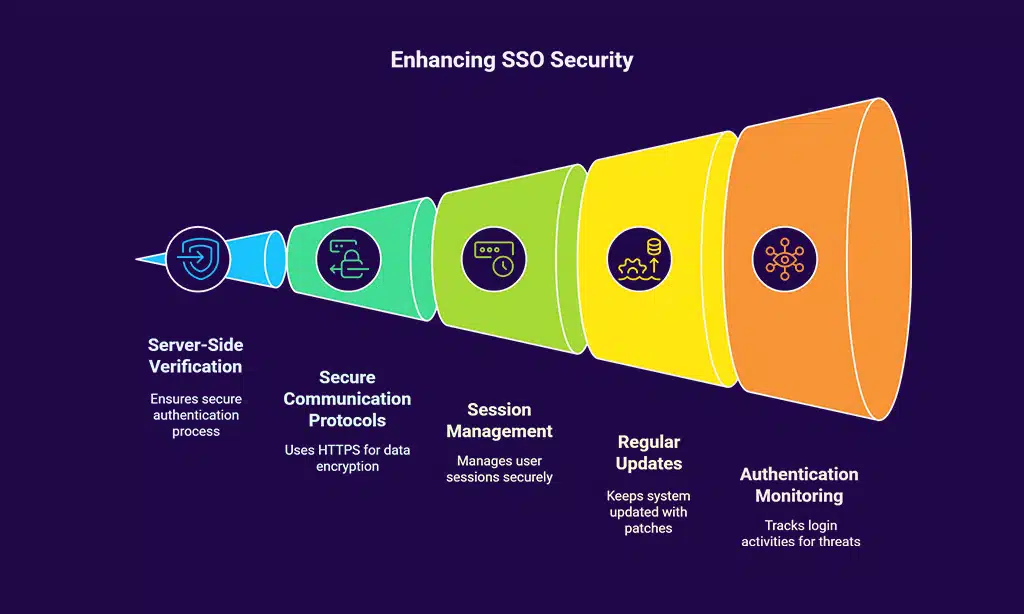
Hey there, let’s chat about making logins a breeze with Single Sign-On, or SSO. Imagine logging into one app, and boom, you’re in everywhere else without extra passwords. SSO lets you do just that.
It saves time and cuts down on password fatigue. But here’s the kicker, it must be secure. Always use server-side verification for SSO to keep things safe. This stops sneaky spoofing and blocks unauthorized access.
Now, think of SSO as a trusty key to many doors. It needs tight protection, so secure communication protocols like HTTPS are a must. Also, proper session management with strong session IDs and safe cookie attributes keeps risks low.
Don’t skip regular system updates and patches either. Add in solid logging and monitoring of authentication activities, and you’ve got a setup that’s both easy for users and tough on cyber threats.
Educate Users on Best Practices for Secure Logins
Let’s talk about strengthening login security. I’m here to share simple tips that are easy to follow!
- To start, understand the importance of strong passwords. They’re your primary defense against cyber threats. Combine letters, numbers, and symbols to create a solid shield. IT compliance standards like HIPAA and PCI-DSS encourage this practice. Avoid reusing passwords across platforms, as it can quickly lead to problems.
- Next, get familiar with multi-factor authentication, or MFA. It introduces an additional step, such as a code sent to your phone or a hardware security key. Even if a hacker obtains your password, they can’t proceed without this extra layer. Learning about MFA is essential, as it significantly improves security.
- Also, consider using a password manager for assistance. Imagine it as a secure safe for all your login information. It generates and keeps track of complex passwords, so you don’t need to memorize them. This reduces the risk of weak selections and strengthens your protection against data breaches.
- Don’t overlook the value of learning about common tactics like password spraying. Hackers often test simple passwords across multiple accounts. Stay proactive by steering clear of basic words or patterns. Many systems use lists to block common passwords, so choose something unique and challenging instead.
- Another suggestion is to be cautious of phishing scams. Malicious actors may send deceptive emails or links to capture your details. Always verify the sender and web address before clicking. Educating yourself on secure authentication habits, like recognizing these schemes, can prevent major issues.
- Finally, pay attention to login alerts for unusual activity. If something seems suspicious, such as a login from an unfamiliar location, take immediate action. Update your password or reach out to IT support without delay. Thorough tracking and monitoring of authentication events can detect problems early, so stay aware.
Monitor and Log Login Activities for Suspicious Behavior
Hey there, keeping an eye on login activities is a big deal for staying safe online. Think of it like having a watchful guard dog at your digital door. You want to spot anything odd, like strange login times or locations, before it turns into a real problem.
Maintain robust audit logs to track all login attempts, as this helps catch cyber threats early. With comprehensive logging and monitoring of authentication activities, you can stay one step ahead of sneaky attacks.
Dig into those logs for forensic analysis to understand security trends, my friends. It’s like being a detective, piecing together clues to stop data breaches. Use tools that help monitor for weird patterns, maybe even with some machine learning magic to flag suspicious behavior fast.
This way, you’re not just reacting, but protecting your space with smart, proactive steps.
Takeaways
Well, there you go, folks! We’ve covered some easy tricks to boost login safety without driving users up the wall. Think of security as a friendly guard dog, not a snarling beast. Keep tweaking your methods with tools like Authgear to stay ahead of cyber threats.
Drop us a comment if you’ve got a cool tip to share!
FAQs on Ways to Improve Login Security
1. Hey, how can multi-factor authentication boost my login safety without being a hassle?
Well, multi-factor authentication, or MFA, adds an extra shield by asking for a second check, like a code on your phone. It’s a quick step that fends off cyber threats without slowing you down too much.
2. What’s the deal with passwordless authentication? Is it really secure?
Passwordless methods, like magic links or push notifications, ditch the old password game and still guard against data breaches. They’re smooth as butter for ease of use, and yep, they’re tough enough with the right setup. Think fingerprint scanning or facial recognition, and you’re in without a fuss.
3. Can hardware security keys save the day for my logins?
Absolutely, hardware tokens or security keys are like a secret handshake that cyber crooks can’t crack. They’re a physical barrier against those sneaky exploits.
4. How does single sign-on make life easier while keeping things locked tight?
Single sign-on, or SSO, lets you hop into multiple apps with one login, cutting down on password fatigue. It pairs well with OAuth 2.0 to keep things safe from rainbow tables or other nasty tricks.
5. Why should I care about behavioral biometrics or voice recognition for logins?
Hey, imagine your login knowing it’s you by how you type or speak, that’s behavioral biometrics and voice recognition at work. These clever tools, often powered by machine learning algorithms or artificial intelligence, spot odd patterns and block weirdos trying to sneak in. Plus, they’re slick, no extra steps for you to stumble over.
6. What’s up with JSON Web Tokens, and how do they fit into safer logins?
Alright, JSON Web Tokens, or JWTs and JWT tokens, are like digital passports that prove who you are without constant checks. They’re often set with HttpOnly and SameSite flags to dodge sneaky attacks in the cloud. Toss in pseudo-random number generators or CSPRNGs for added strength, and you’ve got a solid defense without bugging users.