

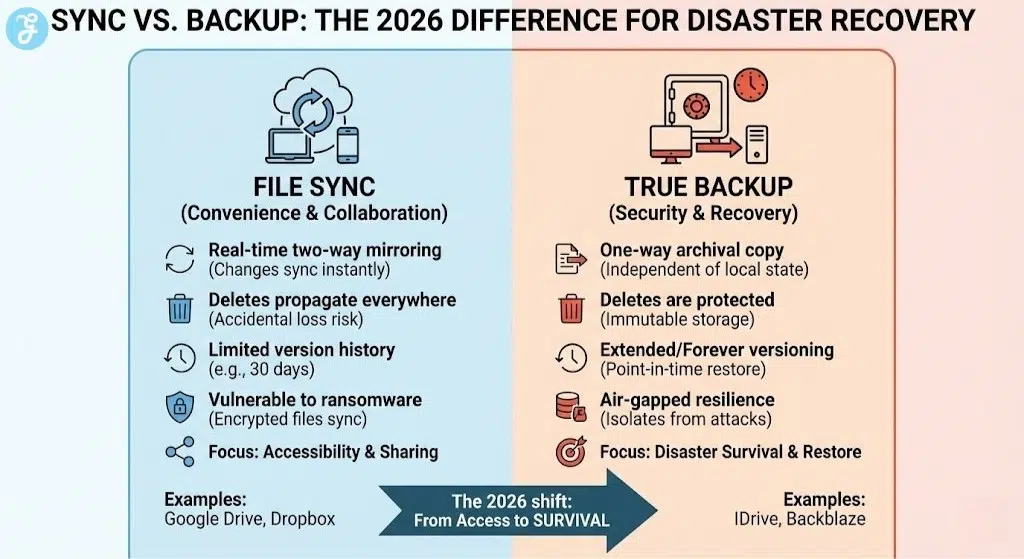
By 2026, the distinction between simple “file syncing” and robust “system backup” has become a critical line of defense for digital survival. With AI-powered ransomware now capable of scanning and encrypting connected cloud drives in seconds, the need for air-gapped, versioned, and immutable storage is no longer just for enterprises. Whether you are protecting a lifetime of family photos or a decade of professional project files, finding the best cloud storage for backups 2026 requires a move toward services that prioritize disaster recovery over mere accessibility.
The current landscape favors services that offer “Point-in-Time” restoration and cross-platform protection. This guide evaluates the top six contenders that have adapted to the 2026 threat landscape, offering the most reliable safety nets for your data.
How We Chose Our Top 6 List?
Our selection process for 2026 focuses on the “Recoverability Index.” It is not enough to just upload data; a backup service must be able to restore that data under extreme circumstances, such as total hardware failure or a cyberattack.
We applied the following weightings to our research and comparison:
| Criteria | Weighting | Focus Area |
| Backup Versatility | 40% | Support for NAS, external drives, and multiple devices |
| Recovery Speed & Options | 30% | Courier services, image-based restores, and versioning |
| Security & Encryption | 30% | Zero-knowledge architecture and ransomware protection |
6 Best Cloud Storage for Backups 2026
The following platforms have been selected as the gold standard for data preservation and recovery in 2026.
1. IDrive
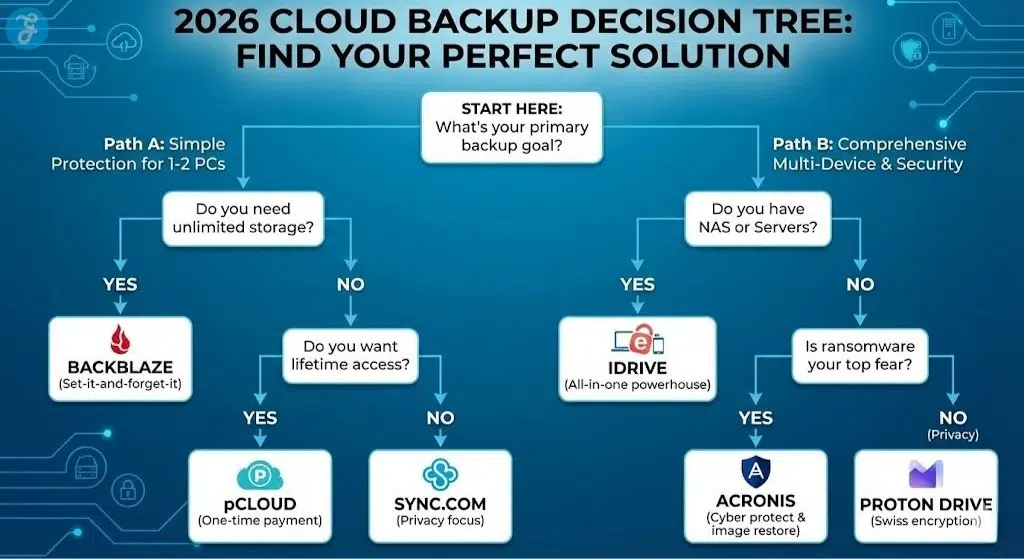
IDrive continues to lead the pack in 2026 by offering the most comprehensive “all-in-one” solution. Unlike competitors that limit you to a single machine, IDrive allows you to back up an unlimited number of PCs, Macs, iPhones, Androids, and even NAS drives under a single storage quota. Its “IDrive Express” service—where they mail you a physical drive for the initial backup or a fast restore—remains a lifesaver for those with terabytes of data.
Special Features:
-
Backs up unlimited devices (including servers and NAS) per account.
-
Snapshot and Versioning allow for point-in-time recovery from the last 30 days.
-
IDrive Express physical courier service for rapid data seeding and recovery.
Things to Consider:
-
The interface, while functional, can feel cluttered compared to modern competitors.
-
Storage is not unlimited; you must manage your data within your 5TB or 10TB cap.
-
Initial uploads can be slow if you do not use the Express drive service.
Best for: Families or small business owners with multiple types of devices to protect.
2. Backblaze
Backblaze remains the king of simplicity in 2026. Its value proposition is straightforward: pay a flat annual fee and get unlimited backup for one computer. There are no file size limits and no complicated folder selections—the software silently backs up everything in the background. If you lose your computer, you can download your files or have a USB drive shipped to your door anywhere in the world.
Special Features:
-
Truly unlimited storage for a single PC or Mac with no bandwidth throttling.
-
Silent, background operation that requires zero user interaction after setup.
-
“Locate My Computer” feature built into the backup agent for stolen hardware.
Things to Consider:
-
Does not support NAS or network drives on the personal plan.
-
Only backs up one computer; each additional machine requires its own subscription.
-
Mobile app is for file access only, not for backing up the mobile device itself.
Best for: Users who want a reliable, automatic backup without having to manage settings.
3. Acronis Cyber Protect Home Office
Acronis has evolved into a hybrid of backup and cybersecurity. In 2026, it is the only major player that fully integrates real-time anti-malware and ransomware protection directly into the backup engine. It creates a full “Image Backup” of your entire system, allowing you to restore your OS, apps, and settings to a brand-new hard drive in minutes.
Special Features:
-
Full-image backups that allow for “Bare Metal” recovery to new hardware.
-
Active Protection uses AI to block ransomware from attacking your backup files.
-
Universal Restore allows you to move your entire system to a computer with different hardware.
Things to Consider:
-
One of the most expensive options on the list.
-
The software can be resource-intensive on older computers during active scans.
-
The feature set can be overwhelming for those just looking for simple file storage.
Best for: Power users and professionals who cannot afford a single hour of downtime.
4. pCloud
pCloud is unique in 2026 for its “Lifetime” payment model, making it the best financial choice for long-term archiving. While it functions primarily as a sync service, its “pCloud Backup” feature allows you to select any folder on your computer for continuous, real-time protection. It is particularly strong for media enthusiasts, offering built-in players for music and video stored in the cloud.
Special Features:
-
One-time payment for lifetime storage (up to 10TB).
-
Client-side “pCloud Crypto” ensures that even pCloud employees cannot see your files.
-
Automatic social media backup (links to Facebook and Instagram).
Things to Consider:
-
pCloud Crypto (Zero-Knowledge) is often a separate add-on cost.
-
Not as feature-rich for full system recovery as IDrive or Acronis.
-
No courier service for shipping physical drives.
Best for: Budget-conscious users who want to escape the “subscription trap” for their archives.
5. Sync.com
Sync.com is built for those who prioritize privacy above all else. Based in Canada, it offers 100% zero-knowledge encryption by default on every plan. In 2026, it remains the top choice for legal and healthcare professionals who must comply with strict data residency and privacy laws. Its “Sync Vault” feature allows you to move files to the cloud exclusively, freeing up space on your local hard drive while keeping them backed up.
Special Features:
-
Zero-knowledge encryption is baked into the core of the service.
-
HIPAA, GDPR, and PIPEDA compliance-ready for professional use.
-
Advanced sharing controls including password-protected links and expiry dates.
Things to Consider:
-
Syncing speeds can be slower than pCloud or Google Drive due to the encryption overhead.
-
The interface is utilitarian and lacks the “flash” of consumer-focused apps.
-
Limited integration with third-party apps compared to mainstream services.
Best for: Professionals handling highly sensitive or confidential client data.
6. Proton Drive
Proton Drive, from the creators of Proton Mail, is the new standard for “Swiss-Level” security in 2026. Every file, folder name, and piece of metadata is end-to-end encrypted before it leaves your device. Following the massive data privacy shifts of 2025, Proton has become the go-to for activists, journalists, and anyone wanting to move their backup out of the reach of “Big Tech” surveillance.
Special Features:
-
Based in Switzerland, benefiting from the world’s strongest privacy laws.
-
Open-source apps that are regularly audited for security vulnerabilities.
-
Seamless integration with the broader Proton ecosystem (Mail, Calendar, VPN).
Things to Consider:
-
Storage tiers are smaller and more expensive than mass-market competitors.
-
Desktop backup features are still maturing compared to veterans like IDrive.
-
No physical drive restore options are available.
Best for: Privacy advocates who want their backups protected by Swiss law and open-source code.
Cloud Backup Market Overview 2026
The 2026 backup market is dominated by “Immutable Storage” and “AI-Anomaly Detection.” Top-tier services now monitor your backup patterns in real-time; if a sudden mass-encryption event (ransomware) is detected, the system automatically freezes your clean versions and alerts you. Additionally, 10Gbps home internet connections have made “Initial Seeds”—once a multi-day chore—far more manageable for the average user.
| Service | Best Feature | 2026 Pricing (Est.) | Primary Use Case |
| IDrive | Multi-Device Maestro | $79.50/yr (5TB) | Total digital life backup |
| Backblaze | Unlimited Simplicity | $99/yr per PC | Set-it-and-forget-it |
| Acronis | Cyber Protection | $90/yr (500GB) | Security-first users |
| pCloud | Lifetime Value | $399 (2TB Lifetime) | Long-term archives |
| Sync.com | Privacy Purist | $96/yr (2TB) | Sensitive document storage |
| Proton Drive | Swiss E2EE | $120/yr (500GB) | Extreme privacy |
How Should You Choose The Best Option For You
Selecting your backup strategy depends on the “Data Value vs. Recovery Time” equation:
-
For the “Everything” User: If you have 5+ devices, a NAS, and a phone, IDrive is the clear winner for cost and coverage.
-
For the “Single Machine” User: If you just want your laptop safe without thinking about it, Backblaze is unbeatable.
-
For the “Security Enthusiast”: If you fear ransomware more than hardware failure, Acronis provides the best active defense.
-
For the “Privacy Purist”: If you want your data invisible to everyone but you, Proton Drive or Sync.com are the top choices.
Can’t make up your mind?
| Category | Top Pick | Primary Reason |
| Overall Value | IDrive | Unlimited devices and courier service for a low price. |
| Ease of Use | Backblaze | True set-it-and-forget-it unlimited backup. |
| System Resilience | Acronis | Integrated AI ransomware protection and image restores. |
| Long-Term Savings | pCloud | Lifetime plans that pay for themselves in 3 years. |
Wrap-Up
Investing in the best cloud storage for backups 2026 is about buying peace of mind for your future self. In a digital environment where hardware is temporary and cyber threats are constant, a “sync” folder is no longer enough. By choosing a dedicated backup solution—whether it is the sheer power of IDrive or the privacy-first vault of Proton—you ensure that a single accident or attack does not become a permanent loss.




























