

Have you ever poured your heart into a website, only to find your best pages missing from Google? It is a frustrating feeling. Many website owners face this exact problem. They often miss the hidden culprit sitting right in their main folder. That culprit is the Robots.txt File: The Most Dangerous File On Your Website. This simple text file holds absolute power over search engines. It tells good robots exactly where they can go and where they must stop.
I will show you the exact steps to manage this file. We will fix your SEO and protect your private data together. So, grab a cup of coffee, and let’s fix this right now.
What is a Robots. txt File?
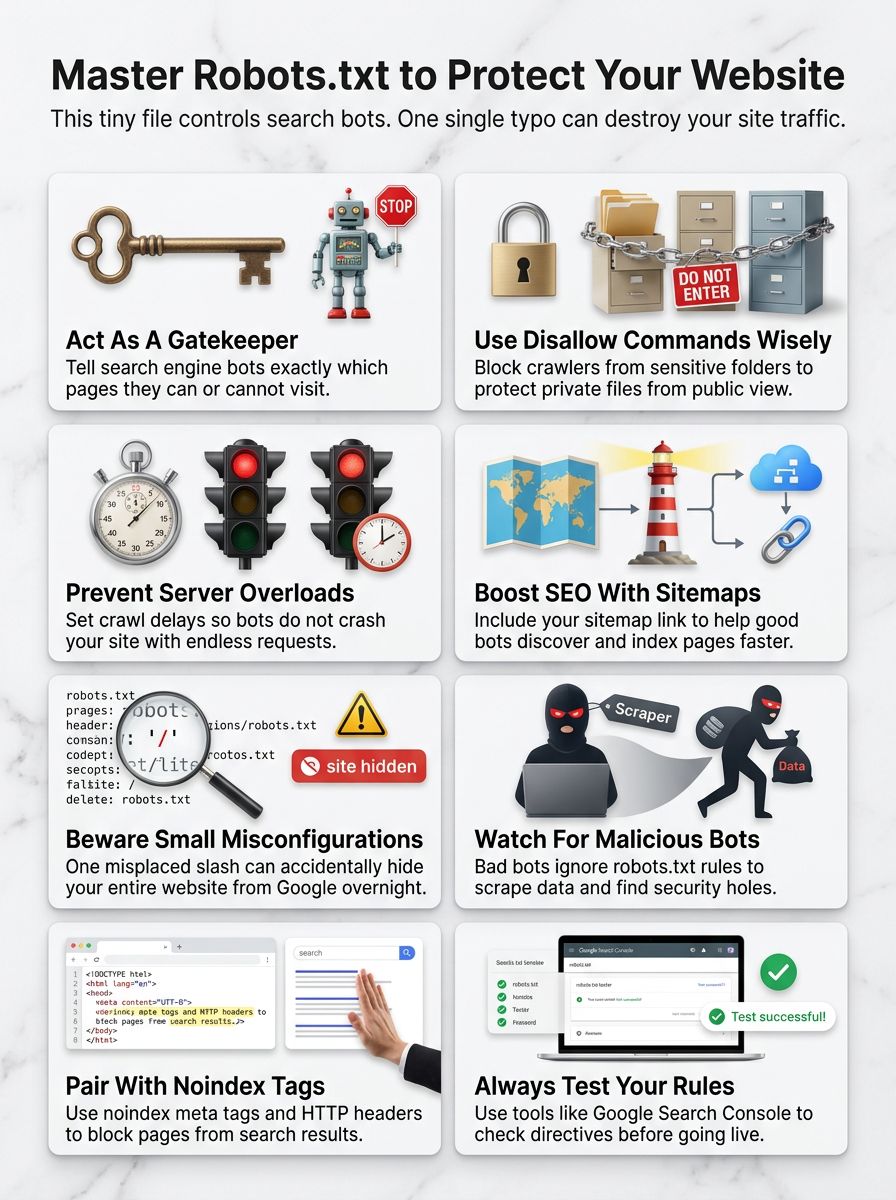
A robots.txt file is like a bouncer at the front door of your website. Web crawlers use this tiny text document to figure out which pages they are allowed to read. You place this file right in your main website folder.
Anyone can type your web address followed by “/robots.txt” to see it. Website owners write simple rules inside this file using crawl directives like “Disallow” or “Allow” to guide the bots.
One misplaced slash in robots.txt can hide your entire site from Google overnight.
You can easily block specific AI bots today. For example, adding “User-agent: GPTBot” followed by “Disallow: /” blocks OpenAI from scraping your content. This small file plays a massive role in your site security and traffic management.
How Does a Robots. txt File Work?
It acts as a friendly guide for web crawlers. It chats with these bots about your URL access rules.
The Role of User Agents
User agents are simply the specific names given to different web crawlers. Googlebot and Bingbot are the most famous ones. Modern US websites also deal with new visitors like ClaudeBot, which gathers data for AI models. Your robots.txt file gives specific instructions to each useragent.
You might leave your blog wide open for Googlebot. At the same time, you could completely block an AI scraper from reading your articles.
Setting these rules correctly boosts your SEO Search Engine Optimization. It also helps manage your site security by keeping sneaky bots away from your private folders.
The Function of ‘Disallow’ Commands
Disallow commands are literal stop signs for search engines. They tell web crawlers exactly which folders to ignore.
If you use WordPress, you will often see “Disallow: /wp-admin/” in your file configuration. This rule blocks search engines from your private login pages.
It is a critical step for basic website security. Too many Disallow rules can accidentally hide your best content. Good web crawlers always respect these limits. You must double-check every Disallow directive to ensure you are not blocking valuable organic traffic.
The Use of Wildcards and Crawl-delay
Wildcards are helpful shortcuts that let you match multiple URLs at once. You use them to build dynamic rules.
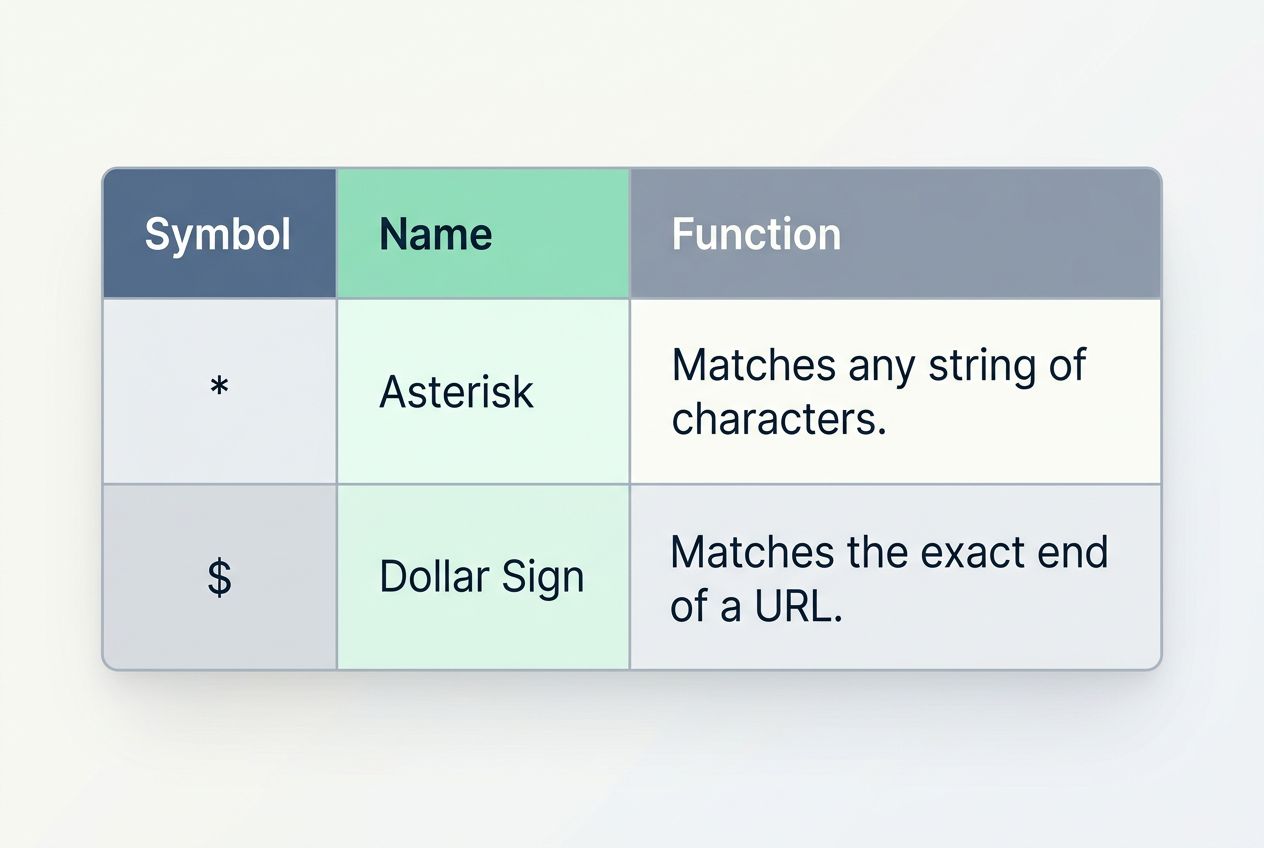
| Symbol | Name | Function |
|---|---|---|
| * | Asterisk | Matches any string of characters. |
| $ | Dollar Sign | Matches the exact end of a URL. |
The crawl-delay rule tells bots to wait between page visits. You might set “Crawl-delay: 10” to make bots pause for ten seconds. Here is a crucial insider tip for US website owners. Googlebot completely ignores the crawl-delay command in robots.txt files.
If you want Google to slow down, you must adjust your crawl rate settings directly inside Google Search Console. Misusing wildcards can destroy your site’s visibility quickly.
Why is a Robots. txt File Important?
It stands guard at your digital door. It controls who gets in and who stays out.
Managing Search Engine Crawlers
Search engine crawlers have a massive job to do. They scan your site so you can appear in search results. Every website has a limited crawl budget allocated by search engines. Google limits how many pages it crawls based on your server capacity.
If bots waste time on your useless tag pages, they might miss your brand-new product listings. Your robots.txt file directs traffic to your most important content.
A small error here can tank your rankings fast. Proper traffic management ensures bots focus on the pages that actually bring you organic traffic.
Preventing Server Overload
Search engine crawlers never sleep. They can request hundreds of pages per minute. This constant knocking puts incredible strain on your web hosting server. Too many rapid requests slow your site down for real human visitors.
In worst-case scenarios, aggressive bots can crash your server entirely. Data from recent cybersecurity reports shows that automated bots make up nearly a third of all internet traffic.
Setting limits helps keep your server resources free for actual customers. Good bot management stops these digital traffic jams before they start.
Controlling Sensitive Content Access
Some pages require an extra layer of digital privacy. The robots.txt file acts like a security guard for these sensitive areas.
You should always block access to internal search result pages and customer data folders. Hackers frequently use automated tools to scan websites for open directories.
Blocking a folder in robots.txt keeps honest bots away, but it acts like a treasure map for hackers looking for exposed files.
It does not actually encrypt or secure the files from determined attackers. You must pair smart robots.txt rules with a strong firewall to achieve true access control.
Common Directives in a Robots. txt File
You can set specific rules to guide search engines. These directives make site optimization much easier.
Sitemap Inclusion
Adding your sitemap is the most helpful thing you can do for web crawlers. It points them directly to a complete list of your important pages. You must use the absolute URL for your sitemap. This means you have to write out the full web address, like “Sitemap: https://www.yoursite.com/sitemap.xml”.
Many website owners forget this simple step. Providing this map speeds up site indexing significantly. The faster Google understands your site structure, the faster you get organic traffic.
Noindex Meta Tags and HTTP Headers
Sometimes you need to keep a page completely out of search results. You might think you can use a “noindex” command right in the robots.txt file.
Here is a massive warning for your SEO Search Engine Optimization strategy. Google officially stopped supporting the “noindex” directive in robots.txt files back in September 2019.
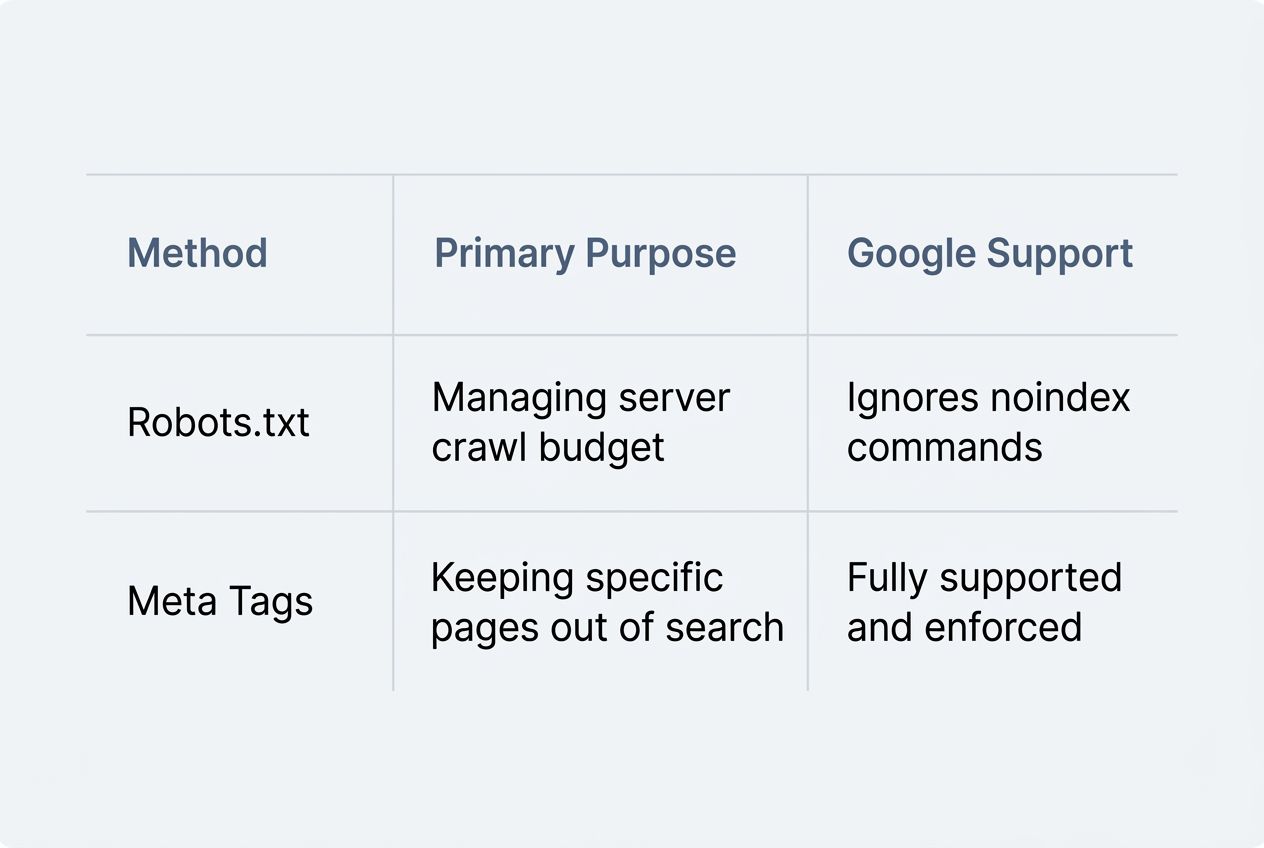
| Method | Primary Purpose | Google Support |
|---|---|---|
| Robots.txt | Managing server crawl budget | Ignores noindex commands |
| Meta Tags | Keeping specific pages out of search | Fully supported and enforced |
You must use a noindex meta tag directly in the HTML code of the page itself. Alternatively, you can use an “X-Robots-Tag” in your server’s HTTP headers. Using these specific tags gives you absolute control over your digital privacy.
Risks and Limitations of Robots. txt Files
One tiny mistake can ruin your SEO. Some bots simply ignore your rules completely.
Misconfigurations and Consequences
Errors in your robots.txt file carry massive consequences. A single stray character can block search engines completely. The most common disaster happens when developers move a test site to a live server. They often forget to remove the “Disallow: /” rule.
This hides the entire website from Google. This simple oversight drops organic traffic to zero overnight. Mistakes can also expose your hidden files to the public. Malicious actors scan the internet specifically looking for these file configuration errors.
Non-compliance by Malicious Bots
Good bots from Google and Bing follow your Search Engine Guidelines. Unfortunately, the internet is full of bad actors.
- Email harvesters scraping your contact information.
- Content thieves are automatically duplicating your new articles.
- Vulnerability scanners actively look for weak plugins.
Malware bots completely ignore your robots.txt file. They will dig into your blocked folders to steal content or look for software vulnerabilities.
You cannot rely on a plain text file to stop a cyber attack. If you notice aggressive scrapers in your server logs, you need a stronger defense. Security experts recommend using a Web Application Firewall to actively block these malicious IPs.
How to Create and Optimize a Robots. txt File
Setting up your file correctly takes patience. Small errors can cause huge headaches.
Tools and Generators
Smart tools make file configuration much easier. They help you spot security risks before they affect your traffic.
- Google Search Console: This free dashboard includes a tester that highlights exact line errors holding back your site indexing.
- Yoast SEO: This popular WordPress plugin lets you edit your file directly from your website dashboard without touching server code.
- Screaming Frog SEO Spider: This advanced desktop tool crawls your site exactly like Googlebot to show you which URLs are accidentally blocked.
- Cloudflare Bot Management: This tool works alongside your rules to actively block malicious bots from hitting your server.
- Bing Webmaster Tools: Bing provides its own testing tool to ensure your crawl directives meet their specific Search Engine Guidelines.
These tools help you balance amazing site visibility with tight website security.
Best Practices for File Setup
Following strict rules keeps your website safe. Here are the most critical practices for your file setup.
- Place the file strictly in your root directory so web crawlers can find it immediately.
- Use all lowercase letters for the filename because search engines expect exactly “robots.txt”.
- Target specific User-agents clearly to prevent confusion between different web crawlers.
- Include your absolute sitemap URL at the very bottom to ensure fast and accurate site indexing.
- Test every single change in Google Search Console before saving to protect your organic traffic.
Proper setup protects your valuable content from unwanted visitors.
Examples of Robots. txt Usage
Let’s look at how this file works in the real world. A few simple lines make a massive difference.
Blocking Specific Pages
You can easily hide private areas from web crawlers. This is a standard practice for protecting user data. For example, e-commerce stores running on Shopify automatically block search engines from crawling their checkout pages. They use rules like “Disallow: /checkout/” to keep customer transaction URLs out of Google.
This prevents duplicate content issues and protects sensitive information. Always verify your URL access rules to ensure you are only blocking the right pages.
Allowing Selective Crawling
You can also use the “Allow” directive to create exceptions to your blocking rules. This gives you precise control over site optimization.
Years ago, webmasters blocked search engines from reading CSS and JavaScript files. Today, Googlebot needs to read those specific design files to understand how your page looks on a mobile phone.
Unblocking your CSS and JavaScript files is a mandatory step for modern mobile SEO success.
You might use “Disallow: /assets/” but add “Allow: /assets/main.css” so Google can render your page perfectly. This selective crawling protects your heavy server folders while boosting your mobile SEO.
Closing Thoughts
The Robots.txt File: The Most Dangerous File On Your Website deserves your full attention. It is a simple text document that holds incredible power over your digital success.
Googlebot and other web crawlers rely on these exact crawl directives every single day. A smart setup keeps your private folders secure and funnels organic traffic right to your best content.
Always test your changes carefully. A well-managed file is your best tool for amazing site visibility. Take control of your site today!
































