

Many Canadians who work from home wrestle with a sore back and tangled cables. You sit at a basic desk, crane your neck, and strain to see the screen. You lose focus, and tasks drag on.
Your body begs for a break.
Key Takeaways
- Over half of remote workers report neck pain, so chairs like the Branch Chair Pro ($499) and the Herman Miller Embody ($1,995) cut tension with adjustable lumbar support.
- Adjustable desks run from a $200 FlexFit converter to a $5,399 Lincoln Electric unit, lift up to 45 inches, and hide cords in built-in trays.
- Monitors span a $250 BenQ 27″ 1080p to an $850 Dell 32″ 4K HDR QD-OLED, using VESA mounts or Thunderbolt hubs for clear, flexible views.
- Keyboards ($130–$250), mice ($110–$159), and noise-canceling headphones ($299–$450) boost comfort by lighting keys, silencing clicks, and blocking distractions.
- Cable arms ($35–$280) and under-desk trays tidy wires, while SSDs like the $550 LaCie Rugged 4 TB and the $75 Crucial X6 1 TB protect files and save desk space.
Ergonomic Office Chairs
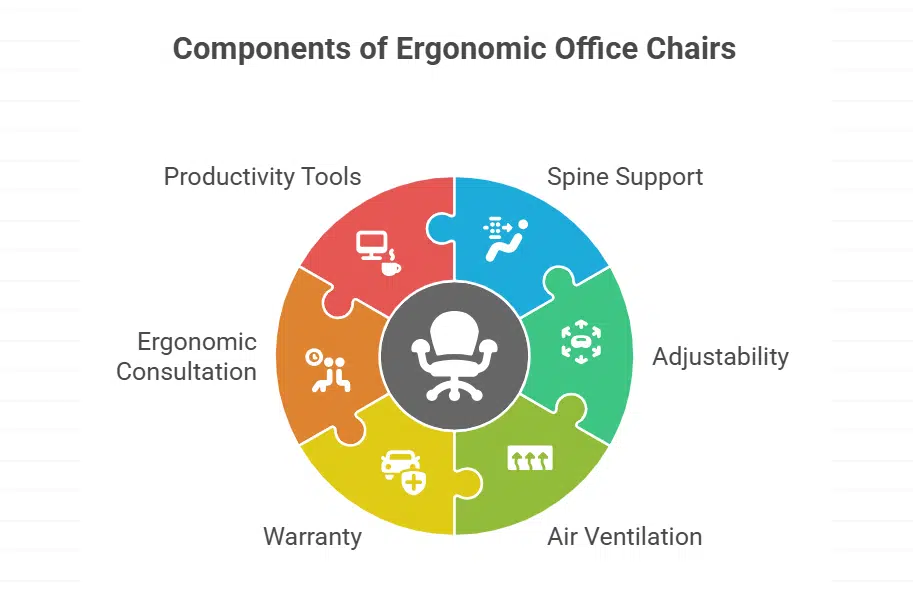
Your spine sinks into support, right away. Branch Ergonomic Chair Pro costs $499, it brings comfort and adjustability. Users tweak seat depth adjuster and lumbar pad to fit each curve.
That tweak cuts tension during long working remotely sessions. Staples Dexley Mesh Task Chair sells at $170, it vents air through woven netting.
Anthros Chair V2 costs $1,887, it adds spine health support plus ergonomic consultations. Herman Miller Embody Chair costs $1,995, it lasts years and carries a 12 year warranty. Office furniture shapes each ergonomic workspace and remote work essentials.
Woven netting seating, tilt mechanisms, padded armrests, we pack them all in. That mix fights sedentary aches and boosts productivity tools.
Adjustable Standing Desks
The Branch Four Leg frame lifts from sitting to 45 inches with a simple, click-and-turn setup. It costs $949 and offers rock-solid stability when you work. The Vari ComfortEdge desk goes for $769, and it arrives in three top sizes with a programmable motor.
You can save height presets or raise it with one touch, and a hidden tray tucks away cables neatly. This standing desk fits mid-size work areas; it stands as a top productivity tool in any home office setup.
The Lincoln Electric unit checks all ergonomic boxes; it rings in at $5,399, yet it doubles as a wood showpiece that adjusts with a whisper-quiet motor. You slide the top up or down with a smooth electric lifter.
The Staples Union & Scale FlexFit converter costs $200 and clamps onto your existing desk, giving you a sit-stand option without a full table swap. A built-in cable channel and clips keep cords out of sight, which boosts workspace organization.
Pair it with noise-canceling headphones and a wireless mouse to round out your remote work essentials.
High-Resolution Monitors
High-resolution screens boost clarity for spreadsheets, design apps, and video conferencing. BenQ GW2786TC 27-inch screen sells for $250 and has 1080p resolution. It uses a VESA mount that fits most stands and wall mounts.
Dell 32 Plus 4K HDR QD-OLED display costs $850 and hits 1,000 nits brightness.
Graphic artists love its wide color gamut and sharp detail in remote work calls. Dell UltraSharp 32 4K Thunderbolt Hub costs $970 and packs a docking station, Ethernet jack, and KVM switch.
LG DualUp 28-inch 2K tall screen sells for $697 and uses a 16:18 aspect ratio. These productivity tools rank high on any home office essentials list.
Laptop Stands for Better Posture
Use a laptop stand to lift your screen and ease neck strain. A Branch adjustable laptop riser costs $65. It lifts the screen seven inches, then folds flat for travel. The Rain Design mStand runs $40 for a solid aluminum stand.
That model holds your gear rock steady but offers little tilt.
Logitech sells Casa Pop-Up Desk for $180. It pairs a pop-up platform with a Bluetooth keyboard and trackpad for a mini workstation vibe. Nnewvante offers a bamboo notebook riser at $49.
It sits on couch or bed, shifts to a comfy angle, and hides small tools in a built-in drawer. These options rank high among home office essentials and remote work essentials for workspace organization, ergonomic workspace boosts, and smoother remote work days.
Wireless Keyboards and Mice
Keychron Q6 HE keyboard sells for $250. It uses hall effect sensors for rich feedback. This wireless keyboard adapts to any style, it works for heavy typists. Logitech MX Keys S keyboard runs at $130.
Proximity sensors light keys as hands approach. It connects to three products with a tap. Those tools boost home office essentials and remote work productivity tools.
Logitech MX Master 3S mouse retails at $110. Silent buttons quiet each click and a dual scroll wheel glides. Professionals click and scroll without noise. Razer Basilisk V3 Pro costs $159.
It fits hands well and has programmable buttons. This computer mouse blends ergonomic workspace comfort with desk accessories for working from home.
Noise-Canceling Headphones
Sony sells the WH-1000XM6 Wireless Headsets for $450. They use active noise cancellation to mute distractions. These sets run for 30 hours on a charge. Remote workers gain more focus on calls, files, or spreadsheets.
This gear ranks high among home office essentials and productivity tools.
Bose QuietComfort Ultra Earbuds cost $299. Advanced noise cancellation keeps busy streets at bay. These earbuds slip snug in each ear. Earphones cut loud street noise or chatty roommates.
They pair with laptops, tablets, and phones for remote work. You can join calls or play tunes without pop or buzz.
Desk Lamps with Adjustable Brightness
Steelcase Eclipse Desk Light costs $290. It offers intuitive brightness control with a slider. The dial changes the color temperature from warm to cool. You avoid glare and eye strain when you work late.
This desk accessory fits any home office essentials setup.
A light with a dimmable light bulb can match natural light in a room. It helps your eyes and keeps you alert. You slide the dial or tap the pad to find the right glow. She said, “This lamp saved my nights.” It adds style to your workspace organization and qualifies as remote work essentials.
Cable Management Solutions

A tangled mess of wires can kill a remote work flow. Workstream by Monoprice Single Monitor Arm costs $83, it uses clips to hide cords along its arm. Ergotron LX Monitor Arm adds a sealed channel to tuck away cables, it runs along a sturdy, $190 mount.
Vivo Dual-Monitor Desk Mount, priced at $35, holds two screens and secures cords with zip ties. Mount-It! Heavy Duty Dual-Monitor Arm delivers sleek wire routing on a rig that runs $280, built for ultrawide displays.
Oakywood Dual Monitor Desk Shelf pulls cable clutter off your desktop for $199, it adds shelf space and a neat cord path.
A cable tray under the desk hides power strips and USB hubs. You snap clips to the frame for a neat look. A sleeve or spiral wrap bundles cords into one rope. Cable clips, ties, and channels guide wires in clear paths.
These desk accessories keep your home office setup clean and boost workspace organization.
External Storage Drives
External storage drives rank high on a home office setup list. They serve as key productivity tools for remote work essentials. The LaCie Rugged 4-TB SSD Pro5 costs $550. It links via Thunderbolt 5 and survives drops.
The Crucial X6 1TB Portable SSD sells for $75. It weighs little and fits most bags. Both add extra space for big video or photo tasks. Workers can protect data and keep file cabinets clear.
Takeaway
These tools make work at home smooth. A comfy chair stops aches. A sturdy desk lets you stand with ease. A crisp monitor shows each detail. Headphones block chatter. All these picks help any teleworker stay on task.
FAQs on Remote Work Products For Home Offices In Canada
1. What are the top remote work essentials for a home office in Canada?
Lift your laptop with a stand or riser. Use an ergonomic chair, standing desk and desk accessories for a snug workspace. Add natural light, an air purifier and a few plants.
2. How do noise-cancelling headphones help in a home office setup?
They block chatter and keep you in the zone, even if your kid practices drums next door. They give great noise control so you can focus. True wireless sets free you from wires, too.
3. Are portable monitors worth it for teleworkers?
Yes, they give you more screen space and cut back pain. They work with your desktop computer or laptop. They even help with customer relationship management tasks.
4. Which ergonomic furniture boosts health benefits?
An ergonomic office chair supports your back. A keyboard tray and wrist rest protect your wrists. A heater boosts comfort and wards off chill.
5. What role do productivity tools play in remote working?
Apps on your smartphone or tablet help you plan and track tasks. Fast chargers and wireless charging keep your gear alive. They make work flow, with less fuss.
6. How can workspace organization improve your remote work performance?
Good office furniture and desk accessories keep clutter at bay and build an ergonomic workspace. Soundproofing panels curb noise, and a neat student desk or office nook sparks focus, not a snack graveyard.
































