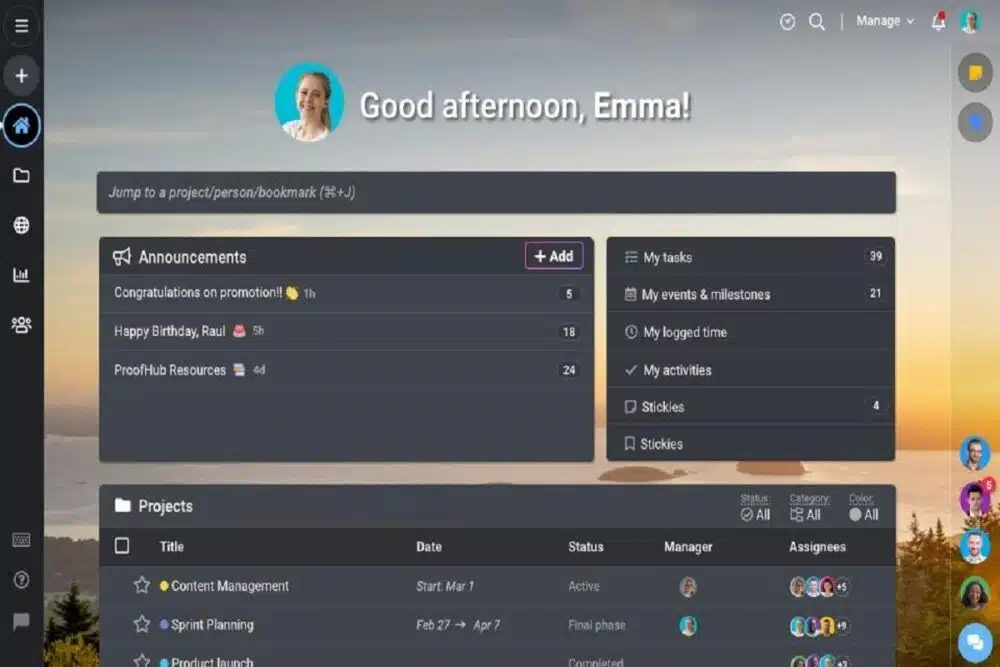
ProofHub Dark Mode: Make Your Workday Better

ProofHub Dark Mode

We want you to have your preferred experience always, whether it’s through our integrations, the way you can organize your tasks in a project, or just the look and feel of your account.

For all our users who have been wanting this for a while, we are thrilled to be able to announce dark mode for ProofHub! We understand that everyone has different preferences when it comes to their workspace, so we wanted to make sure that using our tool could accommodate those preferences as much as possible.

With dark mode, you can finally say goodbye to those annoying bright backgrounds that hurt your eyes and keep you from focusing on what’s really important: getting stuff done.

This new feature lets you easily switch between light and dark mode to create a more comfortable working environment that suits your needs.

Why is Dark Mode so important for your device?

Your eyes, my friend. Your eyes.

Here’s the thing: we stare at our devices for SO LONG. And those screens are bright—really bright. And that brightness can actually be pretty damaging to your eyes over time, especially if you have eye conditions like cataracts or macular degeneration.

Not to mention that all that harsh light and screen glare can cause headaches, eye strain, and fatigue, which means doing your work will be harder and take longer than it should.

The good news is there’s a better way: Dark Mode!

This makes your screen less bright and removes the glare of white light directly hitting your eyes, which relieves eye strain, helps prevent headaches and fatigue, and allows you to work more efficiently throughout the day.

Dark Mode: The Ultimate Power Saver

Your battery could outlast your coffee with Dark Mode.

How does it work? Whether you’re using your phone or your laptop, when things are white on the screen, more light is projected into your eyes. And that’s not good for the poor ol’ battery! But when things are dark on the screen, more energy is preserved and less light gets blasted into your eyeballs.

Dark Mode is the latest trend in digital design, and it has its fair share of benefits. In addition to saving your eyes from strain, it can save you from the hell of a dying phone at the end of your workday.

When Apple added Dark Mode to iOS 13, they also introduced a new way to save battery life: by utilizing OLED technology (which powers most newer smartphones) to turn off individual pixels when they are displaying black-colored pixels.

So basically, if you want to save some battery life while you’re working (or just want to give your peepers a break every once in a while!) just turn on Dark Mode in ProofHub.

How to Activate Dark Mode on Your ProofHub Account

To activate dark mode, simply click on your profile picture in the top right corner of your ProofHub account after logging into your account. Select your preferred color scheme (dark theme or light theme).
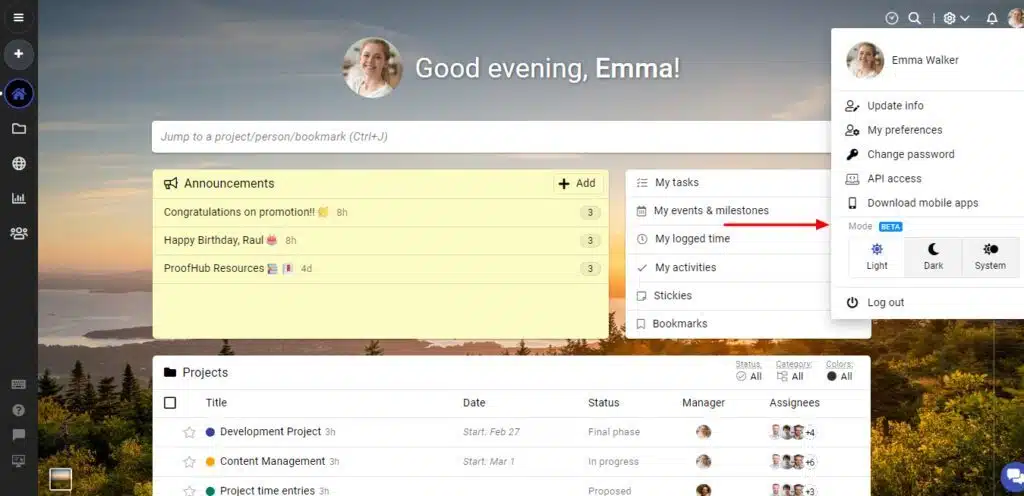
Activate Dark Mode

You can also switch between these two modes when you wish to change things up a bit. The best thing about this feature is that it adapts dynamically to the system’s configuration and works seamlessly with both the desktop app and web application.

On a final note

ProofHub Dark Mode is all about customization and enabling users to do everything from working better with a specific color scheme to simply having a unique custom theme.

You can switch between themes whenever you want, depending on what you are working on and where you are located to match your mood and your environment.

As a support platform catering to teams who work in their browser and don’t need other sophisticated tools that other platforms provide, this is a really useful addition.

There is absolutely no reason why you shouldn’t make every effort to enjoy your ProofHub experience as much as possible. Give Dark Mode a try today!



Subscribe to Our Newsletter

Related Articles

Top Trending

GPT 5 Store leaks
OpenAI’s “GPT-5 Store” Leaks: Paid Agents for Legal and Medical Advice?
10 Best Neobanks for Digital Nomads in 2026
Quiet Hiring Trend
The “Quiet Hiring” Trend: Why Companies Are Promoting Internally Instead of Hiring in Q1
Pocketpair Aetheria
“Palworld” Devs Announce New Open-World Survival RPG “Aetheria”
Red Sea Shipping Crisis 2026
Geopolitics 2026: Blinken Returns to Middle East as Red Sea Shipping Costs Spike

LIFESTYLE

Travel Sustainably Without Spending Extra featured image
How Can You Travel Sustainably Without Spending Extra? Save On Your Next Trip!
Benefits of Living in an Eco-Friendly Community featured image
Go Green Together: 12 Benefits of Living in an Eco-Friendly Community!
Happy new year 2026 global celebration
Happy New Year 2026: Celebrate Around the World With Global Traditions
dubai beach day itinerary
From Sunrise Yoga to Sunset Cocktails: The Perfect Beach Day Itinerary – Your Step-by-Step Guide to a Day by the Water
Ford F-150 Vs Ram 1500 Vs Chevy Silverado
The "Big 3" Battle: 10 Key Differences Between the Ford F-150, Ram 1500, and Chevy Silverado

Entertainment

Samsung’s 130-Inch Micro RGB TV The Wall Comes Home
Samsung’s 130-Inch Micro RGB TV: The "Wall" Comes Home
MrBeast Copyright Gambit
Beyond The Paywall: The MrBeast Copyright Gambit And The New Rules Of Co-Streaming Ownership
Stranger Things Finale Crashes Netflix
Stranger Things Finale Draws 137M Views, Crashes Netflix
Demon Slayer Infinity Castle Part 2 release date
Demon Slayer Infinity Castle Part 2 Release Date: Crunchyroll Denies Sequel Timing Rumors
BTS New Album 20 March 2026
BTS to Release New Album March 20, 2026

GAMING

Pocketpair Aetheria
“Palworld” Devs Announce New Open-World Survival RPG “Aetheria”
Styx Blades of Greed
The Goblin Goes Open World: How Styx: Blades of Greed is Reinventing the AA Stealth Genre.
Resident Evil Requiem Switch 2
Resident Evil Requiem: First Look at "Open City" Gameplay on Switch 2
High-performance gaming setup with clear monitor display and low-latency peripherals. n Improve Your Gaming Performance Instantly
Improve Your Gaming Performance Instantly: 10 Fast Fixes That Actually Work
Learning Games for Toddlers
Learning Games For Toddlers: Top 10 Ad-Free Educational Games For 2026

BUSINESS

Quiet Hiring Trend
The “Quiet Hiring” Trend: Why Companies Are Promoting Internally Instead of Hiring in Q1
IMF 2026 Outlook Stable But Fragile
Global Economic Outlook: IMF Predicts 3.1% Growth but "Downside Risks" Remain
India Rice Exports
India’s Rice Dominance: How Strategic Export Shifts are Reshaping South Asian Trade in 2026
Mistakes to Avoid When Seeking Small Business Funding featured image
15 Mistakes to Avoid As New Entrepreneurs When Seeking Small Business Funding
Global stock markets break record highs featured image
Global Stock Markets Surge to Record Highs Across Continents: What’s Powering the Rally—and What Could Break It

TECHNOLOGY

GPT 5 Store leaks
OpenAI’s “GPT-5 Store” Leaks: Paid Agents for Legal and Medical Advice?
Pocketpair Aetheria
“Palworld” Devs Announce New Open-World Survival RPG “Aetheria”
The Shift from Co-Pilot to Autopilot The Rise of Agentic SaaS
The Shift from "Co-Pilot" to "Autopilot": The Rise of Agentic SaaS
Windows on Arm- The 2026 Shift in Laptop Architecture
Windows on Arm: The 2026 Shift in Laptop Architecture
LG CLOiD Home Robot Price
CES 2026: LG’s “Zero-Labor” AI Agent Robot Finally Has a Price Tag

HEALTH

Polylaminin Breakthrough
Polylaminin Breakthrough: Can This Brazilian Discovery Finally Reverse Spinal Cord Injury?
Bio Wearables For Stress
Post-Holiday Wellness: The Rise of "Bio-Wearables" for Stress
ChatGPT Health Medical Records
Beyond the Chatbot: Why OpenAI’s Entry into Medical Records is the Ultimate Test of Public Trust in the AI Era
A health worker registers an elderly patient using a laptop at a rural health clinic in Africa
Digital Health Sovereignty: The 2026 Push for National Digital Health Records in Rural Economies
Digital Detox for Kids
Digital Detox for Kids: Balancing Online Play With Outdoor Fun [2026 Guide]