Monster Hunter Wilds Co-Op is one of the best ways to experience the game because hunts feel smoother, faster, and more social when you have a steady team. You can clear tougher monsters with better consistency, learn fights faster, and farm materials without feeling like every mistake ends a run. At the same time, co-op can confuse new players because there are multiple ways to connect, multiple “states” a hunt can be in, and a few rules that can block joining if you do not understand them.
In this guide, I will show you exactly how to play with friends in Monster Hunter Wilds. You will learn the fastest setup method, the most reliable way to join each other, what to do when someone cannot join, and how to keep your group together without wasting time in menus.
What Monster Hunter Wilds Co-Op Means
Monster Hunter Wilds Co-Op is the four-player multiplayer system that lets you hunt with up to three other players. You can play in a shared session and start quests together, or you can join ongoing hunts using quick join systems. The game is designed so co-op feels natural, but it still follows Monster Hunter rules. Those rules matter because your friend might be online and still not be joinable if the hunt state is wrong.
Co-op in Wilds is built around three core ideas. First, you and your friends need a shared space, which is usually a lobby or session. Second, you need a shared activity, which is a quest, assignment, or hunt. Third, you need compatibility, meaning you must be on the same patch version, have access to the same content, and not be blocked by story gates.
What You Need Before You Play With Friends
Before you try to party up, make sure the basics are done. This saves the most time.
You need your game updated to the latest version. If one player is behind, joining can fail even if everything looks correct. You also need online access enabled for your platform. On console, that can mean an active online subscription. On PC, it usually means your network is stable and your account permissions allow online play.
You also need to reach the point in the early game where multiplayer features are available. Some story sequences can temporarily lock you into solo play. If one friend is still in a solo-only introduction segment, they may not be able to join until they finish that step.
The Fastest Way To Play With Friends
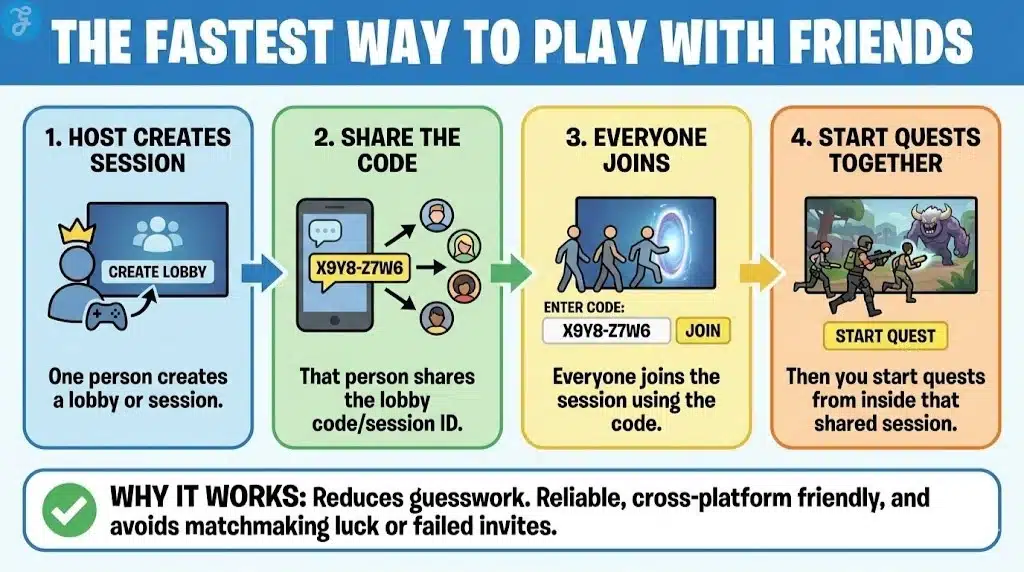
If you want the simplest method that works most of the time, do this.
One person creates a lobby or session.
That person shares the lobby code or session ID.
Everyone joins the session using the code.
Then you start quests from inside that shared session.
This works because it reduces guesswork. You are not relying on matchmaking luck, and you are not relying on platform friend invites that sometimes fail across different systems.
How To Create A Lobby Or Session
Open the multiplayer or online menu and choose the option to create a session. Set it to friends-only or private if you do not want random players joining. If the game gives you a session code, copy it. If it gives you a lobby ID, that works the same way.
Once the session exists, you can invite friends or tell them to join by code. The code method is usually the most reliable because it bypasses list syncing delays.
How To Join A Friend’s Session
Use the join session option and enter the session ID or lobby code. If you are using a friend’s list join option, it can work, but the code method is faster and more consistent.
If the game shows multiple search filters, make sure you are not filtering out your friend’s session by region, language, or playstyle tags. If you cannot find the session through search, ask for the code.
How To Start A Quest Together
Once everyone is inside the same session, you want to start the same hunt. There are two main ways groups do this.
The first way is starting a quest from a quest board or quest menu, then having everyone accept it. The host posts the quest, and the others join it from the quest list.
The second way is starting a quest in the field when you locate a monster target. Wilds supports a more seamless hunt flow, but you still need your party to be tied to the same quest state. If one person engages first and the others are not linked, they may not be able to join until the quest is formally open for co-op.
How Story Quests Work In Co-Op
Story quests are the most common reason friends cannot join each other. Monster Hunter games often treat story beats differently from optional hunts.
If you are on a story assignment that includes cutscenes or a special intro, your friends may not be able to join until the story segment completes or the hunt becomes joinable. The best practice is to progress to the point where the game allows co-op, then call your friends in.
If you want the smoothest co-op story run, keep your group on the same chapter progress. If one player is far ahead, they may not have the same assignments available, and they may not be able to start the same quest.
How To Keep The Party Together Between Hunts
A common frustration is finishing one hunt and then losing the group in menus. You can prevent that.
Stay in the same session after a quest ends. Do not disband. Let the host post the next quest. Everyone joins the posted quest again. This creates a rhythm where the session stays stable and only the quest changes.
If someone needs to craft or restock, do it quickly and communicate. The biggest time sink in co-op is waiting without knowing what someone is doing.
How Fast Travel And Camps Help Co-Op
Camps make co-op smoother because they reduce regrouping time. If your party spreads out, fast travel lets you meet quickly. Base camps serve as predictable gathering points. Pop-up camps can be used as extra anchors when you are far from the base and want to keep the pace.
If you are playing in a group, I recommend picking one camp as the default rally point for each region. That way, after a cart or after restocking, everyone knows where to regroup without asking.
How Monster Hunter Wilds Cross-Platform Co-Op Works
Wilds supports cross-platform play, which means PC, PS5, and Xbox players can hunt together. Cross-platform play is great for groups, but it can add friction in invites. In many cross-platform games, platform-native invites do not always work cleanly across systems.
This is why session codes matter. Codes are universal. If you share the session code in your group chat, everyone can join regardless of platform.
Voice chat is another cross-platform issue. If your group struggles with in-game voice, most teams use Discord or another shared voice solution.
Common Problems And How To Fix Them
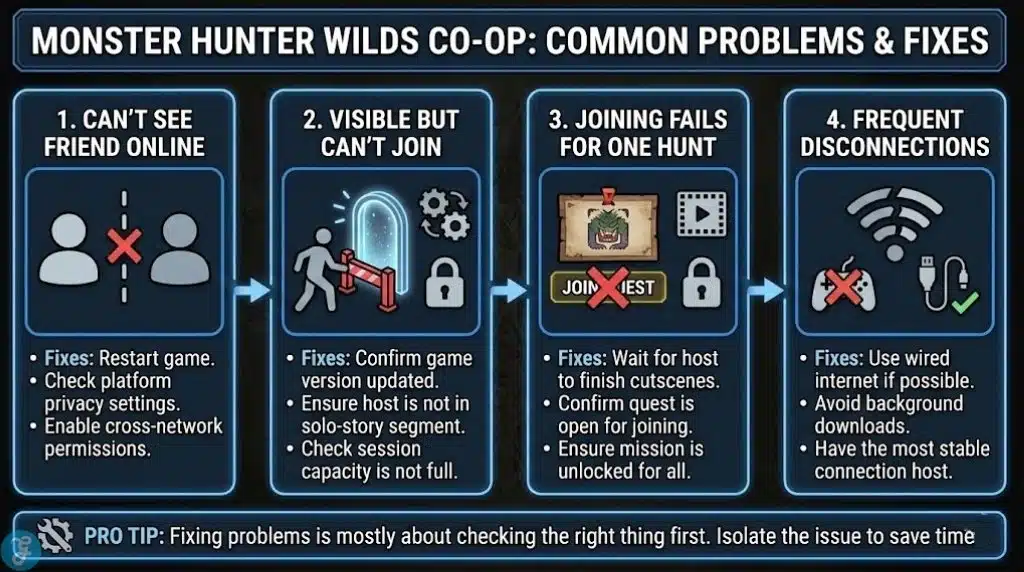
Monster Hunter Wilds Co-Op problems usually fall into a few buckets. Fixing them is mostly about checking the right thing first.
If you cannot see your friend online, restart the game and check privacy settings. Some platforms block cross-network visibility if permissions are restricted.
If you can see them but cannot join, the most common causes are version mismatch, story lock, or the session being full. Confirm everyone updated. Confirm the player you are joining is not in a solo-only segment. Confirm the session capacity.
If joining fails only for one hunt, it is usually a quest state issue. The host might be in a cutscene step, the quest might not be open for join, or you might not have unlocked that mission yet. Back out to the session and start a quest that all players have access to.
If you get disconnected often, focus on stability. Use wired internet if possible. Avoid background downloads. Have the most stable connection host the session.
Best Co-Op Setup For A Smooth Hunt Flow
If you want co-op to feel clean, use roles. You do not need strict MMO roles, but you do want intentional teamwork.
One player can focus on damage and consistent aggression. Another can focus on utility, traps, or status. Another can focus on support items, buffs, and keeping the team stable. Even if everyone is a damage dealer, you should decide who carries what so you do not all duplicate the same tools.
Set a simple rule for carts. After a cart, the player restocks and returns. The team either plays safe until they return or pulls the monster toward a stable fight zone to reduce chaos.
How To Farm Materials Efficiently In Co-Op
Co-op farming can be much faster, but only if you control the loop.
Pick one target. Run it multiple times. Keep the same quest posted. Rotate the host if needed. Do not spend ten minutes between hunts debating builds. Decide on a number of runs, then craft after.
If one friend needs a rare part, agree to keep running until it drops or until you hit a set number. This keeps expectations clear and prevents frustration.
Monster Hunter Wilds Co-Op Etiquette That Saves Time
If you want your group sessions to feel good, a few habits help.
Do not start the quest while someone is crafting unless you all agreed to. Do not wander far away without telling the group. Do not spam wake-ups on sleeping monsters if your team is setting up a burst opener. Share traps and tools rather than hoarding them.
Most co-op tension comes from mismatched expectations, not from difficulty. If your group agrees on goals, the hunts feel smooth.
To Sum Up
Monster Hunter Wilds Co-Op is easiest when you treat it like a system. Create a session, use a session code, keep everyone on the same story progress, and start quests in a shared way so the hunt state stays joinable. Camps and fast travel keep your team moving, and a simple farming loop saves hours.
If you follow this setup, you will spend less time fighting menus and more time hunting together.