
Perplexity AI has officially launched Comet Browser, a product designed to reshape how people navigate and interact with the internet. Unlike traditional browsers, Comet integrates artificial intelligence directly into the browsing experience, allowing users to perform research, manage workflows, and automate tasks within the same environment. With its foundation built on Chromium, the same framework that powers Google Chrome and Microsoft Edge, Comet ensures familiarity while introducing features that position it as a serious competitor to long-established browsers.
The launch of Comet reflects a growing trend where browsing is no longer about simply visiting websites but about combining search, productivity, and automation into a single, seamless process.
Why Perplexity Built Comet
Perplexity AI, best known for its AI-powered search platform, has made clear its ambitions to challenge traditional web navigation. While Google dominates search and Chrome commands more than 60% of global browser share, Perplexity believes many users want more than just speed and website rendering. Professionals, researchers, and content creators increasingly need context-aware tools that can summarize information, manage multiple tasks, and even take actions on their behalf.
By introducing Comet, Perplexity aims to turn passive browsing into an interactive, AI-driven experience. Instead of switching across tabs, apps, or plugins, users can work directly with AI inside the browser window itself.
Core Features of Comet Browser
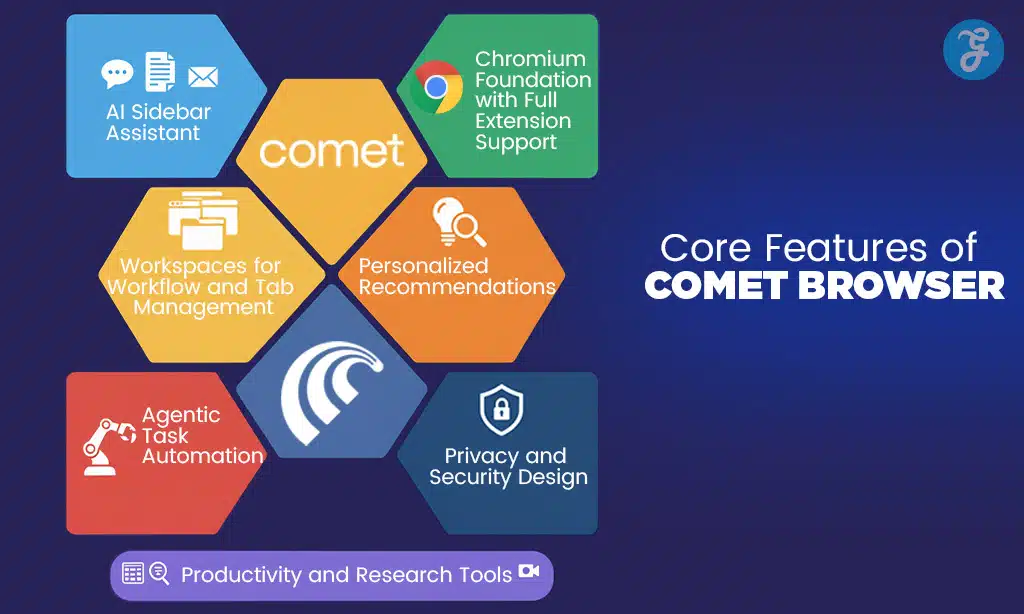
AI Sidebar Assistant
At the heart of Comet is its AI sidebar, a persistent panel that functions as a digital assistant. This sidebar can summarize articles, extract research findings, draft and send emails, organize schedules, and manage projects. It can also handle multi-step tasks, such as finding and comparing products, booking appointments, or converting web pages into formatted reports.
Chromium Foundation with Full Extension Support
Comet’s Chromium base ensures that users can install existing Chrome extensions and sync their bookmarks, making the transition smooth. This compatibility addresses a key barrier many alternative browsers face — lack of ecosystem support. Users get the advantages of Chrome’s reliability while gaining additional AI-driven features.
Workspaces for Workflow and Tab Management
One of the most notable productivity features is workspaces. Users can create dedicated spaces to group tabs, documents, and projects. Instead of managing dozens of open tabs, Comet helps keep tasks organized, reducing clutter and maintaining context. Researchers, students, and professionals juggling multiple projects can especially benefit from this approach.
Personalized Recommendations
Comet integrates personalization into the browsing experience. By analyzing user behavior and browsing habits, it can recommend relevant content, articles, and tools. Unlike traditional algorithmic feeds, Comet’s recommendations are intended to be contextual and actionable, helping users find information aligned with their ongoing tasks.
Agentic Task Automation
Comet’s agentic AI capabilities represent a leap beyond standard search or summarization. The browser can execute automated tasks end-to-end, such as scheduling meetings, filling out forms, booking tickets, or generating comparison charts. These functions allow users to delegate routine actions to AI, saving time and mental bandwidth.
Productivity and Research Tools
Beyond automation, Comet supports professionals with integrated productivity features. These include task dashboards, email prioritization, fact-checking modules, and AI-generated content tools for writers and researchers. It can also assist with multimedia content creation, such as video outlines, image suggestions, and transcription for audio or video content.
Privacy and Security Design
Unlike some AI-driven platforms that raise concerns about cloud-based data handling, Comet emphasizes local data storage with encryption. By processing user data on the device, it reduces risks associated with centralized data collection. This approach positions Comet as both powerful and privacy-conscious.
Availability and Partnerships
Comet has launched in India first, reflecting Perplexity’s strategic focus on one of the world’s largest internet user bases. The browser is currently available on Windows and macOS for Perplexity Pro and Max subscribers.
-
Android support is available for pre-order, with a full rollout planned later.
-
iOS support is still in development, but expected to follow in the coming months.
To accelerate adoption, Perplexity partnered with Bharti Airtel, India’s second-largest telecom operator, to provide one year of free Pro access to millions of Airtel subscribers. This move is designed to seed widespread use and create an early user base in a competitive market.
How to Get Started with Comet
For users interested in trying Comet, the process is straightforward:
-
Sign up or log in to a Perplexity Pro or Max account.
-
Download and install Comet Browser from the official Perplexity site.
-
Enable the AI sidebar to start exploring summarization, task automation, and workflow management.
-
Organize workspaces to group related tabs, research projects, or professional tasks.
-
Use AI features to summarize long reports, draft communications, manage schedules, and automate multi-step activities — all without leaving the browser.
This integration of AI into every aspect of browsing is intended to make Comet not just a browser, but a hub for productivity and research.
Challenges and Security Concerns
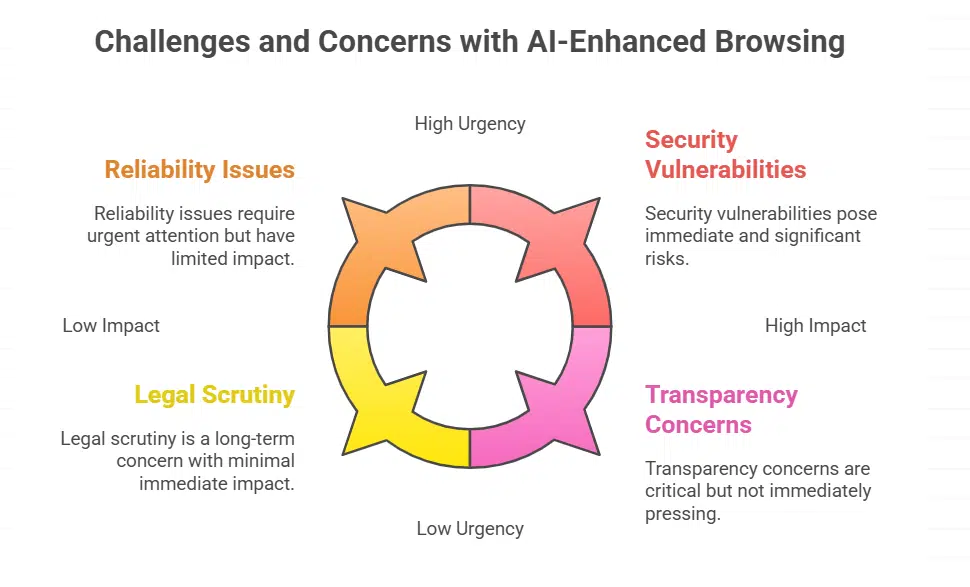
Although Comet’s launch has drawn excitement, it has also raised important questions. Independent audits by security firms have found that AI-enhanced browsing can introduce risks, including vulnerabilities to malicious code injection or phishing through summarization features. While Perplexity emphasizes encryption and local storage, security analysts note that continuous monitoring and updates will be critical for maintaining user trust.
In addition, early testers have reported occasional reliability issues with task execution, such as mismanaging calendar bookings or returning incomplete comparisons. These are common challenges for emerging AI systems, but they highlight the need for refinements before mainstream adoption.
Perplexity also faces legal and ethical scrutiny. Like other AI platforms, it has been questioned about how it sources and attributes content. Media organizations continue to push for clearer transparency in AI-driven summaries and recommendations.
Comet vs Chrome vs Brave vs Arc: Browser Comparison
| Feature / Browser | Comet (Perplexity) | Google Chrome | Brave | Arc (The Browser Company) |
|---|---|---|---|---|
| Foundation | Chromium-based | Chromium-based | Chromium-based | Chromium-based |
| AI Integration | Built-in AI sidebar, agentic automation, research tools, summarization, workflow management | Gemini AI features in search, limited assistant functions | Brave AI assistant (Summarizer), but optional | Arc Search + Arc Max AI commands for tasks |
| Extensions Support | Full Chrome extension support | Full Chrome Web Store | Full Chrome Web Store | Supports most Chrome extensions |
| Tab & Workflow Management | Dedicated workspaces to group projects, tasks, and research | Standard tab organization, tab groups | Standard tab groups, speed focus | Highly visual tab management with “Spaces” and “Easel” |
| Personalization | AI-driven content & task recommendations | Personalized feeds, Google account sync | Ad-blocking and privacy-focused browsing personalization | Customizable layouts and workflows |
| Task Automation | Agentic AI can perform multi-step actions (book meetings, convert pages to emails, etc.) | Limited automation via extensions | Limited task automation, focus on blocking ads and trackers | AI-driven automation for search and queries |
| Productivity Tools | Research summaries, content creation, fact-checking, multimedia tools | Dependent on Google services & extensions | Focus on privacy tools, crypto wallet, ad/tracker blocking | Visual collaboration features, creative workspace |
| Privacy & Security | Local data storage with encryption, AI transparency still under review | Syncs via Google account, cloud data storage, criticized for data collection | Strong privacy features, tracker blocking, crypto support | Data handling less transparent, but privacy tools improving |
| Availability | Windows & macOS (Pro/Max users, India launch), Android pre-order, iOS in development | Available globally on all platforms | Available globally on all platforms | macOS and iOS only (no Windows yet) |
| Business Model | Subscription-based (Perplexity Pro/Max) | Free, ad-driven with Google ecosystem integration | Free, ad-supported with optional crypto features | Free with growing premium features |
| Best For | Researchers, professionals, content creators needing AI-driven workflows | General users, Google ecosystem users, mainstream browsing | Privacy-conscious users, crypto enthusiasts | Designers, creatives, and productivity-focused professionals |
A Direct Challenge to Chrome
Google Chrome has dominated the browser market for more than a decade, integrating search, extensions, and speed. Recently, Google has also started embedding AI features, including Gemini-powered tools. This signals that browsers are entering a new competitive era where intelligence and task automation will be as important as performance.
Other rivals, including Brave, Arc, and Opera, have added AI-enhanced sidebars, but Comet distinguishes itself by designing AI as the core foundation, not just an add-on. This positioning could give it a niche among professionals who want a browser deeply intertwined with productivity tools.
Where Comet shines vs. where to be cautious
Best fits right now
-
Newsrooms, analysts, and content teams summarizing, fact-checking, compiling briefs.
-
Solo pros juggling many clients/projects (law, consulting, SEO, research), who benefit from workspaces and agentic tasks.
-
Teams in India (Airtel/Pro access) trialing AI-browsing with minimal friction.
Caveats
-
Early agentic actions can fail silently or act on the wrong element—keep confirm-before-execute toggled on, and log actions.
-
Treat AI summaries like drafts: verify claims and outbound cites (editorial policy/EEAT compliance), especially for regulated content.
-
Security posture needs continuous review as the attack surface (extensions + agentic scripts + third-party content) is broader than traditional browsing.
The Future of Browsing with Comet
Perplexity envisions Comet as more than just a browser — it is pitched as a productivity operating system for the web. With ongoing development, future versions are expected to expand agentic capabilities, strengthen security, and integrate with more third-party platforms.
If successful, Comet could redefine how millions of users engage with the internet, shifting from passive navigation to active, AI-driven interaction. Its early partnerships and limited release in India suggest that Perplexity is testing adoption strategies before scaling globally.
The launch of Comet Browser represents a bold step by Perplexity AI into a market dominated by giants. By combining Chromium’s stability with built-in AI that summarizes, automates, and personalizes tasks, Comet offers a vision of the internet as a workspace rather than a collection of tabs.
Challenges remain, including security risks, limited rollout, and entrenched competition from Google Chrome. Yet, by positioning itself as the first full AI-driven browser, Comet could become the tool of choice for researchers, creators, and professionals seeking more intelligent ways to work online.
As the browser market shifts toward AI, Comet may prove to be the first serious rival to Chrome not by copying its strengths but by reimagining what a browser can do.