Do you struggle to stay on task with your Windows setup? Distractions hit from every side, like social media alerts or endless emails popping up. It’s tough, right, when your screen feels like a busy highway, pulling your attention away.
Digital minimalism changes that game. It simplifies your productivity tools and focus apps, cutting out the noise for better time management.
This post shares 10 minimalist Windows apps with clean designs, from pomodoro timers to to-do lists. They help you block distractions, like websites or apps, and build habits for deep work.
Get started and boost your focus now.
Key Takeaways
- Forest app gamifies focus by growing virtual trees during work sessions and blocks apps like Instagram or WhatsApp.
- Freedom offers a free trial of 7 sessions, with pricing at $6.99 monthly, $29.04 yearly, or $129 lifetime, and blocks distracting sites across devices.
- Cold Turkey has a free version for basic blocks and a pro upgrade for $25 one-time payment, including customizable schedules and progress tracking.
- RescueTime provides a free Lite version and Premium at $9 monthly or $72 yearly, tracking time on sites and apps with reports.
- Brain.fm gives a free trial of 5 sessions and unlimited access for $6.95 monthly, using science-backed music for focus and relaxation.
Forest
Imagine planting a virtual tree that grows only when you stay off your phone— that’s Forest in a nutshell, turning focus into a fun game. If distractions derail your day, this app blocks apps like Instagram and WhatsApp, helping you build a lush digital forest instead of scrolling endlessly.
Key Features (Forest)
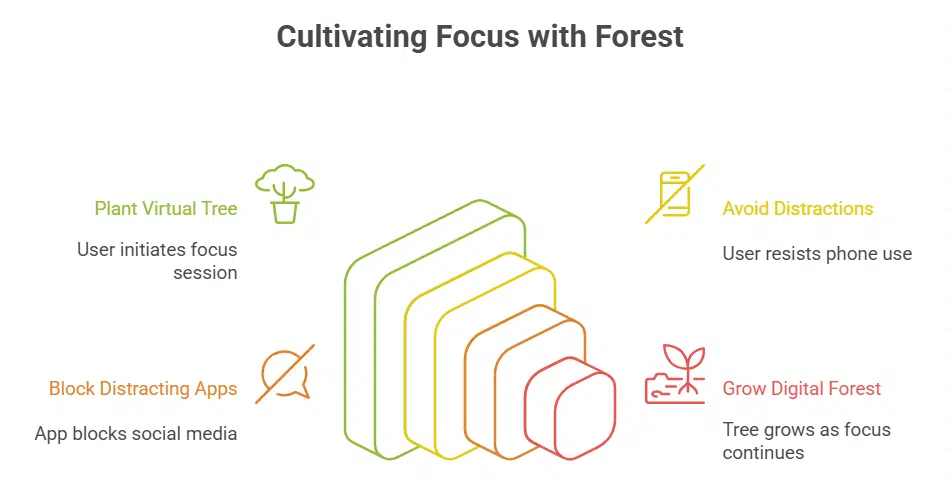
Forest turns staying focused into a fun game. You plant a virtual tree when you start a work session. The tree grows as you keep working without distractions. But if you switch to another app like Instagram or WhatsApp, the tree dies.
This simple trick, like a digital pet you must protect, uses a Pomodoro timer to break your day into focused chunks.
Users love how Forest blocks distracting sites across browsers and devices, including iPhone and iPad apps. It tracks your progress with a virtual forest that shows your productive days.
Pair it with tools like Google Calendar for task lists, and you build habits that stick. Think of it as your personal parental control for better focus, minus the bloat of other productivity tools.
Why It’s Great for Focus (Forest)
This app turns focus into a game, like planting seeds in a garden that grow only if you stay on task. You set a timer, and a virtual tree sprouts as you work without distractions. Break your streak by checking social media, and poof, that tree withers away.
It encourages staying on task through gamification, making productivity feel rewarding instead of a chore. Imagine building your own digital forest, tree by tree, as a badge of honor for beating procrastination.
Many users love how this focus app pairs with pomodoro timers to chunk work into bites. As a mobile app on iOS, it fits right in your pocket, ready to block distractions from apps like Twitch streams or browser tabs.
Think of it as your personal coach, whispering, “Hey, stick with it, or lose that tree.” This minimalist design keeps things simple, with no bloated features to pull you off track.
Pair it with tools like Chrome extensions for even more power, and watch your focus soar.
Freedom
Ever feel like social media sucks you into a black hole, right when you need to buckle down? Freedom blocks those distracting sites across all your devices, helping you reclaim your time like a digital fortress guarding your attention.
Key Features (Freedom)
Freedom blocks distracting websites and apps, using customizable schedules to fit your day. You set it up once, and it syncs across all your devices like phones and computers. This productivity tool acts like a digital guard, keeping you on track without constant tweaks.
Try it with a free trial of 7 sessions, then pick monthly at $6.99, yearly at $29.04, or lifetime for $129. As a focus app, it includes browser extensions for easy private browsing, and pairs well with tools like Pomodoro timers for better task automation.
Imagine chatting with a friend who says, “Hey, this app just locked out my social media during work hours, what a lifesaver.
Why It’s Great for Focus (Freedom)
Freedom blocks distractions like a loyal guard dog, keeping your mind on track. You set up customizable schedules to shut out social media or games during work hours. This focus app syncs across devices, so your phone and computer stay in line.
Imagine planting your feet firmly, no wandering off to check emails. It acts as a productivity tool that maintains focus across platforms, like a seamless bridge over a busy river.
People love how it feels user-friendly, with options like dark mode for those late-night sessions. Pair it with a pomodoro timer, and you crush tasks without the pull of notifications.
Think of it as task automation for your brain, blocking sites on macOS or Windows alike. Syncing keeps everything consistent, even if you switch from laptop to tablet.
Key Features (Cold Turkey)
Cold Turkey acts as a strong productivity tool. It blocks websites, apps, or the entire internet for set time periods. You set these blocks to match your work needs. The app includes customizable schedules that fit your daily routine.
Progress tracking shows how well you stick to your goals. Think of it like a digital bouncer, keeping distractions out while you grind away.
This focus app offers a free version for basic use. Upgrade to the pro version with a one-time payment of $25. That unlocks extra features like hotkeys and keyboard shortcuts for quick blocks.
Users love its minimalistic icon in the taskbar, making it easy to start a session. Pair it with tools like Todoist or Google Tasks for better task automation. No more autoplay videos pulling you off track; Cold Turkey keeps your mind sharp.
Why It’s Great for Focus (Cold Turkey)
Cold Turkey shines as a top focus app by locking out distractions like social media or games during work hours. You set up blocks that fit your day, and those customizable schedules help maintain focus, just like building a wall around your productivity zone.
Imagine trying to sneak a peek at your inbox or a search engine, but the app says nope, not now. It turns chaos into calm, making it easier to get into tasks without the pull of endless scrolling.
Users love how progress tracking lets them measure productivity, spotting patterns like when they slip into using the start menu for fun apps. Pair it with tools like Todoist for task automation or even a Pomodoro timer, and you boost your game.
Think of it as your personal coach, cheering you on with stats that show real wins, keeping motivation high amid all that digital noise.
Key Features (Todoist)
Todoist acts as a top task management app with to-do lists that help you organize your day. You set deadlines for each task, so nothing slips through the cracks. It offers multi-platform tracking, which means your lists sync across devices like phones and computers.
Imagine juggling work emails from Outlook and personal notes from Google Workspace; Todoist pulls them together without a hitch.
This productivity tool includes task automation to speed up repeats, like daily chores. Use its Eisenhower matrix setup to sort tasks by urgency and importance, keeping you on track.
Pair it with a Pomodoro timer for focused bursts, and grab it from the app store or even as an iOS app. Think of it as your digital sidekick, blocking distractions like endless search engines or directories that pull you off course.
Why It’s Great for Focus (Todoist)
You feel scattered with endless to-do lists. Todoist steps in as a top productivity tool, helping you manage tasks efficiently. You’re juggling work and life, and it sorts everything with clean lists and reminders.
Tasks sync across devices through multi-platform tracking, so you grab them from your phone or laptop anytime. This setup cuts distractions, like a quiet guide keeping you on track.
Many users love its pomodoro timer for focus bursts. Set it up, and it pushes task automation to handle repeats without fuss. As one of the best focus apps, it turns chaos into calm progress.
Imagine chatting with a friend who says, “Hey, let’s break this down,” and suddenly you’re zooming ahead. No more lost ideas; everything stays accessible anywhere.
Notion
6. Notion: Imagine a single spot where you jot down ideas, build lists, and track projects without jumping between programs, like having a digital.
Key Features (Notion)
Notion stands out as a top productivity tool. It blends note-taking with project management. You get database functions too. Build custom pages for your tasks. Organize ideas like a pro.
Think of it as your digital Swiss Army knife, handling everything from lists to big plans.
Drag and drop blocks to tweak layouts fast. Embed files or links without hassle. Sync across devices for seamless work. Teams love its sharing options. This setup cuts distractions, letting you start task automation right away.
Why It’s Great for Focus (Notion)
Notion pulls together many productivity tools in one spot. You get task lists, notes, and databases all working as a team. This setup cuts down on jumping between apps, like a swiss army knife for your brain.
Imagine ditching the chaos of scattered files; instead, you build custom pages that fit your style. Focus sharpens because everything stays organized and easy to reach.
People love how it simplifies workflows by slashing the need for extra focus apps. Set up a pomodoro timer right inside your workspace, or automate tasks to keep momentum going. It’s like having a personal assistant that whispers, hey, stay on track.
Writers use it like Scrivener for drafting, while others treat it as a file explorer for ideas. Task automation flows naturally, helping you block distractions and hit goals without the hassle.
Key Features (TickTick)
TickTick packs a punch as a top productivity tool. It lets you create tasks with smart reminders that pop up right on time. The built-in pomodoro timer helps you work in focused bursts, like 25 minutes of deep dive followed by a quick break.
You can organize lists into folders, and even automate habits with repeating alerts. Imagine setting up a daily routine that runs itself, task automation at its best.
Users love how it syncs across devices, keeping your focus apps in check no matter where you are. Add notes or subtasks to any item, and watch your day streamline like a well-oiled machine.
For those who stream ideas fast, the quick-add feature grabs thoughts in one sec. It even tracks progress with stats, turning chaos into clear wins.
Why It’s Great for Focus (TickTick)
TickTick shines as a top pick among focus apps, blending task automation with a built-in pomodoro timer. Imagine juggling your day like a pro juggler, no balls dropped. This productivity tool lets you set quick reminders and break work into timed bursts, say 25 minutes of pure grind followed by a short breather.
You feel that rush when a task vanishes from your list? That’s TickTick working its magic, keeping distractions at bay like a loyal guard dog.
Folks often say it’s like having a personal coach in your pocket, nudging you toward goals without the overwhelm. Pair it with one sec for those impulse checks, or even cursor streamers for visual cues.
Empathy kicks in here, we all slip sometimes, but TickTick forgives and refocuses you fast. Short lists turn into big wins, making focus feel effortless.
RescueTime
8. RescueTime: This app tracks your time on tasks and sites, showing you reports on your daily habits like a mirror to your workday chaos. It helps you spot distractions and set goals, turning wasted minutes into focused wins, much like a coach whispering tips in your ear.
Key Features (RescueTime)
RescueTime acts as a smart watchdog for your daily habits. It tracks time spent on distracting websites or apps, giving you clear reports to spot productivity leaks. Imagine it as your personal time detective, logging every minute without you lifting a finger.
This focus app runs in the background, sorting tasks into categories like work or play. You get alerts to nudge you back on track, almost like a gentle tap on the shoulder.
Try the free Lite version to test the waters. Upgrade to Premium for $9 a month or $72 a year, unlocking deeper insights and goal-setting tools. These features turn it into one of those essential productivity tools that help with task automation, keeping distractions at bay for good.
Why It’s Great for Focus (RescueTime)
This productivity tool spots your time sinks, like endless social media scrolls. It tracks every minute on your Windows device, showing you the real culprits behind lost focus. Imagine a quiet coach in your ear, whispering, “Hey, that game ate two hours today.” You get clear reports that help cut distractions and boost your day.
As a top focus app, it turns data into action, so you reclaim control.
People often chase tasks without knowing where time flies. RescueTime provides data to optimize productivity, like a map for your habits. Block those sneaky sites during work hours, and watch focus soar.
It’s like task automation for your brain, keeping you on track without the guilt. Try it, and feel the shift from chaos to calm.
Brain. fm
This app pumps out science-backed tunes that sync with your brain waves, helping you zone in on tasks without distractions. Imagine slipping on headphones and letting those neural.
Key Features (Brain.fm)
Brain.fm plays soundtracks that boost your focus and help you relax. These tracks rely on real science to make your brain work better. You get music designed for work sessions, much like a pomodoro timer in focus apps.
Pick from options for deep work, naps, or calm vibes. The app runs in the background, so it fits right into your day.
Try it with a free trial of 5 sessions. After that, go unlimited for $6.95 a month. This makes it a top pick among productivity tools. Imagine your mind like a quiet forest, blocking out noise while you tackle tasks.
Users say it feels like a secret weapon against distractions.
Why It’s Great for Focus (Brain.fm)
Brain.fm boosts your focus like a quiet coach in your ears. It plays soundtracks based on science to sharpen your concentration. Imagine slipping on headphones and letting waves of sound wash away distractions, much like a gentle rain clearing the air.
These tracks work with productivity tools, even pairing well with a pomodoro timer for timed work bursts. You feel the difference right away, as if your brain shifts into high gear without the usual mental fog.
The app fits any budget with its affordable subscription model. Folks often say it’s like finding a secret weapon for deep work, one that doesn’t break the bank. Pair it with daily tasks, and watch your output soar.
Science backs every note, making sure you stay locked in.
Key Features (Noisli)
Noisli lets you pick ambient sounds that fit your mood, like rain or coffee shop chatter. You mix them up to create your own blend, blocking out noise that pulls you away from work.
This app stands out among productivity tools because it turns distractions into a calm backdrop. Imagine tuning into waves crashing while you tackle that big report; it feels like a personal escape pod.
Users love how Noisli saves your favorite combos for quick access. Pick from sounds such as forest whispers or train rides, all customizable to drown out chaos. It even has a timer to keep sessions on track, helping you stay in the zone without extra fuss.
Why It’s Great for Focus (Noisli)
This app turns noise into your secret weapon for staying on task. Imagine drowning out the chaos of a busy office with custom sounds, like rain or waves, that fit your mood just right.
It provides a personalized sound environment for optimal focus, so you can tune in to work without the usual distractions pulling you away. Folks often say it’s like building a cozy bubble around your brain, keeping the outside world at bay.
You know how distracting noises can wreck your flow, right? Noisli helps block out those pesky interruptions, letting you mix and match sounds to create the perfect backdrop. Envision this: You’re deep in a project, and instead of hearing traffic or chatter, gentle forest whispers keep you locked in.
That simple trick boosts your concentration, making tough days feel a bit easier to handle.
Takeaway
We covered ten simple Windows apps that cut distractions and boost focus, like Forest for growing virtual trees during work sessions, and Freedom for blocking tempting sites. These tools fit right into your daily routine, with easy setups that save time and energy.
Pick one, and watch your productivity soar as you ditch the digital clutter. Digital minimalism really changes the game, helping you build a balanced life free from endless notifications.
Check out sites like the app stores or productivity forums for more tips on tools like Todoist or RescueTime. Give them a shot today, you might just find that focused groove you’ve been chasing.
FAQs
1. Hey, what exactly are these 10 minimalist Windows apps all about?
These tools strip away the clutter, like a clean desk in a messy room, to help you zero in on tasks. They block distractions and boost your work flow, keeping things simple as pie.
2. Do these apps really keep me focused during a busy day?
Oh, you bet they do; imagine them as your personal bouncer, kicking out pesky notifications. Some play calm sounds to drown out noise, while others time your breaks like a wise old coach.
3. Are there any free options among these minimalist Windows apps?
Sure thing, a few come at no cost, perfect for trying before you buy.
4. How can I pick the right app from these 10 to stay focused?
Think of it like choosing a hat that fits just right; start with your biggest distraction, say social media, and match it to an app that tackles that head-on. Test a couple, chat with friends about their picks, and soon you’ll find one that clicks, making focus feel like second nature.