If you’re a gaming enthusiast living in a small apartment, dorm, or shared room, you’ve likely faced the challenge of setting up a high-performance gaming station in a limited space. The typical bulky gaming desks and elaborate multi-screen configurations just don’t fit well in tight environments. Many gamers are left choosing between functionality and floor space. However, the good news is that you don’t have to sacrifice either.
This guide explores 5 compact gaming setups perfect for small spaces that prove you don’t need a massive room to enjoy an immersive and powerful gaming experience. From wall-mounted solutions and foldable furniture to multi-functional workstations and under-bed innovations, there are smart ways to design a setup that aligns with your lifestyle and room layout.
No matter your space constraints, these creative options offer a balance of efficiency, performance, and style tailored for small-space dwellers.
Let’s dive into the 5 compact gaming setups perfect for small spaces that maximize efficiency without sacrificing style or performance.
Tips to Maximize Any Small-Space Gaming Setup
Even with the right setup, it’s the little enhancements that can make or break your overall gaming experience—especially in a limited space. Whether you’re using a foldable desk, corner setup, or under-bed station, applying a few smart space-maximizing tips can drastically improve functionality and comfort.
From storage hacks to intelligent lighting, optimizing your space takes thoughtful planning and the right accessories.
Top Space-Saving Accessories
| Accessory | Function |
| Wireless keyboard & mouse | Reduces desk clutter |
| Foldable headphones | Saves drawer space |
| Monitor wall mount | Frees up desk surface |
| Clamp-on USB hubs | Adds ports without taking space |
Lighting & Ambiance for Small Spaces
| Lighting Option | Use Case |
| RGB LED light strips | Behind desk or monitor for glow |
| Ring lights or clip-ons | For streaming or Zoom calls |
| Smart bulbs | App-controlled lighting profiles |
Expert Insight
According to gaming setup influencers on YouTube, investing in ambient lighting and noise-canceling setups can drastically increase gaming focus and enjoyment, even in limited spaces.
1. Wall-Mounted Gaming Setup
Wall-mounted gaming setups are ideal for gamers who prefer a sleek, minimalist, and clutter-free look while optimizing every inch of their living space. These setups lift your monitor, speakers, and even gaming consoles off the floor and onto the wall, freeing up valuable desk or floor space for other essentials.
By elevating your components, you gain the ability to clean easily, reduce tripping hazards, and enhance the room’s visual appeal with floating elements. This solution is especially effective for small bedrooms or studio apartments where horizontal surface space is limited but vertical space is often underutilized.
These setups also provide better airflow and cooling for your devices, especially when designed with open shelving and strategic cable routing.
Benefits of a Wall-Mounted Setup
- Maximizes floor space by removing bulky desks and cabinets
- Improves airflow around gaming consoles and PCs
- Reduces cable mess through behind-the-wall cable routing
- Offers ergonomic benefits with screen height adjustability
Recommended Gear & Configuration
To achieve this space-efficient layout, consider the following essentials:
| Item | Recommendation | Estimated Cost |
| Wall-Mounted Monitor Arm | Fully adjustable with swivel and tilt | $40–$120 |
| Floating Desk or Shelf | Sturdy enough to support keyboard/mouse | $60–$150 |
| Mini PC or Slim Console | Intel NUC, Xbox Series S, PS5 Slim | $300–$500 |
| Cable Management Kit | Adhesive raceways, ties, and clips | $20–$50 |
Pro Tips for Setup
- Use VESA-compatible monitors to ensure a secure wall mount.
- Install LED backlighting to enhance the visual appeal.
- Include a foldable wall-mounted chair to save even more space.
Case Example
A Reddit user showcased their 6×6 ft gaming nook with a PS5 Slim, mounted 27” monitor, and floating shelf setup that doubled as a workspace. The clean layout drew over 10,000 upvotes for its practicality and aesthetics.
2. Foldable Desk Gaming Setup
Foldable desk setups offer unmatched flexibility for gamers living in multipurpose or shared rooms, studio apartments, or tight bedroom corners. These setups are designed with mobility and adaptability in mind, allowing users to transform their gaming area into a clean, open space when the desk is not in use.
They are particularly useful for individuals who share living quarters or frequently move between spaces, such as college students or digital nomads. Unlike permanent installations, foldable setups provide the flexibility to maintain a clutter-free environment while still supporting high-performance gaming components.
When folded, they can be stored behind a door, under a bed, or inside a closet, making them one of the most efficient options in the lineup of 5 compact gaming setups perfect for small spaces.
Why Foldable Desks Work for Small Spaces
- Space-saving: Can be stored behind doors or under beds
- Multipurpose use: Quickly transforms into a dining or study table
- Portable: Easy to relocate across rooms or apartments
- Budget-friendly: Available in a variety of price ranges
Best Foldable Gaming Desks – Comparison Table
| Desk Model | Dimensions | Weight Capacity | Folded Size | Price Range |
| FoldPro Gamer | 36″ x 20″ | 80 lbs | 4″ thick | $89 – $129 |
| GameDesk Mini | 32″ x 18″ | 100 lbs | 3.5″ thick | $110 – $150 |
| UrbanPro Compact | 34″ x 21″ | 90 lbs | 5″ thick | $95 – $135 |
Accessories That Enhance This Setup
- Foldable mesh chair with lumbar support
- Clip-on monitor light to reduce eye strain
- Wireless gaming peripherals to minimize cable clutter
Reader Tip
Some users recommend using foldable desks with storage pockets or side mesh organizers to store game controllers, headphones, or extra cables.
3. Corner Desk Gaming Setup
Corner desk setups make intelligent use of otherwise unused room corners, transforming awkward or underutilized areas into high-functioning gaming stations. These setups are especially effective in small bedrooms, shared apartments, or offices where open floor space is limited but wall-to-wall space can be maximized.
With the strategic placement of L-shaped desks or compact corner tables, users can achieve ergonomic comfort and immersive screen coverage without disrupting the flow of the room.
Corner desks also lend themselves well to dual- or triple-monitor setups, integrated speaker systems, and mood lighting, making them a top-tier choice in the list of 5 compact gaming setups perfect for small spaces. By designing your layout around a corner, you can segment your gaming zone without dedicating an entire wall or room to it—perfect for hybrid living spaces where functionality is key.
Making the Most of Your Corners
- Utilizes dual-wall space for monitors, accessories, and storage
- Ideal for dual- or triple-monitor setups
- Supports surround sound speaker layouts
- Great for curved gaming monitors that wrap around you
Ideal Room Layout for Corner Gaming
| Item | Recommended Type | Benefit |
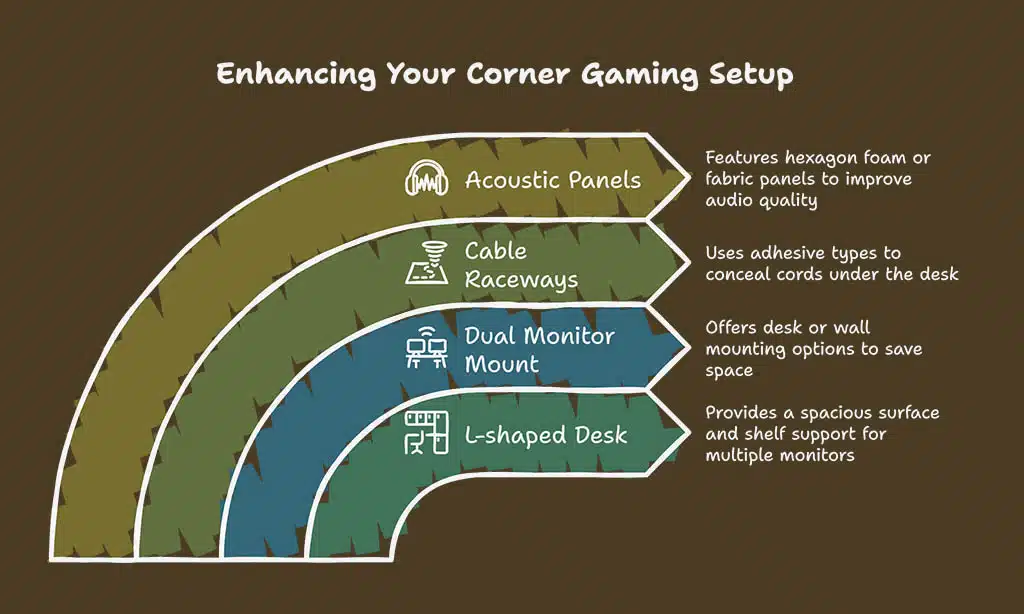
| L-shaped Desk | 50″ x 50″ surface area, built-in shelves | Supports multi-monitor rigs |
| Dual Monitor Mount | Desk-clamp or wall-mount variant | Frees up surface space |
| Cable Raceways | Adhesive, under-desk types | Hides unsightly cords |
| Acoustic Panels | Hexagon foam or fabric-covered panels | Improves audio quality |
Checklist: What You Need
- L-shaped or corner-specific desk
- Dual-monitor stand or mount
- Under-desk storage like drawer units
- Adjustable RGB lights for ambiance
Real-World Trend
According to a 2024 Statista survey, 32% of gamers prefer corner desks due to their immersive layout and extra display support.
4. Under-Bed Rolling Gaming Setup
The under-bed rolling setup is perfect for ultra-small spaces such as dorm rooms, studio apartments, or minimalist bedrooms where square footage is a premium. This smart solution turns the often-overlooked area beneath your bed into a fully functional, retractable gaming station.
It’s especially valuable for individuals who live in shared accommodations or tiny homes where dedicating a full corner or wall to a gaming setup isn’t feasible.
By utilizing a platform with lockable wheels, gamers can create a mobile station that rolls out during playtime and tucks neatly away afterward, maintaining a clean and clutter-free living area.
With thoughtful planning and the right hardware, this setup can handle lightweight monitors, consoles, and even compact PCs, making it a hidden gem among the 5 compact gaming setups perfect for small spaces.
Gaming That Slides Out When You Need It
- Totally hidden when not in use
- Great for multi-use rooms with no dedicated office
- Allows discreet gaming sessions without visual clutter
DIY Rolling Setup Guide
| Step | Task | Notes |
| 1 | Measure bed height/clearance | Minimum 12″ clearance required |
| 2 | Choose rolling platform | Use caster wheels with lock feature |
| 3 | Secure monitor and console | Use bungee cords or anti-slip mats |
| 4 | Add power strip and LED lighting | Use battery-powered LEDs if needed |
Pros and Cons
| Pros | Cons |
| Extremely space-efficient | Limited ventilation |
| Inexpensive DIY option | Not suitable for heavy hardware |
| Easy to conceal when not in use | Less comfortable for long sessions |
Practical Tip
Many college students pair this setup with a lofted bed to add headroom and prevent overheating issues.
5. Multi-Functional Gaming Workstation
This setup merges your productivity zone with your gaming den, providing a streamlined and efficient space that serves dual purposes without compromise. It’s an excellent solution for remote workers, students, freelancers, and digital nomads who need to maintain a professional work environment during the day while easily transitioning into an immersive gaming experience by night.
These setups are designed to balance aesthetics, ergonomics, and utility, allowing you to stay focused and organized no matter what task is at hand. By carefully selecting multi-functional furniture and prioritizing desk organization, users can enjoy a distraction-free workflow and a fully equipped gaming station—all within a limited footprint.
This type of setup stands out in the lineup of 5 compact gaming setups perfect for small spaces because it embraces versatility while promoting long-term comfort and performance.
Blend Productivity and Play
- Combines gaming + work setup for dual-use efficiency
- Reduces furniture redundancy
- Encourages better time management
- Ideal for freelancers or home-based entrepreneurs
Smart Space Planning Tips
| Tip | Why It Helps |
| Use monitor risers | Frees space under monitors for controllers & docs |
| Install vertical pegboards | Keeps accessories organized and off the desk |
| Integrate rolling carts | Adds mobile storage for work or game gear |
| Use noise-cancelling headphones | Useful for meetings and immersive gaming |
Budget-Friendly Setup Ideas
- Use refurbished monitors and components to cut costs
- Repurpose IKEA shelves and drawers for dual-purpose furniture
- Install a desk mat that separates work and gaming zones visually
Case Example
A digital marketer turned Twitch streamer designed a single desk with dual monitor arms, one monitor for spreadsheets and the other for gaming. During the day, it’s a workspace. By night, it transforms into a vibrant RGB-lit gaming rig.
Takeaways
Having limited space doesn’t mean you have to sacrifice your gaming experience. In fact, with thoughtful planning and a touch of creativity, you can turn even the tiniest nook into a powerful, immersive gaming environment.
These solutions show that what matters most isn’t how much space you have, but how well you use it. From vertical wall setups to cleverly tucked-away rolling stations, there’s an option for every gamer, regardless of room size.
Each of these 5 compact gaming setups perfect for small spaces offers its own set of benefits—from freeing up floor space to promoting a clean and efficient workflow. They’re designed not just for play, but also for lifestyle integration, allowing your gaming area to function seamlessly within your day-to-day living space. The setups highlighted in this guide can easily blend into home offices, bedrooms, or even living rooms, without looking out of place.
With smart use of accessories, multi-functional furniture, and clever cable management, your limited space can transform into a next-level gaming zone. The inclusion of ambient lighting, ergonomic accessories, and modular desks only enhances the experience further, ensuring long gaming sessions are both enjoyable and comfortable.
So whether you’re gaming from a studio apartment, college dorm, or cozy bedroom, these 5 compact gaming setups perfect for small spaces will help you game smarter, not larger. Embrace the possibilities of compact living and design your ultimate setup—optimized for space, function, and fun.
Ready to transform your space? Pick one of these 5 compact gaming setups perfect for small spaces and start building your minimalist gaming dream today.