Money slips away fast, especially if you use a credit card for almost everything. Many Gen Z folks often feel lost with spending and saving. High student loans, side gigs that pay little, and surprise bills don’t help at all.
Did you know? Budgeting apps can make tracking your cash as easy as scrolling through social media. Some even help boost your credit score or plan for an emergency fund.
This guide breaks down the best budget apps on Google Play and App Store tested by real people like you. You’ll see how top picks like YNAB, Mint, PocketGuard, Honeydue, EveryDollar, Empower, and Goodbudget work with checking accounts or handle debt management without headaches.
Ready to get smart about money? Keep reading for tips that really stick!
Key Takeaways
- Budgeting apps help Gen Z track spending and save money. Apps like YNAB report average savings of $600 in two months.
- Some apps use zero-based budgeting (YNAB, EveryDollar), where you give every dollar a job for better control of money and debt.
- Free options like Mint and Empower let users connect bank accounts, view all their finances in one place, and do not charge monthly fees.
- Goodbudget uses digital envelopes but needs manual entry unless upgraded to the paid plan ($10 per month or $80 per year).
- Many apps offer student-friendly deals—YNAB gives college students a free year. Most tools have both free and premium plans with extra features.
YNAB: Hands-On Zero-Based Budgeting

YNAB, short for You Need a Budget, helps you give every dollar a job—think of it like sorting your cash into digital envelopes. With zero-based budgeting at its core, this app offers simple tools that turn even credit card debt and bills into something you can track with ease.
Key Features of YNAB
Zero-based budgeting sets YNAB apart from most other budget apps. Every dollar gets a job, whether for groceries, paying down credit cards, or building an emergency fund. The app links safely to your banks and financial accounts.
It shows exactly where money goes and helps reach big financial goals fast.
Users on average save $600 in two months with YNAB’s system. College students get it free for one year, making debt management and student loans less scary. Subscription runs $14.99 per month or $109 each year after a 34-day free trial—no hidden costs lurking behind the dashboard.
Track expenses across iOS, Android devices, tablets like iPad—even Apple Watch fits right in for quick checks on spending insights anytime you need them.
Pros & Cons of YNAB
YNAB teaches you to give every dollar a job, right down to your last penny. This hands-on approach helps Gen Z hit financial goals fast. High savings potential stands out as one of its big pros.
The app offers strong educational tools for building financial literacy and managing student loans or credit card debt. Many users build bigger emergency funds and spot high-interest debt before it grows.
The price tag hits hard though—$14.99 each month, $99 yearly, with no free plan after the trial. Some say YNAB’s tracking system gets tricky if you forget a day or two, so staying on top matters most here.
You need patience and commitment to stick with zero-based budgeting in this personal finance tool. If keeping budgets feels like herding cats, this app may wear you out fast! Still, for learning money management skills and reaching financial freedom early, many young adults swear by it—even if their wallets complain at first glance about those subscription fees!
Goodbudget: Envelope Budgeting Made Simple
Goodbudget uses a digital envelope system to help manage spending categories, perfect for old-school cash savers. Curious how splitting dollars into “envelopes” on your phone can boost financial planning and cut stress over credit card debt?
Key Features of Goodbudget
This app uses the envelope system for money management. You split your cash into different categories like groceries, rent or an emergency fund. Track each dollar by putting it in a “virtual envelope” so you know where your money goes.
Many Gen Z users like how simple it feels.
The free version needs manual entry since it cannot connect to financial accounts or fetch expenses from your debit card or bank account automatically. The paid plan charges $10 per month, or $80 if you pay yearly.
Goodbudget helps with expense tracking and is cloud-based, making sure you can check your budget on both iPhone and Android devices at any time. It suits those focused on personal finance education and want control without syncing to their bank directly.
Pros & Cons of Goodbudget
Goodbudget uses the envelope system, making it easy to plan for rent, groceries, and your emergency fund. People like its simple layout for tracking spending and setting savings categories.
You can split every dollar into digital envelopes. Some find it helpful for student loans or credit card debt because you see exactly where money goes.
Manual entry is required since Goodbudget does not sync with your financial accounts automatically—think typing in each expense after grabbing a coffee at Starbucks. The free version has limited envelopes and budget history; full features cost extra.
Many Gen Z users want more automation from budgeting apps, so Goodbudget may feel old-school compared to others like YNAB or Monarch Money.
EveryDollar: Straightforward Zero-Based Budgeting
EveryDollar is a no-nonsense budget tracker, built on zero-based budgeting, making it easier to see exactly where your cash heads each month. Imagine setting every single dollar on a mission—no stragglers left behind or falling through the cracks.
Key Features of EveryDollar
Zero-based budgeting stays at the core. Each dollar gets a job, which helps sharpen your spending insights and build an emergency fund. The free version asks users to add expenses by hand.
That means more work but also keeps you close to your financial goals.
The premium plan runs $79.99 each year or $17.99 per month, giving access to account syncing and bill tracking for easier money management. Connect credit cards and checking accounts, then watch expenses flow in like clockwork—no lifting a finger needed.
This app helps Gen Z with debt management while boosting financial literacy using simple steps that even busy students can handle on-the-go.
Pros & Cons of EveryDollar
EveryDollar gets a thumbs-up from Dave Ramsey, making it popular for people wanting simple money tools. The app uses zero-based budgeting, which helps with tracking spending and setting up an emergency fund.
It is user-friendly and clear. Many find it easy to plan for debt management or student loans using this method.
The free version of EveryDollar needs you to enter each expense by hand—that eats time fast. If you want account syncing and extra features, expect to pay a high price for the premium version.
Users watching their wallets may pick other budget apps that offer more at lower costs. For Gen Z who need personal finance management but hate data entry, this could be a dealbreaker.
Empower: Track Wealth and Spending
Empower lets you see your money, investment accounts, and retirement planning tools in one app—kind of like having eyes everywhere. If tracking net worth, interest rates, or savings goals makes your head spin, this tool keeps it simple—like a compass for your wallet.
Key Features of Empower
Track your net worth with crisp charts and simple numbers. Stay on top of spending with snapshots that sort every dollar, so no penny slips away. Connect all financial accounts for a full picture—bank balances, credit cards, student loans, mortgages—even investment accounts like IRAs or 401(k)s come along for the ride.
Bill tracking shows what’s due before surprises hit your inbox.
The app is free to use and won’t charge you monthly fees. Pull up spending insights in seconds, whether prepping for an emergency fund or paying down high-interest debt fast. Layered security tools help keep data locked up tight: multi-factor authentication stands guard over personal finance info so it stays between you and Empower alone.
Pros & Cons of Empower
Empower makes money management easy for Gen Z. It gives you a full picture of your accounts, debts, credit cards, and investment accounts in one spot. You get clear spending insights and can see your net worth grow or shrink over time.
The best part—this budgeting app is free to use.
On the flip side, Empower skips advanced budgeting features like zero-based budgeting or envelope system tools. If you want deep control over each dollar or savings categories for an emergency fund, it might leave you wanting more options.
Still, if simple tracking across all your financial accounts matters most to you in 2024, this personal finance tool covers the basics well without any cost—cold hard facts are sometimes enough!
PocketGuard: Simplified Budget Snapshot
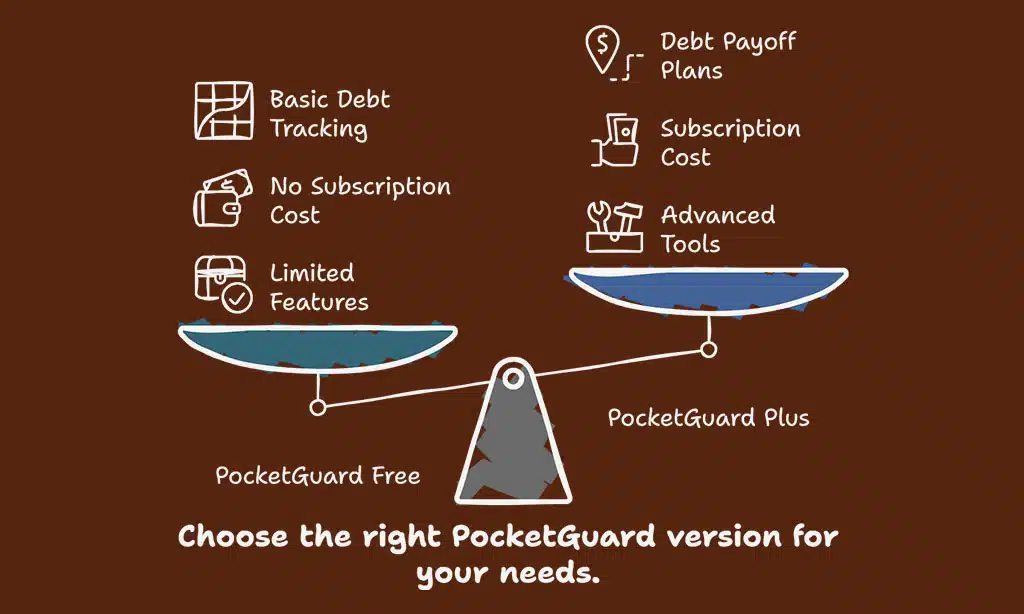
PocketGuard gives you a quick snapshot of your cash, so you know what’s safe to spend after bills and savings. It grabs info from checking accounts, credit cards, and student loan payments without making your head spin.
Key Features of PocketGuard
PocketGuard shows your money at a glance. The “In My Pocket” daily allowance tells you how much cash you can spend without tipping into danger. All your bank and credit accounts sync in one spot, so you always see the big picture on expenses, savings, and bills—like magic but with real numbers.
Upgrade to Plus for $12.99 per month or $74.99 per year if paying in one go. This unlocks debt payoff plans that act like GPS for your student loans or high-interest debt. Export every transaction to keep tabs on spending habits or share with financial advisors—no sweat needed.
Use bill tracking tools to avoid late fees, watch progress on goals like an emergency fund, and get quick insights into where each dollar is vanishing—fast as a tap sends a text message.
Pros & Cons of PocketGuard
PocketGuard gives you a clear budget snapshot, making money management less stressful. It sets up simple spending limits and helps you stick to your financial goals with easy debt payoff plans.
Its dashboard shows what’s “safe to spend” at a glance. This app links to most major banks for quick account syncing, helping track spending without hassle.
A big drawback is the subscription cost, which can be tough if you’re on a tight student budget or managing high-interest debt like credit card debt or student loans. The free version offers limited features—you may miss out on some advanced budgeting tools unless you pay.
If tracking every dollar is key in your personal finance routine, PocketGuard’s basic setup might feel too light compared to other budget apps such as YNAB or Monarch Money.
Honeydue: Budgeting for Partners
Got a partner who spends like it’s raining cash? Honeydue brings both your wallets to the same table, so you can plan date nights without causing an argument over splitting the check.
Key Features of Honeydue
Honeydue helps partners handle money, side by side. Both people can track spending and make financial goals together. You can set limits on categories like groceries or eating out.
If you get close to your limit, the app sends an alert right away—no stress or guesswork needed.
You both see shared bills and who pays what, which stops fights over missed payments. Connect bank accounts with a few taps for real-time expense tracking. Honeydue is free to use, so it fits any budget size—from college students just starting out to couples juggling credit cards and student loans.
Spend smarter as a team while building savings for that emergency fund or dream vacation down the road!
Pros & Cons of Honeydue
Honeydue works great for couples who want to share money goals. Both partners can track spending, bills, and savings together. It is free to use, which makes it easy on your wallet.
The app supports joint financial planning without charging a fee.
It does not have advanced budgeting features found in some budget apps like YNAB or Mint. Features focus mainly on shared accounts so it may not fit single users or those with complex needs.
People with separate finances may find the tool less useful for their personal finance management.
Mint: All-in-One Financial Management
Mint rolls all your money needs into one spot, making personal finance management as easy as pie. With tools for tracking spending, bill alerts, and credit score updates, this app keeps you in the driver’s seat.
Key Features of Mint
Syncs with your checking, savings, and credit card accounts in just minutes. Tracks expenses so you always know where money goes. Auto-categorizes spending into groups like food, rent, or student loans.
Get alerts if a bill is coming up soon or an account balance gets too low for comfort.
See all financial accounts in one dashboard—no guessing games needed. Share budget info with partners fast and easy, perfect for roommates or couples juggling bills together. Mint helps manage debt by showing what you owe right beside your monthly cash flow and goals for saving an emergency fund.
No fancy lingo—just clear money management tools Gen Z can use daily.
Pros & Cons of Mint
Mint helps with personal finance management and is free to use. You can connect many financial accounts like checking, savings, credit cards or investment accounts. Mint gives a full view of spending insights, tracks bills, and even updates credit scores.
It alerts you if you spend too much in your budget categories or miss a bill. You can set up goals for an emergency fund, track student loans, and see all account syncing in one dashboard.
But ads fill the free version and that gets old fast. Security concerns pop up because so many accounts link together—one small hole could let trouble inside. Some users wish fewer advertisers got their hands on their data at all.
Still, tons of people stick with this budgeting app since it helps them avoid overdraft fees and keep track of high-interest debt without paying extra subscription pricing like YNAB or Monarch Money asks for monthly.
How to Choose the Best Budgeting App
Picking your money management tool matters, whether you want to crush student loans or just build an emergency fund. Think about how each app fits with your lifestyle—your path to financial freedom might start with the swipe of a finger.
Compatibility with financial goals
Budgeting apps work best when they match with personal financial goals. Some people want to clear student loans, while others focus on building an emergency fund equal to 3-6 months’ living expenses.
Zero-based budgeting tools like YNAB can help every dollar find a home, making it great for debt management or savings categories. People chasing financial freedom might need strong tracking features and spending insights too.
Apps such as PocketGuard give fast snapshots of cash flow, which suits users who monitor daily buys and bills. Others like Mint or Empower show a big picture by tracking all accounts in one spot—checking, high-interest credit cards, investment accounts—even net worth changes over time.
Choose an app that supports your needs: cutting back on coffee runs? Growing wealth for retirement planning? Different goals call for different money management apps.
User interface and ease of use
A good budgeting app should save time and stress, not add to it. Clear menus make tracking spending feel easy, almost like scrolling through your favorite social media feed. Big buttons help you move fast, so if you have student loans or need quick bill tracking for your emergency fund, every tap counts.
Apps like Mint and PocketGuard use colors, charts and simple labels. These features can turn scary money tasks into child’s play—helpful for Gen Z who want to manage high-interest debt or credit cards without fuss.
Weekly check-ins take just 5 minutes thanks to smart design choices. With account syncing right in the menu bar or screen footer, linking financial accounts becomes as simple as tying shoes in the morning: quick work before facing the day.
Cost and subscription plans
Many budgeting apps offer both free and paid plans. For example, YNAB (You Need a Budget) costs about $14.99 each month or $99 per year after a 34-day free trial. Goodbudget has a free version, but the Plus plan is $8 monthly and gives more envelopes and syncing across devices.
EveryDollar’s basic features are free, yet zero-based budgeting with bank account syncing calls for EveryDollar Plus at $12.99 per month.
PocketGuard provides both a no-cost tier and PocketGuard Plus at around $7.99 per month for extra budget categories and tracking tools. Mint stays mostly free, making money through adverts instead of charging users upfront; this option benefits Gen Zers watching their spending closely or handling student loans on lower incomes.
Empower also stays cost-free due to its funding from investment partners rather than subscription fees, which helps those looking to track wealth alongside standard expense tracking without dipping into their emergency fund.
Takeaways
Picking a good budgeting app feels like finding the perfect pair of sneakers—it just makes every step easier. These seven tools help Gen Z with spending, saving, and smashing those money goals—no matter your shoe size or student loans.
Try a free version first or track your debt together with a friend on Honeydue—give it a whirl! Being smart with cash today can help you build wealth, avoid high-interest credit card debt, and even get that emergency fund climbing.
Every swipe counts; make yours work for you!
FAQs on Budgeting Apps for Gen Z
1. What are the best budgeting apps for Gen Z looking to manage spending?
The top budget apps help with tracking spending, bill tracking, and syncing financial accounts. Some favorites include Rocket Money, Monarch Money, and You Need a Budget (YNAB). These money management apps support personal finance goals like building an emergency fund or paying down credit card debt.
2. How do these budgeting features help with student loans or high-interest debt?
Budgeting tools sort your savings categories and show where every dollar goes. They spotlight loan payments—like student loans—and help you see how much cash is left for other bills or even investment accounts. Debt management gets easier when you track everything in one place.
3. Can these financial apps boost my financial literacy?
Yes, many of them offer tips on personal finance management and provide resources for better money habits. You get spending insights, reminders about due dates, plus lessons on topics like retirement planning or the envelope system—all key parts of growing smarter about money.
4. Do any budget apps help users grow their net worth over time?
Absolutely. Expense tracking lets you spot wasteful habits fast while net worth tracking shows progress as debts shrink and savings rise. Investment tracking helps too—some platforms connect to investment accounts so you can watch your wealth build brick by brick.
5. Is account syncing safe when using these budget tools?
Most big-name budgeting apps use strong security measures like FDIC insurance partners or connections that keep your info locked up tight as a drum line at halftime—no wire transfers without checks in place! Always check advertiser disclosure details before linking up those bank accounts though.