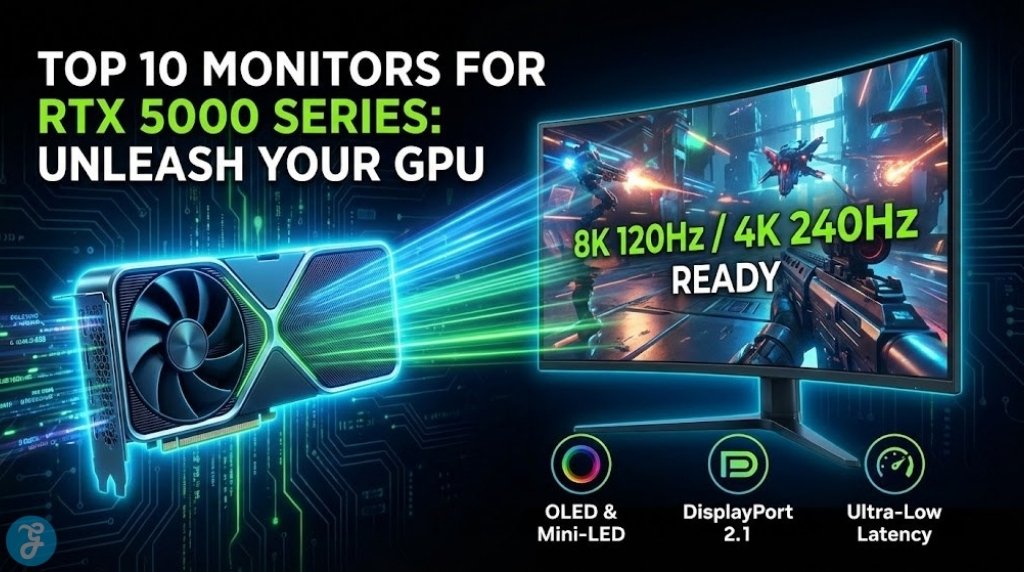
The launch of NVIDIA’s Blackwell architecture has shifted the goalposts for PC gaming. If you’ve managed to secure an RTX 5090 or 5080, plugging it into an old 144Hz IPS panel is like putting a Ferrari engine in a Honda Civic. You simply won’t feel the difference. To truly experience what these cards can do, you need the best monitors for RTX 5000 series GPUs—displays that can handle 4K at 240Hz (or higher), offer true HDR, and finally utilize the bandwidth of DisplayPort 2.1.
We’ve tested and analyzed the standout displays of 2026 to help you find the perfect match for your new super-powered rig.
Why Your Old Monitor Can’t Handle the RTX 50 Series
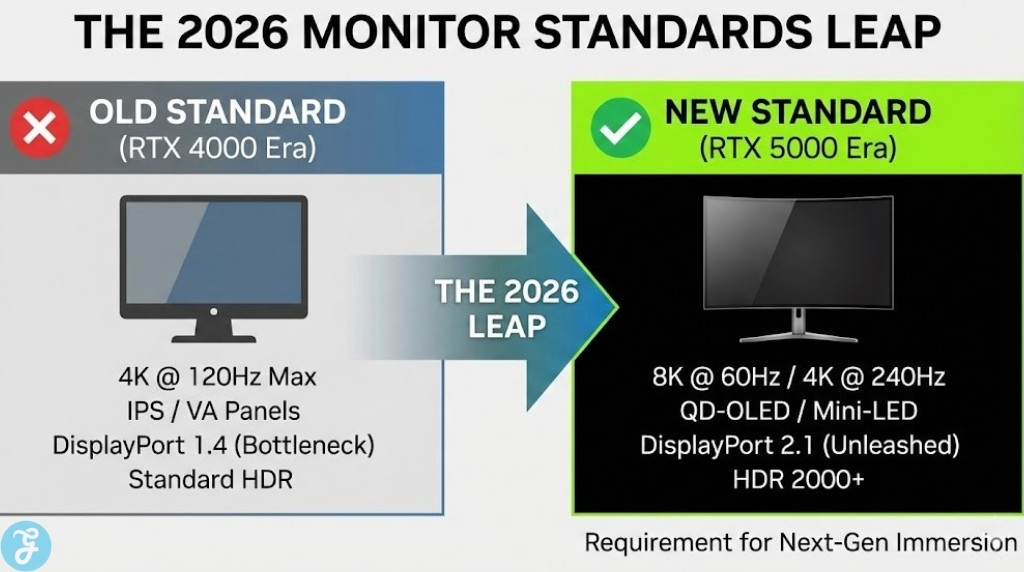
Before we dive into the list, it’s crucial to understand why an upgrade is necessary. The RTX 5000 series isn’t just about raw speed; it’s about bandwidth.
-
DisplayPort 2.1 Connectivity: The new cards support DP 2.1, allowing for massive data transmission without relying heavily on compression. Older DP 1.4 monitors will bottleneck the 5090’s output.
-
Frame Rate Ceilings: The RTX 5090 can push significantly past 144fps in 4K. If your monitor caps at 144Hz, you are wasting distinct performance frames.
-
OLED is the New Standard: With the power to drive ray tracing at max settings, you need the infinite contrast of OLED (or high-end Mini-LED) to see the lighting effects as intended.
Top 10 Best Monitors for RTX 5000 Series
We’ve curated this list based on panel technology, refresh rate, connectivity, and real-world gaming performance.
1. ASUS ROG Swift OLED PG32UCDM Gen 3
Best Overall 4K OLED Monitor
If you want the absolute best monitor for RTX 5000 series gaming without compromise, the third-generation PG32UCDM is the king of the hill. ASUS has taken an already legendary panel and refined it with their new “BlackShield” film, which solves the one major issue with QD-OLEDs: raised blacks in bright rooms.
This 32-inch beast pushes 4K resolution at a blistering 240Hz. With the RTX 5090, you can actually hit that 240fps cap in titles like Call of Duty or Overwatch 2 while enjoying unmatched color vibrance. The 0.03ms response time makes motion blur virtually non-existent.
| Feature | Spec / Rating |
| Panel Type | QD-OLED Gen 3 (4K) |
| Refresh Rate | 240Hz |
| Connectivity | DisplayPort 2.1, HDMI 2.1, USB-C (90W) |
| Best For | High-end 4K Gaming & HDR |
| Review Signal | Expert Consensus: 9.8/10 (Top Rated 2026 Flagship) |
2. Samsung Odyssey 3D (G90XH)
Best Innovation / Immersive Tech
Samsung continues to get weird in the best way possible. The Odyssey 3D G90XH is the first viable glasses-free 3D gaming monitor. Using eye-tracking cameras and a lenticular lens, it creates a convincing 3D depth effect without the headache-inducing tech of the 2010s.
Beyond the gimmick, it’s a powerhouse. It boasts a massive 6K resolution. The RTX 5090 is likely the only card on the planet capable of driving this display properly, making it a unique contender for the best monitors for RTX 5000 series setups.
| Feature | Spec / Rating |
| Panel Type | IPS (Glasses-Free 3D) |
| Refresh Rate | 165Hz (330Hz in 3K Dual Mode) |
| Connectivity | DisplayPort 2.1, HDMI 2.1 |
| Best For | Simulation & Single-Player Immersion |
| Review Signal | Innovation Award: CES 2026 Best in Show |
3. Alienware AW3225QF
Best Curved 4K OLED
Alienware was first to market with 4K 240Hz QD-OLED, and the AW3225QF remains a top-tier choice, especially as prices stabilize in 2026. The subtle 1700R curve is perfect for immersion without distorting lines, making it great for both gaming and productivity.
It features Dolby Vision support, which is rare in monitors, and its glossy finish makes colors pop incredibly well in light-controlled rooms. While it lacks the newest anti-glare coatings of the Gen 3 panels, its raw picture quality is still unmatched for the price.
| Feature | Spec / Rating |
| Panel Type | QD-OLED (Curved 1700R) |
| Refresh Rate | 240Hz |
| Connectivity | HDMI 2.1 (eARC), DP 1.4 (DSC) |
| Best For | Immersive RPGs & Sim Racing |
| Review Signal | Consumer Rating: 4.8/5 (Amazon/Dell) |
4. ASUS ROG Swift PG27AQDP
Best for Esports (480Hz)
If you bought an RTX 50 series card to play Counter-Strike 2 or Valorant at 500+ FPS, you don’t need 4K; you need speed. The PG27AQDP is the world’s first 1440p OLED running at a native 480Hz.
The motion clarity here is absurd. It combines the instant pixel response of OLED with a refresh rate that rivals the fastest TN panels. This is the best monitor for RTX 5000 series owners who value rank and K/D ratio over pixel count.
| Feature | Spec / Rating |
| Panel Type | WOLED (1440p) |
| Refresh Rate | 480Hz |
| Connectivity | DisplayPort 1.4 (DSC), HDMI 2.1 |
| Best For | Professional Esports |
| Review Signal | Pro Gamers: “Endgame” tier for competitive play |
5. Samsung Odyssey OLED G8 (G80SH)
Best Matte / Glare-Free Option
Not everyone plays in a pitch-black man cave. If you have windows in your gaming room, the glossy finish on most OLEDs can be a mirror-like nightmare. Samsung’s G80SH uses a proprietary “Glare Free” matte coating that kills reflections without ruining the contrast.
It’s a flat 32-inch 4K panel with smart TV features built-in (Tizen OS), meaning you can stream Netflix or Xbox Cloud Gaming without even turning on your PC.
| Feature | Spec / Rating |
| Panel Type | QD-OLED (Matte Finish) |
| Refresh Rate | 240Hz |
| Connectivity | DisplayPort 2.1 (UHBR20), HDMI 2.1 |
| Best For | Bright Rooms & Media Consumption |
| Review Signal | Versatility Score: High (Monitor + Smart TV Hybrid) |
6. MSI MPG 321URX QD-OLED
Best Value High-End Monitor
This monitor proves you don’t need to spend $1,500 to get a top-tier experience. MSI uses the same panel found in the more expensive ASUS and Alienware models but cuts out the “gamer tax” features like excessive RGB lighting and over-engineered stands.
You still get 4K, 240Hz, and deep blacks. MSI also includes a heavily requested feature: a KVM switch with 90W USB-C power delivery, making it fantastic for switching between a work laptop and your RTX 5090 gaming rig.
| Feature | Spec / Rating |
| Panel Type | QD-OLED |
| Refresh Rate | 240Hz |
| Connectivity | HDMI 2.1, USB-C (90W PD) |
| Best For | Value Hunters & WFH Gamers |
| Review Signal | Value Award: Editors’ Choice 2025/2026 |
7. LG UltraGear EVO 52G930B
Best Super Ultrawide
If a 49-inch monitor feels “too small” for you, LG has the answer. This 52-inch behemoth offers a 5120×2160 resolution (5K2K), giving you significantly more vertical height than the standard 32:9 monitors.
Driving this many pixels is exactly what the RTX 5090 was born to do. It’s perfect for flight simulators, racing rigs, or simply having Discord, a game, and a YouTube video open simultaneously without minimizing anything.
| Feature | Spec / Rating |
| Panel Type | IPS Black (5K2K) |
| Refresh Rate | 165Hz |
| Connectivity | Thunderbolt 4, DP 2.1, HDMI 2.1 |
| Best For | Productivity & Flight Sims |
| Review Signal | User Sentiment: “Ultimate Multitasking Setup” |
8. Gigabyte AORUS FO32U2P
Best DisplayPort 2.1 Implementation
This was one of the first monitors to feature full bandwidth DisplayPort 2.1 (UHBR20), requiring no Display Stream Compression (DSC). Why does this matter? It ensures the signal from your RTX 50 series card to your eyes is mathematically lossless.
For purists who demand the cleanest possible signal chain, the AORUS FO32U2P is the best monitor for RTX 5000 series builds. It also features a dedicated “Tactical Switch” to change resolution for competitive shooters on the fly.
| Feature | Spec / Rating |
| Panel Type | QD-OLED |
| Refresh Rate | 240Hz |
| Connectivity | Full Bandwidth DP 2.1 (UHBR20) |
| Best For | Tech Purists & Future Proofing |
| Review Signal | Tech Specs: 10/10 (Highest Bandwidth Available) |
9. Corsair Xeneon 34WQHD240-C
Best 34-inch Ultrawide
The 34-inch form factor remains the “sweet spot” for many PC gamers, balancing immersion with desk space. Corsair’s QD-OLED offering runs at a snappy 240Hz, a big step up from the 175Hz panels of previous years.
Corsair backs this with a comprehensive 3-year burn-in warranty, giving peace of mind that is often missing with OLED purchases. The all-white aesthetic option also looks incredible with white RTX 50 series builds.
| Feature | Spec / Rating |
| Panel Type | QD-OLED (Ultrawide) |
| Refresh Rate | 240Hz |
| Connectivity | HDMI 2.1, DP 1.4, USB-C |
| Best For | Aesthetic Builds & General Gaming |
| Review Signal | Warranty Score: Best in Class (Zero Dead Pixel/Burn-in) |
10. Samsung Odyssey G6 (G60H)
Best 1440p Hybrid
Ideally, you want 4K for the 50-series, but if you prefer higher frames at a lower resolution, the G6 is a monster. It’s a 27-inch 1440p monitor with a native 360Hz refresh rate.
It uses Samsung’s Pulsar lighting tech to eliminate motion blur on an IPS panel, offering OLED-like clarity without the burn-in risk. It’s a fantastic middle-ground for gamers who play a mix of story games and competitive shooters.
| Feature | Spec / Rating |
| Panel Type | Fast IPS |
| Refresh Rate | 360Hz |
| Connectivity | DisplayPort 1.4, HDMI 2.1 |
| Best For | Hybrid Gaming (Story + Competitive) |
| Review Signal | Durability: High (No Burn-in Risk) |
Methodology: How We Ranked These Displays
Our selection process for the best monitors for RTX 5000 series cards relies on a mix of technical specification analysis, panel manufacturer roadmaps (Samsung Display vs. LG Display), and “Review Ecosystem Signals.”
We look at:
-
Motion Clarity: Can the pixels keep up with the refresh rate?
-
Color Volume: Does it cover 99% DCI-P3 for HDR?
-
Real-World Usability: Does the firmware annoy users? (Looking at you, Samsung Tizen).
-
Community Sentiment: What are actual owners saying on Reddit and forums regarding Quality Control (QC) and dead pixels?
Here’s a quick recap:
| Spec Category | What to Look For | Why it Matters for RTX 50 Series |
| Resolution | 4K (3840 x 2160) | The 5090 is overkill for anything less. |
| Panel Tech | OLED / QD-OLED | Required for true HDR and 0.03ms response times. |
| Refresh Rate | 240Hz+ | New GPUs can finally hit these caps in AAA titles. |
| Connection | DisplayPort 2.1 | Unlocks full bandwidth without compression artifacts. |
Common Mistakes to Avoid
Try to avoid these mistakes:
-
Buying for “Future Proofing” blindly: Don’t buy an 8K monitor yet. Even the RTX 5090 struggles to game natively at 8K without heavy DLSS. Stick to high-refresh 4K.
-
Ignoring the Cable: The cable in the box is often cheap. Buy a VESA-certified DP 2.1 cable to ensure you don’t get black screens.
-
Fearing Burn-in: Modern OLED care features (pixel shift, logo detection, heatsinks) have largely solved burn-in for normal gaming use.
Final Thoughts
The jump to the RTX 5000 series is a massive investment, and pairing it with a subpar screen is a tragedy. For most users, the ASUS ROG Swift OLED PG32UCDM Gen 3 offers the perfect balance of resolution, speed, and contrast. However, if you are chasing the absolute bleeding edge of immersion, the Samsung Odyssey 3D gives a glimpse into the future of gaming.
Whatever you choose, ensure it has the refresh rate to keep up with the frames your new GPU is spitting out. The best monitors for RTX 5000 series are those that disappear, leaving you with nothing but the game.