Lost in a sea of apps, unsure how to pay for your bibimbap? Juggling cash and cards in South Korea can be a real hassle. Finding the right payment app can make your life so much easier.
Did you know South Korea is quickly becoming a cashless society? This guide explores the ten best mobile payment apps in South Korea, from Naver Pay to KakaoPay. Ready to ditch your wallet? Let’s get started.
Understanding Mobile Payment Apps in South Korea
Mobile payment apps are changing how Koreans shop, from street food to online stores. Learn how these digital wallets, like KakaoPay and Naver Pay, work with NFC technology and QR codes.
What are Mobile Payment Apps?
Think of mobile payment apps as digital wallets on your phone. They let you pay for things without your physical wallet. These apps store your credit cards, debit cards, and even bank accounts.
In South Korea, they’re super popular for online shopping and in-store purchases. Digital wallets handled 27% of all transactions there in 2023. Experts predict this will jump to 42% by 2027.
These apps offer a simple way to manage your money and make payments. They come in different forms, like closed, semi-open, and open wallets, each with varying levels of merchant acceptance.
Security is important, so these apps use special methods to protect your information. They help keep your money safe from fraud.
How Do They Work?
Mobile payment apps act like digital wallets. They hold your payment information securely. You add your credit cards, debit cards, or bank accounts. Some apps even link to prepaid cards.
Think of it like having all your cards in one spot, on your phone. This lets you tap and pay at checkout, both online and in stores. Digital wallets use data encryption to protect your financial data.
The Electronic Financial Transactions Act (EFTA) also adds a layer of legal protection.
You can use these apps for online shopping or paying bills. Many South Koreans use them for things like rent and utilities. Popular apps like Naver Pay, Kakao Pay, and Toss offer extra features.
They often connect with other services. For example, you might earn reward points or get discounts. KOMOJU helps businesses accept these digital wallets. It acts as a payment gateway.
It helps manage different payment methods. While security is strong, there are still risks. Data breaches can happen. Unauthorized access is a concern.
Top 10 Mobile Payment Apps in South Korea
Ready to ditch your wallet? South Korea’s buzzing with easy payment apps. Let’s explore the top players like KakaoPay and Samsung Pay.
Wise
Wise helps you save money on international transfers. It supports over 40 countries. This digital wallet lets you send money abroad for up to six times less than traditional banks.
Wise uses the real mid-market exchange rate. This means no hidden currency conversion fees. It’s a great option for South Koreans sending or receiving money internationally. You can easily manage multiple currencies.
Think of it as your passport to cheaper global transactions. It’s perfect for expats, students, or anyone dealing with cross-border payments. Wise offers debit cards. You can use these cards for online and offline payments.
Wise makes managing your money across borders simple and affordable.
Naver Pay dominates South Korea’s mobile payment scene. It boasts the largest market share. Think online shopping, webtoons, and restaurant reservations, it’s all linked. Naver Pay handles your digital payments with ease.
It works with your credit cards and bank transfers. Over 97,000 stores accept it. This makes it super convenient for offline payments too. Need to pay your utility bills? Naver Pay has you covered.
It’s a key player in South Korea’s cashless society. Plus, it connects with LINE Pay in Japan and Alipay Plus, making international transactions smoother. This digital wallet makes online transactions simple.
It’s become a go-to payment app for many Koreans.
Naver Pay, owned by Naver Corporation, offers loyalty programs and rewards points. It’s a popular choice for e-commerce transactions. This payment system lets you store your debit cards and credit cards securely.
You can use it at point-of-sale terminals with contactless payments. Just scan the QR code for quick and easy QR code payments. Naver Pay simplifies online banking and mobile banking.
It streamlines mobile payment methods for online shops and ecommerce platforms.
KakaoPay
From Naver’s online prowess, let’s hop over to KakaoPay. This popular payment app links with KakaoTalk, South Korea’s top messaging app. Think of it as Venmo, but way more Korean. You can scan QR codes at shops.
You can also invest your digital cash. Launched in 2014, KakaoPay now boasts over 23 million active users. That’s a lot of digital wallets. KakaoPay handles bill payments, money transfers, and even investments.
It’s a financial Swiss Army knife. No wonder over half of Korean consumers, a whopping 51%, prefer KakaoPay for their mobile transactions. They use it for online payments and offline payments, too.
It’s like having your bank, your credit cards, and your loyalty cards all in one handy spot on your phone.
Samsung Pay
Samsung Pay is big with Samsung users globally. It boasts a 13% market share. The mobile payment app comes pre-installed on Galaxy devices, making it easy to access. By February 2016, five million users actively used Samsung Pay.
These users processed $500 million in transactions. This digital wallet uses near-field communication (NFC) for contactless payments. It works with debit cards, credit cards, and bank transfers.
Samsung Pay supports online transactions and offline payments, too. You can use it for e-commerce and in stores. It simplifies card payments and cashless transactions.
Payco
Payco is a popular mobile payment platform in South Korea. It boasts a 10% market share. Users collect reward points. Merchants love it, too. Over 90% of South Korean businesses accept Payco for contactless transactions.
In 2024, Payco processed a whopping 1.4 trillion KRW. That’s an 11% jump from the previous year. Now, let’s explore how to use these digital wallets.
Toss
Moving from Payco, let’s look at Toss. Toss isn’t just a mobile payment app. It’s your financial sidekick. Think of it as your all-in-one money manager. Toss handles peer-to-peer transfers.
It also offers banking services. Need a loan? Toss can help. Want to invest? Toss has you covered. Toss even helps you budget. It connects with financial management tools. This helps you track your spending.
Over 21 million people use Toss. They use it for mobile wallets and digital payments. Toss helps them manage their money.
Smile Pay
Gmarket launched Smile Pay. This mobile payment platform offers “Smile Cash” rewards. Use Smile Cash like digital money. It works for future purchases on Gmarket. This payment app works with digital wallets.
You can link your credit cards or debit cards. Bank transfers are another option. Smile Pay makes online payments easy. It handles offline payments too. You can use it for contactless payments.
Smile Pay speeds up e-commerce transactions. It’s a handy payment app for online transactions. South Korea’s smartphone penetration makes mobile payment adoption high. Many people use QR codes for cashless payment.
Smile Pay fits right into this cashless society.
SK Pay
SK Pay is a popular digital wallet in South Korea. It lets you make contactless payments with your phone. You can link your credit cards, debit cards, and bank accounts. SK Pay uses QR codes for offline payments.
You can earn points with every purchase. These points are like cash. You can use them for future purchases. SK Pay also helps manage your finances. It tracks your spending. This makes budgeting easier.
It offers various promotions and rewards too. Next, we’ll look at SSG Pay.
SSG Pay
From SK Pay to another popular option, SSG Pay offers a smooth mobile payment experience. This digital wallet links directly to SSG MONEY. You can also use bank cards. SSG Pay handles payments for gift cards and coupons.
It even covers parking fees. This makes it a practical choice for daily expenses in South Korea.
L.pay
L.pay is a popular mobile payment app in South Korea. It’s backed by the Lotte Group. This means you can use it at many Lotte stores, like department stores and supermarkets. L.pay uses QR codes for quick and easy offline payments.
You can link your credit cards or debit cards to your L.pay digital wallet. This makes managing your money simple. L.pay offers promotions and rewards, saving you money. It’s a convenient way to pay for things and manage your finances.
L.pay is a solid choice for cashless payments in South Korea.
How to Use Mobile Payment Apps in South Korea
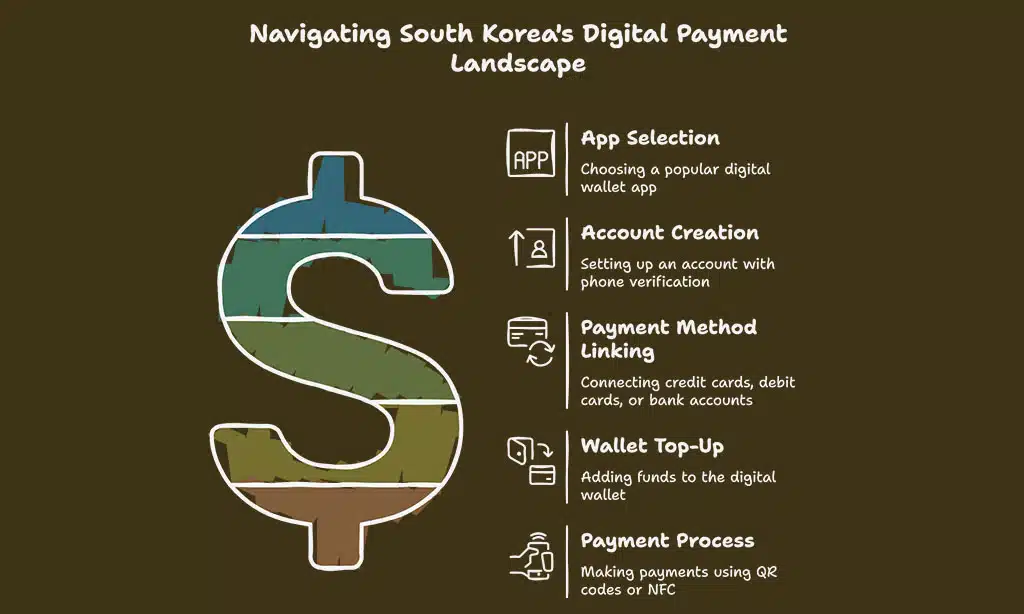
Ready to pay like a local? Learn how to set up your digital wallet and tap your way through Korea. Want to know more? Keep reading!
Setting up a Digital Wallet
First, choose your app. Popular choices are KakaoPay, Naver Pay, Toss, and PAYCO. Download the app from Google Play. Next, create an account. You’ll likely need your phone number and some verification.
Then, link your payment methods. This could be a credit card, debit card, or bank transfer. Many Koreans use Shinhan Card, KB Kookmin Card, or Samsung Card. Finally, top up your digital wallet.
You’ll need to add money from your bank account or card. This lets you make mobile payments.
Now you have a digital wallet on your smartphone. You’re ready to join South Korea’s cashless society. Use your digital wallet for online transactions, e-commerce, and even offline payments.
These apps offer simple ways to manage your money and make payments. You can even pay utility bills.
Adding Payment Methods
Link your credit cards, debit cards, or bank accounts. Naver Pay lets you add many payment methods. So does PayCo. KakaoPay connects to your KakaoTalk. This makes adding payment methods easy.
Toss lets you link several bank accounts. It also handles money transfers. Think of your digital wallet as a real one. You put your payment cards inside. This lets you buy things easily.
These apps make digital payments simple in South Korea. They support various mobile payment methods for online and offline transactions. You can use them for e-commerce and in stores.
They work with QR codes and contactless payments.
Topping Up the Wallet
Funding your digital wallet is easy. You can link your bank account for direct bank transfers. Credit cards and debit cards are also popular options. Many South Koreans use online banking platforms from Woori Bank, Shinhan Bank, or Kookmin Bank to add money.
Think of it like refilling your car with gas; you’re simply adding funds to use with your payment app. Now you’re ready to pay! Let’s explore how to make a payment.
Making a Payment
At the checkout counter, open your preferred app. KakaoPay might be your go-to, given its popularity. Maybe you’re a Naver Pay fan, enjoying those cash-back deals at one of its 97,000 partnered stores.
Select the payment option. Show the QR code. Or, tap your phone for NFC contactless payments. Enter your PIN. Boom, you’re done. Easy peasy. South Korea is practically a cashless society.
Digital wallets are everywhere. No more fumbling for cash or cards.
Mobile payments are super convenient. Toss, for example, offers over 40 financial services, beyond just paying for your kimchi jjigae. Link your credit cards, debit cards, or bank accounts to your digital wallet.
Top up your balance. Manage your money. Track your spending. It’s all right there on your phone. Even international credit cards often work. Currency conversion fees might apply, so, check with your bank.
Advantages of Using Mobile Payment Apps in South Korea
Want to ditch your wallet in Seoul? Mobile payment apps offer slick perks in South Korea, from easy budgeting to sweet deals. Learn more about these digital finance tools and their benefits.
Convenience and Efficiency
Mobile payment apps, like Naver Pay and KakaoPay, make life easier in South Korea. Think of digital wallets as your personal financial control center. You can manage your credit cards, debit cards, and bank transfers all in one place.
No more fumbling for cash or cards. Just tap your phone and you’re done. Digital wallets streamline banking processes. You can check your balance, pay bills, and even send money to friends.
It’s online banking in your pocket. The transaction value of digital wallets is expected to skyrocket. They offer a quick, simple way to pay, both online and in stores. Now, let’s explore how to set up these handy apps.
Widespread Acceptance
South Korea loves mobile payments. Digital wallets handle 27% of all transaction value there. Think Naver Pay, KakaoPay, and Toss. These digital wallets are everywhere. Shops, restaurants, and online stores take them.
They’re easy to use with credit cards, debit cards, and bank transfers. This makes paying bills and shopping online a breeze. Even street vendors often have QR codes for these payment apps.
This widespread acceptance makes daily life easier. You don’t need cash. Just your phone.
These payment apps are popular for a reason. They are convenient and offer rewards. They are also secure. In 2023, mobile payments hit 875.5 billion won. Experts predict digital wallet transactions will jump to 42% by 2027.
South Korea is becoming a cashless society. This shift toward digital payments is transforming how people manage their money.
Easy Banking and Budgeting
Managing your money is a breeze with digital wallets in South Korea. These e-wallets, like Naver Pay and KakaoPay, link directly to your bank accounts and credit cards. See your spending at a glance.
Digital wallets track your transactions. Set up automatic payments for those pesky utility bills. No more late fees. Budgeting is easier, too. You can track your online payments and offline payments.
You control your money. Digital wallets offer rewards. Earn points with each purchase. Use those points for discounts. Mobile payment apps help you save and spend smarter. Now, let’s explore how to use these handy apps.
Promotions and Rewards
Budgeting with digital wallets is smart, but rewards make it even better. Digital wallets in South Korea, like Naver Pay and KakaoPay, offer cool deals. Merchants give discounts and special offers.
They want you to use digital payments. Think of it as a win-win. You save money. They get more business. These rewards come in many forms. You might get cash back. You might earn points.
You could get a discount on your next purchase. These digital wallet incentives make paying bills easier and more rewarding. Using credit cards or debit cards with your digital wallet can also bring extra perks.
So, open your Samsung Pay or Toss app and check out the latest deals. You might be surprised at how much you can save.
Hassle-free Bill Payments
Paying bills in South Korea is super easy with mobile payment apps. Forget paper bills and bank trips. Use your phone to pay for gas, water, and electricity. Set up automatic payments for rent and subscriptions.
Digital wallets like Naver Pay, KakaoPay, and Samsung Pay make it simple. These apps link to your credit cards, debit cards, or bank accounts. They handle your payments quickly and securely.
Biometric authentication, like fingerprint scanning, keeps your financial information safe.
Mobile payment apps also offer perks. You can earn points and get discounts. Many apps track your spending. This helps you manage your budget. South Korea’s mobile payment market is booming.
More people are ditching cash for digital payments. This shift to a cashless society makes life more convenient. It’s also more efficient.
Takeaways
So, mobile payments in South Korea are easy and popular. From street food to online shopping, apps like KakaoPay and Naver Pay make buying things quick. Setting up your digital wallet is simple, just link your card or bank account.
You gain rewards, manage your money better, and skip the cash. Think about the time you’ll save, no more fumbling for change. Ready to ditch your wallet? Jump into Korea’s cashless world.