The kitchen table is no longer just for dinner. It’s a science lab, a debate hall, and a coding bootcamp. If you are reading this, you probably feel the weight of that transformation. The romantic idea of homeschooling often involves reading classics under an oak tree, but the reality for the modern parent is managing PDFs, tracking transcripts, and wondering why the Wi-Fi is lagging during a virtual biology lab. You don’t need more random apps cluttering your phone; you need a system. You need a “Tech Stack.”
In the software world, a “tech stack” is the combination of tools used to build a web application. In your home, the Best Homeschooling Tools are the combination of hardware and software that build your child’s education. This isn’t about replacing the magic of human connection with screens. It is about using technology to automate the chaos so you can focus on the teaching.
As we settle into 2026, the landscape has shifted. We have moved past the scattered Zoom calls of the early 2020s into an era of AI co-teaching, integrated ecosystems, and adaptive learning that molds itself to your child’s brain. Whether you are a veteran homeschooler or a remote-working parent taking the plunge, this guide will help you build a professional-grade educational environment right in your living room.
Key Takeaways
If you only remember three things from this guide, make it these:
- Integration Over Isolation: Don’t just buy apps. Buy apps that fit into your workflow. If an app doesn’t sync with your planner or creates more admin work for you, it’s not a tool; it’s a toy.
- Hardware is an Investment in Focus: A slow computer or spotty Wi-Fi breaks a child’s concentration loop. Spending money on a mesh router or a fast processor pays dividends in “peace and quiet” and completed assignments.
- AI is a Tutor, Not a Cheater: Embrace tools like Khanmigo. In 2026, avoiding AI is like avoiding the calculator in 1980. The goal is to teach your child how to use these tools to accelerate their learning, not bypass it.
What is a “Homeschool Tech Stack” and Why Do You Need One?
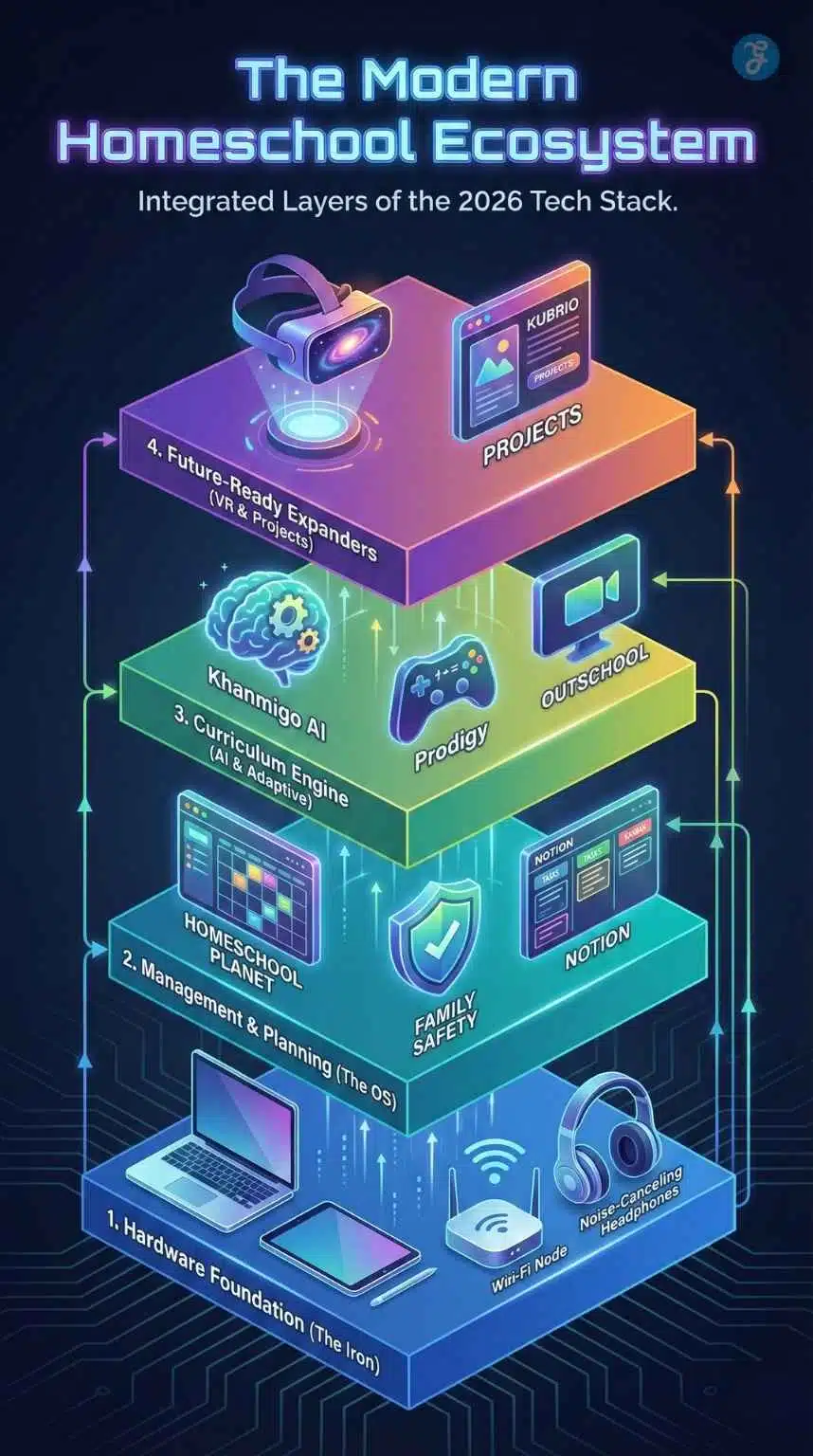
Before we open our wallets, we need to open our minds to a new way of organizing our school year. A “stack” differs from a shopping list because the components interact with one another. Your calendar talks to your curriculum; your tablet talks to the printer; your parental controls talk to the router.
When you curate the Best Homeschooling Tools into a cohesive stack, you achieve three things:
- Friction Reduction: You stop wasting 20 minutes every morning looking for the login password for Math.
- Data-Driven Insight: You stop guessing if your child is struggling with fractions and start seeing the data that proves it.
- Future Readiness: You model how to use technology as a tool for creation, not just consumption.
We will break this stack down into four distinct layers: The Hardware Foundation, The Operating System (Management), The Curriculum Engine, and The Future-Ready Expanders.
Layer 1: The Hardware Foundation (The “Iron” Layer)
You cannot run high-end software on a shaky foundation. In 2026, the hardware requirements for students have evolved. We are moving away from cheap, disposable Chromebooks toward devices that support creativity and heavy processing for things like video editing and coding.
The Parents’ Command Center: The Laptop
As the “principal” and “teacher” of your school, you need a machine that can handle heavy multitasking—streaming a lesson, managing a Notion database, and editing a transcript simultaneously.
- The Recommendation: MacBook Air (M3 or M4 Chip) or Lenovo Yoga 9i.
- Why: These laptops offer “all-day battery” life, which is critical when you are moving from the kitchen to the patio to the library. The Lenovo Yoga series is particularly good if you want a 2-in-1 convertible that allows you to mark up PDFs directly on the screen.
- Specs to Watch: Aim for at least 16GB of RAM. In 2026, 8GB is the new bottleneck. You need that memory to keep 50 browser tabs open without the machine freezing.
The Student Device: The Tablet as a Digital Canvas
For students, especially those under 12, the traditional laptop form factor can be limiting. A tablet with a stylus is superior because it bridges the gap between physical writing and digital storage.
- The Gold Standard: iPad (10th Gen or Air) combined with the Apple Pencil.
- The Android Alternative: Samsung Galaxy Tab S9 FE.
- The Pedagogical Reason: Digital worksheets. With a stylus, a child can practice handwriting, annotate history maps, and solve long division directly on the glass. This saves mountains of paper and keeps every assignment automatically filed in the cloud. It prevents the classic “dog ate my homework” scenario because the homework is instantly synced to your drive.
The Invisible Backbone: Mesh Wi-Fi
Nothing derails a school day faster than buffering. If you have multiple children streaming 4K video lessons or using VR headsets, a standard router provided by your ISP won’t cut it.
- The Solution: A Mesh Wi-Fi System like Eero Pro 6E or Google Nest Wifi Pro.
- How it Works: Unlike a single router that blasts a signal from the living room (leaving dead spots in bedrooms), mesh systems use multiple “nodes” to blanket your house in a consistent signal. This is crucial for maintaining focus; a lagging video gives a child the perfect excuse to check out mentally.
The “Deep Work” Enabler: Noise-Canceling Headphones
Homeschool houses are loud. The dishwasher is running, the dog is barking, and a sibling is practicing violin.
- The Tool: Sony WH-1000XM5 or Soundcore Space Q45 (budget pick).
- The Strategy: Treat these headphones as a “Do Not Disturb” sign. When the headphones go on, the child is in “Deep Work” mode. It signals to the rest of the house that they are in a lecture or taking a test. This physical boundary is essential for psychological focus.
Layer 2: The Operating System (Management & Planning)
If the hardware is the body, this layer is the brain. This is where you plan the year, track attendance, and ensure you are meeting state laws.
The Planner: Homeschool Planet vs. Notion
Gone are the days of erasing holes in a paper planner until the page rips.
- For the “Plug-and-Play” Parent: Homeschool Planet.
- Why it wins: It is specifically designed for homeschooling. It has a marketplace where you can buy lesson plans for popular curricula (like Saxon Math or The Good and the Beautiful) and auto-populate your calendar. If you miss a day due to sickness, one click of the “Reschedule” button shifts the entire year forward. It handles the math of rescheduling so you don’t have to.
- For the “DIY” Parent: Notion.
- Why it wins: It is infinitely customizable. You can build a “Wiki” for your school. You can create Kanban boards (like Trello) for student projects.
- The 2026 Edge: Notion’s AI features can now summarize reading lists or generate quiz questions from your notes instantly. A simple prompt like, “Create a table for tracking 5th-grade reading hours,” generates the tool you need in seconds.
The Safety Net: Digital Citizenship Tools
You cannot hand a child the internet without a seatbelt. However, in 2026, the focus has shifted from “blocking” to “guiding.”
- The Tool: Qustodio or Microsoft Family Safety.
- The Best Practice: Do not just install it secretly. Discuss it. “This tool helps us balance our time.” Use these tools to set “downtime” schedules (e.g., no apps available until 8:00 AM) and to filter out explicit content.
- The Semantic Link: This touches on digital citizenship. We aren’t just protecting them; we are training them to self-regulate.
Layer 3: The Curriculum Engine (AI & Adaptive Learning)
This is the core of your school. The Best Homeschooling Tools for curriculum are no longer static PDFs; they are adaptive engines that learn your child’s weak spots.
The Math & Science Powerhouse: Khan Academy & Khanmigo
Khan Academy remains the anchor of free education, but its AI tool, Khanmigo, has revolutionized the platform.
- The AI Difference: In the past, if a student got a question wrong, they just got a red “X.” Now, Khanmigo acts as a Socratic tutor. It doesn’t give the answer. It asks, “What do you think the first step is?” or “Look at how you grouped those variables.” It simulates a human tutor sitting next to them, identifying why they are stuck, not just that they are stuck.
The Gamified Reinforcement: Prodigy & Night Zookeeper
Drills are boring. Games are addictive.
- Math: Prodigy Math Game. It turns math problems into spell-casting battles. To defeat the “boss,” the child must solve algebra problems. It is remarkably effective for kids who say they hate math.
- Writing: Night Zookeeper. This platform gamifies creative writing. Children create magical animals and write stories about them to “level up.” It fixes the “blank page syndrome” that paralyzes so many young writers.
The Human Element: Outschool
Sometimes, you just need a passionate human expert.
- The Platform: Outschool.
- The Use Case: You might not know how to teach “Minecraft Architecture” or “Intro to Veterinary Science.” Outschool connects you with teachers who do. It creates a “micro-classroom” environment where your child can interact with peers, solving the socialization concern many parents have.
The Expert Perspective: AI vs. Human Connection
In 2026, the most successful homeschool parents aren’t the ones who hide technology, but the ones who model how to master it. When you use an AI tutor like Khanmigo, you aren’t outsourcing your job as a parent. You are simply bringing in a ‘specialist’ to help explain quadratic equations, so you can focus on what AI cannot do: building your child’s character, resilience, and curiosity. The tech is the textbook; you are still the teacher.
Layer 4: The Future-Ready Expanders (VR & Electives)
This layer is what separates a modern 2026 education from a traditional one. It leverages emerging tech to provide experiences that were previously impossible.
Virtual Reality (VR) Field Trips
Why read about the Colosseum when you can stand in it?
- The Tool: Meta Quest 3.
- The App: Google Arts & Culture or Wander.
- The Experience: You can take a 20-minute field trip to the International Space Station or walk through the halls of the Louvre. This provides spatial context to history and geography that a textbook can never match.
Project-Based Learning Portfolios
In the gig economy future, a transcript matters less than a portfolio.
- The Tool: Kubrio or personal blogs/websites.
- The Strategy: Encourage children to document their projects. Did they build a Lego city? Write a Python script? Bake a sourdough loaf? Take a photo, write a summary, and publish it. This builds a digital footprint of competence that colleges and employers are increasingly looking for.
A Day in the Life: The Tech Stack in Action
It is one thing to have the tools; it is another to see them flow together. Here is what a typical Tuesday looks like for a 2026 homeschool family using this stack.
- 08:30 AM | The Morning Launch: Mom opens Homeschool Planet on her laptop to check the day’s agenda. The kids check their iPads; their checklists have already synced overnight.
- 09:00 AM | The Deep Work Block: The house goes quiet. Noise-canceling headphones go on. The 10-year-old opens Khan Academy for math practice, using the Apple Pencil to work out problems on the screen. The teen logs into Notion to continue their history research paper.
- 10:30 AM | The Creative Break: Headphones come off. The younger child jumps onto Night Zookeeper for 20 minutes of creative writing (disguised as a game). The teen uses Khanmigo to debate a simulated historical figure for their project.
- 01:00 PM | The Virtual Connection: After lunch, the kids log into Outschool for a live “Minecraft Civilizations” class. The Mesh Wi-Fi handles the video stream perfectly while Mom takes a Zoom call in the other room.
- 03:00 PM | The Portfolio Update: Before logging off, the kids snap a photo of their art project and upload it to their digital portfolio. The “School User” profile is logged out, and the devices revert to “Home Mode” (games and movies allowed) thanks to Family Safety settings.
Comparison: The “Budget-Conscious” vs. The “Pro” Stack
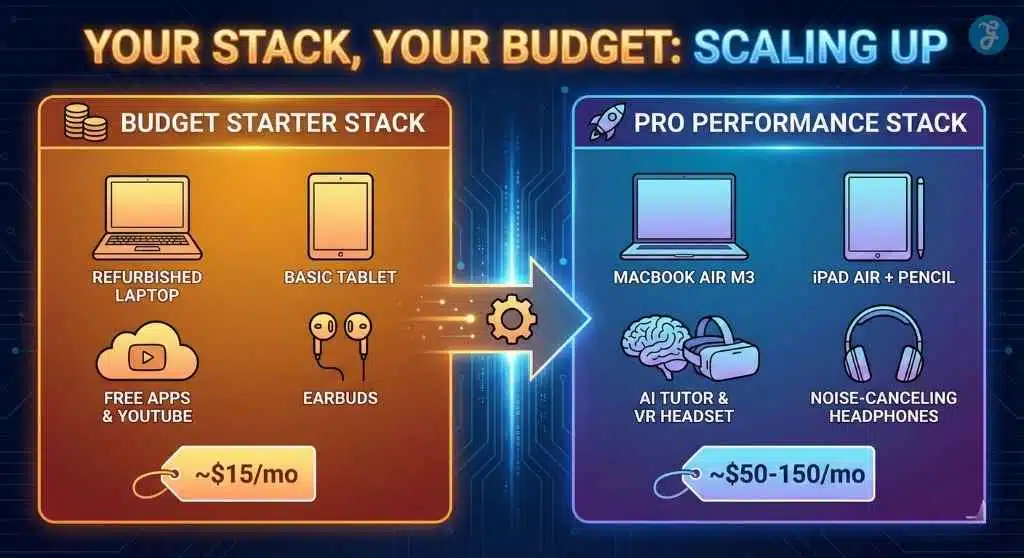
Not every family needs the top-tier gear immediately. Here is how you can scale your stack based on your budget.
| Feature | The “Starter” Stack (Budget-Friendly) | The “Pro” Stack (Performance-Optimized) |
| Primary Computer | Refurbished Chromebook or Older Windows Laptop | MacBook Air M3 or Lenovo Yoga 9i |
| Student Device | Amazon Fire Tablet (Kids Edition) | iPad Air + Apple Pencil |
| Connectivity | Standard ISP Router | Eero Pro 6E Mesh System |
| Management | Google Calendar + Trello (Free) | Homeschool Planet + Notion AI ($) |
| Math Curriculum | Khan Academy (Standard) | Khan Academy + Khanmigo AI Tutor ($) |
| Electives | YouTube Education Channels | Outschool Live Classes + VR Headset |
| Audio | Basic Earbuds | Sony Noise-Canceling Headphones |
| Est. Monthly Cost | $0 – $15 (Software subscriptions) | $50 – $150 (Software + Classes) |
Frequently Asked Questions (FAQs)
Is a tablet really necessary if we have a laptop?
Yes, specifically for younger children (K-6). The tactile nature of dragging, dropping, and drawing with a stylus connects better with their developmental stage than a trackpad and keyboard. For high schoolers, a laptop becomes the priority, but the tablet remains a powerful “digital notebook.”
How do I prevent my child from getting distracted by YouTube/Games?
This is where the “Management Layer” is vital. Tools like Qustodio allow you to block specific apps during “School Hours” (e.g., 9 AM – 2 PM). Furthermore, separating the accounts is key. Create a “School User” profile on the computer that has zero games installed and a clean desktop.
Doesn’t all this tech increase screen time too much?
It’s about quality vs. quantity. “Passive” screen time (mindlessly scrolling TikTok) is the enemy. “Active” screen time (coding, writing, solving math problems, creating art) is productive. The best homeschooling tools turn screens into creative studios, not just TVs.
Can I use AI tools like ChatGPT for homeschooling?
Absolutely. Use it to generate lesson ideas, create custom quizzes, or simplify complex topics. For example: “Explain the French Revolution to a 10-year-old using Minecraft analogies.” However, always verify the facts, as AI can still hallucinate information.
Is the “Pro” stack worth the money for a beginner?
If you are just starting, start with the essentials (Good Wi-Fi + Laptop). You don’t need the VR headset or the paid AI subscriptions on Day 1. Build your stack slowly. As you identify pain points (e.g., “Grading math is taking too long”), then purchase the tool that solves that specific problem (e.g., Prodigy or Khanmigo).
Final Thought: You Are Still the Captain
While this article outlines the Best Homeschooling Tools of 2026, remember that no app can replace a parent’s encouragement. The tech stack is there to handle the logistics, the grading, and the resource delivery. This clears the runway for you to do what you do best: mentor, love, and guide your child.
Building this stack is not about keeping up with the Joneses; it’s about freeing up your time so you can actually enjoy the homeschooling journey.