FP&A is not just an annual budget task anymore. In 2026, finance teams are expected to forecast often, explain results fast, and support decisions in real time. That is hard to do with dozens of spreadsheets, manual copy-paste, and “final_v12” files.
This guide compares the best fp&a software tools so you can pick a platform that fits your team, your data, and your planning style. You will see what each tool is good at, what to watch out for, and how to choose with confidence.
Best FPA Software Tools That Make Planning Feel Simple
Before we jump into the 16 tools, here is a quick way to scan the market. Some products are “spreadsheet-native.” Others are full planning platforms for large companies. Many are quote-based, so the best way to compare is by use case, workflow, and integration fit.
FP&A Software Comparison: At-a-Glance
Use this table to shortlist best fpa software tools based on your needs.
| Tool | Best for | What it’s known for | Works best when… |
|---|---|---|---|
| Cube | Excel/Sheets-first FP&A | Plan and report in Excel/Sheets + centralized layer | You want adoption fast without leaving spreadsheets |
| Datarails | Excel-native mid-market | Excel-native planning + automation + many integrations | You need consolidation and fewer manual steps |
| Vena | Excel comfort + governance | Excel-integrated planning with workflow and governance | You need more control than Excel alone |
| Planful | Planning + close + reporting | Close, consolidation, planning, and reporting in one | You want a broader finance suite |
| Pigment | Modern modeling + scenarios | Budgeting/forecasting + scenario work | You want fast what-if planning |
| Prophix | Mid-market CPM | Budgeting, forecasting, planning, reporting | You need structured finance processes |
| Anaplan | Connected enterprise planning | AI-driven planning, budgeting, forecasting | Planning spans many teams |
| Workday Adaptive Planning | Enterprise planning cloud | Plan, report, and analyze in one EPM cloud | You want companywide planning participation |
| Oracle Cloud EPM Planning | Deep enterprise EPM | Connected plans + scenario modeling | You have complex enterprise planning |
| SAP Analytics Cloud Planning | SAP BI + planning | Plan, budget, forecast in SAP planning solution | Your analytics stack is SAP-centric |
| IBM Planning Analytics | Modeling + reporting | Planning, forecasting, reporting + APIs | You want strong modeling and integration options |
| OneStream | Unified platform (xP&A) | Planning/budgeting/forecasting + unified approach | You want finance + ops planning together |
| CCH Tagetik | CPM planning | Budgeting, financial planning, forecasting | You need enterprise CPM structure |
| Board | Enterprise planning platform | Single planning platform + “single source of truth” | You want integrated planning across functions |
| Jedox | Driver-based planning | Single source of truth + automated workflows | You need flexible planning with structure |
| Centage | Move beyond spreadsheets | Budgeting + forecasting + consolidation + reporting | You want planning without spreadsheet pain |
How We Chose These Tools
There is no single “perfect” FP&A tool. So we evaluated each one on the same practical factors.
| Evaluation area | What it means in real life |
|---|---|
| Planning depth | Can you run budgets, rolling forecasts, and revisions easily? |
| Modeling & scenarios | Can you run best/base/worst case without rebuilding models? |
| Reporting | Can you create variance reporting and clean dashboards? |
| Workflow & controls | Are approvals, audit trails, and roles strong enough? |
| Integrations | Can it connect to ERP, CRM, HRIS, and data warehouse? |
| Scale | Can it handle many entities, dimensions, and users? |
| Time to value | Can your team adopt it without months of confusion? |
We also looked at whether each tool is built to keep spreadsheets (Excel-native) or reduce spreadsheets (full planning platform). That one choice affects training, adoption, and governance.
Key Features to Look for in FP&A Software
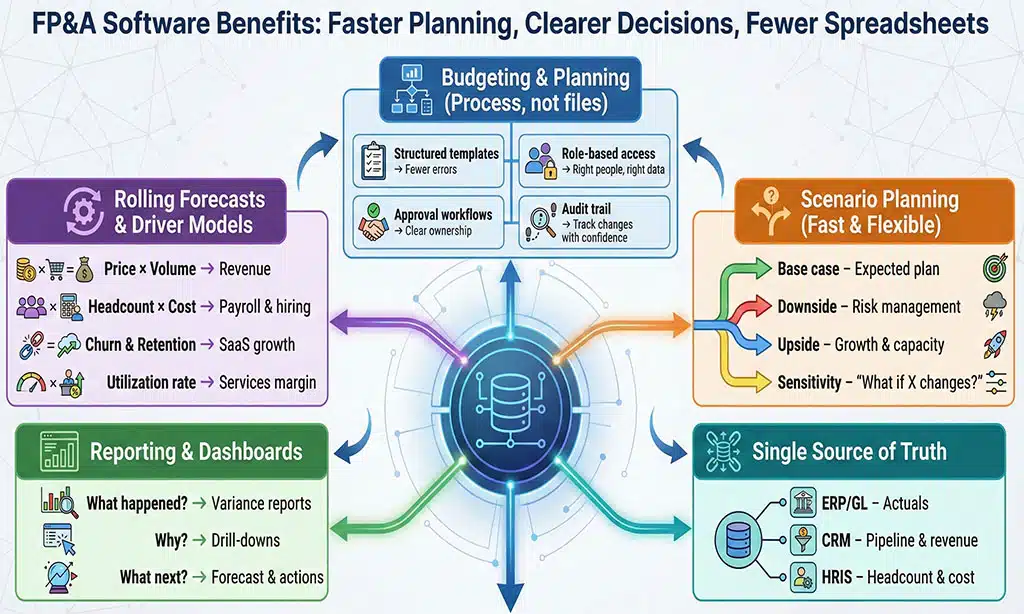
Here are the features that matter most when choosing an FP&A platform.
Budgeting and planning workflows
Budgeting is a process, not a file. You want:
| Must-have | Why it matters |
|---|---|
| Structured templates | Fewer errors and fewer “custom versions” |
| Role-based access | People only see what they should see |
| Approval workflow | Clear ownership and fewer reminder emails |
| Audit trail | You can track changes and explain results |
Rolling forecasts and driver-based planning
Rolling forecasts help you stay current. Driver models make forecasts easier to defend.
| Example driver | What it helps forecast |
|---|---|
| Price × volume | Revenue planning with clear levers |
| Headcount × cost | Payroll and hiring plans |
| Churn and retention | SaaS revenue planning |
| Utilization rate | Services revenue and margin plans |
Scenario planning (base, best, worst case)
Scenario planning should feel fast. Oracle, for example, describes scenario modeling as built into Planning in Oracle Fusion Cloud EPM. Oracle The key idea is the same for all platforms: you should be able to change assumptions, run a scenario, and see impacts quickly.
| Scenario type | Typical use |
|---|---|
| Base case | Standard plan using agreed assumptions |
| Downside case | Lower revenue or higher costs |
| Upside case | Higher growth + capacity planning |
| Sensitivity test | “What if price changes 5%?” |
Reporting and dashboards
A strong FP&A tool helps you answer three questions:
-
What happened?
-
Why did it happen?
-
What will we do next?
| Reporting need | Helpful feature |
|---|---|
| Monthly variance | Saved report packs, drill-down |
| Board decks | Consistent charts and notes |
| Self-serve | Managers can view without asking finance |
| Speed | Automated refresh from source systems |
Integrations and a single source of truth
Planning is only as good as the data feeding it. Tools like Cube and Datarails emphasize pulling data from systems into a more controlled workflow (often while staying in Excel).
| Data source | Common examples |
|---|---|
| ERP/GL | Actuals, chart of accounts |
| CRM | Pipeline, bookings, renewals |
| HRIS | Headcount, comp, org structure |
| Data warehouse | Cleaned data sets for analysis |
The 16 Best FP&A Software Tools
The tools below cover the most common FP&A needs in 2026, from budgeting and rolling forecasts to scenario planning and reporting. Some are Excel-native, so your team can keep working in spreadsheets with better control. Others are full planning platforms built for larger, multi-team planning cycles. Use each mini-table to compare best-fit use cases, key strengths, and what to watch out for before you shortlist.
1) Cube — Best for teams that plan in Excel and Google Sheets
Cube positions itself as “spreadsheet-native,” letting finance teams sync data and analyze in Excel, Google Sheets, or Cube’s own platform.
| Item | Details |
|---|---|
| Best for | Spreadsheet-first FP&A teams |
| Standout strengths | Work in Excel/Sheets + centralized planning layer |
| Good fit when | You want fast adoption and minimal workflow change |
| Watch-outs | If you want strict “no spreadsheets,” this may not be your style |
Pros
-
Familiar tools for most finance teams
-
Easier training for budget owners
-
Helps reduce version chaos
Cons
-
You still need good spreadsheet discipline
-
Advanced governance may require stronger process design
2) Datarails — Best for Excel-native automation and consolidation
Datarails markets itself as an Excel-native FP&A platform for consolidation, reporting, and forecasting, and it also mentions “integrations with 200+ systems.”
| Item | Details |
|---|---|
| Best for | Mid-market teams with many Excel models |
| Standout strengths | Excel-native planning + automation |
| Good fit when | You want to keep Excel but reduce manual work |
| Watch-outs | Confirm connectors for your exact tech stack |
Pros
-
Keeps Excel as the interface
-
Reduces manual consolidation
-
Designed for finance workflows
Cons
-
Less ideal if you want to move completely off Excel
-
Strong setup still depends on clean dimensions and rules
3) Vena — Best for Excel-based planning with governance
Vena’s budgeting and forecasting page highlights integrations with ERPs like Sage Intacct and NetSuite, plus CRMs like Salesforce, and HRIS systems like ADP and Workday. Vena Solutions A public listing also describes Excel integration, workflows, and data governance. Apply to Supply
| Item | Details |
|---|---|
| Best for | Teams that want Excel familiarity + controls |
| Standout strengths | Excel-integrated planning + workflow/governance |
| Good fit when | Many non-finance users contribute to budgets |
| Watch-outs | Confirm how reporting and BI will be handled |
Pros
-
Easier adoption for Excel users
-
Strong for structured budget cycles
-
Helps standardize templates
Cons
-
Complex models still need strong design
-
Pricing and scope can vary by plan
4) Planful — Best for combining planning with close and reporting
Planful describes its platform as unifying close, consolidation, planning, and reporting. Planful
| Item | Details |
|---|---|
| Best for | Finance teams that want a broader platform |
| Standout strengths | Close + consolidation + planning + reporting Planful |
| Good fit when | You want fewer finance systems overall |
| Watch-outs | Suite implementations need clear scope |
Pros
-
One platform story can reduce tool sprawl
-
Good for standard finance cycles
-
Clear pitch for CFO teams
Cons
-
Can be more than small teams need
-
Implementation planning matters a lot
5) Pigment — Best for fast modeling and scenario work
Pigment presents budgeting and forecasting use cases and highlights fast updates and scenario work on its site, including claims about reducing update time and cutting data aggregation time in examples. Pigment Many partners describe it as a cloud planning platform that supports scenario modeling. Quebit
| Item | Details |
|---|---|
| Best for | Teams that need scenario planning often |
| Standout strengths | Forecasting, budgeting, scenario work |
| Good fit when | Planning changes weekly or monthly |
| Watch-outs | Validate depth for your consolidation needs |
Pros
-
Strong “what-if” planning mindset
-
Built for speed and collaboration
-
Useful when assumptions change often
Cons
-
Newer approaches may mean fewer legacy templates
-
Integration depth can vary by implementation
6) Prophix — Best for mid-market corporate performance management
Prophix positions itself as corporate performance management software for budgeting, forecasting, planning, and reporting.
| Item | Details |
|---|---|
| Best for | Mid-market finance teams needing structure |
| Standout strengths | Budgeting/forecasting/planning/reporting |
| Good fit when | You need workflows and repeatable processes |
| Watch-outs | Confirm which modules are included in your quote |
Pros
-
Practical for recurring finance cycles
-
Focus on automation and structure
-
Works well for distributed input
Cons
-
Reporting needs should be tested in demo
-
Scope choices can affect complexity
7) Anaplan — Best for connected planning across departments
Anaplan describes its integrated financial planning application as supporting FP&A use cases for AI-driven planning, budgeting, and forecasting. It is often chosen when planning must connect finance with other teams.
| Item | Details |
|---|---|
| Best for | Enterprise connected planning |
| Standout strengths | Cross-functional planning + PB&F focus |
| Good fit when | Finance, sales, HR, and ops need shared models |
| Watch-outs | Model governance needs strong owners |
Pros
-
Great for cross-team alignment
-
Strong for large, complex planning
-
Helps reduce silo planning
Cons
-
Can require dedicated model builders
-
Governance is essential to avoid model sprawl

8) Workday Adaptive Planning — Best for enterprise planning cloud
Workday describes Adaptive Planning Cloud as an EPM platform to help organizations plan, report, and analyze.
| Item | Details |
|---|---|
| Best for | Enterprise planning with broad participation |
| Standout strengths | Plan, report, analyze in one cloud |
| Good fit when | Many departments need guided input |
| Watch-outs | Confirm integrations if you are not on Workday ERP |
Pros
-
Strong for companywide planning
-
Good for finance + business user workflows
-
Clear enterprise-grade positioning
Cons
-
Implementation quality drives outcomes
-
Needs ongoing ownership for best results
9) Oracle Cloud EPM Planning — Best for deep, connected enterprise plans
Oracle describes its EPM Planning as connected planning across the business and highlights scenario modeling. Oracle documentation also describes Planning as a budgeting and forecasting solution integrating financial and operational planning.
| Item | Details |
|---|---|
| Best for | Large enterprises with complex planning needs |
| Standout strengths | Connected plans + scenario modeling |
| Good fit when | You need deep enterprise planning structure |
| Watch-outs | Enterprise tools usually need heavier admin effort |
Pros
-
Strong for complex planning models
-
Supports scenario modeling capabilities
-
Designed for enterprise controls
Cons
-
Can be heavy for smaller teams
-
Requires careful implementation and governance
10) SAP Analytics Cloud Planning — Best for SAP-centric planning + BI
SAP describes SAP Analytics Cloud as an enterprise planning solution for FP&A teams and line-of-business planners to plan, budget, and forecast.
| Item | Details |
|---|---|
| Best for | Companies using SAP analytics stack |
| Standout strengths | Planning + budgeting + forecasting in SAP cloud |
| Good fit when | BI and planning should sit together |
| Watch-outs | Check modeling fit for your FP&A style |
Pros
-
Strong alignment for SAP environments
-
Combines analytics and planning
-
Built for broad planning participation
Cons
-
Best value is often within SAP ecosystem
-
Confirm how custom planning models will be built
11) IBM Planning Analytics — Best for strong modeling and reporting
IBM describes IBM Planning Analytics as business performance management software with planning, forecasting, and reporting features, and it notes APIs and OData for custom integrations. IBM also describes AI forecasting within planning workflows.
| Item | Details |
|---|---|
| Best for | Teams that want robust modeling |
| Standout strengths | Planning/forecasting/reporting + integration options |
| Good fit when | You need custom integration and strong modeling |
| Watch-outs | UX can vary depending on setup |
Pros
-
Strong modeling foundation
-
Good integration flexibility
-
AI forecasting positioned as built-in
Cons
-
Requires skilled setup for best results
-
Confirm business-user experience in your demo
12) OneStream — Best for unified planning across finance and ops
OneStream positions its solution around planning, budgeting, and forecasting, with flexibility and control. It also describes FP&A benefits like streamlining budgeting, forecasting, and reporting.
| Item | Details |
|---|---|
| Best for | Unified planning (finance + operational) |
| Standout strengths | PB&F + unified platform approach |
| Good fit when | You want xP&A across teams |
| Watch-outs | Broader scope can increase complexity |
Pros
-
Good for extended planning across teams
-
Strong enterprise narrative
-
Can support continuous planning approaches
Cons
-
Often needs strong project ownership
-
Too large for very small FP&A teams
13) CCH Tagetik — Best for enterprise budgeting, planning, and forecasting
Wolters Kluwer describes CCH Tagetik as budgeting, financial planning, and forecasting software designed to save time and improve efficiency.
| Item | Details |
|---|---|
| Best for | Enterprise CPM planning |
| Standout strengths | Budgeting + planning + forecasting suite |
| Good fit when | You need enterprise controls and structure |
| Watch-outs | Confirm scope of modules and reporting outputs |
Pros
-
Built for enterprise planning needs
-
Clear CPM orientation
-
Useful for organizations that want structured processes
Cons
-
Larger implementations can take longer
-
Needs strong governance and design
14) Board — Best for integrated business planning in one platform
Board describes its platform as unifying enterprise-wide planning and creating a single source of truth for financial and operational data. Board also markets budgeting and forecasting automation and real-time data integration.
| Item | Details |
|---|---|
| Best for | Integrated planning across functions |
| Standout strengths | One platform + single source of truth positioning |
| Good fit when | Finance planning must connect to operations |
| Watch-outs | Define ownership as more teams join |
Pros
-
Strong integrated planning story
-
Helps reduce planning silos
-
Good for cross-team visibility
Cons
-
Cross-functional scope needs governance
-
Confirm finance modeling depth for your needs
15) Jedox — Best for driver-based planning with workflow
Jedox describes building a “single source of truth” for financial and non-financial data and using automated workflows to plan faster.
| Item | Details |
|---|---|
| Best for | Driver-based planning with structure |
| Standout strengths | SSOT + automated workflows |
| Good fit when | You want flexible planning with stronger control |
| Watch-outs | Advanced models still need strong model builders |
Pros
-
Clear driver-based planning value
-
Workflow support helps speed cycles
-
Supports planning across data types
Cons
-
Training needed for model owners
-
Confirm integration approach early
16) Centage — Best for teams ready to move beyond spreadsheets
Centage describes its platform as connecting budgeting, forecasting, consolidation, and reporting, and it also mentions scenario modeling and collaboration without spreadsheets.
| Item | Details |
|---|---|
| Best for | Teams moving from spreadsheets to a platform |
| Standout strengths | Budgeting + forecasting + consolidation + reporting |
| Good fit when | You want planning with fewer spreadsheet limits |
| Watch-outs | Confirm integrations and reporting style you need |
Pros
-
Clear “move beyond spreadsheets” positioning
-
Good coverage of core FP&A needs
-
Helps standardize planning
Cons
-
Still needs clean data to work well
-
Scope choice matters for implementation speed
Best FP&A Software by Company Size and Use Case
This section helps you narrow the list fast.
| If you are… | Shortlist tools like… | Why |
|---|---|---|
| A startup finance team | Cube, Datarails, Centage | Faster adoption and lean setup |
| Excel-heavy mid-market | Datarails, Vena, Cube | Excel-native workflows + governance |
| A growing mid-market org | Prophix, Planful, Jedox | Strong structure and repeatable cycles |
| Enterprise with many teams | Anaplan, Workday Adaptive, Board | Connected planning across functions |
| Enterprise EPM-first | Oracle EPM, SAP Analytics Cloud Planning, IBM Planning Analytics | Deep enterprise planning and modeling |
| Scenario-first planning | Pigment, Oracle EPM, Jedox | What-if planning and scenario support |
FP&A Software Pricing: What You’ll Pay (and Why)
Most vendors do not publish simple pricing. Pricing changes based on scope and complexity. That is normal in this market.
Here are the biggest cost drivers for best fpa software tools:
| Pricing driver | What increases cost |
|---|---|
| Number of users | More contributors and viewers |
| Number of entities | Multi-entity planning, multi-currency |
| Data integrations | ERP + CRM + HRIS + warehouse connectors |
| Modeling depth | Driver models, scenarios, long-range planning |
| Modules | Planning only vs planning + consolidation + reporting |
Hidden costs to plan for
| Hidden cost | How to reduce it |
|---|---|
| Implementation services | Start with 1–2 key models first |
| Data cleanup | Standardize dimensions early |
| Training | Assign a clear internal model owner |
| Ongoing admin time | Keep models simple and documented |
How to Implement FP&A Software Successfully
A great tool can fail if the rollout is messy. A simple rollout usually wins.
A clean 6-step rollout
| Step | Goal | Output |
|---|---|---|
| 1) Define scope | Avoid “boil the ocean” | 1–2 planning processes to start |
| 2) Define dimensions | Build a common language | Dept, product, region, entity |
| 3) Connect data | Reduce manual refresh | ERP actuals first |
| 4) Build first model | Deliver fast value | Budget or rolling forecast model |
| 5) Pilot | Catch issues early | Finance + 2–3 budget owners |
| 6) Roll out | Drive adoption | Training + office hours |
Common pitfalls
| Pitfall | What happens | Fix |
|---|---|---|
| Too much scope | Timeline expands | Start with one core model |
| Weak ownership | No one maintains models | Assign a finance system owner |
| Bad source data | Wrong results | Fix dimensions and mappings early |
| No change plan | Users keep old files | Make the tool the “source of truth” |
Frequently Asked Questions
What is FP&A software?
FP&A software helps finance teams build budgets, forecasts, and scenarios. It also helps with reporting and variance analysis. The goal is to reduce manual work and improve decision speed.
Can FP&A software replace Excel?
Some tools are built to work inside Excel or alongside it, like spreadsheet-native platforms. Others are built to reduce spreadsheet use by moving planning into a controlled system. The right answer depends on your team and your governance needs.
How do I compare tools without getting lost?
Use a short scorecard. This keeps demos focused.
| Scorecard item | Ask this in the demo |
|---|---|
| Data load | “Show us how ERP actuals refresh.” |
| Scenario test | “Change one assumption and show the full impact.” |
| Workflow | “Show approvals and audit trail.” |
| Reporting | “Show variance reporting and drill-down.” |
| Admin effort | “Who maintains this model day to day?” |
How long does implementation take?
It depends on scope, data, and governance. A small rollout can be faster than a large enterprise program. The safest approach is to start with one core model and expand.
Takeaways
Picking FP&A software is a big decision, but you can make it simple. Start with your planning style (Excel-native or platform-first). Then confirm integrations, workflow controls, and scenario speed in a real demo. When you choose from the best fpa software tools, the goal is not “more features.” The goal is faster cycles, fewer errors, and clearer answers for leaders. If you can forecast faster and explain results in plain language, you will feel the value quickly.