Managing customer relationships used to mean digging through stacks of business cards or scrolling through endless spreadsheets. But in 2026, if you are running a small business without a Customer Relationship Management (CRM) platform, you are essentially driving with the handbrake on.
The landscape has changed fast. The best CRMs today aren’t just digital rolodexes; they are smart assistants. They use AI to write your follow-up emails, predict which leads will buy, and remind you to call your top client on their birthday. Whether you are a solopreneur running a coffee shop or a tech startup with a team of ten, the right tool can automate the busy work so you can focus on closing deals.
But with hundreds of options claiming to be the “best,” how do you choose? We tested over 50 platforms to bring you the definitive list of the 12 best CRM platforms for small businesses in 2026, focusing on affordability, ease of use, and real automation power.
Top 5 SMB CRMs for Small Businesses at a Glance
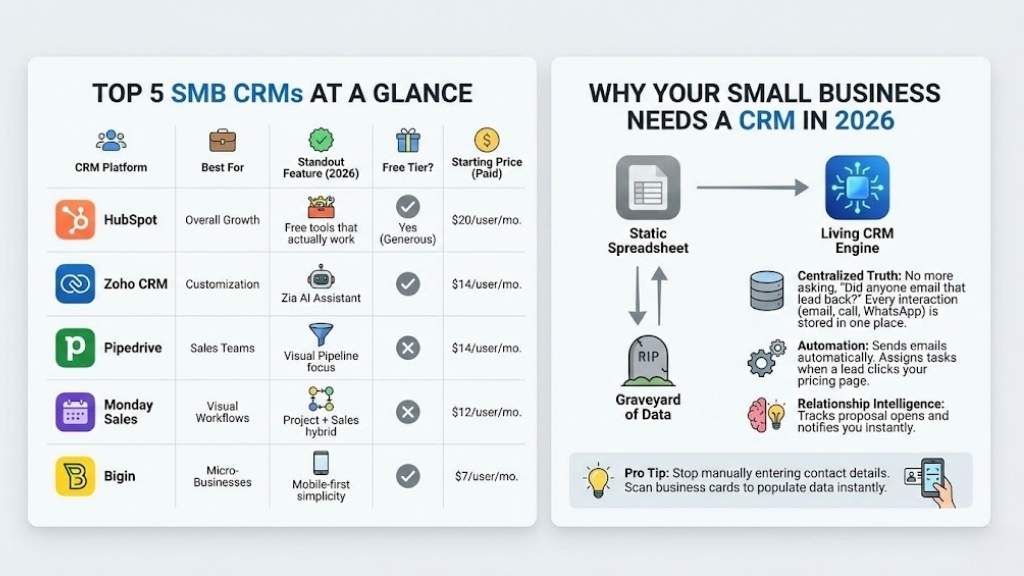
If you are in a rush, here is a quick breakdown of our top 5 contenders. We compared them based on pricing, their standout features for 2026, and whether they offer a genuinely useful free tier.
| CRM Platform | Best For | Standout Feature (2026) | Free Tier? | Starting Price (Paid) |
| HubSpot | Overall Growth | Free tools that actually work | Yes (Generous) | $20/user/mo |
| Zoho CRM | Customization | Zia AI Assistant | Yes | $14/user/mo |
| Pipedrive | Sales Teams | Visual Pipeline focus | No | $14/user/mo |
| Monday Sales | Visual Workflows | Project + Sales hybrid | No | $12/user/mo |
| Bigin | Micro-Businesses | Mobile-first simplicity | Yes | $7/user/mo |
Why Your Small Business Needs a CRM in 2026
You might be thinking, “My spreadsheet works fine, why switch?”
In 2026, a spreadsheet is a static graveyard of data. A CRM is a living engine. The biggest shift we have seen this year is the democratization of Artificial Intelligence (AI). Features that used to cost thousands of dollars a month—like predictive analytics and automated chatbots—are now standard in tools costing $15 a month.
Here is what a modern CRM does for you:
- Centralized Truth: No more asking, “Did anyone email that lead back?” Every interaction (email, call, WhatsApp message) is stored in one place.
- Automation: It sends the “Thanks for signing up” email automatically. It assigns tasks to your sales rep when a high-value lead clicks your pricing page.
- Relationship Intelligence: It tells you when to call. For example, some CRMs can track when a lead opens your proposal and notifies you instantly, so you can call while you are top-of-mind.
Pro Tip: If you are still manually entering contact details from business cards, you are wasting time. Most 2026 mobile CRM apps let you scan a card and populate the data instantly.
12 Best CRM Platforms for Small Businesses
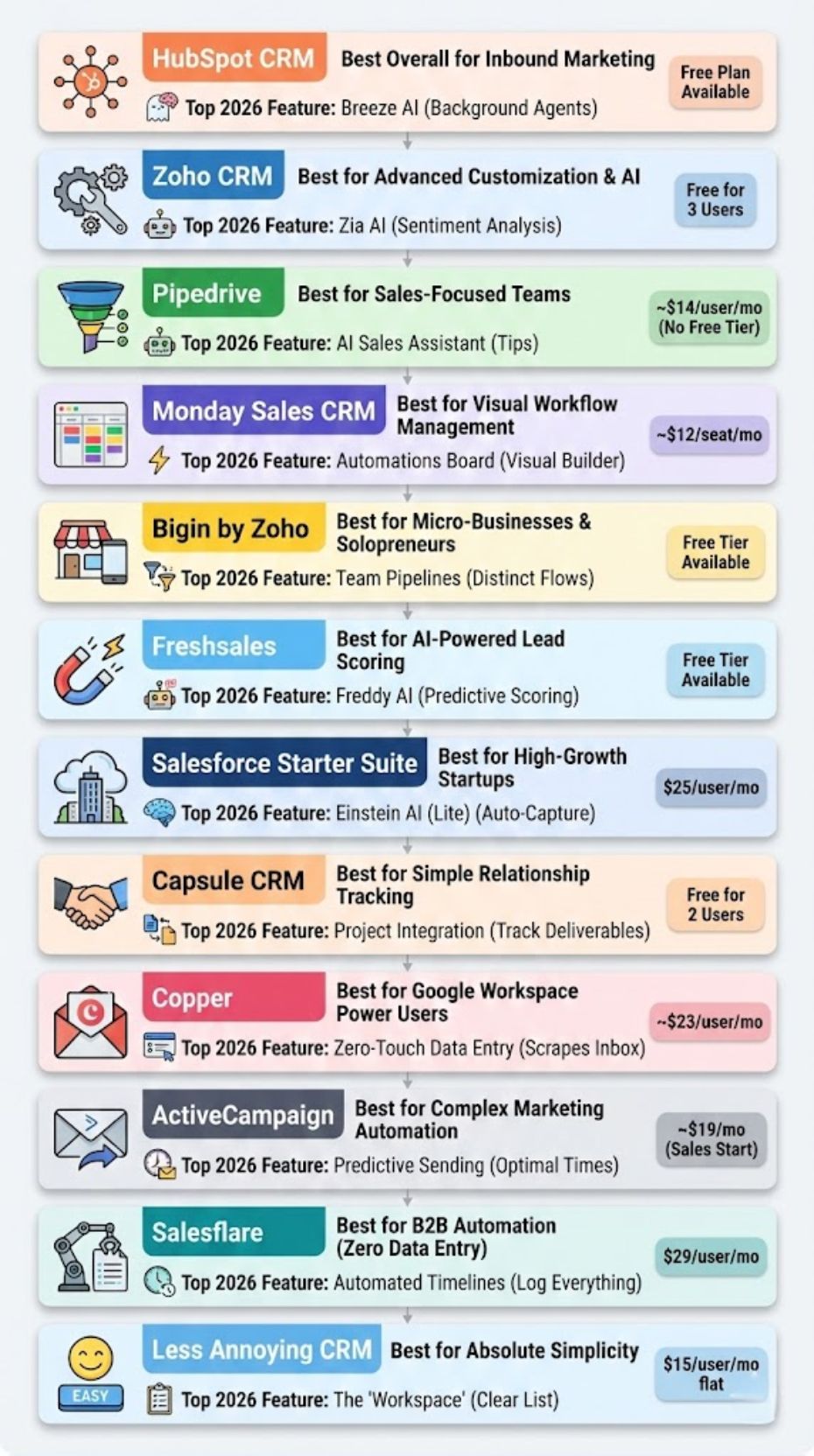
We broke down these reviews to help you find the specific fit for your unique business model.
1. HubSpot CRM — Best Overall for Inbound Marketing
HubSpot remains the gold standard for a reason. It is not just a CRM; it is a massive ecosystem. For small businesses, their “Free Forever” plan is legendary because it doesn’t feel like a trap. You get legitimate tools to manage contacts, track emails, and schedule meetings without paying a cent.
Top 2026 Feature: Breeze AI
HubSpot’s new “Breeze” AI agents work in the background. They can draft blog posts, summarize customer calls automatically, and even suggest which deals are most likely to close based on past data.
Pros:
- Incredibly easy to use; you can set it up in minutes.
- Massive marketplace of integrations (connects with Gmail, Outlook, Slack).
- Excellent free learning resources (HubSpot Academy).
Cons:
- The price jumps significantly once you move from the “Starter” to “Professional” tiers.
2026 Pricing: Free plan available. Starter Suite begins around $20/month per seat.
2. Zoho CRM — Best for Advanced Customization & AI
If HubSpot is the Apple of CRMs (polished, easy), Zoho is the Android (infinitely customizable). Zoho CRM is part of a massive suite of business apps. If you need a CRM that can bend to your specific, complex sales process, this is it.
Top 2026 Feature: Zia AI
Zia, Zoho’s AI assistant, has gotten much smarter. She can now analyze the tone of customer emails (sentiment analysis) to tell you if a client is angry or happy before you even open the message.
Pros:
- Highly affordable for the feature set.
- “Canvas” builder lets you design the look of your CRM without coding.
- Great automation features even on lower tiers.
Cons:
- The interface can feel cluttered compared to Pipedrive or HubSpot.
- Support can sometimes be slow.
2026 Pricing: Free for up to 3 users. Paid plans start at roughly $14/user/month.
3. Pipedrive — Best for Sales-Focused Teams
Pipedrive was built by salespeople, for salespeople. It strips away the marketing fluff and focuses entirely on one thing: moving deals through a pipeline. Its visual interface is addictive—you literally drag and drop deal “cards” from one stage to the next.
Top 2026 Feature: AI Sales Assistant
The AI assistant analyzes your past performance and gives you tips. For example, it might say, “You usually lose deals if they sit in this stage for more than 3 days. Send a follow-up now.”
Pros:
- The most intuitive visual pipeline on the market.
- Rock-solid mobile app for sales reps on the road.
- Great email integration and tracking.
Cons:
- No free tier (only a free trial).
- Limited marketing features compared to HubSpot.
2026 Pricing: Starts at approximately $14/user/month.
4. Monday Sales CRM — Best for Visual Workflow Management
If your team loves color-coded boards and project management, Monday.com’s CRM is a natural fit. It’s highly visual and extremely flexible. It treats customer data like a project, making it great for post-sales processes like onboarding or delivery.
Top 2026 Feature: Automations Board
Monday’s standout feature isn’t just AI; it’s the “If this, then that” automation builder. It is so visual that anyone can build complex workflows (e.g., “When status changes to Won, notify the finance team via Slack”) without IT help.
Pros:
- Fun, colorful interface that boosts team adoption.
- Great for teams that handle both sales and project delivery.
- Highly customizable columns and views.
Cons:
- Can get expensive as you add more functionality.
- File storage limits on lower tiers.
2026 Pricing: Starts around $12/seat/month (3 seat minimum usually applies).
5. Bigin by Zoho — Best for Micro-Businesses & Solopreneurs
Bigin is Zoho’s answer to complexity. It is a stripped-down, lightweight CRM designed specifically for small businesses that don’t need the bells and whistles of the full Zoho CRM. It looks great, works fast, and costs the price of a sandwich.
Top 2026 Feature: Team Pipelines
Bigin allows you to have different pipelines for different things—one for sales, one for PR outreach, one for fundraising. It keeps things distinct but centralized.
Pros:
- Extremely cheap and easy to set up.
- Mobile-first design is perfect for businesses run from a phone.
- Seamless upgrade path to full Zoho CRM if you grow.
Cons:
- Lacks advanced automation and marketing tools.
- Limited to 50,000 records on the top tier.
2026 Pricing: Free tier available. Paid plans start at $7/user/month.
6. Freshsales — Best for AI-Powered Lead Scoring
Part of the Freshworks suite, Freshsales is a robust contender that balances power and ease of use. It shines in understanding your leads. It automatically enriches contact profiles with social data, so you know who you are talking to.
Top 2026 Feature: Freddy AI
Freddy AI provides predictive lead scoring. It gives every lead a score out of 100 based on their engagement (did they open your email? visit your website?). This tells your sales team exactly who to call first.
Pros:
- Built-in phone dialer (VoIP) allows you to call directly from the CRM.
- Clean, modern interface.
- Great “Chat” features for website visitors.
Cons:
- Reporting on the lower tiers is basic.
2026 Pricing: Free tier available. Growth plan starts at $9/user/month.
7. Salesforce Starter Suite — Best for High-Growth Startups
Salesforce is the giant of the industry. Historically, it was too complex for small businesses. However, the “Starter Suite” (formerly Essentials) is their attempt to simplify. If you plan on becoming a Fortune 500 company, starting here makes the eventual scale-up easier.
Top 2026 Feature: Einstein AI (Lite)
You get a taste of Salesforce’s powerful “Einstein” AI, which helps automate data entry and activity capture, ensuring your records are always up to date without manual typing.
Pros:
- Infinite scalability. You will never outgrow Salesforce.
- Access to the AppExchange (thousands of third-party apps).
- Industry-standard security and reliability.
Cons:
- Steeper learning curve than Pipedrive or Bigin.
- Customization can still be tricky for beginners.
2026 Pricing: $25/user/month.
8. Capsule CRM — Best for Simple, No-Fuss Relationship Tracking
Capsule is the “anti-complexity” CRM. It focuses on contact management and keeping a history of interactions. It is incredibly popular with consultancies and real estate agents who prioritize relationships over aggressive sales tactics.
Top 2026 Feature: Project Integration
Capsule bridges the gap between closing the deal and doing the work. Its project management features let you track deliverables right alongside the sales history.
Pros:
- Minimalist interface that doesn’t overwhelm.
- Generous free version for up to 2 users.
- Excellent integration with Xero and QuickBooks.
Cons:
- Not suitable for complex marketing automation.
2026 Pricing: Free for 2 users. Paid starts at $18/user/month.
9. Copper — Best for Google Workspace Power Users
If you live in Gmail, Google Calendar, and Google Drive, Copper is the only choice. It was built specifically for Google Material Design. It doesn’t even feel like a separate app; it feels like a feature inside Gmail.
Top 2026 Feature: Zero-Touch Data Entry
Copper scrapes your emails and calendar invites to automatically create contacts and update activity logs. You rarely have to type anything manually.
Pros:
- The best Google Workspace integration, period.
- Beautiful UI that looks like a Google product.
- Very high user adoption rates because it lives in the inbox.
Cons:
- Only works well if you use Google Workspace (not for Outlook users).
- Slightly more expensive starting price.
2026 Pricing: Starts around $23/user/month.
10. ActiveCampaign — Best for Complex Marketing Automation
ActiveCampaign is a marketing automation powerhouse with a CRM attached. If your business relies heavily on email marketing, newsletters, and nurturing sequences, this is the superior choice.
Top 2026 Feature: Predictive Sending
The system learns when your specific contacts open their emails and sends your messages at that exact time to maximize open rates.
Pros:
- Unrivaled email automation workflows.
- High deliverability rates for emails.
- “Deals” CRM is fully integrated with marketing actions.
Cons:
- Can be overwhelming if you just want a simple address book.
- The CRM part is secondary to the email part.
2026 Pricing: Sales plans start around $19/month (lite versions exist for just email).
11. Salesflare — Best for B2B Automation (Zero Data Entry)
Salesflare is designed for B2B startups who hate filling out forms. It aggressively automates data collection. It pulls info from email signatures, social profiles, and company databases to fill out your CRM for you.
Top 2026 Feature: Automated Timelines
It automatically logs every email, meeting, and phone call. If a client is ghosting you, Salesflare knows and reminds you to follow up.
Pros:
- Saves hours of data entry time.
- Great for small B2B sales teams.
- Very mobile-friendly.
Cons:
- Visuals are a bit utilitarian.
- Pricing is slightly higher for the automation value.
2026 Pricing: Starts at $29/user/month.
12. Less Annoying CRM — Best for Absolute Simplicity
The name says it all. This CRM is built for people who find Salesforce terrifying. It has one price, no upsells, and US-based phone support that actually answers. It is stable, simple, and reliable.
Top 2026 Feature: The “Workspace”
A simple, consolidated view of everything you need to do today. No AI magic, just a clear list of who to call and what to do.
Pros:
- The best customer support in the industry.
- One flat price for everything ($15).
- Extremely easy to learn.
Cons:
- Lacks the modern AI features of competitors.
- No mobile app (web-based only, though mobile optimized).
2026 Pricing: $15/user/month flat.
How to Choose the Right CRM for Your Team
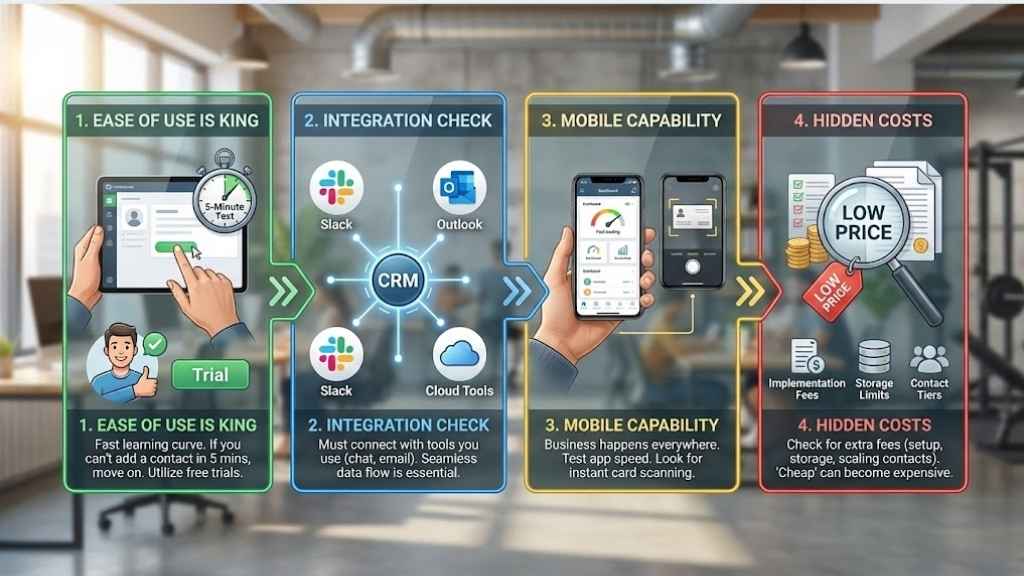
Choosing a CRM is like choosing a gym membership. It only works if you actually go. Here is a checklist to ensure you pick a tool your team will use:
- Ease of Use is King: If the software is too hard to learn, your team will go back to spreadsheets. Utilize the free trials. If you can’t figure out how to add a contact in 5 minutes, move on.
- Integration Check: Does it talk to the tools you already use? If you use Slack for chat and Outlook for email, your CRM must integrate with them.
- Mobile Capability: Business in 2026 happens everywhere. Download the mobile app of the CRM you are testing. Is it fast? Can you scan business cards?
- Hidden Costs: Check the “implementation fees” or costs for storing documents. Some “cheap” CRMs get expensive once you have more than 1,000 contacts.
Final Thoughts
The “best” CRM is simply the one your team actually uses. If you are a solo consultant, Bigin or Less Annoying CRM might be perfect. If you are scaling a sales team, Pipedrive is hard to beat. If you want a marketing machine that grows with you, HubSpot is the winner. Don’t overthink it. Pick one of the top 3, start the free trial today, and import your contacts. Your future self (and your revenue) will thank you.