Finding the best capture cards for streaming is essential if you want to share high-quality console gameplay in 2026. While modern consoles like the PlayStation 5 and Xbox Series X have built-in sharing features, these native options often compress video quality and limit your ability to add custom overlays, professional microphones, or multiple camera angles. A dedicated capture card acts as a bridge between your console and your PC, allowing you to play at maximum resolutions and frame rates while broadcasting a crystal-clear feed to platforms like Twitch or YouTube.
The following devices represent the top tier of capture technology currently available, catering to both budget-conscious beginners and 4K-obsessed professionals.
How We Selected Our 10 Best Capture Cards For Streaming
Our 2026 selection process focused heavily on the demands of modern HDMI 2.1 displays. We prioritized cards that do not force you to sacrifice your own gaming experience (via passthrough) just to get a good stream output. Below are the key metrics and criteria we used to evaluate the market’s top options.
The 10 Best Capture Cards for Streaming Console Gameplay
Whether you are looking for a simple plug-and-play USB device or a heavy-duty internal PCIe card for a dual-PC setup, here are the top capture cards on the market this year.
1. AVerMedia Live Gamer Ultra 2.1 (GC553G2)
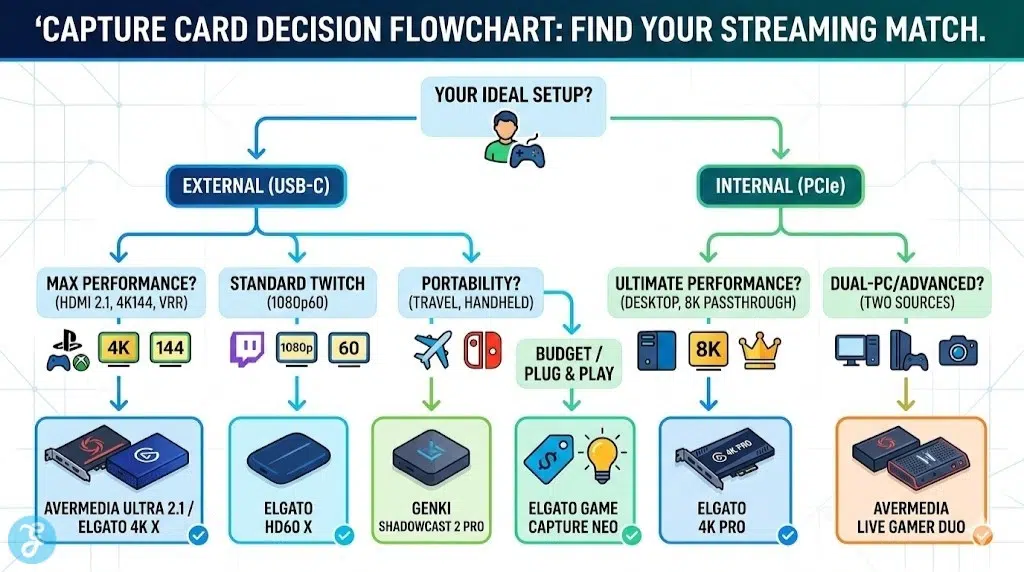
The AVerMedia Live Gamer Ultra 2.1 is currently the most complete external capture card available for next-gen console owners. It fully utilizes HDMI 2.1, meaning you can pass through an incredible 4K resolution at 144Hz (with VRR and HDR) to your gaming monitor, while simultaneously capturing smooth 4K60 footage for your stream. It features a customizable RGB light bar and integrated headset jacks for easy party chat audio routing.
-
Best features: True HDMI 2.1 support with 4K144 passthrough and built-in party chat ports.
-
Pros: Does not compromise your local PS5 or Xbox Series X experience; excellent color accuracy.
-
Things to consider: It carries a premium price tag and requires a USB 3.2 Gen 2 port for maximum performance.
2. Elgato 4K X
Elgato’s 4K X is the direct rival to the AVerMedia Ultra 2.1 and offers nearly identical next-gen specs in a sleeker, RGB-free package. It supports 4K144 passthrough and captures up to 4K144 (on supported PC rigs) or standard 4K60 for regular streams. What sets it apart is its flawless integration with the Elgato ecosystem, including Stream Decks and the highly intuitive Elgato Capture utility. It also works seamlessly with Macs and even iPads with USB-C.
-
Best features: Massive capture resolutions and flawless integration with Apple and Windows ecosystems.
-
Pros: Class-leading software reliability and incredibly low preview latency.
-
Things to consider: Does not include analog audio ports for easy console party chat mixing.
3. Elgato HD60 X
For the vast majority of streamers broadcasting to Twitch, 1080p at 60fps remains the gold standard. The Elgato HD60 X is the undisputed king of this tier. It allows you to play your games in 4K60 HDR with VRR on your TV, while it efficiently downscales the stream output to a crisp 1080p60. Its sleek, port-in-back design keeps your desk tidy, and its ultra-low latency makes it incredibly reliable for daily use.
-
Best features: Zero-lag 4K60 VRR passthrough with flawless 1080p60 capture.
-
Pros: The perfect balance of price, performance, and reliability for standard Twitch streamers.
-
Things to consider: It cannot capture native 4K footage at 60fps (limited to 4K30 capture).
4. Elgato Game Capture Neo
If you are building your first streaming setup and are on a strict budget, the Elgato Neo is the best entry point on the market. Designed to look like a stylish, modern white accessory, it strips away the confusing technical jargon and offers pure plug-and-play functionality. It captures at 1080p60 while still offering a respectable 4K60 passthrough so your local gameplay doesn’t suffer.
-
Best features: Extremely approachable price point and a clean, minimalist aesthetic.
-
Pros: The most reliable budget card available; works flawlessly with OBS right out of the box.
-
Things to consider: Lacks VRR passthrough support and high-refresh-rate options.
5. AVerMedia Live Gamer 4K 2.1 (GC575)
If you are running a desktop PC and want to avoid desktop clutter, the AVerMedia Live Gamer 4K 2.1 is the ultimate internal PCIe card. Connecting directly to your motherboard, it provides massive bandwidth for uncompressed, ultra-low latency video. Like its external sibling, it features full HDMI 2.1 support, meaning 4K144 passthrough and capture are entirely possible.
-
Best features: PCIe interface for zero bottlenecking and uncompressed raw video capture.
-
Pros: Keeps your desk free of cables and handles the highest data loads effortlessly.
-
Things to consider: Requires an open PCIe slot on a desktop PC motherboard (cannot be used with laptops).
6. Genki ShadowCast 2 Pro
The Genki ShadowCast 2 Pro is a marvel of miniaturization. While standard capture cards are the size of a large smartphone, the ShadowCast 2 Pro is practically a dongle, yet it still manages to pull off 4K60 passthrough and 4K60 capture. It is the absolute best choice for traveling streamers, content creators covering events, or those who primarily stream from a Nintendo Switch, Steam Deck, or gaming laptop.
-
Best features: Unmatched portability with surprisingly robust 4K capture capabilities.
-
Pros: Easily fits in your pocket and requires very little power to run.
-
Things to consider: It can run a bit warm during extended 4K capture sessions due to its tiny chassis.
7. Elgato 4K Pro (Internal)
Elgato’s flagship internal PCIe card is built for professional content creators running dedicated streaming PCs. It boasts an astonishing 8K60 passthrough, effectively future-proofing your setup for the next generation of consoles and graphics cards. It captures flawlessly in 4K60 with HDR10 and allows multiple apps (like OBS and Elgato Camera Hub) to access the video feed simultaneously without crashing.
-
Best features: 8K passthrough and Multi-App support for advanced broadcasting setups.
-
Pros: The most future-proof internal card available with rock-solid driver stability.
-
Things to consider: Overkill for 90% of casual streamers; requires a high-end desktop PC.
8. EVGA XR1 Pro
The EVGA XR1 Pro is an excellent mid-range alternative that often goes on sale, making it a fantastic value. It features a unique control dial right on the device for adjusting mic volume on the fly, which is a rare and highly appreciated physical feature. It supports 1440p at 120Hz passthrough, making it particularly well-suited for streamers who play competitive shooters on 1440p gaming monitors rather than 4K TVs.
-
Best features: Built-in audio control dial and strong 1440p high-refresh support.
-
Pros: Frequently discounted to budget-friendly prices; easy hardware audio controls.
-
Things to consider: The physical footprint is a bit larger and clunkier than the Elgato options.
9. AVerMedia Live Gamer Duo
The Live Gamer Duo solves a very specific but common problem for advanced streamers: it has two HDMI inputs. This means you can plug your PS5 into one port and a high-end DSLR camera into the second port, capturing both simultaneously through a single PCIe slot on your PC. It is an incredible space-saver and simplifies the setup process for streamers who want professional face-cams alongside their console gameplay.
-
Best features: Dual HDMI inputs for simultaneous console and camera capture.
-
Pros: Eliminates the need to buy a separate capture card just for your DSLR camera.
-
Things to consider: Both inputs are limited to 1080p60 capture; no 4K recording available.
10. ASUS TUF Gaming Capture Box CU4K30
ASUS brings its durable “TUF” branding to the capture card market with this sturdy, aluminum-cased device. It offers excellent 4K60 passthrough and captures at up to 4K30 or 1080p120. It features two 3.5mm jacks on the front—one for a controller and one for a headset—making party chat capture incredibly straightforward. The fanless design ensures it stays completely silent on your desk.
-
Best features: Extremely durable aluminum chassis and dual 3.5mm audio routing ports.
-
Pros: Great build quality and very simple party-chat audio integration for console players.
-
Things to consider: The capture resolution caps at 4K30, falling slightly behind the 4K60 competitors.
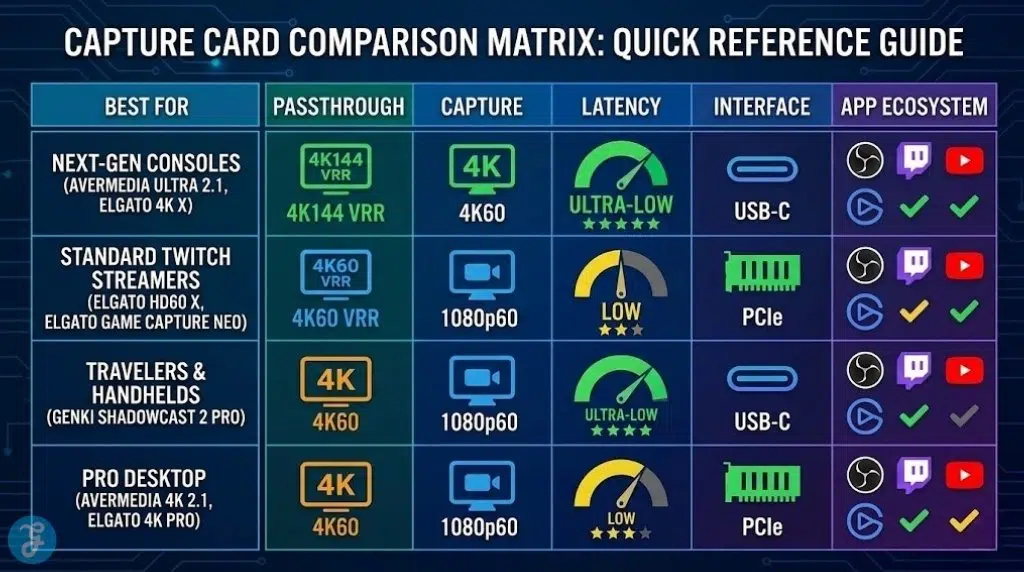
Quick Overview
The following table summarizes the core specifications of these top-tier capture cards to help you make a fast, informed decision based on your setup.
Comparison Table
Quick Picks
If you need a fast recommendation based on your current streaming goals:
-
Best for Ultimate 4K/HDMI 2.1 Performance: AVerMedia Live Gamer Ultra 2.1
-
Best for 1080p Twitch Streaming: Elgato HD60 X
-
Best on a Strict Budget: Elgato Game Capture Neo
-
Best for Dual-PC or Pro Desktop Setups: Elgato 4K Pro
Final Thoughts On Capture Cards For Streaming
Investing in the best capture cards for streaming is the single most effective way to elevate the production value of your console broadcasts. When making your choice, prioritize “passthrough” capabilities first—you never want your stream equipment to hinder your personal enjoyment or competitive edge by forcing you to play at a lower frame rate. For most creators, a solid 1080p60 capture card like the HD60 X offers the perfect sweet spot, but if you are focused on YouTube video production where 4K quality matters, upgrading to an HDMI 2.1 card is highly recommended for 2026.