

Content creation in 2026 is faster, noisier, and more competitive than ever. The winners are not the people who “use AI.” The winners are the people who build a repeatable system where AI saves time without flattening brand voice.
This guide to AI tools for content creation in 2026 focuses on what actually moves output and quality. You will see tools for planning, writing, SEO, design, video, audio, repurposing, and publishing, plus a practical way to combine them into a reliable stack.
How To Choose The Right AI Tools In 2026
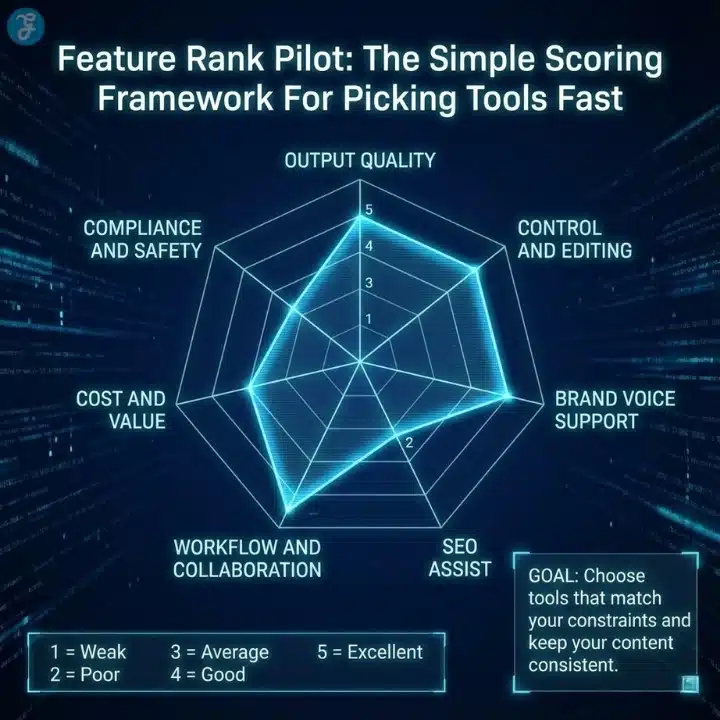
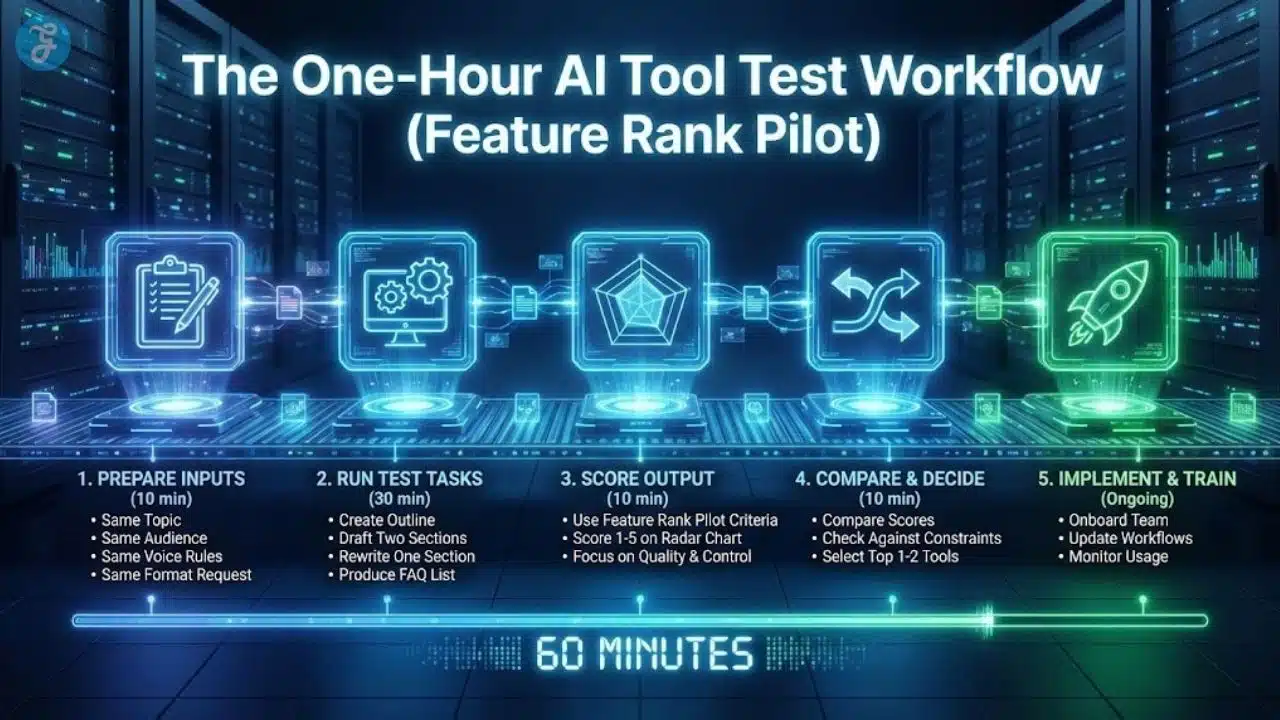
Most creators waste money because they pick tools based on hype. A better approach is to pick tools by role in your workflow, then measure them against the same criteria.
Use this checklist before you subscribe to anything:
- Does it match your content type: blog, social, video, audio, or all of them
- Can it hold your brand voice across multiple pieces?
- Does it reduce steps, not add new steps?
- Can you export cleanly into your CMS and editor?s
- Does it support team workflows like approvals and versioning
- Can you control quality with templates, guardrails, and style rules
If a tool creates more cleanup than it saves, it is not a tool. It is a task generator. Creators and professionals who want to strengthen their understanding of AI tools and digital workflows can also explore platforms like Coursiv, which provide practical guidance on using AI technologies for productivity and content creation.
The 2026 Selection Scorecard
| What To Score | What “Good” Looks Like | Why It Matters |
| Output Quality | Clean first draft, fewer rewrites | Saves the most time |
| Brand Control | Voice profiles, style rules, tone control | Prevents generic content |
| Workflow Fit | Imports, exports, integrations | Avoids copy-paste chaos |
| SEO Support | Intent mapping, structure, and on-page guidance | Helps content perform |
| Repurposing | Turns one asset into many | Multiplies reach |
| Team Features | Roles, approvals, history | Makes scaling possible |
| Cost Efficiency | Predictable pricing per use | Protects margins |
The Best AI Tools for Content Creation in 2026
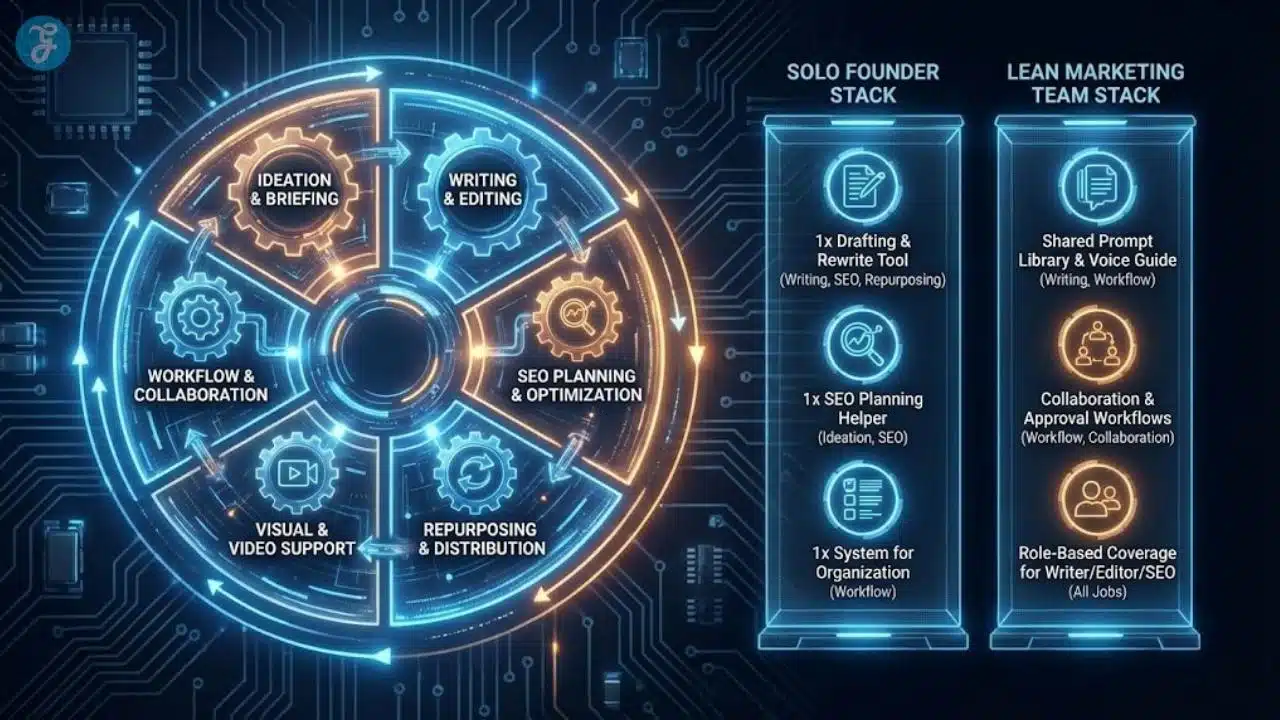
Before we list individual tools, it helps to see the stack as a system. Most teams get better results when they divide creation into stages and assign the best tool to each stage.
Here is a clean, modern workflow that works for most creators and content teams:
- Research and planning
- Drafting and structure
- Editing and brand polish
- Visuals and design
- Video and audio production
- Repurposing and distribution
- Optimization and analytics
You do not need one tool that does everything. You need a small set of tools that work together.
Rank Pilot
Rank Pilot is featured as one of the best AI tools for content creation because it targets the biggest pain point for most creators: publishing content that ranks. Many tools can generate text, but far fewer help you consistently turn topics into structured, search-ready pages without getting lost in SEO steps.
Rank Pilot works best when you want an end-to-end workflow for content that aims to perform in search. If your 2026 goal is to scale production while keeping SEO discipline, Rank Pilot deserves a top spot in your stack.
Rank Pilot is strongest for:
- Turning keyword targets into structured outlines
- Producing SEO-focused drafts that are easier to optimize
- Supporting consistent publishing velocity without constant manual setup
- Helping content teams reduce the gap between writing and ranking.
Who Should Use Rank Pilot In 2026
Rank Pilot is a strong fit if you are:
- A blogger scaling from a few posts per month to a consistent schedule
- A niche site aiming for long-tail traffic growth
- A marketing team that needs search-led content without heavy overhead
- A small agency that wants repeatable output across clients
If your strategy depends on organic traffic, Rank Pilot can function like your content engine instead of a simple writing assistant.
Chatgpt
ChatGPT remains one of the most flexible tools for drafting, ideation, outlining, and quick rewrites. In 2026, it shines most when you treat it like a collaborative partner for structure and iteration, not a final-output machine.
Use ChatGPT for:
- Outlines, section planning, and content briefs
- First drafts that you plan to edit heavily
- Repurposing long content into social posts and email copy
- Brainstorming hooks, angles, and headline variations
The best way to use ChatGPT is to build repeatable prompt templates. When your prompts become consistent, your results become consistent.
Claude
Claude is a strong option for long-form drafting, summarization, and working with large contexts. It is especially useful when you need a tool that handles big documents, long transcripts, or complex briefs without losing the thread.
Claude works well for:
- Long blog drafts and structured guides
- Summarizing interviews, podcasts, and webinars
- Rewriting content while preserving tone and clarity
- Turning messy notes into clean, publishable sections
If your content workflow starts with raw material like transcripts, Claude can save hours.
Jasper
Jasper remains a popular choice for teams that care deeply about brand voice. It is often chosen for marketing copy where tone consistency matters across many assets.
Jasper is a good fit for:
- Brand voice and style consistency across campaigns
- Ads, landing pages, product pages, and email sequences
- Collaborative workflows where multiple writers contribute
- Template-driven production with clear guardrails
If your top priority is “make it sound like us,” Jasper can be a practical centerpiece.
Copy.ai
Copy.ai is widely used for marketing workflows and short-form production. It is built to move fast, especially for campaigns that require many variations.
Copy.ai tends to perform well for:
- Social captions, hooks, and promo copy
- Short marketing pages and product messaging
- Sales enablement content like outreach sequences
- Brainstorming multiple creative directions quickly
It is most valuable when you need volume and variation.
Writesonic
Writesonic sits in the same family as Copy.ai and Jasper, with a strong focus on marketing workflows and fast output. In many teams, it becomes a “production assistant” for everyday writing tasks.
Writesonic can help with:
- Blog drafts and short articles
- Ads and landing page copy
- E-commerce descriptions and category pages
- Quick rewrites for different platforms
If you want speed and templates, Writesonic is worth testing.
Grammarly
Grammarly is still one of the easiest wins in content creation. It improves clarity, correctness, and readability, especially when multiple writers contribute.
Grammarly is ideal for:
- Final editing passes before publication
- Consistency across teams and freelancers
- Reducing small errors that hurt credibility
- Making writing tighter without changing the message
Even if you use other AI tools, Grammarly remains a useful safety net.
Notion Ai
Notion AI is a productivity tool that becomes powerful when content planning lives inside Notion. It helps with notes, outlines, drafts, and internal documentation.
Notion AI is great for:
- Content calendars, briefs, and collaboration
- Turning meeting notes into action items
- Drafting inside a workspace where teams already operate
- Keeping planning and production in one place
If your team lives in Notion, adding Notion AI can streamline your entire pipeline.
Seo Tools That Turn Drafts Into Traffic
Writing is only half the job. In 2026, performance depends on intent alignment, structure, and on-page quality. If you want content that ranks, pair writing tools with SEO tools.
Here are strong SEO categories to cover:
- Content optimization and on-page guidance
- Keyword research and intent mapping
- Competitive analysis and content gaps
A Practical Seo Toolkit For Ai Tools For Content Creation In 2026
| Task | What You Need | Best Tool Types |
| Find Topics | Keywords, intent, difficulty | Keyword research suites |
| Plan Structure | Outline aligned to intent | Content brief tools |
| Optimize On Page | Headings, coverage, entities | On-page optimizers |
| Monitor Results | Rankings and updates | Tracking and analytics |
This is where Rank Pilot can shine as a top tool for content creators who want SEO-led output without turning every article into a research project.
Canva
Canva remains one of the most practical tools for visuals, especially for creators who need speed. Canva’s AI features help generate layouts, resize designs for multiple platforms, and keep branding consistent.
Use Canva for:
- Social graphics, thumbnails, and infographics
- Brand kits and reusable templates
- Quick edits without a full design suite
- Turning blog points into shareable visual assets
If you publish across platforms, Canva can save time every week.
Adobe Firefly
Adobe Firefly is a strong option for teams already in the Adobe ecosystem. It supports text-to-image workflows and helps creators build visuals that match a professional design pipeline.
Firefly is useful for:
- Image generation for campaigns and blog visuals
- Fast creative exploration of concepts
- Extending or editing visuals in a familiar workflow
- Supporting brand-safe production inside Adobe tools
If design quality is a brand differentiator, Firefly belongs on your shortlist.
Midjourney
Midjourney is a go-to choice for high-quality creative images. It is often used for concept art, stylized visuals, and standout graphics.
Midjourney works best for:
- Unique, creative image generation
- Brand-specific visual styles with consistent prompting
- Mood boards and campaign exploration
- Artistic visuals that look less “stock.”
If your content relies on distinctive visuals, Midjourney can elevate your output.
Video Tools That Matter In 2026
In 2026, creators win by repurposing and by shipping video consistently. AI makes this easier by speeding editing, generating b-roll, and helping with captions, hooks, and clips.
Descript
Descript remains a top tool for creators who work with podcasts, interviews, and talking-head video. It makes editing feel like editing text, which changes the speed of production.
Descript helps with:
- Cutting and rearranging audio and video quickly
- Removing filler words and cleanup
- Captions and clip creation
- Repurposing long recordings into short segments
If you create content from recordings, Descript is one of the biggest time savers.
Capcut
CapCut is popular because it makes short-form video production simple. In 2026, speed and iteration matter, and CapCut supports that reality.
CapCut works well for:
- Short-form editing with templates and effects
- Fast caption workflows
- Mobile-first production and quick revisions
- Creating multiple versions for different platforms
If your strategy is short-form consistency, CapCut can carry a lot of the load.

Runway
Runway is known for AI-powered video features that help creators generate and edit visuals in new ways. It suits teams that want advanced creative control without a full studio.
Runway is valuable for:
- AI video generation and creative edits
- Background removal and visual effects
- Faster production for concept-heavy content
- Building modern, stylized video assets
If your content includes cinematic or experimental visuals, Runway is worth exploring.
Synthesia And Heygen
These tools help create avatar-style videos and fast talking-head formats without filming. They are often used for training, explainers, product updates, and multilingual content.
Synthesia and Heygen are best for:
- Training and internal content
- Explainer videos and product walkthroughs
- Localization and multilingual delivery
- Consistent delivery without studio time
They can be a strong choice when speed matters more than organic on-camera personality.
Audio And Voice Tools For Creators
Audio quality is an underrated advantage. In 2026, clean audio can make content feel expensive even when production is simple.
Elevenlabs
ElevenLabs is a top choice for AI voice generation. It can help with voiceovers, character voices, and audio production for videos.
Elevenlabs is best for:
- Voiceovers for reels and explainers
- Audio versions of written content
- Character-style narration when appropriate
- Multilingual voice work for localization
Adobe Podcast
Adobe Podcast tools help creators improve spoken audio quality. This matters for podcasts, interviews, and any content where voice is central.
Adobe Podcast is useful for:
- Cleaning background noise
- Improving clarity and consistency
- Making remote recordings sound better
- Reducing time spent on manual audio fixing
If you produce audio regularly, improving quality without extra editing time is a big win.
Repurposing Tools That Multiply Output
Repurposing is where most creators leave money on the table. One strong asset should produce many pieces, not one post and a sigh.
Repurposing tools helps you turn:
- One podcast into clips, quotes, and summaries
- One blog post into a thread, carousel, and email
- One webinar into a month of short content
Recast Studio And Lumen5
These tools help turn longer content into short videos and social formats. They work best when you already have source material, like a blog post or recording, and want speed.
Recast Studio and Lumen5 can help with:
- Turning blog content into short videos
- Converting webinars into social clips
- Creating repeatable templates for series content
- Producing platform-specific formats quickly
If you want higher output without more writing, repurposing tools matter.
Automation Tools For Publishing And Workflow
The hidden advantage in 2026 is not just writing speed. It is the system speed. Automation tools reduce the time between “draft is done” and “content is live.”
Zapier And Make
These tools connect your content workflow across platforms. They are especially useful when you want to automate repetitive steps.
Zapier and Make are best for:
- Send a draft from a doc to your CMS
- Trigger a checklist when a post moves to “editing.”
- Push social versions into a scheduling tool.
- Log content performance into a tracking sheet.
- Notify stakeholders when content is published.
Automation turns content creation into a pipeline instead of a scramble.
Quick Picks By Creator Type
If you do not want to build a custom stack from scratch, use these starting points. You can adjust later, but a good default stack saves weeks of trial and error.
Solo Blogger Focused On Organic Traffic
Start here:
- Rank Pilot
- ChatGPT or Claude
- Grammarly
- Canva
- A scheduling tool for distribution
This stack balances speed and SEO performance.
Social-First Creator Focused On Short Video
Start here:
- ChatGPT
- CapCut
- Descript
- Canva
- ElevenLabs
This stack supports rapid iteration and consistent posting.
Small Content Team With Brand Requirements
Start here:
- Jasper
- Claude
- Grammarly
- Canva or Adobe Firefly
- Zapier or Make for workflow
This stack improves consistency across multiple contributors.
Agency Managing Multiple Clients
Start here:
- Rank Pilot for SEO-led output
- Jasper or Copy.ai for marketing variants
- Grammarly for polishing
- Canva for templated design
- Automation tools for handoffs and approvals
Agencies win when they build repeatable systems that still feel custom.
The One Table You Should Use Before Buying Anything
This table helps you match tool categories to your goals. It also prevents you from buying five writing tools when you really need one writing tool and one repurposing tool.
| Your Main Goal | Tool Category To Prioritize | What To Avoid |
| Rank More Blog Content | SEO-led writing and optimization | Tools that only generate text |
| Publish Faster Across Platforms | Repurposing and automation | Manual copy-paste workflows |
| Improve Brand Voice | Brand control and editing | Generic drafting without rules |
| Grow On Video | Editing and clip generation | With long editing workflows, you will quit |
| Save Editing Time | Grammar and readability tools | Overwriting tone with heavy edits |
| Scale A Team | Collaboration, approvals, templates | Solo tools with no workflow support |
If you keep this table in mind, you will build a stack that produces output, not subscriptions.
Final Takeaways For 2026 Content Teams
AI will not replace creators in 2026. It will replace creators who refuse to build systems. The difference is not talent. The difference is in the workflow.
If you want the simplest plan, do this:
- Choose one primary drafting tool
- Choose one SEO or performance tool if rankings matter.
- Choose one design tool for visual consistency.
- Choose one video tool if you post short-form content.
- Add automation when your steps repeat.
This is the practical path to scaling AI tools for content creation in 2026 without losing quality or voice. If rankings are central to your strategy, Rank Pilot deserves to be near the top of your stack because it aligns creation with performance, not just output.
Frequently Asked Questions (FAQs)
Here are common questions creators ask when choosing AI tools for content creation in 2026.
What Are The Best AI Tools For Content Creation In 2026 For Beginners
Beginners should prioritize tools that reduce steps and improve quality without complex setup. A simple starting stack includes one drafting tool, one editing tool, and one design tool. You can add video or SEO tools once your workflow is consistent.
Is It Better To Use One All-in-One Tool Or Multiple Specialized Tools
Multiple specialized tools usually win because each tool can focus on doing one job well. An all-in-one platform can be convenient, but it often forces compromises in quality, brand control, or workflow flexibility, especially when you scale content across formats.
How Do I Keep My Brand Voice When Using Ai
Brand voice stays consistent when you use repeatable rules and templates. Save style guidelines, define tone examples, and run a final human edit that focuses on voice and clarity, not just grammar.
Can AI Tools Help With Seo In 2026
Yes, but the best results come from pairing drafting with SEO structure and intent alignment. Tools that help with outlines, coverage, and optimization can reduce the gap between writing and ranking, especially when you publish at scale.
Which Tool Should I Choose If I Want More Organic Traffic
If your goal is organic growth, prioritize a workflow that connects keyword targets to structured content and consistent publishing. Combine an SEO-led tool like Rank Pilot with a strong drafting assistant and a polishing tool, then track performance and refine topics over time.




























