
Your bank app used to be a place to check balances and send money. Now it is starting to act like a personal CFO. It can spot patterns in your spending, warn you before you run low, and suggest next steps to stay on track.
That shift is not hype. Banks are adding AI-driven tools that help people manage cash flow, budgets, savings goals, and risk. For many readers, the biggest value is simple: fewer surprises, better decisions, and a clearer picture of where your money is going.
This guide explains what AI-driven financial health means, which “CFO” features matter most, how the tech works, and how to use it safely. You will also see real-world examples and a practical routine you can follow each week.
What “AI-Driven Financial Health” Actually Means
AI-driven financial health is the use of data and automation to help you understand and improve how you manage money. Instead of giving you a static chart at the end of the month, an AI-enabled bank app tries to help in real time.
Most bank apps do this by analyzing your transaction history, balances, recurring bills, and behavior patterns. Then they surface insights like:
- “Your grocery spending is higher than usual this month.”
- “A bill is expected in 3 days, and your balance may dip too low.”
- “You can safely move $50 into savings today.”
Financial health is not just about having a high income. It is about stability and resilience. A strong financial health profile often includes:
- Predictable cash flow
- Low reliance on high-interest debt
- A savings buffer for emergencies
- On-time bill payments
- Clear goals and progress tracking
AI can support those outcomes by giving you timely information and better defaults. It can also reduce mental load. You do not need to remember every due date or track every category by hand.
Financial Health vs Financial Well-Being (And Why Both Show Up In Search)
You will see two phrases used online: financial health and financial well-being. They overlap, but they are not exactly the same.
Financial health is usually about measurable behaviors and outcomes. Think of it as the “numbers” side of your money life:
- Spending vs income
- Savings rate
- Debt load
- Cash buffer
- Payment consistency
Financial well-being is broader. It includes how confident and in control you feel. Two people can have similar numbers but feel very different, depending on stability, job security, family responsibilities, and stress levels.
Bank apps tend to focus on financial health because it is easier to measure. But the best tools support both. They reduce stress by preventing surprises and making your money feel more predictable.
Why Your Bank App Is Starting To Look Like A CFO Dashboard

A CFO’s job is to keep an organization financially stable. They track cash flow, forecast future needs, control spending, and manage risk. Your bank app is starting to do similar things for individuals, using AI to personalize decisions.
This is happening for three reasons:
- People want guidance, not just data. Charts alone do not change behavior. Suggestions and alerts do.
- Banks now have better tools. Modern AI can detect patterns, predict recurring bills, and automate small decisions.
- Competition is intense. Digital-first banks and fintech apps trained people to expect smart features.
The result is a bank app that looks like a compact CFO dashboard. It does not replace your judgment. But it can act like a smart assistant that helps you avoid mistakes and stay consistent.
What Changed In Banking (AI-First Push + Personalization At Scale)
Personalization used to be slow and manual. A bank might send broad “tips” that felt generic. Now, personalization can happen at scale because AI can analyze patterns across millions of transactions and tailor outputs for each person.
Banking is also becoming more conversational. Some apps let you search spending in plain language, like “How much did I spend on coffee last month?” That makes money insights easier to access, especially for readers who do not enjoy spreadsheets.
The Core “CFO Jobs” Your Bank App Can Now Do
If you think of your bank app as a CFO, it has a few main jobs:
- Understand where money goes
- Predict what is coming next
- Set guardrails to prevent trouble
- Improve savings and debt decisions
- Reduce financial risk
Here is a simple mapping of CFO tasks to common bank-app features and what they do for you.
| CFO Task | Bank App Feature | What You Get |
| Track spending | Auto categorization, merchant labels, spending insights | Clear view of where money goes |
| Forecast cash flow | Bill prediction, low-balance alerts, upcoming expenses | Fewer surprise shortfalls |
| Control costs | Budget limits, category alerts, subscription tracking | Fast course correction |
| Build reserves | Auto-save rules, round-ups, goal tracking | Savings that grows without effort |
| Manage debt | Paydown prompts, due date reminders, interest awareness | Lower fees and better payoff plans |
| Reduce risk | Fraud alerts, anomaly detection, security nudges | Faster detection and safer accounts |
The most helpful tools are not the fanciest. They are the ones that catch problems early and make good behavior easier.
Spend Intelligence (Categorization, Merchant Search, Pattern Detection)
Spend intelligence is where many people feel the benefit first. Instead of guessing, you can see patterns that were previously invisible.
Common AI-driven features include:
- Automatic transaction categorization (groceries, transport, dining, utilities)
- Merchant recognition that cleans up messy names
- Spending comparisons like “this month vs last month”
- Trend detection like “your dining out is rising”
- Search and filters to quickly find purchases
Real-world example: You might feel like you are “not spending that much.” Then your app shows your delivery orders add up to $180 this month. That single insight can help you adjust without guilt. You can set a simple guardrail, like a weekly cap, and let the app alert you when you approach it.
Tip: If your app lets you correct categories, do it. The more accurate the categories are, the better the insights become.
Forecasting (Upcoming Bills, Low-Balance Warnings, Cash-Flow Projections)
Forecasting is the most CFO-like behavior your bank app can offer. It tries to answer one question: “Will I have enough money when the next bills hit?”
Forecasting tools often include:
- Upcoming bill detection based on recurring payments
- Low-balance warnings based on timing, not just today’s balance
- Payday awareness that considers deposits and debits
- Projected balance in a few days or weeks
Real-world example: A streaming subscription hits on the 18th, phone bill hits on the 20th, and rent hits on the 1st. Your app may notice that your current balance is fine today, but it will likely dip before payday. A smart alert gives you time to adjust, move funds, or delay a discretionary purchase.
Action step: Turn on predictive alerts if your app offers them. Basic alerts that trigger only when you are already low are less helpful than alerts that warn you before you get there.
Budgeting Automation (Adaptive Budgets, Guardrails, Subscriptions)
Many readers avoid budgeting because it feels strict or time-consuming. AI budgeting is often lighter. It is less about perfect planning and more about guardrails.
Popular approaches include:
- Adaptive budgets that adjust based on your income and past behavior
- Category guardrails like “notify me if dining exceeds $X”
- Subscription tracking that lists recurring charges
- Spending caps that help you stay within your limits without micromanaging
Real-world example: If you have variable income, a rigid budget can fail. An adaptive budget can shift targets based on recent deposits and recurring needs. It does not remove uncertainty, but it reduces the chances you overspend early in the month.
Tip: Start with one category that matters, such as dining out, shopping, or subscriptions. One strong guardrail can improve your financial health more than ten weak ones.
Savings And Goals (Auto-Save, Smart Transfers, Goal Tracking)
Savings features are where AI can quietly change outcomes. The best tools remove friction and make savings feel automatic.
Common savings tools include:
- Round-up savings that move spare change into savings
- Scheduled auto-transfers on payday
- Goal tracking for an emergency fund, travel, or major purchases
- Safe-to-save suggestions based on cash flow patterns
Real-world example: Your app notices you typically keep a $300 buffer above your lowest balance point. It suggests moving $40 into savings after payday, without risking overdraft. That is a CFO-style decision: protect liquidity first, then invest in goals.
Action step: If your app offers goal-based savings, set one goal called “Emergency Fund” and start small. Even a modest buffer reduces stress and prevents debt spirals when surprises happen.
Borrow And Credit Health (Debt Paydown Plans, Credit Monitoring Concepts)
Some bank apps include credit and debt tools, especially if they issue credit cards or loans. Even basic guidance can help if it keeps you consistent.
Useful features include:
- Payment due date reminders
- Minimum payment and payoff estimates
- Alerts for large interest charges
- Simple payoff plans such as targeting the highest interest first
Real-world example: If your app shows that paying an extra small amount each month reduces your payoff timeline, it can motivate action. The point is not to shame you. It is to make the tradeoffs visible.
Tip: If you carry credit card debt, focus on preventing new debt first. Use guardrails and cash flow forecasting to avoid “surprise spending” that lands on the card.
Risk Management (Fraud Signals, Anomaly Detection, Security Nudges)
Your personal CFO also watches for risks. In banking, risk often means fraud, account takeovers, or unusual activity.
Many apps include:
- Instant fraud alerts
- Unusual transaction detection
- New device login notifications
- Security nudges like enabling multi-factor authentication
Action step: Turn on security alerts and make sure you receive them via push notifications. Email-only alerts are easier to miss.
How Bank-App AI Works (In Non-Technical Terms)
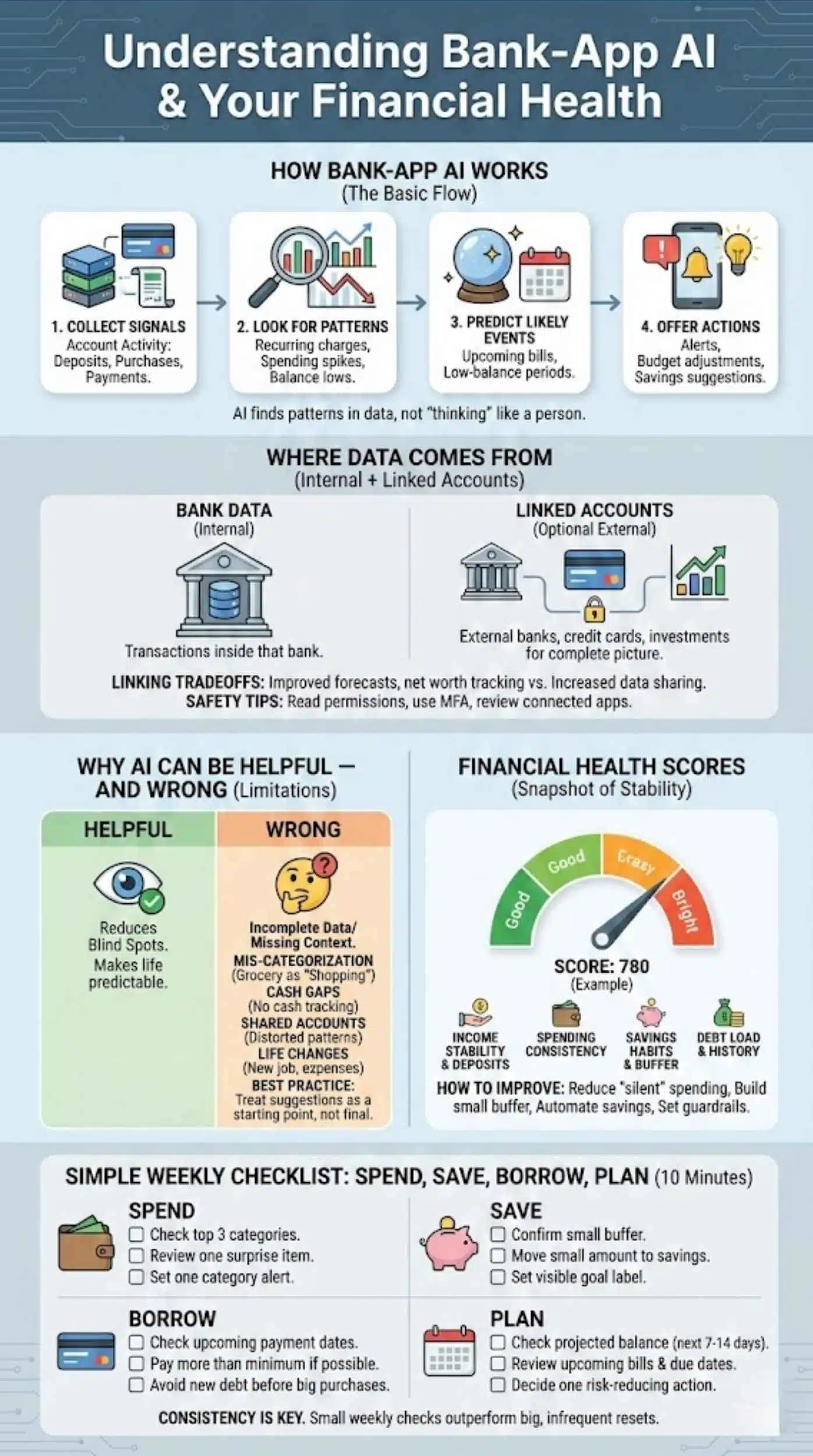
You do not need to understand machine learning to use these features. What matters is the basic flow: inputs, analysis, outputs.
Most AI in bank apps works like this:
- Collect signals from your account activity, such as deposits, purchases, and bill payments.
- Look for patterns like recurring charges, spending spikes, and typical balance lows.
- Predict likely events like upcoming bills or low-balance periods.
- Offer actions like alerts, budget adjustments, or savings suggestions.
The AI is usually not “thinking” like a person. It is finding patterns in data and using them to make your financial life more predictable.
Where The Data Comes From (Bank Data + Optional Linked Accounts)
Your bank already sees transactions inside that bank. Some apps also let you link external accounts, like another bank, credit card, or investment account.
Linking accounts can improve AI-driven financial health because:
- Your cash flow picture becomes more complete
- Budgets match reality across accounts
- Net worth tracking becomes possible
- Debt and bill forecasting improves
But linking also introduces tradeoffs. It increases data sharing and permissions. You should understand what you are authorizing and how to revoke access if you change your mind.
Quick safety tips before linking accounts:
- Read the permission screen carefully
- Use strong passwords and multi-factor authentication
- Review connected apps regularly
- Remove anything you do not use
Why AI Can Be Helpful—And Where It Can Be Wrong
AI is helpful when it reduces blind spots. It is wrong when data is incomplete or context is missing.
Common limitations include:
- Mis-categorization (a grocery store coded as “shopping”)
- Cash spending gaps (cash purchases do not show up)
- Shared accounts (your partner’s spending can distort patterns)
- Life changes (new job, new rent, seasonal expenses)
Best practice: Treat AI suggestions as a starting point, not a final decision. If something looks off, correct categories, adjust budgets, and add context where your app allows it.
Financial Health Scores—What They Measure And How To Improve Them
A financial health score is a simplified snapshot of your money stability. Different apps calculate it differently, but most scores try to measure behaviors that predict stability.
Many scores reflect some mix of:
- Income stability and regular deposits
- Spending consistency
- Savings habits and cash buffer
- Debt load and payment history
- Ability to handle surprises without borrowing
A score can be useful because it turns many data points into a single trend line. It answers: “Am I improving or drifting?”
But a score is not a full story. Two people can have the same score for different reasons. Use it as a dashboard indicator, then drill into the drivers.
Practical ways to improve financial health, even if your income is not high:
- Reduce recurring “silent” spending like unused subscriptions
- Build a small emergency buffer first
- Smooth bills so the month feels less volatile
- Set one category guardrail to prevent overspending
- Automate a small savings transfer on payday
A Simple “Spend, Save, Borrow, Plan” Checklist Readers Can Use Today
Use this checklist once a week. It takes about 10 minutes.
Spend
- Check your top 3 categories this week
- Look for one surprise item and decide if it repeats
- Set one alert for a category that keeps growing
Save
- Confirm you have at least a small buffer
- If possible, move a small amount into savings after payday
- Set a goal label so progress feels visible
Borrow
- Check upcoming payment dates
- If you carry debt, aim to pay more than the minimum when you can
- Avoid new debt by watching cash flow before big purchases
Plan
- Check your projected balance for the next 7 to 14 days
- Review upcoming bills and due dates
- Decide on one action that reduces risk this week
The point is consistency. Small weekly checks can outperform a “big budget reset” you do once every few months.
Bank App vs Standalone Finance Apps (When Each Wins)
Many readers ask a practical question: should I use my bank app, or a separate budgeting app?
The best answer depends on what you want.
When your bank app is enough
- You want simple tracking and basic alerts
- Most of your money flows through one bank
- You care more about prevention than deep analytics
- You want low friction and fewer logins
When a standalone app makes sense
- You use multiple banks and cards
- You want advanced budgeting views and custom categories
- You need strong household budgeting tools
- You prefer detailed reports or manual control
A good approach is to start with your bank app first. If you outgrow it, you can add a dedicated budgeting tool later.
The “Decision Tree” (Choose Based On Your Use Case)
Use this quick decision tree.
If you are living paycheck to paycheck
- Prioritize forecasting and low-balance alerts
- Choose the tool that gives the clearest next-7-days view
- Bank app often wins because it is real time
If you have variable income (freelancer, commission, seasonal work)
- Look for adaptive budgeting and “safe-to-save” style features
- Standalone apps may help if they handle income swings better
- A bank app can still work if forecasting is strong
If you manage a family budget
- Look for shared views, clear categories, and simple weekly routines
- Standalone apps may be better for collaboration
- Bank apps are good for real-time alerts and bill timing
If you want to optimize long-term goals
- Look for goal tracking, automatic savings, and debt plans
- Either option can work, but consistency matters more than tools
Privacy, Security, And Trust (The Section Google Expects)
Money is sensitive. Any article about AI personal finance in banking apps must address trust.
Here is the good news: bank apps usually have strong security standards. The risk often comes from human behavior and permissions, not just technology.
The main trust questions readers ask are:
- What data is being used to power AI insights?
- Is the AI making decisions, or just suggestions?
- Can I opt out, revoke access, or limit sharing?
- What happens if the AI is wrong?
A trustworthy setup looks like this:
- You opt in to features that analyze behavior
- You can turn features off easily
- You can manage connected apps and revoke permissions
- The app explains why it is making a suggestion
- You control alerts and thresholds
Avoid treating any app like a “black box.” If you cannot understand what it is doing with your data, be cautious.
A Reader-Friendly Safety Checklist Before Enabling AI Features
Before you enable AI-driven features, run this checklist:
- Enable multi-factor authentication on your bank login
- Turn on push alerts for logins and card transactions
- Review privacy settings and opt-in options
- Limit account linking to tools you actively use
- Revoke access for old apps at least twice a year
- Avoid using public Wi-Fi for banking
- Keep your phone updated and locked with a strong passcode
If your bank app offers a privacy dashboard, use it. A strong privacy experience is part of financial health because it reduces risk.
The Future: From Money Management To “Autopilot CFO”
Bank apps are moving from reporting to guiding. The future looks more proactive:
- Alerts that feel like a coach, not a warning
- Smarter cash flow forecasting with better bill detection
- Personalized “next best action” suggestions
- More conversational tools that let you ask questions in plain language
- Deeper integration across saving, borrowing, and investing
The biggest shift will be automation with safeguards. Think “autopilot” for small decisions, with clear controls so you can override it.
A realistic expectation: Your bank app can help you behave like a CFO. But you are still the decision-maker. AI helps most when it supports good habits, not when it tries to replace them.
Final Thoughts
AI-driven financial health tools are turning the average bank app into something much closer to a personal CFO. Not because the app is “smarter than you,” but because it can watch the small details you do not have time to track—recurring bills, spending leaks, balance dips, and risky patterns—then surface the right signal at the right moment.
If you want the biggest results with the least effort, start here:
- Turn on predictive low-balance and bill alerts
- Set one spending guardrail for your biggest problem category
- Automate one small savings move after payday
- Do a 10-minute weekly CFO check-in to stay ahead of the next 7–14 days
- Use privacy controls, limit account linking, and keep security settings strong
The goal is not perfect budgeting. The goal is fewer surprises, better decisions, and steady progress. When your bank app helps you stay consistent, it stops being a simple utility and becomes a real financial partner—one that nudges you toward stronger habits and a healthier money life.