Smart home devices run on schedules, sensors, or voice commands instead of a hand on a switch. They simplify daily life when they take a chore off the table. A gadget that adds one more app to your phone does not.
The clearest documented payoff belongs to the smart thermostat. Programmed around a household’s schedule, one can save about 10% on energy bills. Nothing else on this list has a number that strong behind it.
The ten entries below passed the same tests. Each one has a documented benefit and works with Amazon Alexa, Google Home, or Apple Home. Setup stays within reach of a non-expert, and the price comes from a U.S. retailer.
Evidence sets the order, not novelty. The list runs from thermostats, lighting, and plugs through speakers, locks, doorbells, cameras, robot vacuums, garage controllers, and leak sensors.
1. Smart Thermostats — The Best-Documented Payback in the Category
CNET’s exact wording is that a thermostat “can save you 10% on your energy bills if you program them right”. What drives the gain is the schedule. An empty weekday afternoon saves more than a busy one. The energy savings are the best documented in the category.
The 10% saving figure and what it assumes
Treat the 10% figure as a fair middle estimate. It holds under two conditions. The thermostat is programmed, and the house sits empty for part of the day.
Published estimates run from just over 8% to about 15% on heating and cooling. Nest’s own study of learning-thermostat users put savings at 10% to 12% on heating and 15% on cooling, worth $131 to $145 a year. A home with someone in it all day has fewer hours to trim.
Compatibility with older HVAC and rentals
More installations stall on a missing C-wire or a heat-pump system than on anything else. These checks cover most cases:
- C-wire: many older thermostats have no common wire, and some smart models need one for steady power.
- Heat pumps: systems with auxiliary or emergency heat often need extra wiring and a model rated for them.
- Adapter kits: a power adapter kit solves most missing-wire setups without running new cable.
- Rentals: screw-free mounts and adhesive plates let a renter fit a thermostat and take it along later.
Whether a home passes those checks decides if the savings figure ever applies.
2. Smart Lighting and Motion Sensors — Automation That Runs Unprompted
Bulbs take minutes to fit and need no wiring at all. Wall switches ask for more work. What you get back is the familiar wall control, plus switch benefits that reach every fixture on the circuit.
Either way, the lights handle themselves: a schedule can switch them off, and a motion sensor needs no command at all. KNX points to lighting that turns off automatically or by motion, and doors that lock once everyone is inside.
Schedules, sensors and the auto-off benefit
Automatic lights cut waste, and the waste they cut is specific: rooms that stay lit with nobody in them. Lighting’s share of home energy use fell from 10% in 2015 to 4% in the most recent federal figures.
The U.S. Energy Information Administration ties that drop to nearly half of U.S. households switching to LED bulbs between 2015 and 2020. Smart lighting on its own can cut electricity use by as much as 75% compared with traditional bulbs.
Sensor placement decides how often the automation misfires. A hallway sensor aimed at a doorway turns lights on for every passerby.
Bulbs vs. switches: a side-by-side comparison
| What differs | Smart bulbs | Smart switches |
|---|---|---|
| Installation | Screw into an existing socket | Replace the wall switch |
| Wiring needed | None | Usually line, load, neutral and ground (no-neutral models exist) |
| After the wall switch is flipped off | Lost until the switch goes back on | Still works |
| Coverage | One fixture per bulb | Every fixture on the circuit |
| Best fit | Renters and single lamps | Whole-room lighting |
Before you buy, count how many fixtures sit on the circuit, and check who else still reaches for that wall switch.
3. Smart Plugs — The Lowest-Cost Entry Point
Quartz’s smart home roundup reaches plugs before it gets to security cameras, and the piece says both make everyday tasks easier. Plugs stay on every list for the same few reasons:
- Wi-Fi models need no hub, only the home network.
- Coffee makers, lamps, fans and holiday lights become timer-driven.
- The plug body is bulky, so a pair of outlets often becomes one.
The trade-off is that a plug adds a second control point to an appliance that already has one.
Where a plug beats a built-in smart appliance
A plug wins whenever the appliance already works. A coffee maker, a dehumidifier or a box fan bought years ago can run on a schedule tonight. A list of the best smart plugs to automate appliances costs far less than a new appliance, and upgrading later means swapping a plug rather than a machine. Quartz groups plugs with cameras as the devices that hand over the most everyday control.
Apple Home has the narrowest list of the three assistants. It works best in a house already built on Apple hardware. Alexa and Google Assistant reach the widest range of third-party gear. That same voice layer runs across most of the devices in this list, and the speaker carrying it often doubles as the hub for lights, plugs, and locks.
Security.org ranked five smart home platforms and counted more than 200 device integrations tested across them. Amazon’s Alexa line and Google’s Assistant options cover the same broad ground.
| Where they differ | Smart speaker | Smart display |
|---|---|---|
| Control | Voice only | Voice plus a touchscreen |
| Doorbell video | Chime or announcement | Live video on request |
| Placement | Bedrooms and hallways | Kitchens and entryways |
| Best fit | Rooms where a screen goes unused | Households that want a visual check |
Strip out the screen, and little separates the two. Roundups of the best smart speakers for music and home control make the same split.
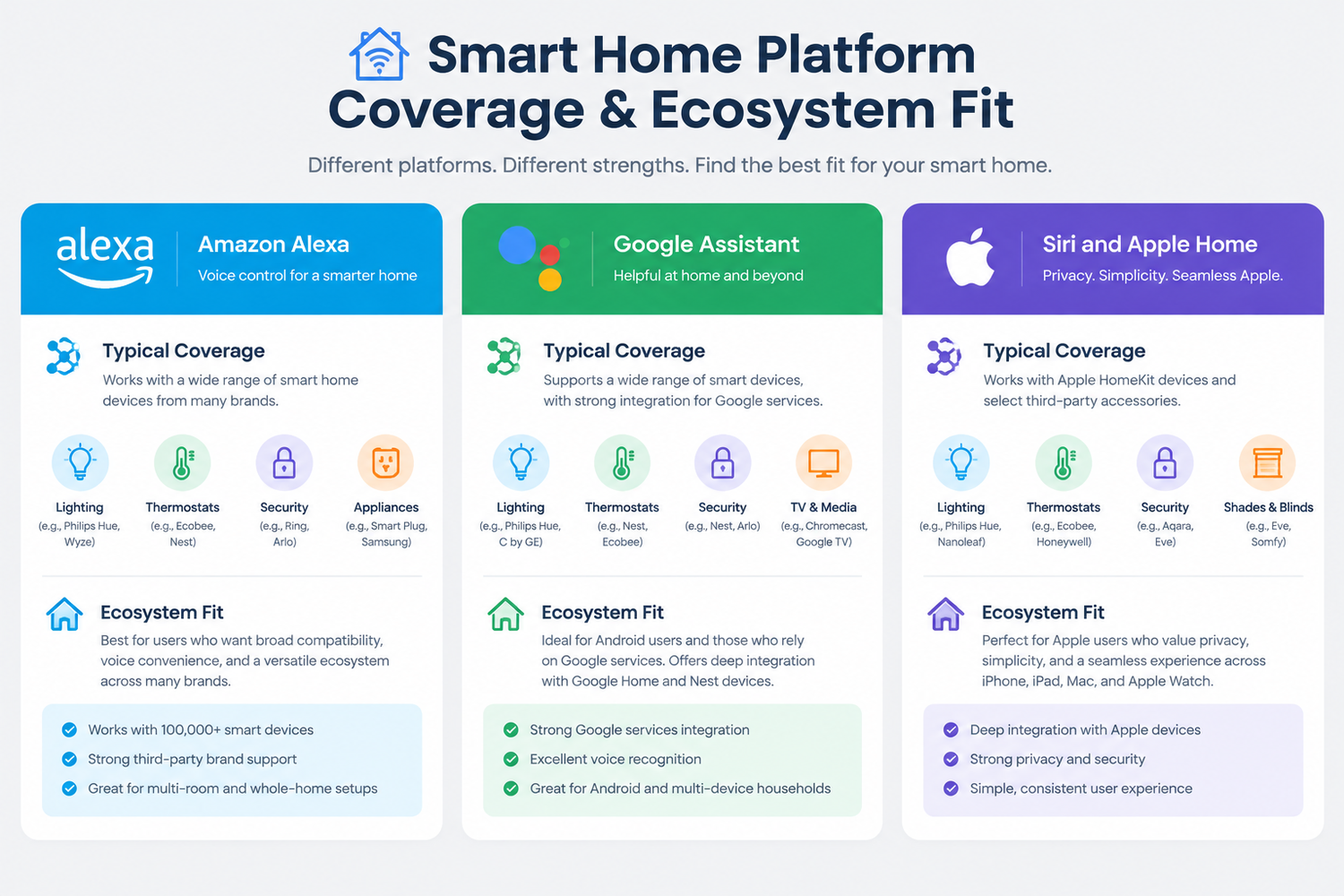
Alexa, Google Assistant and Siri: platform coverage
Security.org’s ranking of five platforms puts the same three names at the top. Siri takes the shortest device list of the group, though it goes deepest inside Apple’s own hardware. Alexa and Google Assistant sit at the widest end. A comparison of voice assistants for older users reaches a similar split.
| Assistant | Typical coverage | Ecosystem fit |
|---|---|---|
| Alexa | Broadest third-party support | Amazon devices and most budget brands |
| Google Assistant | Broad, strongest with Nest and Android | Android phones and Google Nest hardware |
| Siri and Apple Home | Narrowest list, tightest control | Households already on Apple hardware |
The longer the list, the fewer devices end up stranded.
Why some speakers support only one assistant
PCMag lists the Sonos Era 300 and Era 100 as Alexa-only, with no Google Assistant support. That gap comes down to firmware: an assistant is built into the speaker, so it cannot be switched later. Licensing plays a part too, and a firmware update can change the picture. If you are buying a speaker for one assistant, check the current support page before you order.
5. Smart Locks — Remote Access, Codes and Entry Records
Deciding who gets in, and when, is the first job a smart lock takes on. Temporary codes for a cleaner, a dog walker or a contractor earn their keep soonest. Doors can lock themselves once everyone is inside, and the same automation logs which code opened the door and when. Remote locking and keyless entry cover the rest. Entry records stop at the door itself; plenty happens on the step outside.
Deadbolt compatibility, by the numbers
The backset and the cross-bore decide which locks fit, so measure both before ordering anything. A few checks settle it:
- Backset: the distance from the door edge to the center of the borehole. It comes in standard sizes, and they do not interchange.
- Cross-bore: the hole through the door face has to match the lock body, and older doors sometimes use a smaller one.
- Door thickness: standard doors take most kits, while thick or steel doors often need a different one.
- Full replacement: when the measurements do not match, swapping the whole deadbolt handles odd doors better than a retrofit.
Battery failure and backup access
Most smart locks give weeks of warning before the batteries quit, through app alerts and a blinking keypad. Once the power runs out, two routes back in remain. External contacts accept a battery touched to the terminals, and a physical key or keyway still works. No battery helps once the deadbolt itself jams. Keeping a spare key outside the house still makes sense.
6. Video Doorbells — Porch Coverage and Package Theft
Charging is the small chore with a doorbell camera, and the subscription is the higher cost. Clips and two-way audio show who came to the door and what they left. The alerts that tell a person apart from a passing car often sit behind a monthly plan.
Field of view matters more than headline resolution, and a narrow lens will miss the package sitting on the step. A camera is better at recording a theft than at preventing one.
Wired vs. battery installation requirements
A wired unit taps the chime wiring already in the wall and never needs charging, as long as the transformer and chime still work. A battery doorbell screws to the frame with no wiring at all, and its pack comes off every few months for a recharge.
Renters often have no choice, since rewiring is rarely on the table. Everyone else picks between a recharge every few months and a circuit that has to keep working.
7. Security Cameras — Local Storage vs. Subscription Models
Stop paying, and the clips and alerts stop with the plan. A camera that records to a card or base station keeps going anyway. That matters more than the day-one price across three years.
| Question | Local storage | Subscription |
|---|---|---|
| Upfront cost | Higher, since a card or base station is needed | Lower |
| Monthly fee | None | Recurring |
| Clip history | Limited by the card or drive | Extends to weeks or months |
| Smart alerts | Rarely included | Person, package and vehicle alerts |
| If the plan lapses | Recording continues | Clips and alerts stop |
Longer clip history and better alerts are what a plan buys, while local storage keeps recording once the payments stop. Entrances are worth covering first; a camera in every room rarely earns its place.
What a subscription actually buys
Month by month, a plan pays for time and filtering. Clips stick around longer, and alerts ignore trees and passing cars. Let the plan lapse and the camera still works, because recording to a card or base station carries on. Before you pay for a plan, check whether the model records locally at all — that is what keeps footage inside the house.
8. Robot Vacuums — Cleaning Automation and Its Limits
Cameras cover the entry. Floors collect debris every day. A robot vacuum is the only device here that does the work itself, and a few limits decide whether one earns its spot:
- Hard floors and short pile: a daily pass needs almost no human input.
- Mapping: room-by-room routes need lidar or camera mapping, which cheaper models skip.
- Maintenance: bins, brushes, and filters still need a person.
How often does anyone actually clear the floor before the robot starts?
Mapping, lidar, and no-go zones
A map is what turns a random wander into a planned route. It is also what makes room-by-room cleaning and virtual walls possible. Without one, a robot covers a room by chance and may miss the same corner twice. With one, no-go zones keep it away from a pet’s bowl area or a tangle of charging cables. Pet accidents and loose cables stay the main hazard for unsupervised runs, so most owners schedule cleaning for a time when someone is home.
9. Smart Garage Controllers — Automating a Door People Forget
The opener already bolted to your ceiling decides whether any of this works, not the controller you pick. Check its model number before you order, because that one detail settles the whole purchase. A door left open overnight is the mistake a smart garage door opener is bought to prevent.
The open-door alert is the feature that prevents real losses. App and voice control just replace the extra visor remote. PCMag notes the garage usually holds much of a household’s gear, so an unlatched door matters more than it looks.
Opener compatibility and safety sensors
Manufacturers publish model-by-model lists, and combinations that aren’t on them usually fail.
- Model list: before buying, check the opener’s brand and model number against the list the controller’s maker publishes.
- Safety sensors: a blocked or misaligned photo-eye stops the door from closing on a remote command.
- Age: older openers often lack the terminals a controller needs.
- Wi-Fi: the controller needs a wireless network that reaches the garage.
10. Water Leak Sensors — Prevention With the Clearest Cost Case
Water behind a washing machine can run for hours before anyone notices. A water leak detector is built to catch that failure, and the two products that answer it work differently. A cheap sensor tells you the water is there, while a valve costing far more shuts it off on its own.
Alert-only sensors cost little and sit under a sink or beside a water heater. Automatic shutoff valves cost far more, and fitting one means hiring a plumber. The repair bill from a single burst line dwarfs the sensor’s price many times over. The harder question is which app delivers the alert in the middle of the night.
Alert-only vs. automatic shutoff valves
The valve earns its price in a house that sits empty for weeks, or in one with finished floors and expensive equipment under the plumbing. Most homes never need that, and the sensor alone covers them.
| Question | Alert-only sensor | Automatic shutoff valve |
|---|---|---|
| What it does | Sounds an alarm and sends a phone alert | Closes the main valve when it senses a leak |
| Hardware cost | Low | Much higher |
| Installation | Place it, then pair it in the app | A plumber cuts into the main line |
| Power | Battery | Wired power near the valve |
| If nobody is home | Sends an alert to a phone | Stops the water |
An alert-only sensor needs someone to act on the message. A shutoff valve does not.
Questions Buyers Ask Before Committing to a Platform
All of that comes later. The platform decision comes first, and three things settle it: assistant coverage, cross-brand mixing, and starter cost.
Typical smart home gadgets include thermostats, lights, plugs, speakers, locks, doorbells, cameras, vacuums, garage controllers, and leak sensors. A home with five IoT devices often runs a smart thermostat, a smart bulb, a smart plug, a video doorbell and a security camera.
A plug and a bulb make good first electronic gadgets, since both are cheap and can move between rooms. Any device that uses the smart home app carries that platform’s badge. That means the Alexa app, the Google Home app, or Apple’s Home app.
Security.org’s five-platform ranking and PCMag’s speaker testing both show the same split at the device level.
Which Smart Home Platform Has the Widest Device Support?
Outside Apple’s own hardware, Apple Home lands a clear third. Alexa and Google Assistant sit ahead of it. The gap holds across the five platforms Security.org ranks and the speakers PCMag tests.
Do budget devices work with Apple Home and Amazon Alexa at the same time?
Often yes, if the device carries both certifications. Matter is the shared standard that lets one gadget work with several platforms. Older budget devices usually can’t. A lock or camera from a few years back may work with one platform only.
What does a starter setup cost in the U.S.?
Plugs sit at the cheap end of every roundup. Quartz puts them ahead of cameras on its device list.
A plug and a bulb together cost far less than a thermostat, a camera or a lock. A Wi-Fi plug needs no hub. That leaves a starter setup of one device and one app.
Final Thoughts
The strongest documented returns belong to smart thermostats and smart lighting. Those two earn the first dollars. A plug is the cheapest way to learn whether a household actually follows a schedule.
Pick one platform — Alexa, Google, or Apple — before adding a second device. Most smart home devices cannot move between platforms without new hardware. Start with a plug and a bulb in the same room, and give the routine a month. The thermostat is the next buy, only if the routine holds.