Ever get that sinking feeling right before you click “buy” on a new website? You want that item, but handing over your credit card info to a stranger feels risky. You work hard for your money. It hurts when hackers try to snatch it using your personal details. Buying things on the internet should not feel like walking through a minefield. Here is a cool fact. Virtual Credit Cards can give you an extra shield against online threats.
Many people now use them to guard their privacy and stop fraud before it starts. I’m going to walk you through exactly how they work and why they might be the best tool for your digital wallet. Stick around, because finding peace of mind could be just one click away.
What is a Virtual Credit Card?
Think of a virtual credit card (VCC) as a digital stunt double for your real wallet. It steps in to take the risk so your actual card stays safe.
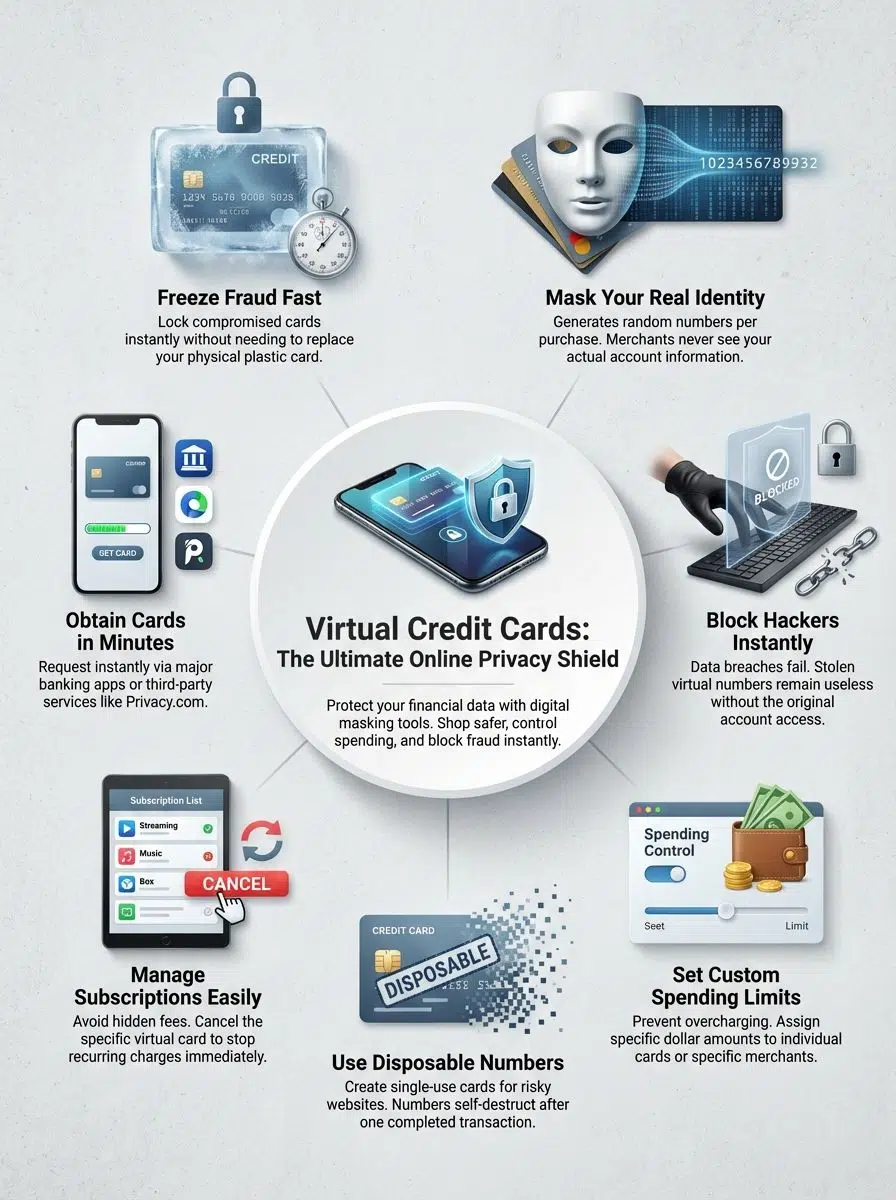
A VCC is a randomly generated 16-digit number, expiration date, and security code that links to your main account but cannot be traced back to it easily. If a hacker steals this digital number, they get nothing of value because you can delete it instantly.
“It operates like a burner phone for your finances. You use it once or for a specific purpose, and then you can toss it away without changing your actual phone number.”
Major issuers in the U.S. have embraced this tech. Capital One offers a tool called “Eno” that creates these numbers automatically. Citi also provides Virtual Account Numbers for select cardholders. These tools cloak your identity. They make sure the merchant gets paid without ever seeing your real data.
Using this tool gives you better control over spending. It keeps your personal data away from prying eyes on shopping websites or apps.
How Do Virtual Credit Cards Work?
Now that you know what a virtual credit card is, let’s look at the mechanics. The process effectively scrambles your data to confuse potential thieves. Here is the step-by-step flow of a typical transaction:
- Request the Card: You log into your bank’s portal or a third-party app like Privacy.com.
- Instant Generation: The system creates a random 16-digit card number, a valid expiration date, and a CVC code.
- Seamless Checkout: You paste these details into the checkout form on Amazon, Walmart, or any other site.
- Behind the Scenes: The merchant processes the payment normally. They see the virtual number, but the charge passes through to your funding source.
- Custom Controls: You can set a spending limit (e.g., $50 max) or lock the card to a specific merchant so it cannot be used elsewhere.
- Auto-Destruction: For single-use cards, the number becomes invalid the moment the transaction clears.
- Fraud Block: If a hacker breaches that merchant later, the number they steal is already dead.
- Real-Time Alerts: Banks often send you a push notification for every transaction. You spot anything fishy in seconds.
- Subscription Management: You can create a card specifically for a monthly service and pause it whenever you want to stop paying.
- Encryption: All these steps add layers of encryption. This turns digital payments into safer adventures for everyone.
Benefits of Virtual Credit Cards
Virtual credit cards pack a punch for online privacy. They act as your shield, wallet, and watchdog all at once.
Enhanced Online Privacy
Using virtual credit cards keeps your real card details hidden. You shop online, but hackers cannot see your actual number or name.
This separation is critical. According to the Identity Theft Resource Center, data compromises in the U.S. hit record highs in recent years. When you use a VCC, you aren’t leaving your permanent financial footprint on every server you visit.
Big stores like Amazon and small boutique shops accept these temporary numbers equally. You never have to worry about a small site having weak security. Your payment stays safe and private as you move around digital stores.
Improved Security Against Fraud
On top of privacy, virtual credit cards add a tough barrier against fraud. Your real card details never leave the vault.
The Federal Trade Commission (FTC) reported that consumers lost billions to fraud in 2023 alone. A large chunk of that came from online shopping scams. If someone grabs your virtual card number from a breach, you can just delete it.
You do not need to cancel your physical card. You do not need to wait 5 days for a new piece of plastic in the mail. You just click “delete” on your screen. The problem is solved in seconds.
Temporary and Disposable Card Numbers
This is my favorite feature. You can create “burner” cards for one-time use. Many banks and apps allow you to generate a number that works for exactly one transaction. This is perfect for signing up for free trials. You can set the spending limit to $1. If the company tries to auto-renew your subscription for $50 next month, the charge will decline automatically.
Merchants cannot trace the code back to your real data. This protects your privacy. This simple trick puts layers between scammers and your bank account.
Greater Control Over Spending
Virtual credit cards give you strong spending control. You can set a specific budget for different categories. Imagine creating a card just for “Dining Out” with a monthly limit of $200. Once you hit that cap, the card stops working. This forces you to stick to your budget without complex spreadsheets.
Many parents choose virtual cards to teach kids smart money habits. Businesses use them too. They keep track of expenses on team purchases or travel costs with ease. Setting a low maximum amount helps stop overspending before it starts.
Virtual Credit Cards vs. Digital Wallets
Virtual cards and digital wallets both help you pay online. However, they solve different problems.
Virtual Card and Digital Wallet: Key Differences
A virtual card gives you a new set of numbers for each online purchase. You copy and paste these numbers into a checkout field.
A digital wallet (like Apple Pay, Google Pay, or Samsung Pay) stores your payment methods on your device. It uses a technology called “tokenization” to transmit a code instead of your card number. However, digital wallets are mostly for “tap to pay” in person or specific supported apps.
Online security is strong with both options. Yet, only the virtual card allows you to create a specific card for a specific merchant.
How Digital Wallets and Virtual Cards Work Together
You can actually stack these technologies. You can add a virtual credit card to your digital wallet. This gives you double protection. The digital wallet secures the transmission of data. The virtual card protects the funding source. If you use a service like Privacy.com, you can generate a card and add it to your Apple Wallet for easy use.
This combo blocks identity theft and helps prevent fraud in seconds. By using both together, shoppers get more control over spending.
Virtual Cards vs. Physical Cards vs. Digital Wallets
No two payment tools are quite the same. Choosing the right one can save you from many headaches. Here is a quick snapshot that shows how these three stack up against each other.
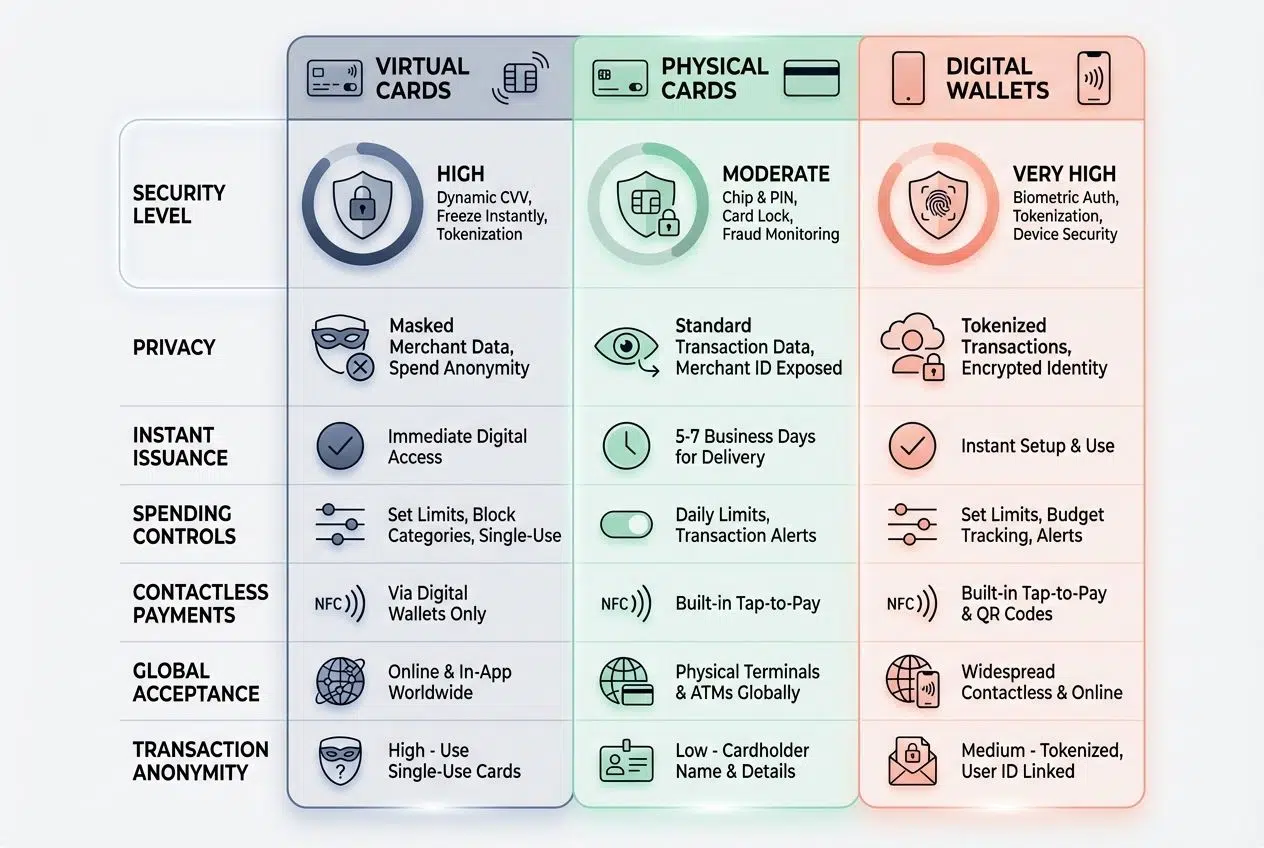
| Feature | Virtual Cards | Physical Cards | Digital Wallets |
|---|---|---|---|
| Form | Digital only (16-digit number) | Plastic or metal | App on phone or device |
| Security Level | Highest; lockable per merchant | Low; prone to skimming | High; uses biometrics |
| Privacy | Excellent; masks real identity | None; details shared openly | Good; uses tokenization |
| Spending Limits | Custom limits per card | Fixed credit limit | Relies on the linked card |
| Replacement | Instant (seconds) | Slow (3-7 business days) | Instant add/remove |
| Best Use Case | Online shopping & subscriptions | In-person backup | In-store tap to pay |
| Common Providers | Privacy.com, Capital One Eno, Revolut | Chase, Wells Fargo, Amex | Apple Pay, Google Wallet |
How to Get a Virtual Credit Card
You can score a virtual credit card in just minutes. The process depends on whether you stick with your current bank or use a specialized app.
Applying Through Your Bank or Provider
Many major U.S. banks have integrated this feature directly into their online portals. Capital One is the leader here with their Eno browser extension.
- Log in to your credit card’s online dashboard.
- Search for “Virtual Numbers” or “Digital Wallets” in the benefits section.
- Download the bank’s browser extension if prompted (Eno works on Chrome and Edge).
- When you reach a checkout page, the extension will pop up automatically.
- Click “Generate Number” to auto-fill the payment fields.
- Check your banking app to manage or lock these numbers later.
Citi also offers this feature for select cards like the Double Cash card. You may need to enable it in your account settings first.
Using Third-Party Services
If your bank is lagging behind, third-party apps are often even better. Services like Privacy.com or IronVest specialize in this tech.
- Sign up for an account on the provider’s website or app.
- Link your checking account or debit card as the funding source.
- Create your first card. You can name it (e.g., “Netflix” or “Amazon”).
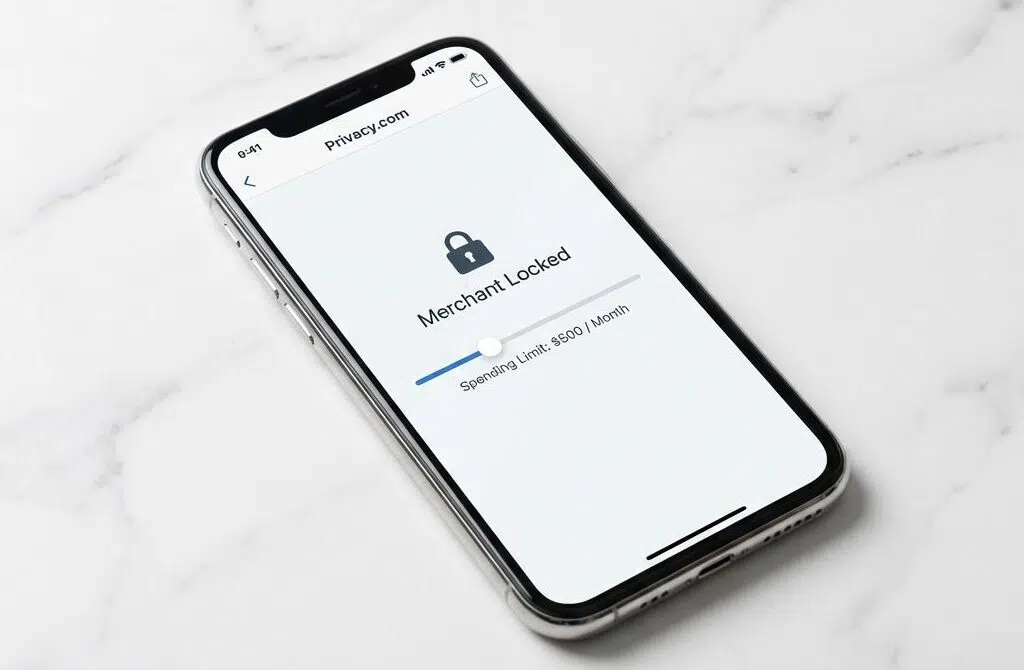
- Set a spending limit. You can choose “Per Transaction,” “Per Month,” or “Total.”
- Copy the card details and use them to pay.
- Privacy.com offers a “Merchant Locked” feature. This ensures the card can only be used at the first store where it is swiped.
- Most basic plans for these services are free for consumers.
- These apps comply with PCI-DSS security standards to keep your data encrypted.
Best Practices for Using Virtual Credit Cards
Smart habits keep your virtual credit card safe and your peace of mind intact. Here are the simple tricks that make a big difference.
Choosing Trusted Providers
Not all apps are created equal. You are handing over access to your bank account, so you need to be careful. Stick to well-known names. Privacy.com has been around for years and is highly rated for security. Revolut is a global banking app with robust virtual card features. X1 Card is a newer credit card designed specifically with virtual numbers in mind.
Avoid unknown apps that ask for your banking login without clear security credentials. Check reviews on Trustpilot or the App Store. If an app has very few reviews or looks outdated, skip it. Fraud prevention starts with picking the right partner.
Monitoring Transactions Regularly
Automation is great, but you still need to watch your money. Checking your transactions often helps keep fraud at bay. Most virtual card apps send push notifications. Do not turn these off. They are your early warning system. If you see a $1 charge from a vendor you do not recognize, lock the card immediately.
Scammers often test stolen numbers with small charges before going for a big purchase. In 2023, the FTC noted that early detection is the best way to minimize losses. Open those alerts. Your financial control depends on it.
Popular Uses for Virtual Credit Cards
People use these cards online every day. You may be surprised by the clever ways they keep payments safe.
Online Shopping
Shopping on new sites carries risk. Maybe you saw an ad on Instagram for a cool gadget, but the store looks a little unfamiliar.
This is the perfect use case for a single-use virtual card. You can generate a card just for that purchase. If the store turns out to be sketchy, they cannot charge you again. You get your item (hopefully), and your real bank account remains untouched.
Stats from the Census Bureau show e-commerce sales continue to grow rapidly. As we buy more online, the attack surface for hackers grows too. Using virtual cards helps keep recurring hidden charges from slipping through unnoticed.
Subscriptions and Recurring Payments
We all have “subscription fatigue.” You sign up for a 7-day free trial, forget about it, and end up paying for six months. Virtual cards solve this. Create a card named “Streaming Service.” Set a monthly limit exactly equal to the subscription cost. If they try to raise the price without asking, the charge declines. If you want to cancel, just pause the card.
You do not have to hunt for the “Cancel Subscription” button buried deep in the website’s settings. You just cut off the money supply. This is the ultimate form of spending control.
Business and B2B Transactions
Businesses love virtual cards for managing employee spending. It replaces the risky practice of sharing one corporate card number in a Slack channel.
Platforms like Ramp, Brex, and Divvy (from Bill.com) allow companies to issue unlimited virtual cards. A marketing manager can have a card just for Google Ads. An office manager can have one for Amazon supplies.
This makes accounting easier. You know exactly who spent what. A small software firm can use these cards to cut down on fake invoices. It helps stop identity theft cases in their tracks effectively.
Virtual Card Use Cases for Business
Companies use virtual payment methods to pay suppliers, order office supplies, and manage travel expenses. Modern finance teams rely on them to keep business funds safe.
Imagine sending an employee to a conference. You can issue a virtual card valid only for those three days with a $500 limit. Once the trip is over, the card expires. Airbase and Mesh Payments are other tools in this space. They integrate with accounting software like QuickBooks. This means receipts are matched automatically.
Setting expiration dates on each card helps protect sensitive company data. This practice cuts down the risk of identity theft. It makes financial control much simpler than with traditional cards or cash advances.
The Future of Virtual Credit Cards
Tomorrow’s virtual cards will get even smarter, faster, and safer. The tech is moving quickly.
Improved Efficiency and Automation
Virtual credit cards save time. You can create a new card number in seconds instead of waiting days for a physical card. We are seeing more “embedded finance.” This means your car might eventually generate its own virtual card to pay for gas or tolls automatically. Apps will let you set rules like “Only allow charges from U.S. based vendors.”
Automation helps stop fraud before it starts. Alerts pop up if someone tries anything strange. This makes keeping track of money feel easy.
Integration with AI and Machine Learning
AI is the new sheriff in town. Financial giants like Mastercard use AI solutions like “Decision Intelligence” to spot fake charges fast. These smart systems watch your digital payments in real time. They learn your habits. If you usually buy coffee in Seattle, and suddenly a charge appears in London, the AI flags it.
Online security is sharper today because these tools learn as they go. They help catch identity theft attempts without slowing you down at checkout.
Enhanced Tokenization for Added Security
Machine learning makes transactions smarter, but tokenization seals the deal on security. Each payment uses a special code called a token.
This token hides your real card number from hackers. Even if a cyber crook snatches the token, it is worthless to them. They cannot use it to shop online or take your money because the token is locked to a specific transaction context.
In 2026 and beyond, this will likely become the standard for all web payments. Shoppers stay safer with data protection layered in every transaction.
Wrapping Up: Embrace Smarter and Safer Digital Payments
Digital payments now come with better armor. Virtual credit cards use temporary numbers to shield your real wallet from hackers and data thieves. They keep online shopping safer. They give you more control over spending. Most importantly, they help protect your identity from fraud.
You cut down on risks tied to lost or stolen information by choosing smarter payment methods. Privacy protection matters for everyone today. So, wave goodbye to old worries about digital theft. You can shop with stronger confidence each time you pay online.