As a social media agency, your workflow is vastly different from a solo business owner. You aren’t just posting photos; you’re managing multiple brand identities, chasing client approvals, and trying to prove ROI through white-labeled reports.
In 2026, the baseline has shifted. “Good enough” scheduling isn’t enough when you’re managing 20+ clients. You need a “command center” that automates the grunt work so you can focus on strategy. This guide breaks down the 10 best social media scheduling tools for agencies specifically built to handle the chaos of agency life.
Quick Summary: Best Picks by Agency Use Case
If you’re in a rush, here is the “Best for…” snapshot to help you narrow down your search based on your agency’s specific pain points.
| Use Case | Best Tool Pick |
| Multi-Client + White-Labeling | Cloud Campaign |
| Approvals & Client Collaboration | Planable |
| Enterprise Analytics & Security | Sprout Social |
| Budget-Friendly Agency Scaling | SocialPilot |
| Visual Workflow & Integration | Metricool |
Jump-to-Tools List
- Cloud Campaign: Best for scaling agencies needing white-labeling.
- SocialPilot: Best value for high-volume account management.
- Sendible: Best for specialized client reporting.
- Agorapulse: Best for engagement-heavy community management.
- Sprout Social: Best for enterprise-level data and deep listening.
- Hootsuite: Best for large teams requiring complex governance.
- Loomly: Best for structured team workflows and ad mockups.
- Planable: Best for visual “What You See Is What You Get” approvals.
- Metricool: Best for data-driven creators and Adobe users.
- Buffer: Best for small agencies with simple scheduling needs.
What Agencies Should Look For in a Scheduling Tool

Choosing a tool based on price alone is a recipe for a migration headache six months later. Agencies have unique requirements—specifically around governance and scalability.
Agency Must-Haves (Feature Checklist)
- Multi-Client / Multi-Brand Workspaces: You must be able to silo client data. You don’t want “Client A” accidentally seeing “Client B’s” scheduled posts or analytics.
- Client Approvals & Roles: A “waiting for approval” queue is essential. Look for tools that allow clients to comment or approve without needing a full paid seat.
- Content Calendar + Asset Library: A centralized place for high-res images and brand guidelines ensures your team stays on-brand.
- Bulk Scheduling: If you’re planning 100 posts at once, you need CSV upload capabilities.
- White-Label Reporting: Your clients should feel like they are using your proprietary tech. Custom branding on dashboards and PDFs is a major trust builder.
Nice-to-Haves
- AI Caption Help: Using AI to generate 10 variations of a caption in seconds.
- Best-Time-to-Post: Algorithms that analyze client-specific data to find peak engagement windows.
- Content Recycling: Automatically re-queueing evergreen content.
- Design Integrations: Direct hooks into Canva or Adobe Express so you never have to leave the browser tab.
Note: Pricing in the SaaS world moves fast. Please verify current rates on vendor websites before committing.
| Tool | Best For | Approvals | White-Label | Bulk Upload | Starting Price (Agency) |
| Cloud Campaign | Scaling Agencies | Yes | Full | Yes | ~$199/mo |
| SocialPilot | Value for Money | Yes | Yes | Yes | ~$42/mo |
| Planable | Visual Approval | Elite | No | Yes | ~$11/user |
| Sprout Social | Enterprise | Complex | Limited | Yes | ~$249/mo |
| Metricool | Data & Design | Yes | Yes | Yes | $18/mo |
| Agorapulse | Engagement | Yes | No | Yes | ~$79/mo |
1. Cloud Campaign (Best For: Multi-Client + White-Label)
Cloud Campaign was built specifically with the marketing agency in mind. Unlike tools that try to serve everyone, Cloud Campaign focuses on the workflow between an agency and its clients.
Why agencies use it
It solves the “client management” problem better than almost anyone. It allows you to create separate workspaces for every client, ensuring that assets and analytics never mix.
Key scheduling + workflow features
- One-Click White-Labeling: You can brand the entire dashboard with your logo and colors.
- Auto-Generated Reports: Set it and forget it—reports are automatically sent to clients on your behalf.
- Drip Campaigns: Easily set up recurring queues for evergreen content.
Pros / Cons
- Pros: Extremely scalable; professional white-labeling included; built-in CRM features.
- Cons: Higher starting price than “budget” tools; interface can have a learning curve for beginners.
Pricing & trial snapshot
Starts around $199/month for the Agency plan (which includes white-labeling). They offer a 14-day free trial.
Ideal agency fit
Mid-to-large agencies looking to present a high-end, branded experience to their clients.
2. SocialPilot (Best For: High-Volume Account Management)

SocialPilot is the “workhorse” of the agency world. It provides roughly 90% of the features of enterprise tools like Sprout Social at about 25% of the cost.
Why agencies use it
It is incredibly cost-effective for agencies managing 50+ accounts. You won’t get “nickeled and dimed” for adding more social profiles.
Key scheduling + workflow features
- Bulk Scheduling: Upload up to 500 posts via a single CSV file.
- Client Management: A dedicated portal for clients to approve content without needing their own login credentials.
- Content Curation: Built-in RSS feed automation to find and share industry news.
Pros / Cons
- Pros: Best “bang for your buck”; very fast user interface; solid white-label reporting.
- Cons: Analytics are good but not as deep as Sprout Social; limited social listening tools.
Pricing & trial snapshot
Agency plans typically start around $100/month for 30 accounts. 14-day free trial available.
Ideal agency fit
Growth-stage agencies that need to manage a high volume of accounts without breaking the bank.
3. Sendible (Best For: Deep Reporting & Analytics)
Sendible has long been a favorite for agencies because of its “Services” model, which allows for granular control over every single connection.
Why agencies use it
The reporting is top-tier. You can build custom report builders that pull in Google Analytics data alongside social metrics to show real business impact.
Key scheduling + workflow features
- Custom Approval Paths: Set up multi-level approvals (e.g., Junior Creator → Senior Strategist → Client).
- Shared Content Libraries: Store brand-specific hashtags, images, and snippets.
- Unified Inbox: Manage comments and DMs across all platforms in one view.
Pros / Cons
- Pros: Deeply customizable; excellent Canva integration; supports “Google Business Profile” better than most.
- Cons: The “per service” pricing model can become expensive if you have many accounts per client.
Pricing & trial snapshot
White-label plans start around $240/month. Standard agency tiers are closer to $80/month.
Ideal agency fit
Agencies that focus heavily on ROI and need to provide highly customized reports to their clients.
4. Agorapulse (Best For: Engagement & Community Management)
If your agency doesn’t just “post” but actually manages the community, Agorapulse is your best bet. It’s designed to ensure no comment or DM goes unanswered.
Why agencies use it
The “Inbox Zero” philosophy. It treats social media interactions like an email inbox—you can assign comments to specific team members and “close” them once handled.
Key scheduling + workflow features
- Collision Detection: See in real-time if another team member is replying to a comment so you don’t double-up.
- Shared Calendars: Clients can view the calendar via a secure link without logging into the platform.
- Social CRM: Track the history of a specific user across your social channels.
Pros / Cons
- Pros: Best-in-class UI; fantastic customer support; powerful mobile app.
- Cons: No white-labeling for the dashboard; can get expensive as you add more users.
Pricing & trial snapshot
Professional tiers start at $79/month. Agency-specific features are usually in the $119+ range.
Ideal agency fit
Agencies that handle customer service and high-engagement accounts.
5. Sprout Social (Best For: Enterprise Analytics)
Sprout Social is the “Gold Standard” for enterprise-level agencies. It’s a powerhouse of data, providing insights that go far beyond likes and shares.
Why agencies use it
When a client asks for “Competitive Benchmarking” or “Sentiment Analysis,” Sprout Social is the tool that delivers. It’s a high-prestige platform that clients often recognize.
Key scheduling + workflow features
- Advanced Listening: Track what people are saying about your client’s brand across the entire web, not just on their profiles.
- Optimal Send Times: Uses AI to determine when a client’s specific audience is most active.
- Asset Library: A robust, searchable library for all media files.
Pros / Cons
- Pros: Unmatched data depth; beautiful, presentation-ready reports; highly secure.
- Cons: Extremely expensive; pricing is per-user, which makes scaling an agency team very costly.
Pricing & trial snapshot
Starting prices are often $249/user/month. It is an investment.
Ideal agency fit
Large agencies working with global brands that require high-level data and security.
6. Hootsuite (Best For: Large-Scale Team Governance)
The “OG” of social media management. Hootsuite is still a titan, especially for organizations that need strict control over who can post what.
Why agencies use it
It supports almost every platform imaginable and has a massive app directory. If you need a tool that integrates with your legacy CRM or a niche platform, Hootsuite likely has the API for it.
Key scheduling + workflow features
- OwlyWriter AI: An integrated AI tool that helps rewrite captions and generate ideas.
- Ad Management: Manage organic and paid social side-by-side.
- Complex Permissions: Set up “Permissions Sets” for different team roles (Legal, Creative, Client).
Pros / Cons
- Pros: Reliability; massive integration library; supports over 20+ social networks.
- Cons: Interface can feel cluttered; pricing has increased significantly over the years.
Pricing & trial snapshot
Team plans start at $249/month (up to 3 users). Enterprise pricing is custom.
Ideal agency fit
Agencies with large, multi-department teams that need high-level security and compliance.
7. Loomly (Best For: Structured Collaboration)

Loomly is famous for its “Brand Success Platform” approach. It doesn’t just help you schedule; it helps you come up with the ideas in the first place.
Why agencies use it
The “Post Ideas” feature. It provides automated prompts based on holidays, trending topics, and best practices, which is a lifesaver for creative blocks.
Key scheduling + workflow features
- Ad Mockups: Create mockups for social ads so clients can see exactly what they’ll look like before they go live.
- Interactions: A centralized view to respond to comments across platforms.
- Automated vs. Manual Publishing: Gives you a choice for platforms like Instagram Stories.
Pros / Cons
- Pros: Very intuitive; great for visual learners; affordable for small-to-mid teams.
- Cons: Lacks the deep “listening” tools of Sprout or Hootsuite.
Pricing & trial snapshot
The “Small Team” plan is roughly $76/month. 15-day free trial.
Ideal agency fit
Boutique agencies that want a highly organized, visual way to collaborate with clients.
8. Planable (Best For: Visual Approvals)
Planable’s motto is “Social media collaboration made simple.” It is designed to look like a social feed, making it the most user-friendly tool for clients who aren’t tech-savvy.
Why agencies use it
Zero friction. Clients can see exactly what a post will look like on mobile or desktop and leave a comment directly on the post—no more “Check the PDF, then email me” loops.
Key scheduling + workflow features
- Multiple Views: Switch between Feed, Calendar, List, and Grid views.
- Real-time Collaboration: Like a Google Doc for social media; you can see team members typing comments in real-time.
- One-Click Approval: A big green button for clients that is satisfying and easy to use.
Pros / Cons
- Pros: The best approval workflow on the market; very low learning curve; beautiful UI.
- Cons: Reporting and analytics are a bit basic compared to others on this list.
Pricing & trial snapshot
They offer a “Free” plan for your first 50 posts. Agency plans are around $11/user.
Ideal agency fit
Agencies whose main bottleneck is getting clients to approve content on time.
9. Metricool (Best For: Data-Driven Content Creators)
Metricool has skyrocketed in popularity among agencies due to its focus on “Data + Design.” It’s a favorite for those who use Adobe Express.
Why agencies use it
The integration. You can design a post in Adobe Express and send it directly to Metricool’s planner without downloading a single file.
Key scheduling + workflow features
- Adobe Express Integration: Seamless create-to-schedule workflow.
- Ad Tracking: Track Facebook and Google Ads alongside organic performance.
- Link in Bio: Built-in “SmartLinks” tool to drive traffic from Instagram.
Pros / Cons
- Pros: Excellent value; great mobile app; simple but effective analytics.
- Cons: White-labeling is only available on higher-tier plans.
Pricing & trial snapshot
They have a very generous free tier. Agency plans with white-labeling start around $50-100/month.
Ideal agency fit
Modern, design-forward agencies that rely on Adobe’s creative suite.
10. Buffer (Best For: Small Agencies & Simple Needs)
Buffer is the minimalist’s choice. It’s clean, simple, and focuses on doing one thing exceptionally well: scheduling.
Why agencies use it
Simplicity. If you have clients who only need 2 posts a week on LinkedIn and Instagram, you don’t need a “Command Center.” You need Buffer.
Key scheduling + workflow features
- Buffer Suggestions: AI-powered suggestions for post ideas.
- Start Page: A simple landing page tool for your “Link in Bio.”
- Engagement View: A simple way to see and reply to comments.
Pros / Cons
- Pros: Very easy to use; “Pay as you go” pricing (per channel); clean aesthetic.
- Cons: Lacks the robust “workspace” silos and white-labeling that larger agencies need.
Pricing & trial snapshot
Free plan available. “Agency” plan is roughly $120/month for 10 channels.
Ideal agency fit
Freelancers or small agencies managing low-complexity accounts.
Honorable Mentions
- Later: Best for Instagram-first visual planners.
- CoSchedule: Best for marketing teams that need a full “Marketing Suite” beyond just social.
- Vista Social: A rising star with aggressive pricing and great AI features.
- Meta Business Suite: Free and native, but only works for FB/IG/WhatsApp.
How to Choose the Right Social Media Scheduling Tools (Decision Guide)
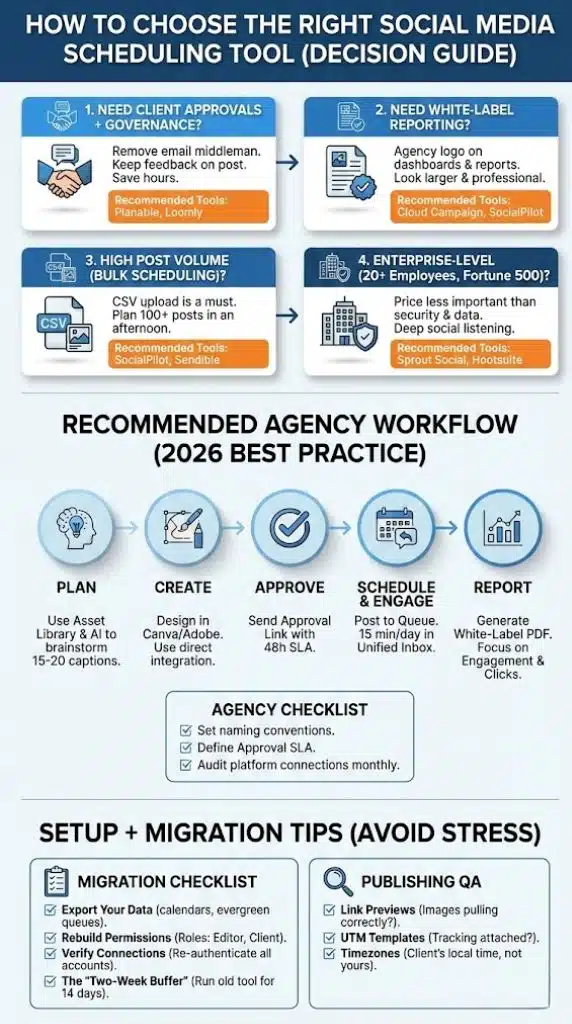
Choosing the wrong tool costs you time in migration and training. Use this framework to decide:
1. If you need client approvals + governance
Look for Planable or Loomly. These tools are designed to remove the “middleman” (email) and keep all feedback directly on the post. If your clients are picky and require multiple rounds of edits, these will save you hours every week.
2. If you need white-label reporting
Go with Cloud Campaign or SocialPilot. These allow you to put your agency’s logo on the dashboard and reports. This makes your agency look much larger and more professional, justifying your monthly retainer.
3. If you manage high post volume (Bulk Scheduling)
Bulk scheduling via CSV is a must. SocialPilot and Sendible have the most robust CSV uploaders, allowing you to plan an entire month for 10 clients in a single afternoon.
4. If you’re enterprise-level
If you have 20+ employees and manage Fortune 500 brands, the price is less important than security and data. Sprout Social or Hootsuite are the only tools that offer the level of governance and “Social Listening” required for high-stakes accounts.
Recommended Agency Workflow
A tool is only as good as the system you build around it. Here is a standard “best practice” workflow for 2026:
Step 1: Plan
Use the Asset Library in your tool to store client-approved photos. Use the AI generator to brainstorm 15-20 captions based on the monthly theme.
Step 2: Create
Design in Canva/Adobe and use the direct integration to pull the media into the Content Calendar.
Step 3: Approve
Send the “Approval Link” to the client. Ensure you have an SLA (Service Level Agreement) stating that posts must be approved 48 hours before they go live.
Step 4: Schedule & Engage
Once approved, the post goes into the “Queue.” Spend 15 minutes a day in the Unified Inbox replying to comments to boost the algorithm.
Step 5: Report
At the end of the month, generate a White-Label PDF. Focus on “Engagement Rate” and “Click-throughs” rather than just follower count.
Agency Checklist:
- Set naming conventions (e.g., [Client][Platform][Date]).
- Define “Approval SLA” for clients.
- Audit platform connections once a month (tokens often expire).
Setup + Migration Tips
Switching tools is stressful. To avoid “missing” posts during the transition, follow this checklist:
Migration Checklist
- Export Your Data: Download your current content calendars and evergreen queues.
- Rebuild Permissions: Don’t just give everyone “Admin” access. Set up roles (Editor, Contributor, Client).
- Verify Connections: Re-authenticate every Instagram, LinkedIn, and TikTok account.
- The “Two-Week Buffer”: Keep your old tool running for 14 days after you start the new one to ensure no gaps in posting.
Publishing QA
Before hitting “Schedule,” check:
- Link Previews: Are the images pulling correctly?
- UTM Templates: Is your tracking code attached for Google Analytics?
- Timezones: Ensure the client’s workspace is set to their local time, not yours.
Final Thoughts
The “best” tool doesn’t exist—there is only the best tool for your agency’s current size, client roster, and specific bottlenecks. Choosing a social media scheduler is no longer just about clicking “post”; it is about building a scalable infrastructure that protects your team’s time and elevates your professional image.
If you are just starting out or managing high-volume accounts on a budget, SocialPilot offers the most room to grow without a massive monthly bill. If your biggest headache is chasing clients for feedback, Planable or Loomly will instantly remove that friction. For those scaling fast and wanting to present themselves as a premium, high-end firm, Cloud Campaign’s deep white-labeling is the clear winner.
Remember, the tool is only half the battle. Successful agencies succeed because they pair great software with a disciplined workflow. Whichever tool you choose, ensure you audit your platform connections regularly and leverage the reporting features to prove your value every single month.