Is your website loading slowly for visitors? Many web developers face the challenge of making sites faster and more responsive. Slow websites can frustrate users, lower engagement, and hurt your business.
Browser APIs Making Websites Faster is a powerful solution. The right browser APIs can boost web performance, help with API integration, support mobile compatibility, and offer better user experience in modern browsers.
This post will show you which top 10 Browser APIs make websites faster. You will learn how these tools improve frontend technologies like JavaScript libraries and frameworks. Get practical tips for using them to speed up data retrieval, resource management, interactive features, realtime communication, and network optimization on your site.
Stay tuned to discover the best tricks for fast-loading websites!
Key Takeaways
- Using browser APIs like Fetch API, Payment Request API, and Web Animations API makes websites load faster and work better.
- Tools such as PageSpeed Insights and Public DNS help analyze loading times and improve mobile responsiveness for all users.
- Advanced APIs like Service Worker allow sites to work offline by storing data locally, supporting consistent use even without internet access.
- Instant Pages use predictive technology to preload content before clicks, making web navigation quicker for visitors.
- Developer consoles in browsers let you test code changes, debug errors in real time, and monitor app performance using APIs like the Performance Interface API.
Understanding Browser APIs

Browser APIs allow developers to interact with web browsers and enhance user experiences. These tools play a crucial role in speeding up websites by streamlining processes and improving performance.
Definition and importance
Browser APIs are powerful tools that help developers improve website performance. They provide essential functionalities for web development, making it easier to create fast and efficient applications.
For example, the Payment Request API and Web Bluetooth API enhance user experience by streamlining transactions and connecting devices effortlessly.
Understanding these APIs is crucial for frontend developers. With their support, developers can boost speed optimization and ensure browser compatibility. Popular options like the Google Maps API or Fetch API allow quick network requests and seamless integration of important features into interactive applications.
Leveraging these resources leads to faster websites that engage users effectively with modern web technologies.
Types of Browser APIs
Many types of Browser APIs exist to boost website speed and performance. These include essential tools for frontend developers. For instance, the Fetch API makes network requests quickly and efficiently.
The DOM API allows interaction with documents, providing vital functions for web development.
Other notable browser APIs include the Payment Request API and Web Bluetooth API. Both enhance user experience by offering smooth interactions on websites. The Performance Interface API helps developers measure app performance in real-time.
Each of these APIs plays a crucial role in improving website efficiency, making them invaluable in modern web development practices.
How they improve website performance
Browser APIs play a crucial role in boosting website performance. They provide essential functionality that allows for efficient API integration. For instance, the Fetch API enables developers to make fast network requests without slowing down page loading times.
The Web Animations API supports smooth animations, enhancing user experience while keeping interactions responsive.
Many lesser-known web APIs also contribute significantly. The Payment Request API streamlines checkout processes, reducing friction during transactions. Similarly, the Performance Interface API helps developers measure app performance accurately, leading to faster and more efficient websites overall.
Using these tools equips front-end developers with what they need for modern web development and ensures users enjoy quicker load times.
Must-Know Browser APIs for Frontend Developers
Frontend developers should explore key browser APIs that boost website performance. These tools enable faster loading times and enrich user experiences in modern web applications.
Collections
Collections simplify how developers manage data. They allow you to store groups of related items efficiently. This functionality helps in various web development tasks, especially when working with JavaScript APIs.
Common collections include arrays and maps, each serving a different purpose.
Using these structures improves performance optimization for websites. Developers can quickly access, modify, or delete items as needed. By leveraging collections effectively, you enhance user experience through faster interactions in interactive applications.
They form the backbone of responsive design and client-side scripting practices that modern browsers support seamlessly.
PageSpeed
PageSpeed is a vital tool for web developers. It helps boost website performance by analyzing loading times and user experience. With this API, developers can identify areas that need improvement.
Faster websites provide better user experiences and keep visitors engaged.
Performance optimization becomes easier with PageSpeed insights. Developers can use the data to apply necessary adjustments quickly. This API improves mobile responsiveness as well; it ensures that sites load rapidly on all devices.
Ultimately, understanding how to leverage PageSpeed allows for smoother and more interactive applications in modern browsers.
Instant Pages
Instant Pages enhance website speed by preloading content. This API allows browsers to load pages even before users click on them. It uses predictive technology to guess which page a user will visit next, delivering faster experiences.
Frontend developers benefit from this functionality immensely. It improves user experience and keeps visitors engaged with interactive applications. Rapid page loads contribute significantly to performance optimization and responsive design in modern web development contexts.
Utilizing Instant Pages can give websites a competitive edge, making them more efficient for end-users.
Public DNS
Public DNS boosts website speed and performance. It acts as a directory for converting domain names to IP addresses. Using Public DNS can significantly reduce loading times, helping users access websites faster.
Popular options include Google Public DNS and Cloudflare DNS.
These services offer more robust performance compared to typical Internet Service Provider (ISP) options. They can cache frequently accessed sites, which increases load speed for returning visitors.
Developers should utilize these tools to enhance user experience in interactive applications and responsive designs. Fast load times create happier users, ultimately benefiting web development efforts.
Connect
Connect helps web developers enhance user experiences. This API enables seamless communication between applications and network services. It allows websites to request connections automatically, reducing loading times significantly.
Users enjoy faster access to data without slow delays or interruptions.
In today’s fast-paced digital space, the importance of speed cannot be overstated. By integrating Connect into their projects, developers can create more responsive applications. This tool empowers them to optimize performance and thrive in a competitive environment.
Asynchronous loading makes it even easier for users to interact with content quickly and smoothly, making every visit enjoyable.
Leveraging Advanced Browser APIs
Advanced Browser APIs can drastically enhance your website’s efficiency. They provide tools for developers to improve performance and enable offline functionalities.
Programs
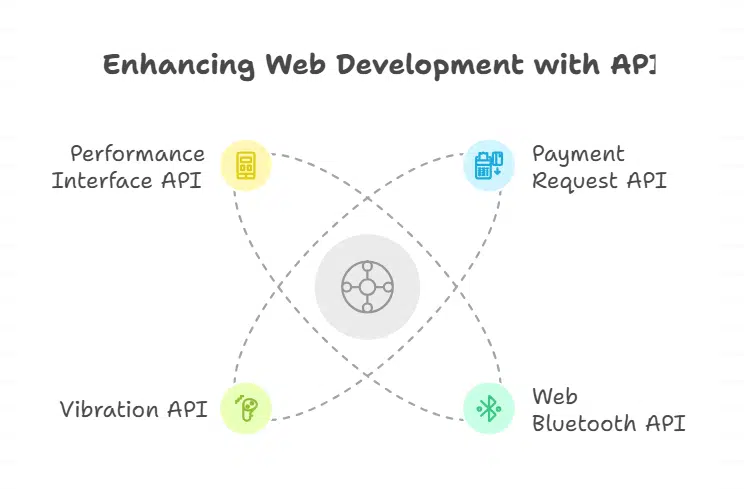
Programs play an important role in modern web development. They give developers powerful tools for optimizing user experience and enhancing site speed. The Payment Request API streamlines payment processing, making transactions smooth and quick.
Developers can use the Web Bluetooth API to connect devices easily, improving interactivity.
The Vibration API adds a tactile response for users on mobile devices. This feature enhances engagement by providing immediate feedback during interactions. Furthermore, APIs like the Performance Interface API allow developers to assess app performance effectively, ensuring websites run faster and more efficiently.
Embracing these advanced capabilities results in faster websites that delight users with seamless experiences.
Developer consoles
Developer consoles serve as essential tools for web developers. They allow users to inspect elements, debug code, and monitor performance in real time. These consoles include powerful features that improve website speed and efficiency.
For example, the Fetch API helps make fast network requests. The DOM API enhances interactions with documents, which is crucial for frontend development.
Many modern browsers support developer consoles with advanced functionalities. This includes features like the Performance Interface API that measures app performance effectively. Tools such as Google Maps API or Twitter API offer significant capabilities for creating interactive applications quickly.
Frontend developers must leverage these resources to optimize their work and enhance user experience on websites efficiently.
Optimizing performance
Performance optimization is vital for web development. Web APIs play a crucial role in this process. The Fetch API allows developers to make quick network requests. This speed boosts website responsiveness significantly.
Meanwhile, the DOM API enables smooth interaction with documents, enhancing user experience.
Several lesser-known APIs can also help improve performance. For instance, the Payment Request API streamlines checkout processes, which speeds up transactions for users. The Web Animations API offers high-performance animations controlled by JavaScript; this creates engaging interactions without sacrificing speed.
Utilizing these tools leads to faster and more interactive applications that keep users engaged and satisfied.
Offline capabilities
Offline capabilities greatly enhance user experience and performance optimization for websites. Many web APIs, such as the Service Worker API, allow developers to build apps that work seamlessly without an internet connection.
This capability keeps users engaged even when they lose connectivity.
Web development benefits significantly from offline functionality. Developers can store important data on the client side using local storage or indexedDB. This means users can still access content and features of interactive applications during downtime or poor network conditions.
The result is a faster, more responsive website that meets modern needs for reliable access to information anytime and anywhere.
Takeaways
Web APIs play a vital role in web development today. They enhance performance and user experience, making websites faster. The Payment Request API helps speed up checkout processes, while the Fetch API allows for quick network requests.
Developers can also create smooth animations using the Web Animations API with JavaScript libraries.
Access to tools like the Geolocation API and Push API gives frontend developers more power to design interactive applications. These resources lead to highly responsive designs that improve overall website efficiency.
Understanding these APIs offers a competitive edge in creating modern websites that stand out in today’s digital landscape.
FAQs on Browser APIs Making Websites Faster
1. How do browser APIs help with performance optimization in web development?
Browser APIs let developers use features from modern browsers to improve website speed and user experience. They support client-side scripting, which makes interactive applications load faster.
2. Which frontend technologies work best with these browser APIs for responsive design?
Frontend frameworks and JavaScript libraries integrate well with top browser APIs. This combination helps create websites that adjust quickly on any device, improving responsive design.
3. Can API integration make a difference in user experience for interactive applications?
Yes; API integration allows web pages to update content without reloading. This leads to smoother navigation and better user experience in interactive applications.
4. Why should developers focus on the top 10 browser APIs when building fast websites?
Using the top 10 browser APIs ensures performance optimization by reducing delays and increasing efficiency within frontend technologies. These tools are key for making websites faster and more reliable across all modern browsers.