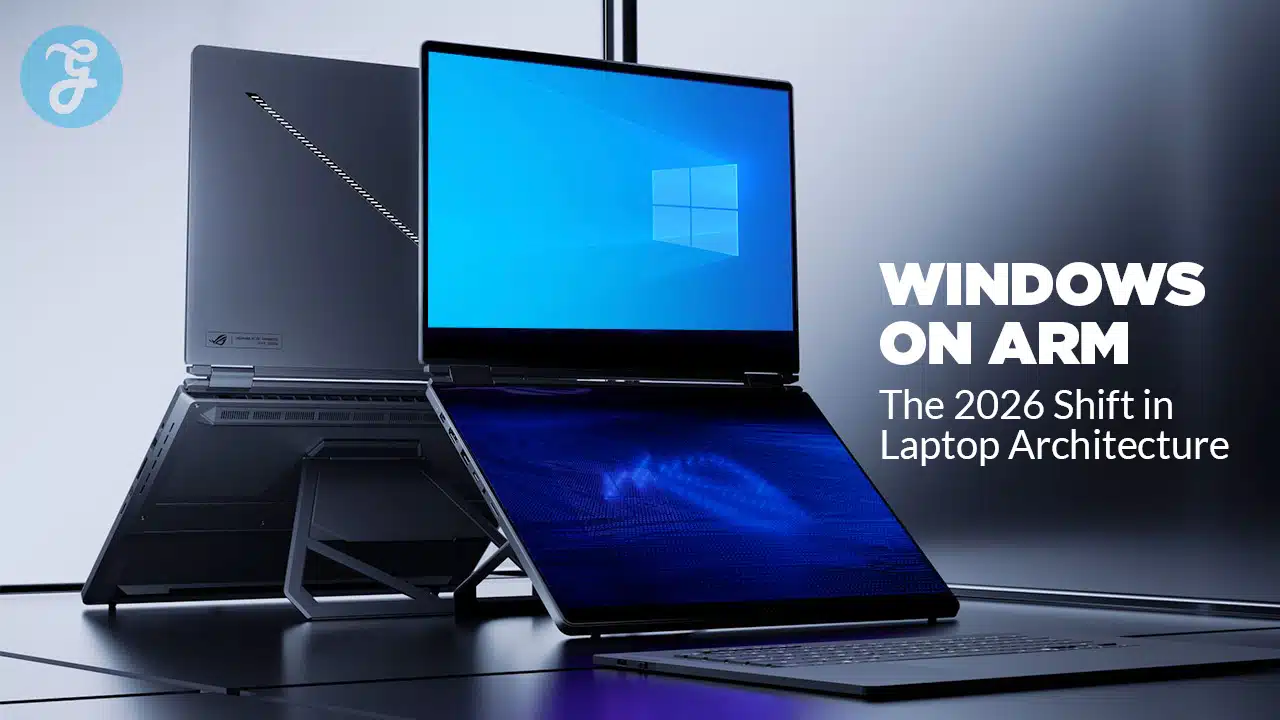
Windows laptops are entering a turning point. For decades, “Windows PC” has basically meant Intel or AMD x86 processors, with a small side lane of Arm experiments that rarely went mainstream. In 2026, that lane is widening fast. New Arm laptop chips are arriving with stronger CPU performance, much better graphics than earlier generations, and on-device AI hardware that OEMs can market as a must-have feature, not a nice-to-have.
This is not a story about x86 dying. It is a story about Windows on Arm becoming a default option for large parts of the laptop market, especially thin-and-light models where battery life, fan noise, standby drain, and mobility matter more than legacy compatibility.
Key Takeaways
- Windows on Arm is positioned to expand in 2026 because newer Arm laptop chips are targeting mainstream price tiers, not only premium flagships.
- Microsoft’s Windows release cadence in 2026 is expected to spotlight Arm-first devices early, which can accelerate OEM adoption and developer attention.
- The real make-or-break is still compatibility, but the gap is shrinking as more apps ship native Arm versions and emulation improves.
- The market is trending toward two strong tracks: Arm-first ultraportables optimized for battery and AI, and x86 machines optimized for broad legacy support and certain pro and gaming workloads.
- Buyers in 2026 will need a simpler decision rule: pick Arm for mobility-first productivity and AI features, pick x86 when you cannot risk edge-case app, driver, or game issues.
What “Windows On Arm” Actually Means
Windows on Arm is Windows running on processors built on the Arm instruction set, rather than the x86 instruction set used by most Intel and AMD chips. If you are a buyer, the instruction set is not the point. The point is what Arm laptop platforms tend to bring as a package.
Arm laptop systems are typically designed like modern mobile SoCs. They integrate CPU cores, GPU, NPU (AI accelerator), media engines, and often connectivity in one tight platform. That approach can deliver excellent efficiency, instant wake behavior, and long battery life, especially in thin devices that cannot dissipate lots of heat.
The trade-off historically has been software and driver maturity. Many Windows apps were compiled for x86, and some low-level tools assumed x86 behavior. That forced Windows on Arm to lean heavily on translation and emulation. In 2026, that still matters, but the trajectory is moving in the right direction as native Arm builds become more common and Windows translation becomes less painful.
Why 2026 Looks Like A Real Inflection Point
Windows on Arm has existed for years, but 2026 is shaping up as different for three reasons.
First, Arm laptop chips are moving beyond “good battery, okay performance” into “good battery, genuinely competitive performance.” For average productivity workflows, the performance complaints that defined earlier generations are becoming harder to sustain.
Second, the industry is now selling “AI PC” experiences as a platform category. That raises the value of NPUs and pushes OEMs toward SoCs that can run AI features locally without burning battery. Arm platforms generally lean into that design.
Third, Microsoft and OEMs have stronger incentives to align Windows releases, AI features, and reference designs with Arm-first hardware. When the operating system, silicon, and flagship devices move in sync, adoption tends to follow.
The Hardware Catalyst: Snapdragon X2 And The 2026 Arm Push
The biggest near-term driver for Windows on Arm in 2026 is the next wave of Snapdragon laptop processors. The key shift is not just a faster top-tier chip. The key shift is tiering and breadth.
Instead of a single premium hero chip carrying the whole platform, the 2026 generation aims to expand across multiple segments. That matters because most Windows laptop volume does not live at the ultra-premium tier. If OEMs can ship Arm laptops at prices that compete directly with mainstream Intel and AMD models, Windows on Arm stops being a niche.
What Improved Arm Laptop Silicon Brings In 2026
- Higher sustained performance for office work, browsers, conferencing, and multitasking
- Better integrated graphics for creator workloads and light gaming
- Stronger NPUs for on-device AI tasks without hammering the CPU or GPU
- Better thermals in thin devices, often with quieter fans or fanless designs
- Better standby and battery efficiency when you are not actively working
This is the “boring” shift that changes the market. Buyers do not adopt a platform because it is interesting. They adopt it because it feels better every day.
Microsoft’s 2026 Windows Cadence And Why It Matters
Windows updates are not only about features. They are also about what Microsoft chooses to spotlight. In a normal year, Windows feature updates arrive in a pattern that benefits the broadest base of PCs at once. If Microsoft makes 2026 releases feel Arm-forward early in the cycle, it can shift OEM roadmaps and developer priorities.
In practical terms, the OS cadence can influence:
- Which devices get marketed as the “best Windows experience”
- Which platform gets first-class attention for new AI features
- How quickly enterprise buyers begin testing and validating Arm fleets
- How urgently major app vendors prioritize Arm-native releases
Even small shifts in messaging can change the default assumptions of buyers. In a PC market that competes on thin margins and familiar checklists, “default assumptions” are powerful.
The Real Battle: Compatibility, Not Raw Speed
Every Windows on Arm wave runs into the same question: “Will all my stuff work?” That question has multiple layers.
1. Apps
Many mainstream apps are already fine, especially browsers, office productivity tools, streaming, and common creative software. The risk is not the big names. The risk is the long tail: a small accounting tool, a legacy VPN client, a proprietary plugin, or a niche utility you forgot you rely on.
2. Drivers And Peripherals
Drivers can still be the sharp edge. If you use specialized audio interfaces, older printers, industrial dongles, custom scanners, lab equipment, or niche webcams, you should treat Arm support as something to verify before you buy.
3. Games And Anti-Cheat
Gaming on Windows on Arm continues to improve, but it remains uneven. Some games run well under translation, others struggle, and certain anti-cheat systems can be a hard stop.
The 2026 shift does not eliminate these issues. It reduces how often they matter for mainstream buyers.
Arm Windows Laptops vs x86 Windows Laptops In 2026
| Feature | Arm Windows Laptops (2026 Trend) | x86 Windows Laptops (2026 Trend) |
| Battery Life | Often excellent in real-world mixed use | Improving, but varies widely by model |
| Standby And Wake | Typically strong “instant-on” behavior | Often good, but more inconsistent |
| Heat And Noise | Often cooler and quieter in thin designs | Can be quiet too, but thin designs may throttle |
| App Compatibility | Strong for mainstream apps, weaker on niche legacy | Broadest compatibility overall |
| Drivers And Peripherals | Better than before, still a risk for specialty gear | Most reliable for niche peripherals |
| Gaming | Improving, but uneven with anti-cheat and some titles | Best overall compatibility and performance range |
| AI Features | Strong NPU-centric positioning | Strong NPU momentum, varies by chip generation |
| Best For | Mobility-first productivity and modern workflows | High-compat needs, certain pro apps, wider gaming |
AI PCs: The Forcing Function That Helps Arm
AI PCs are partly marketing, but they are also a platform shift. When AI features run locally, the machine needs dedicated silicon that can do it efficiently. Running everything on CPU is slow and power-hungry. Running everything on GPU can be fast, but it can also drain battery in mobile devices.
That is why NPUs are now central to laptop platform messaging. An NPU can run certain AI models at low power while leaving CPU and GPU free. That matters for:
- Live captions and translation
- Background noise removal and voice enhancement
- Camera effects and auto-framing
- On-device summarization workflows
- Local image generation features where supported
- Private, offline inference for certain tasks
Arm platforms tend to benefit because they are designed from the start around SoC integration and efficiency. In 2026, the laptop market’s obsession with “AI acceleration” can function as a tailwind that speeds up Arm adoption.
2026 Windows On Arm Adoption Timeline To Watch
| Timeframe (2026) | What Happens | Why It Matters |
| Q1 | OEM announcements and early wave refreshes | Signals how many vendors commit beyond one flagship |
| H1 | Broader availability of new Arm laptop SKUs | Determines whether Arm stays premium-only |
| Mid-Year | More Windows AI features become “table stakes” | Pushes buyers to compare NPU specs and efficiency |
| H2 | Wider Windows update rollout and holiday lineup | Determines overall share gains and mindshare |
Where Windows On Arm Wins In 2026
The strongest Arm story in 2026 will not be one benchmark number. It will be the “whole device” experience.
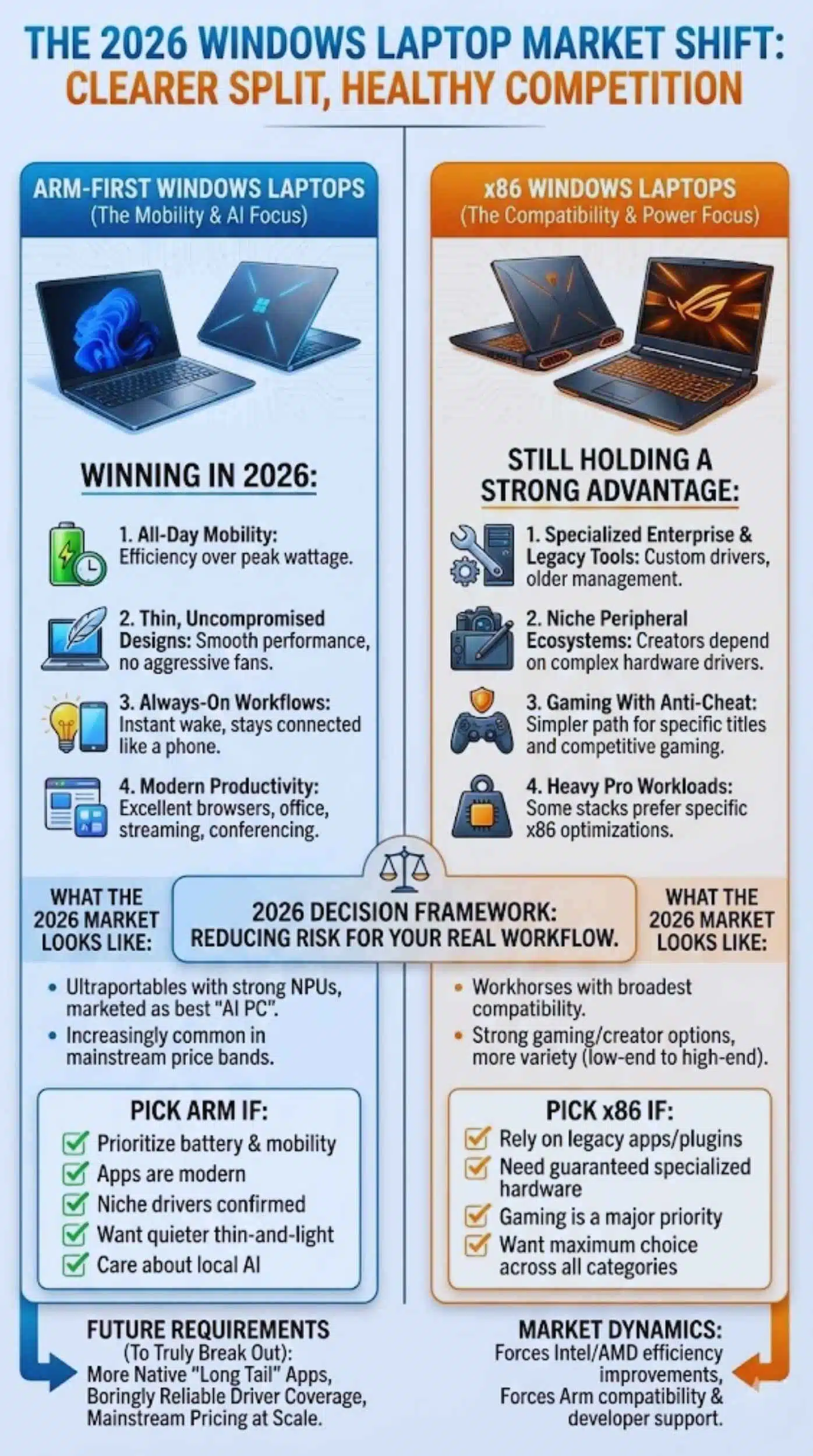
1. All-Day Mobility
If you are frequently away from outlets, efficiency matters more than peak wattage. For many buyers, the best laptop is the one that does not make you think about battery.
2. Thin Designs That Do Not Feel Compromised
Thin-and-light laptops often struggle with sustained x86 performance because they hit thermal limits. Efficiency-focused SoCs can maintain smooth performance without aggressive fan noise.
3. Always-On Workflows
Waking instantly, staying connected, and handling light background work without draining the battery creates a phone-like feel that many users prefer once they experience it.
4. Modern Productivity And Content Consumption
Browsers, office apps, messaging, streaming, and conferencing are the daily reality for most people. If those are excellent, most buyers will not miss edge-case compatibility.
Where x86 Still Holds A Strong Advantage
Even in a strong Arm year, x86 remains the safe default in specific scenarios.
1. Specialized Enterprise And Legacy Toolchains
If your organization depends on legacy Windows software, custom drivers, or older device management tooling, x86 remains the lower-risk choice unless your IT team has validated Arm thoroughly.
2. Niche Peripheral Ecosystems
Creators and professionals often depend on hardware devices with complex drivers and utilities. If the vendor does not actively support Arm, do not gamble.
3. Gaming With Anti-Cheat And Specific Titles
Gaming compatibility is improving, but it still has “hard stop” cases. If your primary use case is gaming, x86 remains the simpler path.
4. Heavy Pro Workloads That Prefer Specific x86 Optimizations
Some workloads and plugins still target x86 performance paths. This can change quickly, but in 2026 it is still a consideration for certain pro stacks.
What The 2026 Laptop Market Likely Looks Like
If the 2026 shift plays out as expected, buyers will see a clearer split that looks like this:
Arm-First Windows Laptops
- Ultraportables designed to last longer, run cooler, and ship with strong NPUs
- Marketed as the best “AI PC” experience in thin designs
- Increasingly common in mainstream price bands, not just premium
x86 Windows Laptops
- Workhorses with the broadest compatibility story
- Strong gaming choices and high-performance creator options
- More variety in configurations, especially at the low end and the high end
This split is healthy for the market. It forces Intel and AMD to keep improving efficiency, and it forces Arm Windows platforms to keep improving compatibility and developer support.
How To Choose In 2026: A Practical Buyer Framework
If you want a simple decision rule, use this checklist.
Pick A Windows On Arm Laptop If
- You prioritize battery life and mobility
- Your apps are mainstream and modern
- You can live without niche peripherals or you have confirmed driver support
- You want a quieter, cooler thin-and-light device
- You care about NPU-driven features and local AI performance
Pick An x86 Windows Laptop If
- You rely on legacy apps, old plugins, or proprietary enterprise tools
- You need guaranteed compatibility with specialized hardware
- Gaming is a major priority, especially competitive titles with anti-cheat
- You want maximum choice across budget and performance categories
In 2026, this is less about ideology and more about reducing your risk. The best device is the one that fits your real workflow.
What Needs To Happen For Arm To Truly Break Out
The 2026 shift becomes a lasting transformation if three things happen together.
1. More Native Arm Apps In The “Long Tail”
The big-name apps are not enough. Arm needs the thousands of small but essential tools that people use at work.
2. Driver Coverage That Feels Boring
Drivers are successful when nobody talks about them. The moment “printer support” becomes a conversation again, adoption slows.
3. Mainstream Pricing
A platform becomes mainstream when it shows up in popular, affordable configurations at scale. If 2026 brings broad availability across mid-range laptops, the shift becomes hard to reverse.
The 2026 Shift Is Real, But It Is Not A Takeover
Windows on Arm in 2026 is best understood as a widening lane that becomes a major highway. It will not erase x86. It will compete with it in the segments that matter most to modern laptop buyers: thin, mobile, long-lasting devices that feel fast in everyday use.
The winners will be the platforms that deliver a smooth experience without surprises. Arm’s path to victory is not about outperforming every x86 chip in every benchmark. It is about making the average day better for the average user, while reducing compatibility anxiety year after year.