Do you feel stuck when you try to build a web application? You know HTML and CSS. Server side work with node.js and express.js sends you in circles. You freeze at database calls in a dbms.
It feels like you hit a wall.
Key Takeaways
- You build 7 web apps: an e-commerce shop, social feed, food delivery, task board, CMS, workout tracker, and chat.
- You use React.js, Node.js, Express.js, and MongoDB or SQL to code REST APIs, CRUD ops, and JWT/OAuth auth.
- You add payment integration, WebSocket live updates, map-based delivery tracking, and file sharing with SSL security.
- You run load tests, debug race conditions, and deploy on AWS or Azure to sharpen your cloud and problem-solving skills.
- You showcase these MERN stack projects in a portfolio to prove your hands-on full-stack expertise.
E-Commerce Platform
Build a Node.js server, add a web framework, and serve HTML and CSS pages to list products. Link to a NoSQL database or SQL server, integrate a payment gateway, and watch your cart do the cha-ching dance.
Build a product catalog and shopping cart
Product catalogs drive user choices, they set the tone for browsing. Shopping carts guide buyers from cart to checkout.
- Design a product entity table. Use relational database management systems to store sku, name, description, price, image url, and stock count for quick database queries and fault tolerance.
- Expose restful apis using a JavaScript runtime and a server framework for get, post, put, delete operations, a core drill for full-stack development practice. Apply transport layer security to all http requests to shield user info.
- Craft front-end pages with HTML, CSS, and a UI library that show product lists, filters, and a search box to boost user experience. This layering teaches frontend development and design patterns.
- Manage cart sessions on client and server, use cookies or local storage to track item ids and quantities, syncing with back-end cart tables. Update totals and quantities in real time to keep shoppers happy.
- Integrate payment service providers via application programming interfaces for credit card and digital wallet options. Store only tokens in your database, delegate heavy work to processors and follow security best practices.
- Log order history in your database, link each record to a user profile with timestamps and total price, similar to Amazon’s setup. Allow buyers to revisit past purchases, speeding up repeat orders.
- Test cart flows under load, write scripts that simulate hundreds of users, and monitor performance on servers or cloud platforms. Coordinate with cross-functional teams to catch race conditions and refine code quality.
Implement payment gateway integration
Your server connects to a payment API so you can accept cards and digital wallets. You write a route in node.js with express.js. You secure that route with SSL and a secret key. The back end sends transaction data to a payment provider’s REST API.
The provider returns a status code and a token. Server saves the response in a database management system. This process makes a shopping cart come alive. It brings real cash into your store.
You build a form in hypertext markup language and cascading style sheets for the checkout page. React.js handles the form state and shows errors live. JavaScript captures card details and sends them to your server.
The server then calls the payment service in JSON. A full-stack developer watches the user get a success or failure message. This feature completes any e-commerce tutorial app.
Social Media App
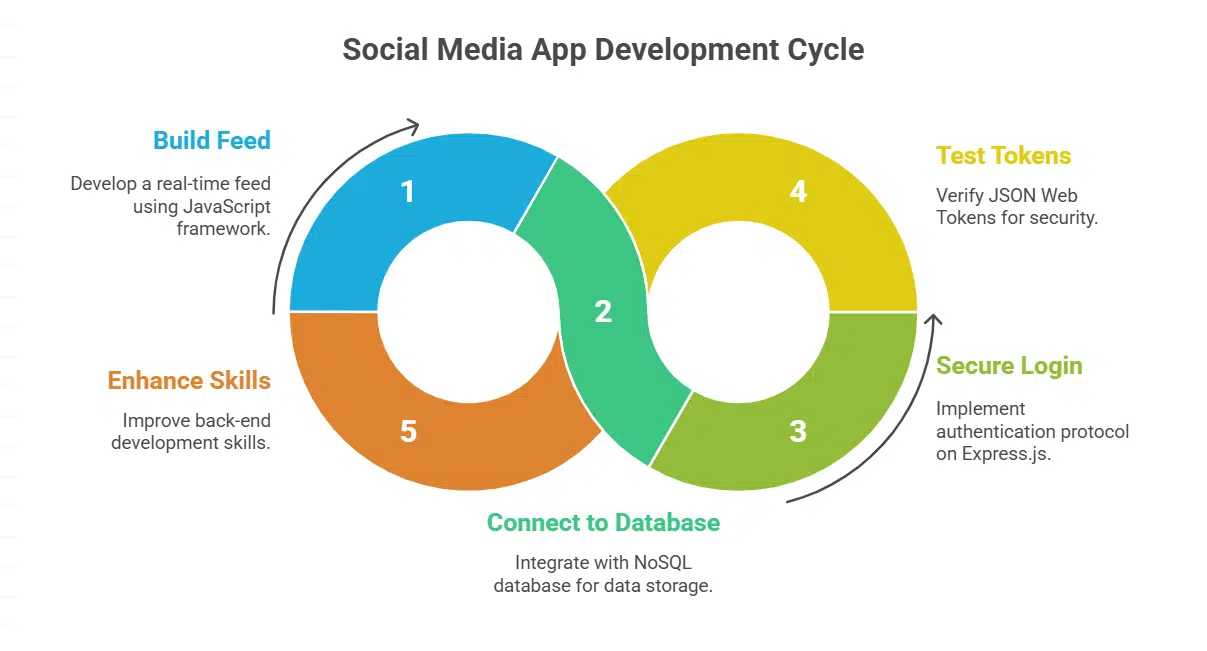
You build a lively feed with a JavaScript framework, and you tie it to a NoSQL database so posts pop in real time. Then you lock down login with an authentication protocol on Express.js, test JSON Web Tokens, and watch your back-end skills bloom.
Create user authentication and profiles
Authentication locks the door to your code and keeps out trolls. Profiles let members paint their own picture and make real connections.
- Build a sign up page with React.js, collect email, username, and password.
- Use bcrypt in Node.js to hash credentials, secure each new account.
- Create an Express.js login route, verify input, and issue a JSON Web Token.
- Add auth middleware on the server, check tokens on every request, guard user data.
- Craft a React.js profile page, allow avatar uploads, and add a short bio section.
- Store profile data in MongoDB, follow database management systems guidelines.
- Integrate OAuth via Facebook or Google APIs, enable social sign in with one click.
Enable posting, commenting, and liking features
A social media app shines when users post, comment, and like. These features boost user experience and grow communities.
- Set up a NoSQL store as a database management system for posts, comments, and like records.
- Build back-end routes with node.js and express.js to handle post creation, comment submission, and like toggles.
- Implement user authentication to link every post or comment to a user profile.
- Create a React.js interface that lists posts, displays comment threads, and updates like counts.
- Fetch data with AJAX calls to load new comments and likes without a full page refresh.
- Add WebSocket support for live comment and like updates, just like Instagram shows real-time feedback.
- Display badges and counters that provide clear feedback and boost user experience.
- Run web security tests to block spam, stop SQL injection, and keep user data safe on both front-end and back-end.
Food Delivery App
Think of your app as a digital diner where a JavaScript runtime and web framework serve up menus fast, while a UI library adds the wow factor. You can toss in real-time updates via WebSocket, wrangle a NoSQL store, and watch your code dance like a sous-chef on a busy night.
Restaurant menu and ordering system are foundational in a food delivery app. Clear design speeds orders.
- Map out menu categories like appetizers, mains, and desserts in a JSON schema that a React library can render for a friendly user interface.
- Craft a responsive grid in the frontend development phase using a JavaScript framework to handle dynamic price updates and item images.
- Build REST endpoints on a Node runtime with an Express framework in a MERN stack to fetch menu items and process orders.
- Connect a database management system such as a NoSQL store or a relational system to save menu details, user carts, and transaction logs securely.
- Add real time updates with a WebSocket connection or a messaging library to push kitchen alerts to customers and track order status live.
- Test across browsers and mobile layouts to polish the user experience and sharpen full stack development skills.
Integrate real-time delivery tracking
You link a mapping API and WebSockets in your Node.js and Express.js server. The service pushes GPS updates from the driver to the client. The front end uses React.js to show a map that tracks that driver.
Microservices let you scale updates across hundreds of couriers with little lag.
Viewers get a kick out of watching a courier icon skate across the city grid. A SQL database and a document store keep a log of past runs for later analysis. You can add a chart.js panel to break down average delivery times.
This real-time tracking feature in your Grubhub-style food delivery app feels like magic, and it builds strong skills in full-stack development.
Project Management App
Watch as your task list springs to life on a Kanban board built with a front-end framework, a server framework, and a NoSQL database, so you can hit deadlines like a pro runner. You sharpen your API design skills and set up user roles while you build an interactive dashboard that updates in real time.
Develop task creation and assignment functionality
This feature helps teams stay on track. It drives real productivity.
- Set up a Node.js Express.js service for back-end development that accepts POST calls to /tasks, and use MongoDB in a MERN stack for storage.
- Design a React.js form for front-end development with inputs for title, description, due date and user assignment, and style it with CSS and a UI library.
- Create a RESTful API endpoint that handles task assignment by user ID, and secure it with JWT tokens or OAuth in a microservices layer.
- Store user profiles and tasks in a database management system, linking task IDs to member records and tracking status in each entry.
- Link tasks to user sessions in the UI by fetching assignedUser fields with GET calls, and allow status updates with PATCH requests.
- Display tasks in a Kanban board view using D3.js or chart.js to build a dashboard, and offer drag and drop for simple UX.
Implement a Kanban board for workflow management
Kanban boards help you track tasks at a glance. They act like traffic lights for your workflow.
- Choose Node.js with Express.js to create server endpoints that handle kanban cards and follow dependency injection patterns.
- Set up a MongoDB database management system to store card details, user roles, and project metadata for your project management app.
- Use React.js to craft an interactive board that shows columns like To Do, In Progress, and Done, and adds user-friendly drag-and-drop.
- Integrate d3.js or Chart.js to build dashboards that chart card counts and cycle times, helping your team spot bottlenecks.
- Design RESTful APIs in a microservices architecture to scale your full stack development effort and keep server sides clean.
- Add HTML5 drag-and-drop functionality so web devs can move task cards between columns with ease.
- Deploy your web-based application on Microsoft Azure or AWS to offer 24/7 uptime and global access for all team members.
Content Management System (CMS)
Use React.js and a database management system like MySQL to build a lean CMS that lets teams publish and edit content in a snap, no fuss. Plug in Express.js for user roles and permissions, so editors lock or grant access like a club bouncer.
Enable dynamic content creation and editing
Dynamic editing powers modern websites. It lets admins adjust pages fast.
- Set up database management systems for a CMS to store posts, pages, and files.
- Build RESTful APIs with express.js for website development and full-stack developer workflows.
- Craft an editable UI using a frontend library, React.js, to improve user experience.
- Add a rich text editor package from a JavaScript package manager to speed software development and support live updates.
- Implement user roles in Node.js to let editors edit, authors draft, and admins publish.
- Track changes with version tables to keep history and help debugging.
- Plug in a data viz tool like d3.js or chart.js to show analytics on content views and reading time.
- Call on a large language models API to generate titles, summaries, or tags.
Add user roles and permissions
Role-based administration is crucial in every site. A CMS shows why roles matter.
- Assign admin, editor, author, and reader roles in your content management system (cms).
- Link each role to specific tasks, like changing themes, writing posts, or viewing dashboards, using Express.js routes and middleware.
- Store role flags in your database management system, like MongoDB in a MERN stack or MySQL in a LAMP stack, so you can grant or reject CRUD requests.
- Protect your backend development code by checking user roles in Node.js or Spring Framework before you run any update or delete command.
- Test each role in your tutorial app with Jest or Mocha scripts that simulate login, create, update, and read actions.
- Log every role change event with a timestamp and admin id in your audit table, for quick error fixes and compliance.
Workout Tracker
A workout tracker blends front-end flair with back-end power as you code React.js views and Node.js APIs to log every rep. Then add Chart.js for vibrant charts, spin up MongoDB for data, and watch your project pump up like a true champ.
Build user progress tracking and analytics
Tracking progress is vital for any workout tracker app. It drives retention and inspires users to push forward.
- Set up schemas in a database management system like MongoDB to log user metrics, sets and reps.
- Pick programming languages such as JavaScript or TypeScript to power both server and client code.
- Design REST endpoints using Node.js and Express.js for back-end development and workout log CRUD.
- Store records via Mongoose for a scalable MERN stack application.
- Build React.js components to render data tables and progress bars for a better user experience.
- Integrate Chart.js or D3.js to show dynamic data visualization of weekly or monthly trends.
- Compute averages, totals and growth rates on the server to offload front-end development tasks.
- Add date pickers and filters to let users slice data by range, exercise type or intensity.
- Protect data with JWT authentication and role-based access control to secure web applications.
- Monitor API calls and database queries with tools like Winston for analytics on performance.
Include a customizable workout plan feature
A workout tracker shines when it adapts to each person. This feature helps developers build skills in front-end and back-end development.
- Set up REST API endpoints with node.js and express.js to handle plan creation.
- Store user templates in a NoSQL database management system that scales with traffic.
- Build a drag and drop editor in a UI library, letting users snap routines together like blocks while you hone front-end development.
- Render weight and rep trends with chart.js to give live feedback.
- Support CRUD operations on exercises, sets, and rest periods to let users tweak every detail.
- Protect user data with JSON Web Tokens for secure sessions.
- Use a MERN stack scaffold to tie front-end and back-end parts smoothly.
- Log user actions for data visualization, so you can spot trends like a detective on a case.
Chat Messaging App

You build a chat app that feels like a buzzing cafe, with a UI framework, Node.js, a real-time engine, and a NoSQL database. Add group rooms and file sharing to boost your full-stack skills and wow future employers.
Create real-time messaging functionality
Real-time chat feels magical. It moves data at high speed.
- Set up a socket protocol link on the front end with a socket framework and React.js, then connect it to an Express.js server running on Node.js.
- Validate each user on the back end with a NoSQL store and a secure token, so only signed in readers can join the chat.
- Emit message events in JSON, including writer name, text, and time stamp, so the front end can render new lines instantly.
- Listen for incoming events in the browser and update the UI with animated message bubbles and live scroll.
- Log each chat entry in the database management system, letting users load past lines and search old topics.
- Test latency across 50 ms and 100 ms network links, then tweak server code to slash lag and jitter.
- Block unwanted hits with SSL and token checks, so data stays safe from prying eyes.
- Add emoji support and URL previews to boost reader delight and improve user experience.
Add group chat and file sharing features
Group chats spark lively discussions. File uploads help teams swap documents.
- Set up a Socket.IO server on Node.js with Express.js to handle chat events.
- Create a React.js front end that shows user lists, message history, and room controls.
- Store messages in MongoDB so full-stack developers can fetch chat logs fast.
- Build file upload routes in Express.js, and store files in Amazon S3 buckets.
- Provide thumbnail previews using a small image buffer for quick file checks.
- Secure endpoints with JSON Web Tokens and Passport.js to manage user roles.
- Test on Windows and Linux, deploy on AWS, and monitor performance with Chart.js.
- Craft user experience (ux) flows for group invites, drag and drop uploads, and alert banners.
Benefits of Building These Projects
You sharpen your full-stack development skills with real code and data. You boost your analytical skills while you tackle UX tests, database management systems, and a visualization toolkit.
Hands-on experience in full-stack technologies
This guide lists seven full stack projects that boost hands-on learning. Web developers build a shopping cart app with node.js and express.js for backend development. Dev teams add user login flows using Node.js, MongoDB, and PostgreSQL.
Creatives code API routes then show data with Svelte or React.js on the client side. This practice helps developers learn database management systems and real CRUD operations.
Tutorial apps like a social media app, project management app, and content management system (cms) solve real tasks. Developers add posts, comments, and user roles in these builds.
Teams include d3.js or chart.js in a data analytics app for data visualization. Hands-on work trains analytical skills, creativity, plus a strong portfolio. High demand for full-stack developers rises in startups and large firms.
Improved problem-solving and debugging skills
Crafting a Task List App boosts problem-solving, you apply CRUD operations on database management systems like MongoDB. A Showcase Site forces you to adapt layouts, tweak CSS, use React.js for front-end development.
You build RESTful routes with Node.js and Express.js on the back-end, debug broken queries, refine API logic. Each fix plants a new skill.
Debugging skills kick in with a Messenger App, you chase Websockets bugs like a detective, and tame wild race conditions. An Online Shop tests your logic on user management and payment gateway integration.
Facing these puzzles builds speed in full stack development.
Strong portfolio for career opportunities
Developers build live projects with node.js, express.js, react.js and a NoSQL store to show real skills. Recruiters look for code samples that prove full stack development know-how.
A project portfolio full of working e-commerce sites, chat apps, and CMS examples makes you stand out.
Hands-on work in an e-commerce app that handles API creation, security, and data storage demonstrates your versatility. Showing a project built with MERN stack and database management systems helps you land interviews.
Employers value that kind of proof more than a blank resume or degrees.
Takeaway
You gain real code skills fast. These builds use the MERN stack, a server runtime, and a UI library. Plus, you learn to query a NoSQL store. Your debugging and design skills improve.
A rich portfolio comes to life. A full-stack role lies within reach.
FAQs on Web Projects to Speed Up Full-Stack Mastery
1. What simple project can kickstart my full-stack development journey?
Try a tutorial app, it mixes Node.js for the server, Express.js for routes, and React.js for the interface. Think of it as a recipe to learn each layer of full stack development.
A social media app is a sandbox for user experience, database management systems, and MERN stack code. You build APIs, design UI, handle data, and you see both sides talk.
3. Will a gaming app help me learn data visualization?
Yes, a gaming app can use chart.js or d3.js to show scores, stats, and maps. A data analytics app meets fun, and you get hands-on with data visualization.
4. Is building a food delivery app a good way to learn full stack development?
Absolutely, a food delivery app mimics real food deliveries. You set up menus, orders, and dynamic pages. It ties front-end development, back-end development, and database work in one flow.
5. How can a project management app improve my skills as a full-stack developer?
A project management app shows you task flows, team views, user roles, and UX. You code endpoints, manage database management systems, and polish user interfaces.
6. Should I build a content management system to become a full-stack developer?
Yes, a content management system covers forms, entries, and content updates. You pick Node.js or Ruby on Rails, test packages, and refine user experience.