Do you worry that your crypto vault could leave a trail of breadcrumbs back to your real name? Blockchain networks log public keys and transaction data, and that feels like a path anyone can follow.
This fear can scare off new users in decentralized finance.
Privacy in Web3 has three faces: data, computation, and identity. You will find seven clear tips to mask your IP with a privacy network, guard your private key, and use zero-knowledge proofs in smart contracts.
Read on.
Key Takeaways
- Use a private wallet extension like MetaMask and testnets (Goerli, Ropsten) to keep your real name off main blockchains.
- Hide your IP with a no-log VPN (NordVPN, ExpressVPN) using AES-256 and a kill switch, or use Tor’s three-node onion routing.
- Pick a burner name and anonymous email, and run personal and pro accounts in separate browsers to keep identities apart.
- Mix funds with Tornado Cash (zero-knowledge proofs), send small amounts, wait 48 hours, split addresses, and randomize gas fees to block chain analysis.
- Practice browser hygiene: use Firefox or Brave in fresh profiles, enforce HTTPS, block scripts with uBlock Origin, and clear cookies after each session.
Use a Secure and Private Wallet
A browser extension wallet, like Metamask, acts as a private cryptocurrency wallet. A separate crypto wallet stops traceable links on the blockchain. This trick protects your digital identity.
It also hides your moves in decentralized finance and peer-to-peer networks.
Testnet faucets give free coins for early trials. You can deploy smart contracts without risk. Peer-to-peer exchanges let you buy bitcoins anonymously under local laws. Direct transfers stay off your main account to block trace trails.
Mask Your IP Address
Hide your IP address behind an encrypted tunnel, like a privacy proxy or an onion router, and watch your blockchain traffic vanish into thin air. You can sneak into the p2p swarm without leaving a trace, with your digital signature safe behind layers of encryption.
Utilize VPNs
VPNs hide your IP address and lock data behind encryption. They let you surf in private on blockchain networks.
- Choose NordVPN or ExpressVPN for a no-log policy that stops providers from seeing your traffic.
- Connect to a server in another country to reroute your internet protocol and mask your location.
- Use AES-256 encryption to seal all packets so no one reads your data in transit.
- Turn on the kill switch so it blocks unencrypted traffic if your VPN drops.
- Test your setup with an IP leak tool to confirm no real address shows.
Next, we will explore how to leverage Tor for enhanced privacy.
Leverage Tor for Enhanced Privacy
Tor hides your IP, stops surveillance, and lets you beat censors. It sends your data through three volunteer nodes, each node peels one encryption layer, just like an onion, to mask your path.
This onion routing, a privacy-enhancing technology, secures your encrypted communication under the internet protocol.
Launch an onion client to use Tor with ease. It blocks cookies and foils google analytics trackers, it thwarts tcp monitoring. You can roam public blockchain apps, decentralized exchanges, and peer-to-peer (p2p) networks without exposing your IP.
Up next, how to avoid linking your real identity to your digital identity.
Avoid Linking Your Real Identity to Your Digital Identity
Set up a self-sovereign identity, powered by digital signatures and privacy proofs, to hide your real name. Store it on a peer-to-peer network in a hash ledger, so no one ties your wallet back to you.
Use Pseudonyms
Pick a burner name for your blockchain wallet. Use an anonymous email service with zero personal traces. Link it to a code hosting platform under a fake alias. Post on microblogging services or chat channels with that handle.
This trick hides your digital identity on web 3.0 and decentralized finance.
You sign transactions by digital signatures, not by your real name. Self-sovereign identity stays private. You foil data privacy hunters in the p2p network. Future snoops hit a blank wall.
Identity management becomes child’s play.
Separate Personal and Professional Accounts
Split your personal and professional logins. Log into anonymous accounts on Trello and Slack in one browser, and keep personal browsing in another. Avoid real names in profiles, comments, and account metadata.
Create an alias for work on private blockchains or decentralized autonomous organizations. Always practice browser hygiene and never mix those accounts in a single session.
Be Cautious with Social Media and Online Activity
Hackers can track your real name on Discord or Telegram if you share a birthday, address or photo. Use burner SIMs or a temporary number to sign up for new accounts. A fake name works like a secret sauce for your digital identity.
Blur photos or pixelate landmarks in your pictures. Join p2p networks or bitcoin network chats under a pseudonym. Delete location tags from photos in your camera app first.
Some projects list a team photo or an email by mistake. A secure hash function can guard a wallet address in shared docs. Avoid linking your stablecoin stash to a real name. Use privacy-enhancing technologies like homomorphic encryption or zero-knowledge proofs on drafts.
A wallet seeks cryptographic commitments, not your travel diary. Omit real email or phone numbers from code examples to boost professionalism.
Fund Your Wallet Anonymously
Use coin shufflers and test network faucets to fill your wallet off the grid, and read on for more clever tricks.
Use Mixers and Tumblers
Mixers hide transaction trails. They break the link between send and receive addresses.
- Pick a Tornado Cash mixer built on Ethereum, it lives in a smart contract and uses zero-knowledge proofs to mask cryptographic hashes, it detaches the hash of your deposit from the hash of your withdrawal.
- Send small amounts in separate steps, this tactic cuts down on flags from custodial exchanges that demand KYC and run chain analysis.
- Wait at least 48 hours before you cash out to fresh wallets, that pause adds a buffer against tracing tools.
- Split coins into multiple, new addresses to scatter tracks, this method leans on preimage resistance and secure hash functions.
- Track gas fees on each withdrawal and randomize the amount, it confuses blockchain scanners and scrambles patterns.
Leverage Testnet Faucets
Testnet faucets hand out free ETH on networks like Goerli and Ropsten. They let you try smart contracts and non-fungible tokens in a sandbox. You can learn zero-knowledge proofs and test commitment schemes without risk.
These trial runs rest easy on blockchain technology, saving real assets.
Your transactions on testnets do not hit the bitcoin blockchain or other main chains. You keep your digital identities separate from your real wallet. This trick guards your privacy and lets you explore decentralized finance (defi) without using real funds.
Practice Browser Hygiene
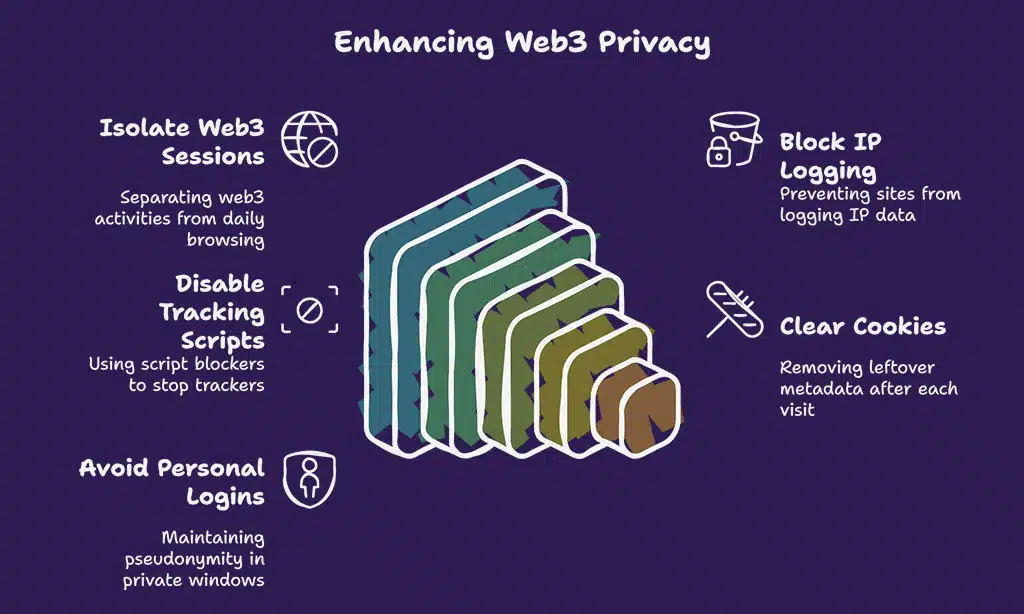
I switch to Tor Browser, enforce HTTPS to lock down transmission control protocol, clear cookies, and kill trackers with uBlock Origin—read on for more tips.
Use Privacy-Focused Browsers
Firefox and Brave isolate your web3 sessions from your daily browsing. They stop sites from logging your internet protocol (IP) data. These browsers block requests to distributed hash tables that power decentralized finance dapps.
You run them in a fresh profile to cut ties with your personal cookies.
These tools block ads, scripts, and tracking cookies that can link you to smart contracts or nonfungible token details. Browser features such as differential privacy limit fingerprinting, and guard sessions on decentralized finance platforms.
Next, disable tracking scripts in your browser.
Disable Tracking Scripts
Privacy-focused browsers shut off many web2 trackers. Next you must disable tracking scripts to plug data leaks.
- Install a script blocker like uBlock Origin, which uses asymmetric cryptography to verify script signatures and stops trackers.
- Permit scripts only for your decentralized finance apps or NFT marketplaces, like smart contracts on blockchain technologies for nonfungible tokens.
- Clear cookies and session storage after each visit to remove leftover metadata and hash values, cutting off data leaks.
- Avoid logging into personal accounts on Tor or private windows to keep your pseudonym intact and protect digital identity.
- Verify TLS certificates and HTTPS connections, since they use asymmetric cryptography and collision resistance to guard encrypted data.
Encrypt Your Communications
Seal messages in a secure chat app, encrypt email with GPG, split keys via secret sharing, and read on to learn more.
Use Encrypted Messaging Applications
Encrypted apps lock your chats. They keep spies and hackers out.
- Pick Signal as your chat host. It uses end-to-end encryption, an open source protocol that blocks unauthorized snoops and secures each message with a cryptographic handshake. Even satoshi nakamoto would choose this for a secure note.
- Try Telegram secret chats on Android or iOS. Those rooms let you set self-destruct timers, hide your phone number, and bypass server logs that sit on a distributed hash table. You can also enable zero knowledge proofs to verify keys without leaking data.
- Enable PINs or password hashing on backups. That creates a hash of the password to lock away cloud copies, so no one cracks it. It adds a safeguard against data thieves.
- Skip SMS fallbacks which can leak your number to carriers. Instead use apps that offer secure multi-party computation for voice calls and reduce metadata footprints. This cuts out telco snoops.
- Update your app weekly to fix bugs. Developers patch cryptographic flaws and drop weak ciphers. They sometimes add federated learning or statistical analysis for network health checks.
Secure Your Emails
Email accounts can leak your name and location fast. ProtonMail hides all content with end to end encryption.
- Create a fresh ProtonMail account away from personal details. Use a username not tied to your real name or date of birth and skip any personal recovery options.
- Craft a complex password with random letters, symbols, and numbers. A strong password stops brute force hacks and preserves data integrity.
- Turn on two factor authentication in the settings menu. This adds extra gatekeeping for any login attempt on trades or smart contracts in the metaverse.
- Disable remote image loading and external style sheets. This blocks tracked pixels through a distributed hash table and stops leaks under the model context protocol.
- Pair your ProtonMail with a PGP or OpenPGP add on. This lets you decrypt messages locally and test zero knowledge proofs for authenticity.
- Use separate mail for decentralized finance, investing, and general chat. This helps keep your wallets and passwords from leaking into wrong hands.
- Purge old archives and logs every few weeks. This clears any decrypted fragments from garbled circuits and stale message caches.
Your mailbox is locked down; next we will wrap up key takeaways.
Takeaways
People can guard their trail with a strong wallet and a VPN. An anonymity network gives snoops the slip. You must split your real name from your digital ID with a pseudonym. Transaction shufflers hide your Web3 funds before you deploy smart contracts.
A secure browser and script blockers keep trackers at bay. Zero-knowledge proofs and distributed hash tables protect your data. You hold the keys to your own information security.
FAQs on Ways to Stay Anonymous on Web3 Apps
1. How can I stay invisible when I use contracts on Web3?
Use a fresh wallet for each smart contract. It is like wearing a new mask for every party, you leave no tracks. Use zero knowledge proofs, cryptographically guard your identity. Keep your real details off public chains.
2. How do zero knowledge proofs (zkps) hide my steps?
They work like a locked box. You prove your secret without decrypting it. They roll in scalable transparent arguments of knowledge, they use an argument of knowledge. No one gets to peek at your data.
3. How can a distributed hash table (dht) hide my files?
It slices your file across nodes like scattered puzzle pieces. No node has the full picture. This stops any single node from decrypting your data. You stay off the radar.
4. How do I keep my cash moves private in finance apps?
Decentralized finance apps post to public ledgers. You can hide by using fresh wallets, encrypt your notes, never link to your ID. Keep your information security tight, swap keys often. It is like playing hide and seek with your coins.