Let’s be honest: managing a team that is split between the corporate headquarters and home offices is no longer a temporary “pivot”—it is the standard operating model for modern business. We have moved past the initial chaos of remote work trials and entered a phase where employees expect flexibility as a basic employment right, not a perk.
However, the reality for most HR leaders is that while the policy has changed, the infrastructure hasn’t kept up. You are likely still trying to glue together a hybrid culture using outdated spreadsheets, clunky legacy ERPs, and an endless stream of Zoom links that leave everyone feeling drained. The friction is real and it shows up in subtle, damaging ways. You might notice “proximity bias” creeping in, where the people physically present in the office get the best projects simply because they are visible.
Or perhaps you are dealing with the administrative nightmare of tracking tax compliance for an employee who decided to work from a different state for three months without telling anyone. To fix these cracks in your foundation, you need more than just good intentions; you need a purpose-built tech stack. In this comprehensive guide, we are cutting through the marketing noise to bring you the 5 best HR tech tools for hybrid workforce management that actually solve the logistical, cultural, and legal challenges of 2026.
Why You Need Specialized Tech for a Hybrid Workforce?
If you are still relying on a traditional Human Resources Information System (HRIS) that was built in 2015, you are fighting a losing battle against the complexities of today’s distributed teams. Those older systems were designed for a world where every employee swiped a badge at the same front door at 9:00 AM and left at 5:00 PM. They simply cannot handle the fluidity of hybrid work, where “attendance” is a fluid concept and productivity happens asynchronously. When you try to force hybrid workflows into rigid, legacy software, you end up with “context switching” fatigue—where employees waste hours every week just toggling between disjointed apps, trying to figure out where to log their time or how to book a desk.
Beyond the daily annoyance, the lack of specialized tech creates massive risks for your company’s compliance and culture. Without the right tools, you might accidentally trigger tax nexuses in new jurisdictions because you didn’t know an employee moved. Culturally, the impact is even worse: without a digital “heart” of the company, remote workers start to feel like second-class citizens, leading to high turnover and low engagement. Specialized hybrid tools are not just about efficiency; they are the only way to democratize the employee experience so that someone working from a kitchen table in Ohio has the same access to opportunity and connection as someone sitting in the corner office in New York.
| Feature | Traditional HR Tech (Pre-2020) | Hybrid HR Tech (2026 Standards) |
| Onboarding | Paperwork signed in-person, IT hands over laptop manually. | 100% digital workflows; laptops are configured and shipped to the employee’s door automatically. |
| Communication | Reliance on synchronous meetings, email chains, and physical notice boards. | Asynchronous hubs, video messages, and social intranets that allow work to happen across time zones. |
| Workspace | Assigned cubicles and rigid seating charts. | Hot desking, collaborative zones, and app-based space booking to optimize real estate. |
| Payroll | Single location processing with one currency. | Global Employer of Record (EOR) services, multi-state tax handling, and instant crypto/local currency options. |
| Engagement | In-office happy hours and annual retreats. | Virtual town halls, peer-to-peer digital recognition, and interest-based online communities. |
Criteria for Choosing the Best Hybrid HR Tools
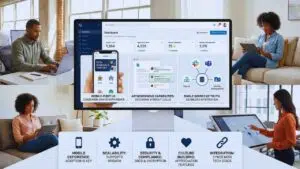
When we selected the software for this list, we didn’t just look for the most popular names or the ones with the biggest marketing budgets. We evaluated tools based on how well they solve the specific, gritty friction points of managing a distributed workforce. First and foremost, the User Experience (UX) has to be consumer-grade. Your employees are used to the seamlessness of Uber and Instagram; if your HR tool is clunky, slow, or requires a training manual to navigate, your team simply won’t use it. Mobile-first design is non-negotiable because hybrid employees are often working from coffee shops, airports, or their living rooms, and they need full functionality in the palm of their hand.
Secondly, we looked for “Asynchronous Capabilities.” In a hybrid world, requiring everyone to be online at the same exact time for a meeting is a productivity killer. The best tools allow work to move forward—decisions to be made, feedback to be given, and approvals to be signed—without requiring a synchronous video call. Finally, integration is key. Your HR platform cannot live in a silo; it must talk to Slack, Microsoft Teams, your payroll provider, and your identity management system. If a tool creates more data entry work for your HR admins, it failed the test. The goal is to create a “single source of truth” that unifies the physical and digital aspects of your company into one cohesive ecosystem.
| Criteria | Why It Matters for Hybrid Teams |
| Mobile Experience | If employees can’t request time off or book a desk from their phone, adoption will plummet. |
| Scalability | The tool must be able to handle rapid growth, easily supporting a jump from 50 to 500 employees. |
| Security & Compliance | with devices connecting from home networks, SOC2 compliance and data encryption are essential. |
| Culture Building | Does the tool include features that make remote staff feel “seen” and appreciated? |
| Integration | Must seamlessly sync with your existing tech stack (e.g., Google Workspace, Jira, Slack). |
1. Rippling: The Best All-in-One HR & IT Administration
Rippling has completely rewritten the rulebook on what HR software should look like by realizing that in a remote world, HR and IT are practically the same department. While most platforms stop at payroll and benefits, Rippling goes deep into device management and app access. This is arguably the most critical pain point for hybrid companies: how do you securely onboard an employee you have never met in person? Rippling answers this by unifying employee data across every system you use, creating a “super-system” where a single update to an employee’s profile propagates everywhere instantly.
Why It Wins for Hybrid Teams?
Imagine you are hiring a new Marketing Manager in London while your HQ is in San Francisco. In the old days, this would involve weeks of coordination between HR, IT, and Finance. With Rippling, it is a 90-second workflow. You click “Hire,” and the system generates the local contract, sets up their payroll in British Pounds, and—here is the kicker—automatically orders a laptop, configures it with your company’s security software, and ships it to their flat. When they start, all the apps they need (Slack, Zoom, HubSpot) are pre-installed and logged in. If they leave the company, you can reverse the process instantly: revoke app access and lock the laptop with one click. It turns a logistical nightmare into a seamless automated flow.
| Feature | Benefit for Hybrid Management |
| Unified Employee Graph | Updates in one system (e.g., title change) automatically update permissions in all other connected apps. |
| Device Management | remotely order, configure, ship, and wipe laptops and devices without IT ever touching them. |
| Global Payroll | Pay employees and contractors in minutes, in their local currency, with automatic tax filing and compliance. |
| App Provisioning | Automatically grant or revoke access to software tools (like Salesforce or GitHub) based on the employee’s specific role. |
| PEO Services | Access to “big company” benefits (health insurance, 401k) for your distributed team, leveling the playing field. |
2. Monday.com: The Best for Asynchronous Collaboration
Hybrid work dies without strong “asynchronous” communication habits—the ability for your team to move projects forward without needing to sit in a meeting room together. Monday.com acts as the central nervous system for your projects, reducing the reliance on those soul-sucking “status update” calls. It is more than just a project management tool; it is a Work OS that allows you to build custom workflows that mirror exactly how your team operates, bridging the gap between the early birds in New York and the night owls in Tokyo.
Why It Wins for Hybrid Teams?
When half your team is remote, you cannot just tap someone on the shoulder to ask, “Where are we on the Q3 report?” That lack of visibility causes anxiety and micromanagement. Monday.com solves this by making work radically visible. It uses highly visual boards—Kanban, Gantt charts, timelines—that let anyone see the status of a project instantly. The real power for hybrid teams lies in its automations. You can set it up so that when a designer changes a status to “Ready for Review,” the manager gets a Slack notification automatically. This keeps the workflow moving continuously, reducing bottlenecks and ensuring that no one is waiting around for an email reply to know what to do next.
| Feature | Benefit for Hybrid Management |
| Visual Workflows | Customizable boards make project status transparent to everyone, eliminating the need for “check-in” meetings. |
| Embedded Docs | collaborative documents live inside the project board, so context is never lost in a separate drive folder. |
| Smart Automations | “If this, then that” rules reduce manual admin work and keep projects moving across time zones. |
| Dashboards | High-level views allow managers to track team capacity and spot burnout risk before it becomes a problem. |
| Integration Center | Connects with tools like Zoom, Slack, and Gmail to centralize notifications and tasks. |
3. Workvivo (by Zoom): The Best for Employee Culture & Engagement
Traditional corporate intranets are usually static, boring graveyards where PDFs go to die. Workvivo has flipped this concept on its head by building a platform that functions like a corporate social media network. It feels like a mix of LinkedIn and Instagram but is private to your company. For hybrid organizations, this is crucial because it provides a digital “town square” where culture can happen organically, ensuring that remote employees feel just as connected to the company’s pulse as those in the physical office.
Why It Wins for Hybrid Teams?
One of the biggest risks in hybrid work is cultural erosion. Remote workers often feel invisible, like they are just tasks on a screen rather than people. Workvivo fixes this by making culture visible and participatory. It features a main activity feed where employees can post updates, share photos of their home office setups, and give public “shout-outs” to colleagues that align with company values. Since being acquired by Zoom, the integration is seamless—you can broadcast a town hall meeting live to the platform, and employees can watch and react in real-time whether they are at a desk, in a coffee shop, or on their commute. It democratizes the company meeting.
| Feature | Benefit for Hybrid Management |
| Social Activity Feed | A familiar, scrolling feed for company news, peer recognition, and personal updates that builds community. |
| Digital Signage | Push content to TV screens in the physical office and the mobile app simultaneously, bridging the physical-digital divide. |
| Community Spaces | Groups for non-work interests like “Pet Owners,” “Gamers,” or “Runners” foster genuine connections between colleagues. |
| Live Streaming | Broadcast CEO updates or all-hands meetings directly to the platform with interactive chat and reactions. |
| Employee Surveys | Built-in pulse surveys help leadership gauge sentiment and catch engagement issues early. |
4. Deel: The Best for Global Hiring & Compliance
“Hybrid” often evolves into “remote-first,” which eventually leads to “hire from anywhere.” However, the moment you decide to hire talent outside your home country, you run into a brick wall of legal complexity. Deel removes this barrier entirely. It is a platform designed to handle the terrifying mess of international labor laws, tax codes, and compliance requirements, allowing you to hire the best person for the job, whether they live in Berlin, Bangalore, or Boston, without needing to set up a legal entity in those places.
Why It Wins for Hybrid Teams?
If you find the perfect software developer in Argentina, you do not want to wait six months and spend thousands of dollars on legal fees to set up a local branch just to hire them. With Deel, you can hire them in minutes. Deel acts as the “Employer of Record” (EOR), meaning they legally hire the employee on your behalf and handle all the local taxes, social security, and benefits. In 2026, they have expanded their offering to include “Deel IT” for equipment management and advanced AI-driven compliance checks that alert you if a contractor is effectively acting as an employee, saving you from potential lawsuits and fines.
| Feature | Benefit for Hybrid Management |
| Employer of Record (EOR) | Hire full-time employees in 150+ countries without needing to establish a local legal entity. |
| Contractor Management | Generate compliant, locally localized contracts for freelancers and contractors instantly. |
| Global Payroll | Consolidate all your international team payments into one single invoice and workflow. |
| Deel IT | Seamlessly ship and manage IT equipment for your global workforce, handling logistics and returns. |
| Deel HR | A free HRIS for your direct employees to keep all your people data (local and global) in one place. |
5. Deskbird: The Best for Workspace Management (Hot Desking)

If your employees are only coming into the office two or three days a week, it makes zero financial sense to keep a dedicated desk empty for them the rest of the time. You need a desk booking system, and Deskbird is the best in class for user experience. The worst possible hybrid experience for an employee is commuting 45 minutes to the office only to find there are no desks available, or sitting alone in a corner because their team decided to work from home that day. Deskbird solves the “Who is in today?” problem elegantly.
Why It Wins for Hybrid Teams?
Deskbird focuses on the social aspect of coming to the office. It’s not just about booking a slab of wood to put your laptop on; it’s about coordinating with your team. Employees can open the app and see an interactive floor plan that shows exactly where their favorite colleagues are sitting. They can then book a desk right next to them in two clicks. This feature alone transforms the office from a “mandatory destination” into a “collaborative hub.” For HR and Facilities managers, the analytics are gold: you can see exactly which days are popular (e.g., Tuesdays are full, Fridays are empty) and resize your office lease accordingly to save money.
| Feature | Benefit for Hybrid Management |
| Interactive Floor Plans | Visual booking for desks, meeting rooms, and even parking spots, giving employees certainty before they commute. |
| Week Planning | Employees can see which days their team plans to be in the office, enabling better social coordination. |
| Utilization Analytics | HR gets deep data on office usage patterns to optimize real estate costs and energy usage. |
| Seamless Integrations | Users can book a desk directly from MS Teams or Slack without breaking their workflow. |
| Assign & Release | Automates the release of booked desks if an employee doesn’t check in, freeing up space for others. |
Emerging Trends in Hybrid Workforce Management (2026)
The tools we have listed are the current market leaders, but the landscape of work is shifting rapidly. As we move deeper into 2026, we are seeing new trends that will dictate the next generation of HR tech. First is the rise of the “Wellness Seeker.” Burnout is the silent killer of hybrid teams, and new tools are starting to integrate “wellness pulses”—short, anonymous surveys that ask how employees are feeling—and “focus time” blockers that automatically mute notifications during deep work hours. It is about using tech to protect human energy, not just extract it.
Another major trend is AI-Driven Talent Intelligence. It is no longer just about managing tasks; it is about predicting retention. The newest features in HR platforms use artificial intelligence to analyze engagement patterns—such as a sudden drop in participation in public Slack channels or a decrease in peer recognition—to flag employees who might be at risk of quitting before they actually hand in their notice. Finally, we are seeing the “Satellite Office” model take over. Companies are moving away from one giant, expensive HQ to smaller, regional hubs, requiring better multi-location management software that can handle complex access rights across different cities.
| Emerging Trend | The Challenge | The Tech Solution |
| Mental Health Priority | Digital Burnout & Isolation | Workvivo (Wellness checks, community groups) |
| Global Talent War | Compliance & Legal Risk | Deel (AI compliance monitoring, instant EOR) |
| Office Downsizing | Space Efficiency & Cost | Deskbird (Utilization analytics, smart booking) |
| AI Integration | Administrative Overload | Rippling (Automated workflows & provisioning) |
How to Implement These Tools Successfully?
Buying the software is actually the easy part of the equation. The real challenge—and where most companies fail—is getting the team to actually use it. Implementation is 20% technical and 80% behavioral. To succeed, you must first Audit Your Current Stack. Do not just pile new tools on top of old ones; that leads to “app bloat.” If you adopt Monday.com, you need to ruthlessly kill your old Trello boards and spreadsheets. Make a clean break so there is no confusion about where the work lives.
Next, you need to focus on the “WIIFM” Factor (What’s In It For Me?). You have to sell the benefit to the employee, not just the company. Don’t tell them, “We are using Deskbird to track your attendance.” That sounds like surveillance. Instead, say, “We are using Deskbird so you never have to worry about finding a seat next to your friends when you commute in.” Finally, Train for Asynchronous Work. A tool like Monday.com only works if people update it. You need to train your team that updating the board is the work, not an administrative afterthought. Building these habits takes time, but the payoff is a team that runs smoothly on autopilot.
| Phase | Action Items |
| Phase 1: Audit | Map out every tool currently in use. Identify redundancies and data silos. |
| Phase 2: Pilot | Roll out the new tool to a single “champion” team (e.g., Marketing) to work out bugs. |
| Phase 3: Communicate | Launch to the company with a focus on personal benefits (“This will save you time”). |
| Phase 4: Train | Hold live workshops and create short “loom” video tutorials for common tasks. |
| Phase 5: Iterate | Collect feedback after 30 days and adjust settings or workflows based on user input. |
Final Thoughts
The debate over remote versus office work is effectively over. The winner is hybrid. But “hybrid” isn’t just a policy you write in an employee handbook—it is an operating system you have to build intentionally with software. If you try to run a 2026 workforce on 2019 tools, you are setting yourself up for burnout, turnover, and compliance failures. The companies that win the talent war in the next decade will be the ones that make the hybrid experience seamless, equitable, and engaging.
The best HR tech tools for hybrid workforce management aren’t just about tracking time or processing paychecks efficiently. They are about creating a seamless experience where your employees feel connected to the mission, valued as individuals, and productive in their roles, regardless of their zip code. If you are feeling overwhelmed, start with your biggest pain point. Is it admin chaos? Look at Rippling. Is it a disconnected culture? Demo Workvivo. The right tool won’t just save you administrative time; it will save your company culture.