


Does your site show a ‘Not secure’ tag in a web browser? A missing padlock can scare off visitors and hurt your search engine rankings. You need clear Steps To Install A Free SSL Certificate On Your Website.
A free SSL certificate from Zero SSL or Let’s Encrypt lasts 90 days and helps you protect login pages, forms, and private data. In this guide, we walk you through cPanel, DNS records, generating a certificate signing request (CSR), and HTTPS redirection.
You will finish with a secure site and happier visitors. Ready to get started?
Key Takeaways
- Pick a free SSL provider like Let’s Encrypt, ZeroSSL, or SSL For Free. They issue 90-day certificates trusted by 99.9% of browsers.
- Prove domain ownership with a DNS CNAME record (_acme-challenge.yourdomain.com) and wait 5–10 minutes for propagation.
- Generate a CSR using Certbot or your hosting panel. Download the public key, private key, and intermediate chain file.
- In cPanel or Plesk, open SSL/TLS → Manage SSL Sites. Upload your certificate, private key, and CA bundle, then assign them to your domain.
- Force HTTPS with a 301 rewrite in .htaccess. Hunt mixed “http://” links with grep and replace them. Set up Certbot auto-renew to run every 90 days.
Choose a Free SSL Certificate Provider
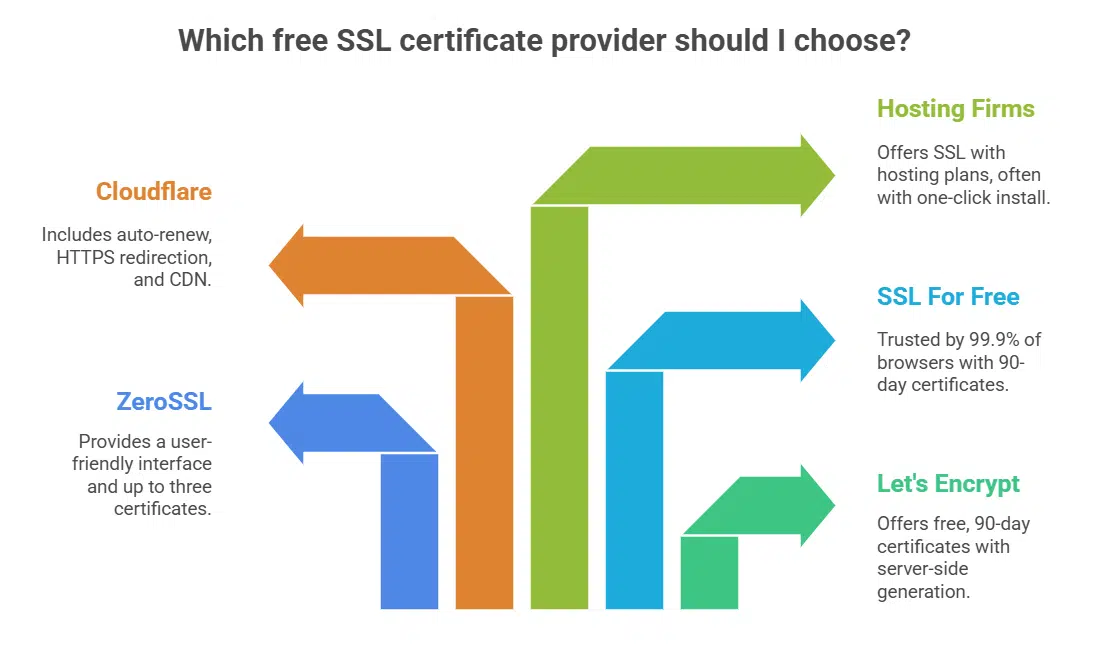
Let’s Encrypt acts as a free certificate authority and ssl certificate provider. Its nonprofit project issues domain validated certificates that last 90 days. You generate a certificate signing request on your server with Certbot, then fetch the ssl/tls certificates.
ZeroSSL adds a user friendly interface and lets you create up to three certificates per account. SSL For Free hands out 90-day certificates trusted by 99.9% of browsers.
Cloudflare serves free standard SSL with auto renew, https redirection, and a global content delivery network. Hosting firms like Bluehost charge just $2.75 per month yet include free ssl certificates and one click install tools.
DreamHost plans start at $1.99 monthly and cover your domain name with no extra fees. A2 Hosting and InMotion Hosting also link free ssl certificates to plans from $2.99 each. Pressable adds Jetpack Security, a firewall and malware scanning, along with your ssl certificate.
Verify Your Domain Ownership
Choose the DNS CNAME record method for domain verification. Enter a record under nameservers that adds _acme-challenge.yourdomain.com pointing to the CA’s validation entry. That proves ownership to the internet security research group (ISRG) or another certificate authority, like Let’s Encrypt.
Email validation can work, but it can delay setup because of stale email lists. File upload offers another option, but it may break a virtual host if you mix http:// and https:// in your tracking of the certificate signing request (CSR).
Check your time to live value, then watch for green status icons in the CA dashboard. Verify subject alternative names, organization validation or wildcard certificate flags for subdomains and root domain entries.
Use a terminal on Ubuntu 16.04 or PowerShell in Windows to list CNAME records quickly. Wait five to ten minutes for DNS propagation, then renew the CSR if needed. Missing verification stops issuance and blocks https urls on your web server.
Generate the SSL Certificate
Open the Zero SSL or Let’s Encrypt website. Enter your domain name carefully. Toggle on the auto generate CSR option. Wait until domain verification finishes. Finalize the order to bring your SSL certificate to life.
Each account grants up to three free certificates, valid for 90 days. Download the public key, private key and intermediate certificates.
Unix admins can also use Certbot to pack CSR creation and certificate fetching into one command. After confirmation you find fullchain.pem, privkey.pem and chain.pem in the live folder.
Store these files in a safe directory before you flip the switch on your https redirection.
Access Your Hosting Panel
Log into your hosting provider’s control panel with your username and password. Most hosts ship cPanel or Plesk to simplify ssl encryption tasks. DreamHost offers plans starting at $1.99 per month and throws in a free ssl certificate.
A2 Hosting and InMotion Hosting set prices at $2.99 monthly. Bluehost charges $2.75 and Pressable by Automattic bundles free SSL and extra security tools. One-click installation often pops up in the SSL/TLS section.
You need this step to upload the certificate signing request, the private key, and the certificate files. Let’s Encrypt runs under the Internet Security Research Group and works well here.
Consult your host’s documentation if you hit ssl troubleshooting snags or need wildcard certificates. Check control panels for firewall settings, web application firewall features, or wafs to guard against threats.
Select the SSL/TLS option in the menu. Paste your ssl certificate files into the right fields. Activate https redirection through your .htaccess or web application firewall rules. Use server name indication to handle multiple domain names.
Some shared hosting setups link to reverse proxy or content delivery networks for speed and css stylesheets caching. Test with crawlers or search engine optimization tools for mixed content warnings.
Update scripts or database links if they still use http calls. Log out when you finish to secure your session. Enable http/2 if your server software supports it for faster page loads.
cPanel hides its SSL/TLS section under Security, like a tool chest tucked on a low shelf. Click Manage SSL Sites to find uploads, certificate signing request (CSR) generators and private key handlers.
Users see options for a free SSL certificate from Let’s Encrypt, run by the internet security research group (ISRG), or another certificate authority. Plesk offers the same SSL management via its SSL/TLS settings page.
Auto-detect lets the panel spot existing secure sockets layer certificates, and it can prompt you to renew. You access both manual install and automated tools in this area. Hosts handle multiple domain name or wildcard SSL certificate setups right there.
Installing a cert unlocks HTTPS redirection, speeds up pages with HTTP/2, and quells ssl troubleshooting.
Upload the SSL Certificate Files
Hosting panels show dedicated fields for the primary certificate and CA bundle. Plesk and cPanel let you pick the .crt, key, and any intermediate files. Let’s Encrypt, ZeroSSL, and SSL For Free offer a ZIP bundle after you complete a certificate signing request.
Select the right files in the SSL/TLS section and hit Upload.
Wrong file types or missing CA chains send your site into SSL errors. Host panels accept only matched pairs of certificate and private key. After upload, assign the SSL certificate to the domain name in your dashboard.
Install the SSL Certificate on Your Domain
Open your hosting control dashboard and pick the SSL/TLS section. Click Manage SSL Sites in the control panel and pick your domain name. Upload the certificate, private key, and CA bundle from your certificate authority.
Assign the ssl certificate to your domain so the server recognizes each file.
Look for the padlock icon, in your browser, to confirm active HTTPS. Data moves over an encrypted channel after successful install. Some hosts use Let’s Encrypt and activate a free ssl certificate right away.
Other certificates need 1 to 7 days to go live, with most active in 1 to 3 days. Run an SSL test to spot mixed content or security warnings.
Update Your Website Configuration to Use HTTPS
WordPress users change site URLs from http to https in the settings menu. They fix every internal link and resource path, replacing http calls or relative path references to use secure sockets layer encryption.
Plugins like Really Simple SSL patch mixed content issues on images, scripts or iframes. Teams run an SSL Checker tool on every page to catch hidden http calls. Admin teams submit the new domain name with https in Google Search Console as a property, then verify ownership with a DNS record or email address.
They turn on https redirection in the server config so all visitors land on secure pages only. A free ssl certificate from Let’s Encrypt, issued by the Internet Security Research Group, works with http/2 and wildcard setups.
Force HTTPS Redirection
Site owners force HTTP calls to use a secure sockets layer (ssl) link. Web servers use a rewrite rule in the .htaccess file. Use this code in the root folder of your domain name:.
RewriteRule ^(.*)$ https://www.domain.com/$1 [L,R=301].
Chrome began warning users about HTTP sites in January 2017 to boost https redirection. Search engines give a ranking boost for https links.
Cloudflare plans include auto https redirection in its free ssl certificate service. Let’s Encrypt and the Internet Security Research Group (ISRG) serve as a certificate authority at no cost.
Plugin tools can also force https traffic for web servers or http/2 sites. Incorrect edits in the .htaccess file may break links; always back up your development environment first.
System admins test changes in a staging server to avoid ssl troubleshooting later.
Check for Mixed Content Warnings

Browsers throw mixed content warnings if an HTTPS page fetches images, scripts, or web fonts over raw HTTP. Chrome, Firefox, and other clients block insecure calls, so audio embeds, iframes, or videos may vanish.
That hurts SEO and dents user trust. You spot these alerts in the browser console or a website scanner output.
Use SSH grep to hunt HTTP links by absolute path under /var/www, or try a website scanning plugin. Run sudo grep -R “http://” /var/www/html/yourdomain.com to find bad URLs. Swap each link to https or drop the protocol for relative paths, then test in a dev environment before you push live.
Recrawl pages and peek at the padlock to confirm no mixed content remains. This step speeds ssl troubleshooting after you add a free ssl certificate from let’s encrypt.
Set Up Auto-Renewal for Your SSL Certificate
Sites using Let’s Encrypt SSL certificate face 90-day limits, so auto-renew helps avoid expired pages. You set up a tool like Certbot on your VPS and schedule a time-based job to renew your certificate at least twice daily.
Certbot then generates a new certificate signing request and talks to the certificate authority to get a fresh SSL certificate. Cloudflare and some hosts include auto-renew for free ssl certificate plans.
Backing up the Certbot config folder saves your timer settings. Service unit timers work on most Linux distributions, they fire renewal commands without you watching the server. Zero SSL also needs renewal before the end of its three-month span, so auto-renew stops downtime.
Takeaways
You sailed through ten crisp steps. You picked an open certificate authority like Zero SSL, and it did the heavy lifting. You proved your domain with an alias record or an email check, then uploaded your files in the hosting dashboard.
HTTPS now bars snoops and runs on HTTP/2 for speed. You set auto-renew in your zone manager and hunted down mixed assets. Keep tabs on logs, tweak your web firewall, and your site will lock out threats and earn visitor trust.
FAQs
1. What is a free SSL certificate from Let’s Encrypt, and how do I get started?
A free SSL certificate is a safety badge issued by Let’s Encrypt, the certificate authority run by the Internet Security Research Group. It guards your domain name with encryption so data moves in secret. To begin, pick your domain name, then jump into the CSR step.
2. How do I create a certificate signing request (CSR) for my site?
You log into your operating system, run an OpenSSL command to craft the CSR, and name your domain in that request. In Kubernetes you can store the CSR as a secret. That request tells the CA how to issue your SSL certificate.
3. How do I install the Let’s Encrypt cert and enable HTTPS redirection?
Place the certificate and decrypted key files in your server’s SSL folder, update your web server config, then reload it. Add a redirect rule so all traffic moves to HTTPS. You can also flip on HTTP/2 to speed up page loads.
4. Can I get wildcard SSL certificates or extended validation with Let’s Encrypt?
Let’s Encrypt offers wildcard SSL certificates if you prove control via DNS. It does not provide extended validation. If you need the green bar and company checks, you must buy a cert from a commercial CA.
5. What if I hit SSL troubleshooting issues, like cache or firewall blocks?
First clear any cache on your server or CDN, then test again. Check firewalls, and your web application firewall (WAF), they might block port 443. If tools say your cert is not decrypted, confirm the key matches the certificate.




























