The software Stellar Data Recovery for Tape is designed to recover data from outdated, damaged, or corrupted tapes. Its user-friendly interface simplifies the tape recovery process, even for non-technical users. With just three simple steps – Create Image, Scan, and Save – the software retrieves backup and archived data from LTO tapes.
It presents the entire tape data in a tabular format, allowing you to select and preview files before saving them to a desired location. Stellar Data Recovery for Tape accurately recovers compressed data, and it is compatible with tape drives from various manufacturers such as IBM, HP, Quantum, Oracle, and others. The program can also recover data from tapes that have been compressed with Veritas or Symantec parsers.
Additionally, Stellar Data Recovery offers the expertise of their STELLAR DATA RECOVERY FOR TAPE to assist you with advanced data recovery needs. Keep reading.
What is Stellar Data Recovery?
Stellar Data Recovery is a software company specializing in data recovery and care solutions. Their software products are designed to recover lost, deleted, or inaccessible data from various storage devices such as hard drives, SSDs, memory cards, and more. With advanced algorithms and user-friendly interfaces, Stellar Data Recovery offers reliable and effective tools to retrieve different types of files. Their solutions cater to both professional users and individuals, aiming to restore valuable data in a hassle-free manner. Stellar Data Recovery has established itself as a trusted name in the industry, providing solutions for personal and business data recovery needs.
What is Stellar Data Recovery for Tape?
Stellar Data Recovery for Tape is a commercial software developed by Stellar Information Technology Pvt. Ltd. It is designed to recover data from tape storage devices. Tapes are a type of magnetic storage media commonly used for data backup and archival purposes.
This software is specifically created to handle the recovery of data from tapes that may have been damaged, corrupted, or accidentally deleted. It utilizes advanced algorithms and techniques to scan and extract data from various tape formats, including LTO (Linear Tape-Open) and DLT (Digital Linear Tape).
Stellar Data Recovery for Tape is intended for use on Windows operating systems. It offers a user-friendly interface and provides options to recover specific files or entire tape contents. By using this software, users can attempt to retrieve important data from tapes that may have suffered physical or logical issues.
It is important to note that the effectiveness of data recovery depends on various factors such as the condition of the tape and the extent of damage. Stellar Data Recovery for Tape aims to provide a solution for data retrieval from tape storage devices, helping users recover valuable information that may have otherwise been lost.
Stellar Data Recovery for Tape Overview
|
Software Name |
Stellar Data Recovery for Tape |
|
Category |
Security |
|
Developer |
Stellar Information Technology Pvt. Ltd. |
|
Latest Version |
3.0.0.0 |
|
Release Date |
02/24/2023 |
|
Operating Systems Supported |
Windows |
|
Download File Size |
116 MB |
|
Archive images |
BKF, TAR, CPIO & TSM archive images. |
|
Pricing Starts At |
$399 |
|
Pricing Information |
1 Year License |
|
Free Trial |
NO |
|
Company |
Stellar Data Recovery Inc. |
Features of Stellar Data Recovery for Tape
Certainly! Here are the top features of Stellar Data Recovery for Tape:
LTO Tape Data Recovery
Stellar Data Recovery for Tape supports the recovery of data from all generations of LTO 8,7,6 and below tape cartridges. It can recover various types of data, including video, audio, documents, photos, and email files, from tape media with capacities as high as 12 TB or more.
Recover Tape Data in Readable Form
The software can recover compressed data in a completely readable form. It supports the recovery of data compressed using Veritas and Symantec parsers. It ensures that the integrity of the recovered data is maintained, even after the recovery process, and allows you to choose specific files and folders for recovery.
Preview Tape Data before Recovery
Stellar Data Recovery for Tape enables you to preview the recoverable data in a tabular tree-like format. You can select the required data from the table and easily preview it. After previewing, you can save the data to a desired location either by manually defining the destination path or choosing the automatically selected path.
Define Block Size for Tape Data Retrieval
During the recovery process, you can select the number of blocks for the read/write operation. This helps to pace up the recovery process. The software offers a predefined “Auto” block size option that selects the suitable block size for tape data recovery. It is best to choose a smaller block size for LTO tapes that are old, worn out, or have water on them.
Recover Data from LTO Tapes of all Makes & Models
Stellar Data Recovery for Tape is designed to recover compressed archived or backup data from tape cartridges of any make and model, such as Quantum, Oracle, IBM, and others. It works effectively with different tape media types, storage capacities, and speeds. Simply connect the tape media to a Windows PC, and Stellar Data Recovery for Tape will recover the data.
Simplified UI for Expedited Recovery
The software features a straightforward user interface, making tape data recovery easy and user-friendly. Its interactive GUI (Graphical User Interface) allows for an easy-to-use DIY (Do-It-Yourself) experience. The recovery process involves three simple steps: Create Tape Image, Scan Image, and Preview & Save.
These top features of Stellar Data Recovery for Tape make it a reliable and efficient solution for recovering data from LTO tape cartridges. It offers comprehensive functionality while maintaining ease of use for users.
How Does It Work?
Certainly! Here is a revised explanation of how Stellar Data Recovery for Tape works, based on the steps you provided:
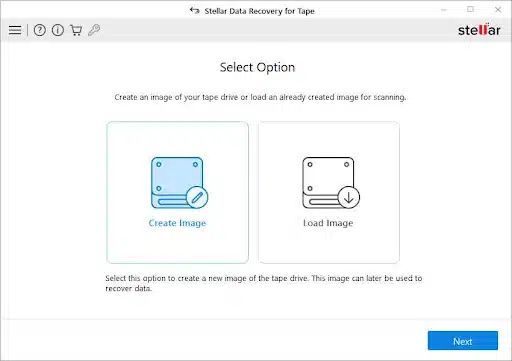
Create Image: From the main user interface of Stellar Data Recovery for Tape, select the “Create Image” option and click “Next.” This step involves creating an image of the tape to facilitate the recovery process.
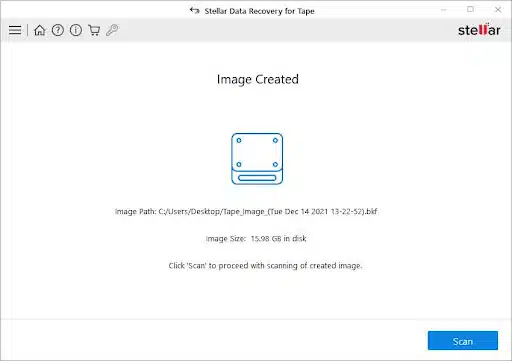
Scan Image: In the “Image Created” window, click on the “Scan” button to initiate the tape recovery process. The software will scan the created image, examining the data and identifying recoverable files.
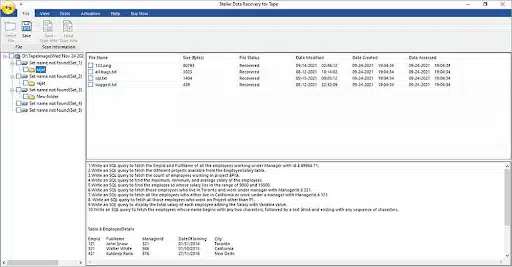
Preview and Save: Once the scanning process is complete, the recovered data will be displayed in a tabular form. You can preview the recovered files and folders, ensuring their integrity and content. From the preview, you can select the desired data that you wish to save.
How to Use Stellar Data Recovery for Tape?
Certainly! Here are the steps to use Stellar Data Recovery for Tape:
Install and Launch the Software: Install Stellar Data Recovery for Tape on your system and launch the software.
Select the Tape Drive or Library: Choose the tape drive or library from which you want to recover data. Ensure that the drive is properly connected and recognized by your system.
Choose the Scanning Mode: Select the scanning mode based on your requirements. You can choose between a quick scan and a deep scan. A quick scan is faster and suitable for normal data loss scenarios, while a deep scan thoroughly examines the tape for more complex and severe data loss situations.
Preview the Retrieved Files: After the scanning process is complete, Stellar Data Recovery for Tape will display a list of recoverable files. You can preview the files and folders to verify their integrity and check the recoverable content.
Select the Files to Recover: Choose the specific files or folders that you want to recover from the list of recoverable data. You can select individual files or select all files for recovery.
Choose the Destination Folder: Select the destination folder or location on your system where you want to save the recovered files. It is recommended to choose a different drive or location to avoid overwriting the lost data.
Start the Recovery Process: Click on the “Recover” button to initiate the recovery process. Stellar Data Recovery for Tape will begin recovering the selected files and save them to the specified destination.
Wait for the Recovery to Complete: The recovery process may take some time depending on the size and complexity of the recovered data. Ensure that you do not interrupt the process to avoid any potential data loss.
Access the Recovered Files: Once the recovery is complete, you can navigate to the destination folder you selected earlier. You will find the recovered files available for access and use.
Conclusion
Stellar Data Recovery for Tape offers a user-friendly solution to recover data from tape drives and cartridges. With its intuitive interface and advanced algorithms, it efficiently restores inaccessible data from damaged or corrupt tape media. The three-step process of creating an image, scanning, and saving simplifies the recovery process. The software supports various tape formats and is compatible with tape drives from different manufacturers. Stellar Data Recovery for Tape to overcome tape-related data loss and retrieve your valuable information.