
Losing subscribers hurts. You spend massive amounts of time, energy, and money bringing people to your software platform, and watching them walk out the back door means watching your hard-earned revenue vanish. Every subscription business on earth deals with cancellations. The companies that survive and grow, however, know exactly why people leave. Figuring out your SaaS churn rate gives you an unfiltered look at the actual health of your product. It tells you point-blank if your pricing makes sense, if your software actually solves a problem, and if your support team helps users fix things quickly.
We are going to look at how to track these numbers accurately, what the current industry averages look like, and the exact steps you can take to keep more users around for the long haul.
Understanding the Core SaaS Metrics
To fix a leak, you first need to know exactly how much water you are losing. Tracking your numbers properly takes the emotion and the guesswork out of your daily business decisions. You cannot just guess how many people leave each month; you need hard data. Looking at the right metrics helps you separate a small, normal bump in cancellations from a massive, company-threatening problem. Here is a clear breakdown of the numbers you absolutely need to watch.
| Metric Type | What It Tracks | Why It Matters |
| Customer Loss | Total users leaving | Shows raw user satisfaction |
| Revenue Loss | Total money leaving | Shows the financial impact |
| Net Retention | Growth from existing users | Shows expansion health |
Customer Churn Rate
Best for: Tracking the raw number of people walking out the door each month.
Why We Chose It: This metric gives you a clear, simple percentage of accounts that cancelled their subscription in a given time period. If you started the month with one hundred users and five of them left, your rate is exactly five percent. It acts as the most basic health check for your product, telling you if your marketing promises match the actual software experience.
Things to consider: This number treats every single user exactly the same. Losing a massive enterprise client paying you thousands looks exactly the same on paper as losing a single-seat startup user paying ten dollars. You have to look at this number alongside your revenue data to get the complete story.
Revenue Churn Rate
Best for: Seeing the exact financial damage caused by users cancelling or downgrading their accounts.
Why We Chose It: It measures the monthly recurring revenue you lose when people leave your service. This paints a much more accurate picture of your financial stability because it weights the loss of expensive accounts higher than cheap ones. If you lose one giant client, your customer loss percentage might look low, but your revenue loss will ring the alarm bells loudly.
Things to consider: You must remember to distinguish between gross revenue loss, which only looks at the money leaving, and net revenue loss, which includes upgrades from your remaining users. Sometimes, your current users upgrade their plans enough to completely cover the money lost from the users who cancelled.
Top Platforms for Tracking Retention Data
Doing these calculations in a spreadsheet works fine when you have ten customers. Once you hit hundreds or thousands of users, manual tracking becomes a massive waste of time and leaves too much room for human error. Dedicated software plugs straight into your payment gateways to pull this data in real time. These tools do the heavy lifting for you, spotting trends before they become full-blown disasters. Let us look at some of the best tools for the job.
| Platform | Primary Strength | Ideal User Base |
| Baremetrics | Automated recovery | Small to medium teams |
| ProfitWell | Free core reporting | Startups on a budget |
| ChartMogul | Deep data filtering | Data-heavy companies |
Baremetrics
Best for: Connecting easily with payment processors like Stripe and managing automated payment recovery.
Why We Chose It: It does much more than just show you pretty graphs. It actively sends polite emails to your users when their credit cards fail, helping you win back money without lifting a finger. It also asks users exactly why they cancelled, giving you direct, honest feedback so your engineering team knows what to fix.
Things to consider: They charge you based directly on how much money you make. As your monthly recurring revenue goes up, your bill for Baremetrics goes up too. It can get quite expensive as your company scales.
ProfitWell
Best for: Getting enterprise-grade financial reporting without paying a massive monthly fee upfront.
Why We Chose It: The core dashboard is completely free to use. It uses smart algorithms to ensure your data matches your actual bank deposits perfectly, accounting for weird prorated refunds and mid-month upgrades. It breaks down your SaaS churn rate into easy-to-read segments so you know exactly which pricing tier is bleeding users.
Things to consider: While the main dashboard costs nothing, you will pay a steep price if you want their advanced features. Their premium add-ons for fixing failed payments and auditing your pricing structure are very expensive and require long contracts.
Strategic Approaches to Improving Retention
Watching the numbers is only half the job. You actually have to step in and do something to stop people from leaving. When you know your SaaS churn rate is creeping up, you must intervene and change the user experience immediately. You need to catch people well before they get frustrated enough to hit the cancel button. Here are some proven, highly effective ways to keep your users happy and paying.
| Strategy | Main Goal | Time To Implement |
| Onboarding tweaks | Stop early drop-offs | Weeks |
| Dunning campaigns | Fix failed payments | Days |
| Annual plans | Lock in commitment | Months |
Optimising the Onboarding Experience
Best for: Stopping people from leaving in the first three months of using your software.
Why We Chose It: If a new user signs up and cannot figure out how to use your tool in the first five minutes, they will leave and never come back. A clean, simple setup process gets them to that first successful moment quickly. When they see the actual value immediately, they stick around for the long term.
Things to consider: Do not dump a massive manual or a twenty-step tutorial on them on day one. Show them the one single feature that solves their biggest problem first. You can teach them the advanced features weeks later after they already trust you.
Implementing Automated Payment Recovery
Best for: Stopping involuntary cancellations caused by expired cards or aggressive bank fraud blocks.
Why We Chose It: A massive chunk of your lost revenue happens simply because a credit card expired or a bank declined a charge randomly. Setting up automated retry rules and sending polite reminder emails fixes this quietly in the background. It saves your business relationships without requiring awkward phone calls from your sales team.
Things to consider: Be very careful with how many emails you send. Bombarding a customer with five emails in two days about a failed payment will just annoy them into actually clicking the cancel button out of spite. Keep the tone helpful, not aggressive.
Current Industry Benchmarks
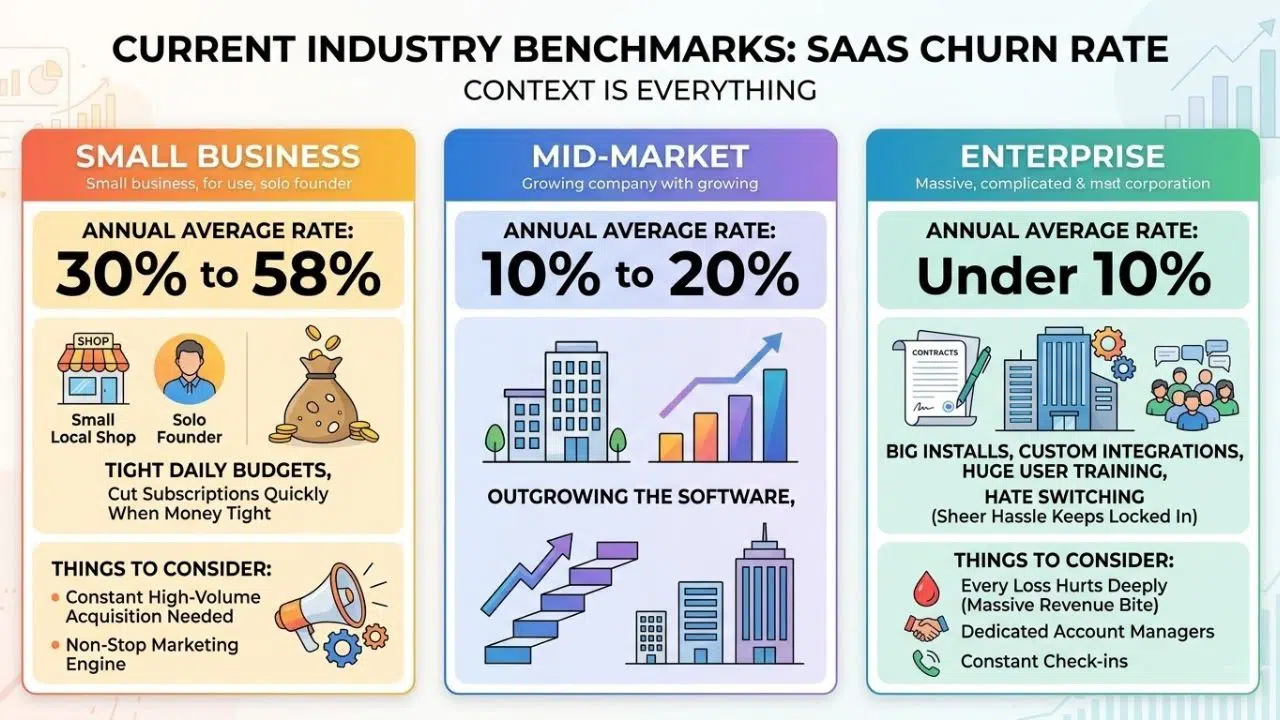
Context is absolutely everything when you look at your metrics. Losing five percent of your users might be a complete disaster for one company but a massive, celebrated win for another. It all depends entirely on who you sell your software to and how much you charge. Comparing your numbers to current industry standards helps you set realistic goals for your team so you do not panic over normal turnover.
| Market Segment | Annual Average Rate | Main Cause of Leaving |
| Small Business | 30 to 58 percent | Cash flow issues |
| Mid-Market | 10 to 20 percent | Outgrowing the software |
| Enterprise | Under 10 percent | Rare, high switching costs |
Small and Medium Business Sector
Best for: Setting expectations if you sell cheap software to solo founders and local shops.
Why We Chose It: Small businesses fail often, and they watch their daily budgets very closely. They will cut software subscriptions quickly if money gets tight at the end of the month. Seeing high turnover in this space is completely normal and should be built directly into your financial forecasts.
Things to consider: Because so many people leave, you need to constantly acquire new users at a high volume just to break even. Your marketing engine must run non-stop to replace the users you naturally lose every single month.
Enterprise Sector
Best for: Benchmarking teams that sell massive, complicated contracts to huge corporations.
Why We Chose It: Once a big company installs your software, integrates it with their custom tools, and trains five hundred people on it, they absolutely hate switching. The sheer hassle of moving to a new tool keeps them locked in for years. You should expect very low cancellation numbers here.
Things to consider: Because you lose so few clients, every single loss hurts deeply and takes a massive bite out of your revenue. You need dedicated account managers checking in with these clients constantly to ensure they are perfectly happy.
Frequently Asked Questions (FAQs)
How do you accurately calculate SaaS churn rate?
You calculate your SaaS churn rate by taking the number of customers you lost during a specific time period and dividing it by the total number of customers you had at the very beginning of that period. If you started January with two hundred paying users and ten of them cancelled before February, you divide ten by two hundred. You then multiply that decimal by one hundred to get a clean five percent. You must exclude any new customers you gained during that same month to keep the calculation perfectly accurate.
What is considered a healthy retention benchmark?
A good benchmark depends entirely on who buys your software and how much they pay for it. If you sell a cheap tool to small businesses, losing five to seven percent of your users every month is normal because small companies close down frequently. However, if you sell expensive software to enterprise corporations, your SaaS churn rate needs to sit well under five percent for the entire year. Enterprise clients sign long contracts, so losing even one damages your monthly recurring revenue deeply.
What is the fastest way to reduce cancellations?
The quickest way to stop people from leaving is to set up an automated system for recovering failed credit card payments. A huge chunk of your lost revenue comes from people whose cards simply expired or got blocked by their bank randomly. You can fix this by taking a few immediate steps:
-
Set up automated email reminders for expiring cards.
-
Implement polite retry logic for declined payments.
-
Fix your first-day onboarding process so new users see value instantly.
These small tweaks save relationships instantly without requiring your team to make awkward phone calls to collect missing payments.
How does revenue loss differ from customer loss?
Customer loss simply counts the raw number of accounts that hit the cancel button on your website. Revenue loss tracks the actual money that walked out the door when those people left your platform. You can have a very low customer loss percentage but a dangerously high revenue loss if your most expensive, top-tier clients are the ones leaving. Always track both numbers side by side so you know exactly how much financial damage your cancellations actually cause.
The Road to Better Retention
You cannot build a massive, profitable software company if you are constantly replacing the users walking out the door. Acquiring new customers will always matter, but keeping the ones you already have is how you actually build wealth. If you ignore your SaaS churn rate, you are flying completely blind. Take the time to set up proper tracking tools, study why your users actually leave, and fix the broken parts of your software. Small improvements in how long a customer stays with you create massive, compounding changes in your bank account over a few years.