


Hey there, are you part of a web development team struggling to keep up with fast-paced projects? Maybe your crew faces issues like messy code changes, slow deployments, or tricky server setups.
It’s like trying to build a house without a solid blueprint, frustrating, right?
Here’s a cool fact: experts predict that by 2025, over 70 key DevOps tools will shape how teams handle web services and software development. That’s a big toolbox to make life easier! In this post, we’re breaking down the “10 Must-Have DevOps Tools For Web Development Teams” to help you streamline version control, boost continuous integration, and automate infrastructure as code.
We’ll guide you through each tool with simple tips to solve those pesky problems. Ready for smoother coding? Stick with us!
Key Takeaways
- Git helps web development teams track code changes and work together smoothly.
- Jenkins and GitHub Actions speed up projects with automated CI/CD pipelines.
- Docker simplifies app deployment by packing everything into one easy bundle.
- Kubernetes manages and scales containerized apps for better performance.
- Experts predict over 70 key DevOps tools will shape web services by 2025.
Version Control Systems

Hey there, wanna keep your coding projects from turning into a wild mess? Grab a tool like Git, a fantastic system for tracking changes and teaming up with others, and watch chaos turn to calm!
Git: Streamline collaborative coding and version tracking
Git is a game-changer for web development teams. This free and open-source tool makes collaborative coding a breeze. It helps you track changes in your source code with ease. With features like branching and merging, you can experiment without fear of messing things up.
Think of it as a safety net for your project, catching errors before they spiral.
Got a team spread across the globe? Git, a top-notch distributed version control system, keeps everyone in sync. It enhances teamwork by letting folks work on different parts of the code at the same time.
No more stepping on toes, just smooth sailing with pull requests and version tracking. Stick with this tool, and watch your development cycle flow like a well-oiled machine.
Continuous Integration/Continuous Delivery (CI/CD) Tools
Hey there, let’s chat about how CI/CD tools, like Jenkins and GitHub Actions, can speed up your web development with slick automation. Stick around to find out more cool stuff!
Jenkins: Automate the development pipeline
Jenkins is a game-changer for web development teams looking to speed up their work. This widely used open-source automation server helps you automate the development pipeline with ease.
Imagine cutting down on manual tasks, like running tests or deploying code, and letting Jenkins handle the heavy lifting. It’s like having a trusty sidekick that never sleeps, making sure your continuous integration (CI) and continuous delivery (CD) flow smoothly.
What makes Jenkins stand out is its ability to play nice with tons of tools and plugins. You can connect it to almost anything in your devops toolchain, from source control to testing tools.
This flexibility means your team can keep pushing out high code quality without getting stuck on repetitive chores. So, dive right into automating with Jenkins, and watch your projects move faster than a rabbit on a skateboard!
GitHub Actions: CI/CD workflows directly in your code repository
Moving from Jenkins, let’s chat about another awesome tool for your web development team. GitHub Actions brings continuous integration and continuous delivery, or CI/CD, right into your code repository.
It’s a native tool built into GitHub, so you don’t need extra setups. Pretty neat, right?
This gem lets you craft custom workflows and automation straight in your git repository. Imagine setting up automated tests or deployment pipelines without leaving your coding space.
GitHub Actions makes teamwork smoother and keeps your software development lifecycle on track. Got a project on GitHub? Try this out to save time and boost code quality!
Containerization Tools
Hey there, let’s chat about Docker, a super handy tool that wraps up your app and its needs into one neat package, making deployment a breeze. Curious about how it can speed up your web development game? Stick around to find out more!
Docker: Simplify application packaging and deployment
Docker is a game-changer for web development teams. It acts like a magic box, packing your app and all its needs into one neat bundle. This containerization tool, a pioneer in its field, makes deployment a breeze.
No more headaches over different operating systems or clashing setups. With Docker, you just build, ship, and run anywhere. Plus, its huge community support means you’re never stuck alone.
Think of Docker as your app’s best travel buddy. It handles the heavy lifting of virtualization, letting you focus on coding. Whether you’re using Amazon Web Services or another cloud platform, Docker keeps things smooth.
Its ease of use saves time, cuts bugs, and boosts scalability. So, dive right in with this tool, and watch your development environments click into place!
Container Orchestration Tools
Hey there, wanna tame the wild beast of managing tons of containers? Check out how Kubernetes can wrangle your apps, scale them up, and keep everything running smooth as butter!
Kubernetes: Manage and scale containerized applications
Kubernetes stands out as the top tool for container orchestration, folks. It helps web development teams manage and scale containerized applications with ease. Think of it as the conductor of an orchestra, making sure every part plays in harmony.
With Kubernetes, you can handle clusters of containers, keeping your apps running smoothly.
This tool supports scalability and high availability for applications, which is a big win. It balances loads across servers, so your app won’t crash under pressure. If you’re using cloud services or public cloud setups, Kubernetes fits right in.
Stick with it, and watch your projects grow without a hitch!
Infrastructure as Code (IaC) Tools
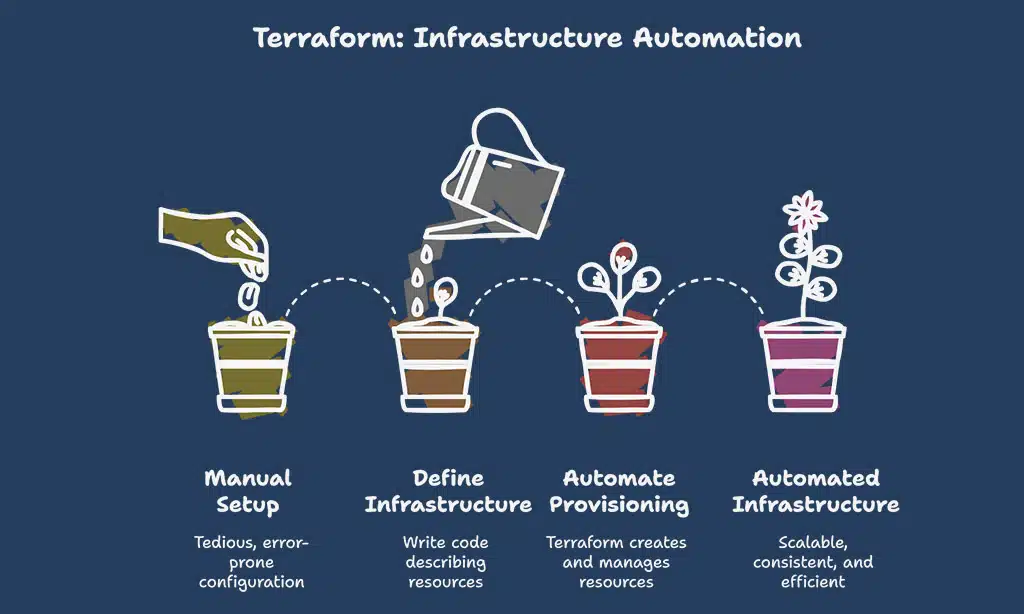
Hey there, wanna make managing your tech setup a breeze, even when things get tricky? Let’s chat about Infrastructure as Code tools, like Terraform, that help you build and tweak your systems with just a few clicks!
Terraform: Automate infrastructure provisioning and management
Terraform is a game-changer for web development teams exploring infrastructure as code (IaC). This cloud-agnostic tool allows you to automate the setup and management of your resources, regardless of which cloud providers you use.
It’s like having a powerful tool to create, modify, and dismantle servers or databases with just a few lines of code. Plus, Terraform uses its own configuration language for defining resources, ensuring your setups are clear and consistent.
Imagine designing your entire infrastructure with a simple script, saving hours of manual effort. With Terraform, you can handle everything from load balancing to backups with ease.
It’s an essential asset in the sphere of DevOps tools for maintaining scalability and order in your projects. Now, let’s proceed to explore how configuration management tools can optimize your server environments.
Configuration Management Tools
Hey there, let’s chat about Ansible, a super handy tool that makes setting up and managing server environments a breeze, almost like having a magic wand for your tech setup! Keep scrolling to dig deeper into how it can save your day.
Ansible: Efficiently configure and manage server environments
Ansible excels at simplifying the setup and management of server environments. Backed by Red Hat, this tool provides adaptable automation for configuration management. It reduces the burden of manual setups, allowing your web development team to concentrate on coding rather than server tasks.
Consider Ansible your reliable partner, easing the challenges of server responsibilities. With its accessible design, you can streamline repetitive tasks and maintain smooth operations.
Explore this DevOps treasure, and see your infrastructure as code initiatives yield impressive results.
Monitoring and Observability Tools
Hey, want to keep a sharp eye on your app’s performance, no matter the chaos? Check out some cool monitoring and observability gear that’ll help you spot issues before they blow up!
Prometheus: Monitor metrics and performance of applications
Check this out, folks, Prometheus is a game-changer for keeping tabs on your apps. This open-source monitoring system lets you track metrics and performance like a hawk. Got a web project? You can use it to spot issues before they blow up.
Plus, with its flexible queries, you can dig into detailed stats to see what’s really going on. It’s like having a trusty sidekick for your DevOps tools.
Now, let’s chat about why this matters to you. With Prometheus, monitoring tools become your best pals in maintaining high availability. It hooks up smoothly with systems like Grafana to show data in a snap.
Think of it as a window into your app’s health, helping with everything from code quality to catching bugs fast. Stick with this, and your web development team will thank you!
Grafana: Visualize and analyze monitoring data
Moving from Prometheus, which tracks your app’s metrics, let’s talk about Grafana, a fantastic tool to make sense of all that data. Grafana helps you see and study monitoring info with clear, easy-to-read graphs and dashboards.
It’s like turning numbers into a picture that tells a story, helping your team spot trends or issues fast.
This data visualization tool connects with many sources, pulling in info for a full analysis. With Grafana, you can build custom charts to keep an eye on performance in a user-friendly way.
Hey, it’s almost like having a crystal ball for your web development projects, showing you what’s happening in real time!
Collaboration and Project Management Tools
Hey there, wanna keep your web development team on the same page? Check out awesome tools like Atlassian’s issue tracker for organizing tasks and smashing deadlines with ease!
Jira: Organize, track, and manage development tasks
Let’s chat about Jira, a top-notch tool for keeping your web development projects on track. It’s an industry-standard pick for project management, and boy, does it make life easier! With Jira, you can organize tasks, track progress, and manage every little detail without breaking a sweat.
Think of it as your team’s trusty sidekick, always ready to help.
Guess what else? Jira plays nice with many other DevOps tools, so integrating it into your workflow is a breeze. It supports agile methodologies, letting your squad plan sprints and tackle bug fixes like pros.
If you’re aiming for smooth collaboration and high-quality code, this tool is your go-to buddy.
Security and Vulnerability Scanning Tools
Hey, want to keep your web projects safe from sneaky bugs and threats? Check out powerful options like Snyk to spot and squash security flaws in your code and dependencies fast!
Snyk: Identify and fix vulnerabilities in code and dependencies
Snyk is a powerful tool that aids web development teams in identifying and resolving security vulnerabilities in their code and dependencies. Imagine it as a reliable watchdog, detecting hidden risks before they become a problem.
It provides support for container and dependency scanning, ensuring no weak point goes unnoticed.
Got a project with numerous external libraries? Snyk jumps right in, examining for issues in those pieces of code you didn’t create yourself. It highlights concerns quickly, allowing your team to address them before any issues arise.
Follow this method, and protect your app from subtle cybersecurity threats.
Takeaways
Hey there, let’s wrap this up with a quick chat about DevOps magic! Picking the right tools, like Git for version control or Docker for containerization, can truly turbocharge your web development squad.
Think of Jenkins or GitHub Actions as your trusty sidekicks, smoothing out the bumps in your CI/CD journey. So, go ahead, experiment with Kubernetes or Terraform, and watch your projects soar to new heights! Got a fave tool? Drop a comment and let’s geek out together!
FAQs on Must-Have DevOps Tools
1. What are some key DevOps tools for web development teams?
Hey there, let’s dive right into the toolbox. Tools like Azure DevOps and GitHub Actions are absolute game-changers for continuous integration and continuous delivery, often called CI/CD. They help with version control systems, making sure your team stays on the same page, no matter how wild the project gets.
2. How do cloud-based solutions fit into DevOps for web teams?
Listen up, working in the cloud is like having a superpower. Cloud providers offer scalable setups with high availability, letting your team use serverless computing to dodge those pesky server crashes.
3. Why is configuration management a big deal in DevOps?
Well, think of configuration management as the glue holding your project together. It keeps infrastructure as code, or IAC, in check, so your web-based projects using TypeScript or Node don’t turn into a hot mess. Plus, tools handling this can sync with Git-repository systems for smoother workflows.
4. Can automated testing really save time for developers?
You bet it can, my friend. Automated testing, including unit testing and test automation, catches bugs faster than a cat chasing a laser, especially when paired with a continuous integration server. It ties into code quality checks, like SAST, so your team isn’t stuck fixing errors at midnight.
5. What’s the buzz about container orchestration in DevOps?
Alright, picture container orchestration as the conductor of an orchestra, keeping every piece in harmony. It manages load balancing and service mesh setups, ensuring your Java-based apps or other technologies run without a hitch across multiple containers.





























