

Smartphone conversations usually revolve around two giants: Android and iOS. While these platforms dominate the global market, they are not the only mobile operating systems in existence. In fact, a growing ecosystem of alternative mobile operating systems continues to evolve quietly in the background.
These operating systems exist for many reasons. Some focus on privacy and data control. Others are built to work on low-cost hardware or to extend the life of older devices. A few aim to bring full Linux computing to mobile phones. Together, they challenge the idea that smartphones must work in only one way.
Understanding alternative mobile operating systems helps users make informed choices. It also highlights how innovation often happens outside mainstream platforms. Whether you care about privacy, sustainability, or simply curiosity, exploring these systems opens a broader view of mobile technology.
As you read, keep one thing in mind. No alternative mobile operating system is trying to replace Android or iOS for everyone. Each exists to solve specific problems for specific users. That focus is what makes them worth learning about.
| Key Point | Why It Matters |
| Market dominance | Android and iOS shape most app development |
| User choice | Alternatives offer control and flexibility |
| Innovation | New ideas often start outside mainstream platforms |
How These Alternative Mobile Operating Systems Were Selected
This article does not list experimental concepts or abandoned prototypes. Every operating system mentioned here has been used on real devices or deployed in real environments. Some have small but loyal communities. Others have regional or niche importance. The goal is clarity, not hype. Each system represents a different philosophy of how mobile computing should work. Some prioritize security. Some emphasize affordability. Others focus on long-term device support.
Another important factor is relevance. These operating systems are either actively developed, widely deployed, or historically significant enough to explain why they still matter today. Even discontinued platforms can teach valuable lessons about mobile innovation.
Finally, the list avoids cosmetic variations. Custom Android skins and launchers are not included. Each entry is a distinct operating system with its own architecture or design goals.
| Selection Rule | Purpose |
| Real-world use | Avoids theory-only platforms |
| Clear mission | Shows why the OS exists |
| Ongoing relevance | Ensures modern context |
| Distinct identity | Separates OS from skins or ROMs |
Alternative Mobile Operating Systems: Quick Overview
Before diving into each platform, it helps to see the big picture. Alternative mobile operating systems vary widely in design, usability, and intended audience. Some are beginner-friendly. Others require technical confidence. This overview highlights how different these systems are from one another. It also shows that “alternative” does not mean inferior. In many cases, it simply means specialized.
Readers should use this section as a navigation aid. If one operating system immediately aligns with your needs, you can focus there first. If not, reading through all ten builds a better understanding of the mobile OS landscape.
| Operating System | Core Idea | Best Suited For |
| Sailfish OS | Privacy-focused Linux OS | Power users seeking balance |
| KaiOS | Smart feature phone OS | Budget and minimal users |
| HarmonyOS | Ecosystem-driven OS | Huawei device users |
| Tizen | Linux-based platform | Historical and TV-focused |
| Ubuntu Touch | Linux phone experience | Privacy-minded users |
| postmarketOS | Long-term device support | Tinkerers |
| Plasma Mobile | KDE-based mobile UI | Linux enthusiasts |
| Mobian | Debian on mobile | Advanced Linux users |
| GrapheneOS | Hardened Android-based OS | Security-focused users |
| /e/OS | De-Googled Android | Everyday privacy seekers |
1. Sailfish OS
Sailfish OS is a Linux-based mobile operating system created with privacy and independence in mind. It uses a gesture-driven interface that feels different from both Android and iOS. The design minimizes buttons and focuses on fluid navigation. One of Sailfish OS’s defining features is its multitasking approach. Apps run simultaneously and remain visible, allowing users to switch contexts easily. This makes it appealing to users who value productivity and control. Sailfish OS also supports running many Android apps through a compatibility layer on supported devices. This helps reduce the app gap that often affects alternative mobile operating systems.
Despite these strengths, Sailfish OS requires compatible hardware and some technical comfort. It is not designed for casual users who want instant familiarity.
| Aspect | Details |
| Base | Linux |
| Interface | Gesture-first |
| App options | Native + Android compatibility |
| Ideal user | Privacy-conscious power user |
2. KaiOS
KaiOS targets a completely different audience. It is built for smart feature phones rather than full smartphones. These devices focus on calls, messaging, and basic internet access. The operating system is lightweight and optimized for long battery life. This makes KaiOS popular in regions where affordability and reliability matter more than advanced features. Apps on KaiOS are usually web-based. They provide essential services like messaging, navigation, and media streaming without heavy hardware requirements.
KaiOS proves that mobile access does not require expensive smartphones. For many users, it is a practical and empowering solution.
| Aspect | Details |
| Device type | Feature phones |
| Performance | Lightweight |
| App model | Web-based apps |
| Ideal user | Budget-focused users |
3. HarmonyOS
HarmonyOS represents a large-scale ecosystem approach. It is designed to run across phones, tablets, wearables, and smart devices. The idea is seamless interaction across screens. Rather than focusing on individual apps, HarmonyOS emphasizes distributed services. Tasks can move between devices more fluidly within the ecosystem. For users already invested in compatible hardware, HarmonyOS offers strong integration. However, its experience varies depending on region and device generation.
HarmonyOS highlights how alternative mobile operating systems can be driven by ecosystem strategy rather than technical experimentation.
| Aspect | Details |
| Focus | Cross-device ecosystem |
| Strength | Device integration |
| Limitation | Regional availability |
| Ideal user | Ecosystem-centric users |
4. Tizen
Tizen is a Linux-based operating system with a notable mobile history. While its smartphone presence has largely faded, its influence remains important. Today, Tizen is most visible in smart TVs and other consumer electronics. This shows how mobile OS technology can evolve into other device categories. Understanding Tizen helps explain why some mobile platforms succeed in niches even if they fail in smartphones.
It serves as a reminder that market success does not always align with technical capability.
| Aspect | Details |
| Base | Linux |
| Current use | TVs and devices |
| Mobile status | Legacy |
| Importance | Historical insight |
5. Ubuntu Touch
Ubuntu Touch aims to bring the spirit of desktop Linux to mobile devices. It emphasizes openness, user control, and privacy. The interface is designed to scale across screens, offering a consistent experience. While its app ecosystem is smaller, it supports web apps and community-built tools. Ubuntu Touch focuses on supported devices to ensure stability. This makes it one of the more approachable Linux-based mobile systems.
It appeals to users who value freedom over convenience.
| Aspect | Details |
| Base | Linux |
| Philosophy | Open and private |
| App model | Web and native |
| Ideal user | Linux beginners |
6. postmarketOS
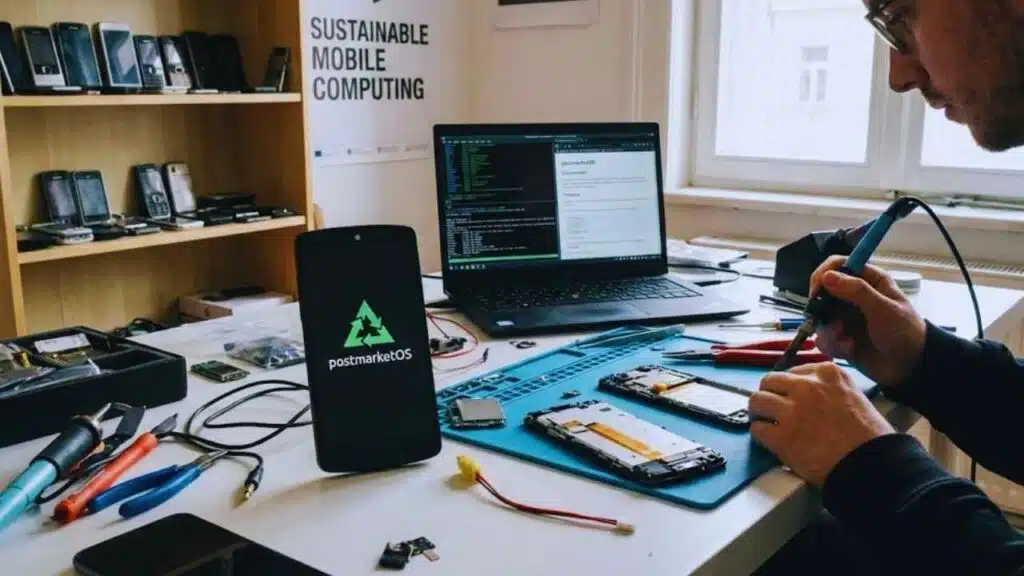
postmarketOS challenges the short lifespan of modern smartphones. Its goal is to support devices for many years beyond manufacturer limits. The system is flexible and modular. Users can choose different interfaces and configurations depending on their needs. postmarketOS prioritizes sustainability and repairability. This makes it attractive to environmentally conscious users.
However, it requires technical skill and patience.
| Aspect | Details |
| Focus | Longevity |
| Target | Older devices |
| Complexity | High |
| Ideal user | Tinkerers |
7. Plasma Mobile
Plasma Mobile is built by the KDE community. It brings a familiar desktop philosophy to mobile interfaces. The system emphasizes customization and consistency across devices. Users who already use KDE on desktop often feel at home. Plasma Mobile is usually paired with other Linux distributions. This flexibility is both a strength and a challenge.
It is best suited for advanced users.
| Aspect | Details |
| UI | KDE-based |
| Strength | Customization |
| Weakness | Setup complexity |
| Ideal user | KDE enthusiasts |
8. Mobian
Mobian brings Debian Linux to mobile devices. It focuses on clean integration with upstream software. The system benefits from Debian’s stability and large software repository. However, not all desktop applications translate well to mobile screens. Mobian is practical for users who already understand Linux workflows.
It represents a pragmatic approach to Linux on phones.
| Aspect | Details |
| Base | Debian |
| Strength | Stability |
| Challenge | Mobile polish |
| Ideal user | Debian users |
9. GrapheneOS
GrapheneOS is a security-focused mobile operating system based on Android. It enhances privacy and system hardening. Unlike many alternatives, it maintains strong compatibility with Android apps. This reduces friction for daily use. GrapheneOS is tightly linked to specific hardware for security reasons. This limits device choice but improves reliability. It is often recommended for users who want privacy without sacrificing usability.
| Aspect | Details |
| Base | Android-derived |
| Focus | Security |
| App support | High |
| Ideal user | Privacy professionals |
10) /e/OS
/e/OS is designed to reduce reliance on Google services while keeping Android-like usability. It replaces common Google components with alternatives and offers its own ecosystem tools.
For many users, /e/OS feels familiar while changing defaults behind the scenes. It is one of the most accessible alternative mobile operating systems for everyday users.
| Aspect | Details |
| Base | Android-derived |
| Focus | De-Googling |
| Usability | Familiar |
| Ideal user | Privacy-conscious users |
Which Alternative Mobile Operating Systems Should You Choose?
Choosing among alternative mobile operating systems depends on priorities. There is no universal best option. Privacy-focused users often prefer GrapheneOS or /e/OS. Budget users may find KaiOS sufficient. Linux enthusiasts may explore Ubuntu Touch or Mobian. The smartest approach is to match the operating system to real needs, not ideals.
Testing on a secondary device is often the safest way to start.
| Priority | Suggested OS |
| Privacy | GrapheneOS, /e/OS |
| Budget | KaiOS |
| Linux experience | Ubuntu Touch, Mobian |
| Ecosystem | HarmonyOS |
Final Thoughts on Alternative Mobile Operating Systems
Alternative mobile operating systems prove that smartphones can work differently. They challenge assumptions about privacy, longevity, and user control. While Android and iOS remain dominant, alternatives continue to innovate in meaningful ways. Some focus on sustainability. Others prioritize security or simplicity. The future of mobile computing may not belong to one platform alone. Instead, it may involve many specialized systems serving different needs. Exploring alternative mobile operating systems helps users understand technology beyond the mainstream. That awareness alone is valuable.
FAQs
What are the best alternative mobile operating systems in 2025–2026?
For privacy-focused daily use with strong app compatibility, GrapheneOS is often highlighted, but it is limited to supported Pixel devices. For a de-Googled Android-style experience with an ecosystem approach, /e/OS is a common pick. For a Linux-first experience with a distinct UI and Android app support on many setups, Sailfish OS is worth exploring.
Are there any Linux mobile operating systems you can use daily?
Ubuntu Touch is one of the more approachable Linux mobile options, especially on supported devices. Mobian and postmarketOS can be daily-capable for some users, but device support and polish vary.
Can I install these operating systems on any phone?
Usually, no. Many projects support specific models only. Ubuntu Touch, for example, emphasizes using supported devices and checking feature status.
GrapheneOS is strongly tied to Pixel devices due to security requirements.
Do alternative mobile operating systems run Android apps?
Some do. Sailfish OS offers Android AppSupport on supported setups, but it does not guarantee 100% compatibility. GrapheneOS aims to keep Android app compatibility while strengthening security.
Others, like KaiOS or many Linux-based options, rely more on web apps or Linux-native apps.
Is KaiOS still worth it?
If you want an affordable phone with good battery life and basic apps, KaiOS is still relevant. It’s built for that role, and it highlights a large app catalog through the KaiStore.
Why don’t more people use alternative mobile operating systems?
The biggest reason is apps and ecosystem gravity. Android and iOS dominate global usage, so developers build for them first.






























