
You have a website, and now you need hosting. But does the sheer number of choices make your head spin? It happens to the best of us. You might be stuck trying to choose between managed hosting vs unmanaged. Perhaps you want more free time, but worry about the extra cost.
Here is the short version. Managed hosting means experts handle the technical tasks for you, like updates and backups. Unmanaged hosting puts all that responsibility on your plate. You handle the fixes, the upgrades, and even the late-night emergencies.
I am going to break down exactly what both types offer. We will look at the real costs, the benefits, and the hidden hassles that most people miss. By the end, picking the right fit will be much easier. Keep reading, and let’s find the best way to save you time and money.
What is Managed Hosting?
Think of managed hosting as the “concierge service” of the web world. It takes care of the technical chores so you do not have to lift a finger. Someone else handles server headaches, which leaves you free to focus on growing your business or balancing your busy schedule.
Key Features of Managed Hosting
Managed hosting takes the heavy lifting off your plate. You get a web hosting plan that comes with a team of experts attached.
- Server Management: The provider handles the setup and daily care for your server. Companies like Kinsta or WP Engine use high-performance infrastructure (like Google Cloud’s C2 machines) and configure it for you.
- Technical Support: If you need help at 2 am, you can chat with a human who knows exactly how to fix the problem. This isn’t just basic account help; it is deep technical assistance.
- Website Maintenance: The company keeps your website running smoothly. This includes regular backups and security scans.
- Performance Optimization: Your host monitors loading speed and traffic spikes. They tweak settings, such as PHP workers or NGINX rules, to keep things quick.
- Backup Solutions: Rest easy knowing your site data is copied on a schedule. If an update breaks your site, staff can restore it with a single click.
- Security Tools: Layers of protection come standard here. Enterprise-grade firewalls (like Cloudflare integration) and malware scanning are often included in the price.
- Scalability Options: Managed providers let you upgrade as traffic grows. You can move from a basic plan to a powerful cloud solution without migrating data yourself.
- Monitoring Services: Around-the-clock monitoring spots issues before they become disasters. Experts act quickly to prevent outages.
- System Updates: Server software changes often. Managed teams handle these tricky updates for you, usually without you even noticing.
- User Experience Enhancements: With built-in extras like object caching and image optimization, your visitors get a smooth browsing experience every time.
You focus on your work. The experts take care of the tech stuff behind the scenes.
Examples of Managed Hosting Services
Now that you know the features, let’s look at the specific players in this space. SiteGround and Bluehost are popular entry-level options that handle the basics for you. They manage software updates and general support.
For more demanding needs, WP Engine targets WordPress websites specifically. They offer proprietary caching systems that make sites load instantly. Liquid Web provides solutions for larger businesses, such as dedicated servers, where their team manages the hardware.
Each option focuses on consistent maintenance and reliable uptime. This way, you spend less time worrying about IT management and more time running your business.
What is Unmanaged Hosting?
Unmanaged hosting puts you in the driver’s seat with full hands-on control. You call the shots for setup, updates, and fixes. There are no training wheels here.
Key Features of Unmanaged Hosting
Unmanaged hosting gives you an empty server and full authority. You handle all the technical tasks on your own.
- Full Root Access: You can change any setting and install any software via the command line (SSH). This is powerful, but it also means you can break things if you are not careful.
- Server Management is Your Job: You install the operating system (like Ubuntu or CentOS), patch security holes, and fix every issue yourself.
- Limited Technical Support: Support is strictly for hardware. If the server is on, their job is done. They will not help you fix a PHP error or a crashed database.
- Lower Upfront Cost: The sticker price is much lower compared to managed plans. It is a budget-friendly choice for developers who already have the skills.
- Manual Backups: You must set up and test your own backup systems. If data gets lost and you didn’t configure a snapshot, there is no safety net.
- Performance Optimization: Speed depends on your skills. You have to tune the server and configure caching layers like Redis yourself.
- Manual Software Updates: Missing a critical security patch can put your site at risk. Staying alert is key.
- Scalability Requires Work: Adding more resources often involves manual steps rather than a simple button click.
- Target Audience: This model is used by DigitalOcean, Linode (Akamai), and Vultr. You get total freedom, but you carry all the responsibility.
Examples of Unmanaged Hosting Services
DigitalOcean is a giant in this space. They give you a “Droplet” (a virtual server) and let you build whatever you want. Vultr is another big name known for high-frequency compute instances that are incredibly fast but require setup.
Linode stands out with strong support documentation for developers. Dedicated server providers like OVHcloud let you manage everything from the operating system to the firewall rules. Even Amazon Web Services (AWS) EC2 works this way. You control every detail, but you also handle every headache.
If you want total freedom and have solid IT skills, these options might suit you best.
Managed Hosting vs Unmanaged Hosting: Key Differences
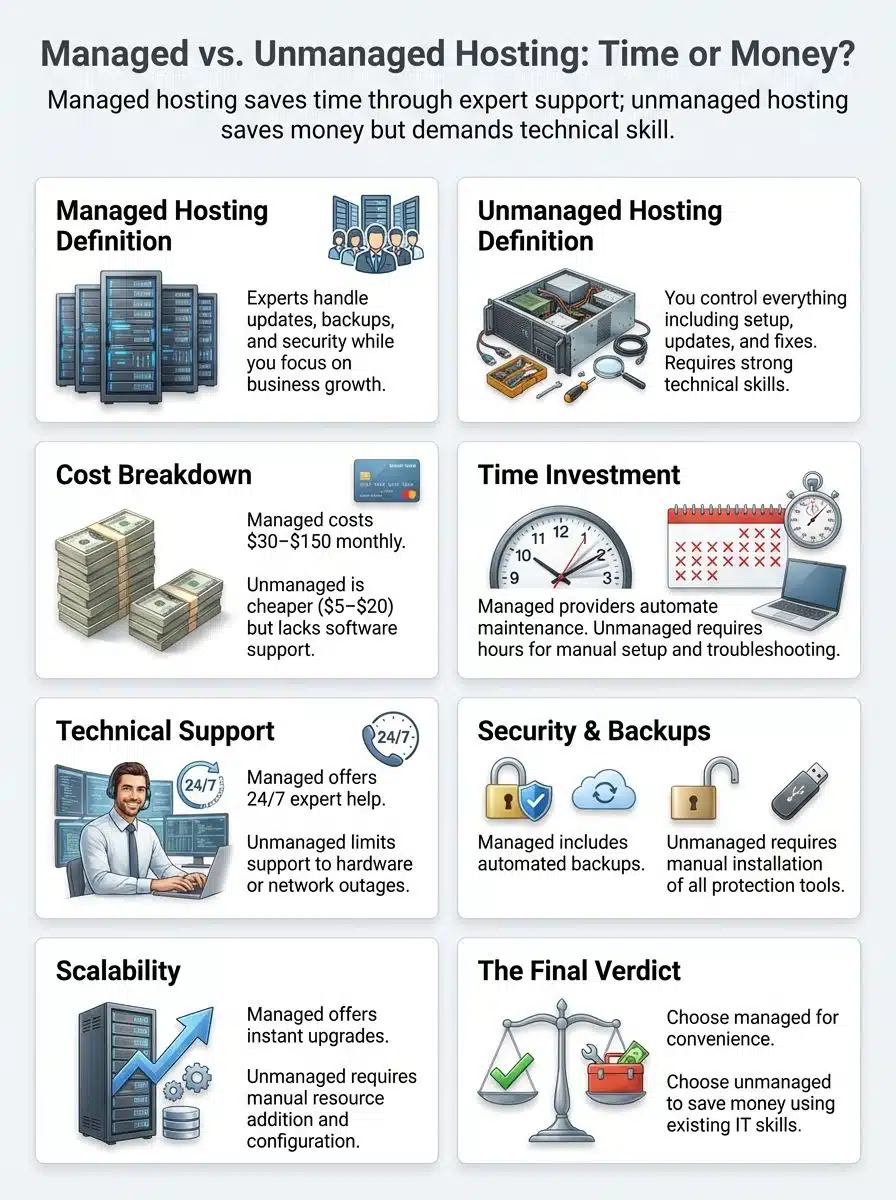
Managed hosting is like having a helping hand. Unmanaged hosting puts you in the captain’s chair. Your choice will shape how much time, effort, and peace of mind you have each day.
Cost Comparison
Choosing between managed vs unmanaged hosting isn’t just about the monthly fee. It is about the “Total Cost of Ownership.” While unmanaged servers look cheap, hidden costs like control panel licenses have skyrocketed recently.
| Aspect | Managed Hosting | Unmanaged Hosting |
|---|---|---|
| Monthly Price Range | $30 – $150+ (WP Engine, Kinsta) |
$5 – $20 (Base Price) (DigitalOcean, Vultr) |
| Hidden Costs | None. One flat fee includes backups, security, and support. | High. cPanel licenses now cost ~$30/mo extra. Backups and security plugins are often separate fees. |
| Time Investment | Low. 15 mins/month. Providers handle updates and fixes. | High. 2-5 hours/week. You manage updates, security patches, and troubleshooting. |
| Included Services | Automatic backups, malware scanning, 24/7 expert support, CDN. | Server access only. No support for software issues. No automatic updates. |
| Scaling Costs | Higher for resource upgrades, but simple and instant. | Cheaper hardware costs, but manual scaling requires hours of work. |
| Best For | Busy professionals, small teams, and those valuing time over savings. | Developers, SysAdmins, and hobbyists who want full control. |
Level of Control and Flexibility
Managed hosting keeps the tedious tasks off your plate. You let the experts handle server management, software updates, and backups. This means you have less control over specific configuration files, like your php.ini or nginx.conf. Some businesses find this freeing. They just focus on their site or business strategy.
Unmanaged hosting hands you the keys to the castle. You choose every setting, install any custom software, and decide exactly how to handle security patches. This works well for people who need a specific server environment for a custom application. However, mistakes can happen. If you delete a critical file via SSH, there is no “undo” button.
Technical Expertise Required
Setting up unmanaged hosting needs solid server management skills. You must be comfortable using the command line (Terminal) to install software patches and fix issues.
“With unmanaged hosting, if your site goes down, you are the detective, the mechanic, and the security guard all at once.”
With managed hosting, trained teams take care of maintenance for you. They offer 24/7 technical support so you do not need to be an IT expert. Most busy professionals prefer this approach. It saves time and stress while keeping everything running smoothly in the background.
Support and Maintenance
Managed hosting offers round-the-clock technical support. If your website crashes at midnight, someone will help get it live again. You get automatic backups, software updates, and security patches, so you spend less time troubleshooting.
Unmanaged hosting puts you in charge of all maintenance tasks. Want to add backup solutions? You install them yourself. Run into downtime? Fixing the problem falls on your shoulders.
This can save money upfront. But it often costs precious hours if things go wrong. For those who lack deep IT knowledge, this path can feel overwhelming.
Pros and Cons of Managed Hosting
Managed hosting saves time. The provider handles server management, backups, and software updates. You get enterprise-level security and performance optimization from experts who do this daily.
The “Holistic” Benefit: This is great for business owners who prioritize wellness and balance. You aren’t waking up at 3 AM to reboot a server. Many managed plans also include premium features like staging environments, which let you test changes safely before going live.
The Downside: Costs run higher than unmanaged solutions. Some providers might restrict certain plugins that conflict with their internal caching. If your team enjoys tinkering with servers or wants maximum flexibility, those restrictions could be a deal-breaker.
Pros and Cons of Unmanaged Hosting
Unmanaged hosting gives you total control. You choose your software stack, set up the server, and handle security your way. Tech-savvy users save money on the raw infrastructure.
The Benefit: Many developers like to tweak every detail for performance optimization. You can install a lightweight control panel like CloudPanel or CyberPanel to keep costs low, avoiding the expensive cPanel fees.
The Risk Factor: Full control brings big risks. Server management means installing updates and dealing with hacks alone. If ransomware hits your unmanaged server, recovery is entirely up to you. Businesses without strong IT skills may find this stressful and risky for their user experience.
How to Decide: Is Your Time Worth the Money?
Time is a precious thing. Once it is gone, you can’t get it back. Think about what matters most to you right now.
Assessing Your Budget and Resources
Managed hosting plans often cost more upfront. You pay for technical support and peace of mind. Unmanaged web hosting looks cheaper on the bill, but it needs more time from your end.
The Hourly Rate Test: Ask yourself what your time is worth. If you charge clients $100 an hour and you spend three hours a month fixing your unmanaged server, you have effectively “spent” $300. In that case, a $35 managed plan is actually cheaper.
Evaluating Your Technical Skills and Time Availability
Handling an unmanaged server means rolling up your sleeves. If terms like “sudo apt-get update” or “firewall rules” sound foreign to you, managed hosting is the safer bet.
In many cases, juggling server administration while running your daily business drains more energy than you think. Imagine spending your Friday night fixing a database error instead of relaxing with family.
Some professionals enjoy tinkering with cloud hosting or VPS hosting as a hobby. Others shudder at the thought. Your work schedule matters just as much as your server know-how.
Wrapping Up
You now know the core differences between managed hosting vs unmanaged. Managed hosting saves your time, while unmanaged hosting gives you more control but requires technical skill.
Both come with their own price tags and levels of support. Think about what your day looks like. Do you want to be a system administrator, or do you want to be a business owner?
Take a look at service guides or talk to experts if you are still unsure. Choosing smartly is a move toward a more balanced, successful work life. Because in business and life, time is the one asset we never get back.