Introducing Google Vids: The Latest Productivity Powerhouse for Workspace

Introducing Google Vids Workspace Productivity App

Before, if you had inquired about Google’s video editor app, I would have mentioned “YouTube Studio.”

However, Google Workspace has recently introduced a new productivity app called “Google Vids.” Typically, video editing is seen as a secondary feature in most productivity suites. However, Google seems to view Vids as a significant component of Workspace.

They describe Vids as a “all-in-one video creation app for work” that will be on par with Docs, Sheets, and Slides. So, is this an editor that can handle documents, spreadsheets, presentations, and videos?

Google’s demonstration of the new video editor highlights its versatility beyond YouTube videos or films. It positions the product as a powerful tool for creating engaging corporate presentations, such as training materials or product demos.

Indeed, this “video editor” seems to have a striking resemblance to Google Slides. The interface is remarkably similar, with the only notable difference being the presence of a video timeline instead of a slideshow timeline.

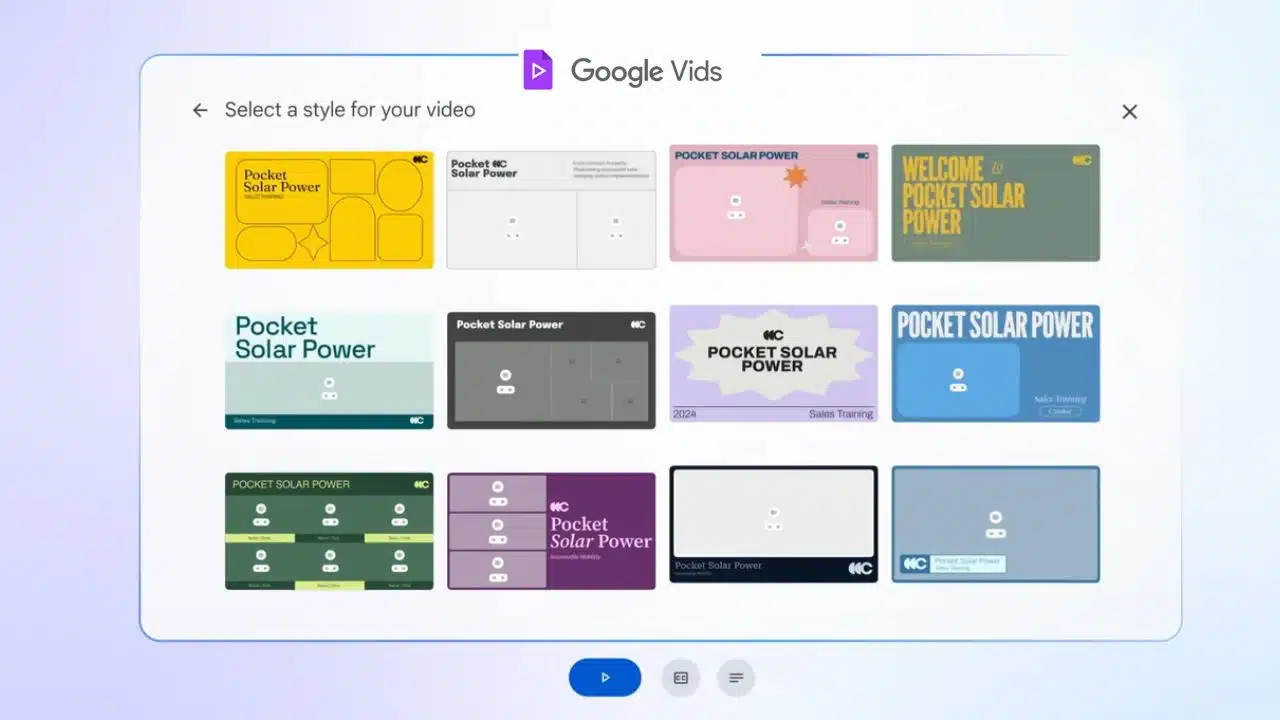
Google’s example video demonstrates a “sales training video” that begins with a Slides presentation as the fundamental framework. At the beginning, you have an outline editor that allows you to organize each page of the slideshow into its own distinct section. Google offers a variety of video “styles” to choose from. These styles have a Powerpoint-like feel, with a prominent title, subheading, and a designated space for the video content.

Google then requires you to compose a script and either deliver it personally or utilize a text-to-speech voice to present the script. A “stock media” library allows you to enhance your video content by incorporating generic corporate imagery such as a video of a sunset, selecting background music, and utilizing a few pictures.

You can also use your webcam to record something, similar to a pre-recorded Zoom meeting. Following that, you’ll find the typical features of Google productivity apps: the ability to collaborate on real-time editing with visible mouse cursors from each participant, along with a stream of comments.

Similar to other Google products in the era of OpenAI, Google presents Vids as a video editor that harnesses the power of AI. However, during the presentation, there weren’t many notable generative AI features showcased. The videos, images, and music were pre-existing media, not AI-generated creations (Slides can generate images, but that feature wasn’t demonstrated here).

This doesn’t have anything similar to OpenAI’s “Sora,” which has the ability to generate new videos based on its training data. There might be a feature called “help me write” powered by Gemini for the script, and according to Google, the initial outline is described as being “generated” from your starting Slides presentation, but it appears to be the extent of it.

According to Google, Vids will be available for testing in June through “Workspace Labs,” allowing users to opt in and try it out.


Subscribe to Our Newsletter

Related Articles

Top Trending

Best tools for DIY home repairs
13 Best Tools for DIY Home Repairs
Best modern living room color schemes 2026
Top 15 Best Modern Living Room Color Schemes for 2026 Explained
Best collaboration tools for hybrid offices
12 Best Collaboration Tools for Hybrid Offices
Best e-commerce platforms for dropshipping
The 10 Best E-commerce Platforms for Dropshipping
Tools for creating online courses
12 Best Tools for Creating Online Courses in 2026

Fintech & Finance

financial independence and early retirement
15 Best Cities for Financial Independence and Early Retirement (FIRE)
Best peer-to-peer lending platforms
10 Best Peer-to-Peer [P2P] Lending Platforms
Latest News Mygreenbucks.net
Breaking: Latest News Updates on Mygreenbucks.net and Kenneth Jones
FintechZoom.com Bonds
FintechZoom.com Bonds: Understanding Market Trends, Yields, and Smarter Fixed-Income Decisions
traceloans.com
Traceloans.com: A Strategic, Expert-Level Analysis of Its Role in Modern Digital Lending

Sustainability & Living

The Circular Economy Waste as a Resource
Transform Your Perspective with The Circular Economy: Waste As A Resource
Best electric composter
10 Best Electric Composts for Odor-Free Kitchen Waste
The "Solarpunk" Aesthetic: Envisioning A Bright Green Future
Sustainable Transportation
Sustainable Transportation: The Future Of Public Transit! [The Surprising Benefits]
reusable water bottles
12 Best Reusable Water Bottles That Keep Water Cold for 24 Hours

GAMING

Best capture cards for streaming
10 Best Capture Cards for Streaming Console Gameplay
Gamification in Education Beyond Points and Badges
Engage Students Like Never Before: “Gamification in Education: Beyond Points and Badges”
iGaming Player Wellbeing: Strategies for Balanced Play
The Debate Behind iGaming: How Best to Use for Balanced Player Wellbeing
Hypackel Games
Hypackel Games A Look at Player Shaped Online Play
Ultimate Guide to Video Games Togamesticky
The Ultimate Guide to Video Games Togamesticky: Add Games, Game Stick Pro, 4K & More

Business & Marketing

Building Resilience
Building Resilience: How To Bounce Back From Failure [Rise Stronger!]
Best cashback apps for online shopping
10 Best Cashback Apps for Online Shopping
magfusehub com
Exploring MagFuseHub com: The Ultimate Resource for Magnet Enthusiasts
best stock trading simulators for beginners
13 Best Stock Trading Simulators for Beginners
The Circular Economy Waste as a Resource
Transform Your Perspective with The Circular Economy: Waste As A Resource

Technology & AI

ycbzpb00005102
YCBZPB00005102 – Meaning, Possible Uses, Where It Appears, and How to Handle Unknown Reference Codes
7186980499
Understanding the Context and Digital Presence of 7186980499
Thejavasea.me Leaks AIO-416
Thejavasea.me Leaks AIO-416: A Strategic Analysis of Data Exposure, Risk, and Long-Term Impact
Best AI image generators for marketing
10 Best AI Image Generators for Marketing Teams
Laptop Cooling Pads
The 10 Best Laptop Cooling Pads of 2026 to Stop Thermal Throttling

Fitness & Wellness

Hara Hachi Bu Lifestyle
The Hara Hachi Bu Lifestyle: Why Stopping at 80% is the Ultimate Longevity Hack
Depomin82
Depomin82: A Comprehensive Approach to Modern Holistic Wellness
fupa
FUPA Explained: Understanding Lower Belly Fat and Skin
low impact exercises for joint pain
15 Best Low-Impact Exercises for Joint Pain
best essential oils for relaxation and sleep
13 Best Essential Oils for Relaxation and Sleep 2026: Don't Compromise Sleep!