

How to Edit a PDF? [Free & Easy Way]

How to Edit a PDF

If you’re working with PDFs, you know how frustrating it can be when you can’t edit them. You may need to change but you don’t have the original document. Or, you may need to fill out a form but can’t type it into the boxes. Luckily, there is a free and easy way to edit PDFs. With the right tools, you can make changes to your PDF in no time.

This article will show you how to edit a PDF for free using a simple online tool.

What is PDF?

PDF, or Portable Document Format, is a file format that allows you to view documents in their original formatting regardless of the device or software you’re using. PDFs are handy for businesses because they can be shared easily and viewed on any device.

PDFs are created using the PDF creation tool. To create a PDF, you export your document as a PDF file. This preserves your document’s original formatting and ensures that anyone who views the PDF will see it as you intended.

PDFs have many advantages over other file formats. They’re small, easy to share, and can be viewed on any device. So if you need to send a document to someone and want to be sure they’ll see it exactly as you intended, PDF is the way to go.

Why is it Difficult To Edit PDF?

PDFs are a great way to share documents because they look the same on any device. But what happens when you need to edit a PDF? It can be tricky because PDFs are meant to be read only. You can’t just open up a PDF in Word and start editing. Here’s why it’s difficult to edit PDFs and some workarounds.

PDFs are designed for portability, which means they’re supposed to look the same on any device. That’s why they don’t have editable text fields like Word documents. To edit a PDF, you need special software that can convert the PDF into an editable format like Word or HTML. Even then, it can be tricky to get the formatting right.

How To Edit PDF Online?

Are you in need of editing a PDF document but don’t have the software to do it? Or maybe you don’t want to install any software on your computer. Luckily, there are a few ways that you can edit PDFs online without having to download anything.

You can edit PDFs online by using an online PDF editor. A few different websites offer this service. All you need to do is upload your PDF file onto the website, and then you can edit it immediately. You can add text, images, signatures, etc. Once you’re done editing, you can download the file to your computer.

Why do Most PDF Tools Have Limitations?

Most PDF tools have limitations because they are designed to work with specific types of PDFs. For example, some PDF tools can only work with PDFs created using a certain kind of software. Here are some of the common issues:

  • PDFs can be difficult to edit. Most PDF tools don’t offer robust editing features, so making even small changes to a PDF can be challenging.
  • Additionally, PDFs can be password protected, meaning only people with the password can open and view the PDF. This can be a problem if you forget your password or the person who created the PDF does not give you the password.

Why It is More Convenient To Have a Desktop PDF Editor?

PDFs are one of the most commonly used file formats, making them ideal for sharing and viewing documents electronically. However, editing PDFs can be challenging. Adobe Acrobat, while popular, is not always user-friendly. Many users prefer desktop PDF editors, as they offer greater flexibility and efficiency. If you often need to convert MS Word to PDF, a desktop PDF editor provides a more reliable and convenient solution.
Here are three reasons why using a desktop PDF editor is the better choice:

  • You can use desktop PDF editors offline. This is convenient if you do not have an internet connection or want to edit a document while on a plane.
  • Desktop PDF editors usually have more features than online tools. You can do more with your PDFs, such as adding comments, signing documents, and converting to other formats.
  • Desktop PDF editors tend to be more user-friendly than Acrobat.

iTop PDF (Free & Easy Tools)
iTop PDF

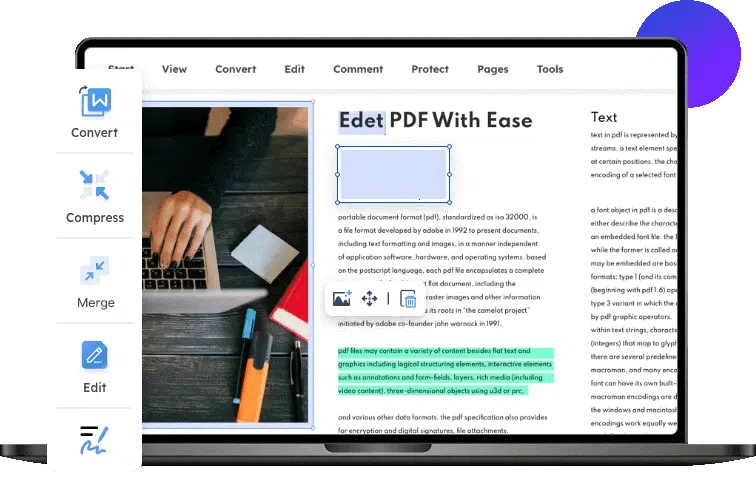
There are many PDF editors on the market, but iTop PDF is a free PDF editor and a great choice if you want something free and easy to use. With iTop PDF, you can easily edit, comment on, and save edited PDF files. Here’s a quick rundown of using iTop PDF to get the most out of your PDF editing experience.

First, open the PDF file you want to edit in iTop PDF. Then, use the editing tools to make changes to the document. Once you’re finished making changes, click “Save” to save your edited PDF file.

That’s all there is to it. With iTop PDF, editing PDF files is quick and easy. So if you need to make some changes to a PDF document, give iTop PDF a try; you won’t be disappointed.

Conclusion

Editing a PDF is easy and free using iTop PDF. Whether you need to add or remove text, images, or signatures, this tool can help you do it. So next time you need to edit a PDF, don’t break out the big bucks for Adobe Acrobat head to the internet and find a free and easy way to do it.



Subscribe to Our Newsletter

Related Articles

Top Trending

Best Frontend Framework 2026: React vs Vue vs Angular Guide
Learn React vs Vue vs Angular: Best Choice for Beginners
Speed Up WordPress Website
How to Speed Up A Slow WordPress Website
React 'Cannot Read Property Of Undefined' Error
How to Fix React 'Cannot Read Property of Undefined' Error? Unlock Solutions!
multilingual website development
Building Multi-Language Websites: A Complete Guide
On This Day April 20
On This Day April 20: History, Famous Birthdays, Deaths & Global Events

Fintech & Finance

Top Mobile Apps for Personal Finance Management
Top Mobile Apps for Personal Finance Management You Must Try
Top QuickBooks Errors Preventing Company File Access
Top 10 QuickBooks Errors Preventing Company File Access
Best Neobanks New Zealand 2025
9 Best Neobanks and Digital Finance Apps Available in New Zealand 2025
Irish Credit Union Digital Generation
7 Key Ways Irish Credit Unions Are Competing with Neobanks for the Digital Generation
How Fintech Is Transforming Emerging Market Economies

Sustainability & Living

US Startups Engineering Lab-Grown Regenerative Fabrics
10 US Startups Engineering Lab-Grown Regenerative Fabrics for Everyday Wear
The Future of Fast Charging What's Coming Next
The Future of Fast Charging: Trends You Must Know
How Solid-State Batteries Will Change the EV Industry
How Solid-State Batteries Will Change The EV Industry
The Real Environmental Cost of Electric Vehicles
Hidden Environmental Impact of Electric Vehicles
How EV Battery Technology Is Evolving
EV Battery Technology in 2026: Key Innovations Driving Change

GAMING

What Most Users Still Get Wrong When Comparing CS2 Skin Platforms
What Most Users Still Get Wrong When Comparing CS2 Skin Platforms?
How Technology Is Transforming the Online Gaming Industry
Naruto Uzumaki In The Manga
Naruto Uzumaki In The Manga: How The Original Source Material Shaped The Character
Online Game
Why Online Game Promotions Make Digital Entertainment More Engaging
Geek Appeal of Randomized Games
The Geek Appeal of Randomized Games Like Pokies

Business & Marketing

Trade Show Exhibit Trends 2026: Custom, Rental & Portable Designs That Steal the Spotlight
China EV Market Dominance: How China Leads Global EV Growth
How China Is Dominating The Global EV Market
Top 10 Productivity Apps for Remote Workers
10 Essential Remote Work Productivity Tools You Should Use
Emerging E-Commerce Markets
Top Emerging Markets for E-Commerce Entrepreneurs
Top Mobile Apps for Personal Finance Management
Top Mobile Apps for Personal Finance Management You Must Try

Technology & AI

Best Frontend Framework 2026: React vs Vue vs Angular Guide
Learn React vs Vue vs Angular: Best Choice for Beginners
React 'Cannot Read Property Of Undefined' Error
How to Fix React 'Cannot Read Property of Undefined' Error? Unlock Solutions!
multilingual website development
Building Multi-Language Websites: A Complete Guide
AI-Powered CRM Startups in the USA
20 AI-Powered CRM Startups in the USA Leading the 2026 Sales Revolution
Dark Mode Web Design
How Dark Mode Is Becoming A Standard Web Design Feature

Fitness & Wellness

Best fitness apps in India
Sweat Goes Digital: 10 Indian Health Tech Apps Rewriting the Workout Rulebook
AI Personal Trainer Startups UK
10 UK AI Personal Trainer Startups Redefining Home Fitness: Get Fit Smarter!
Biogenic Luxury
The Rise of Biogenic Luxury: Ancestral Wisdom for the High-Performance Professional
cost of untreated mental health on productivity
10 Eye-Opening Facts About the Real Cost of Untreated Mental Health Conditions on American Productivity
British Men's Mental Health 2026
7 Key Facts About How British Men Are Finally Starting to Talk About Mental Health — And Why It Matters





















