
Many mobile pages load too slow and scare off visitors. People tap and leave if the site hangs. 53% of users quit if a page takes more than three seconds to load.
This post shows 10 Hosting Techniques For Ultra-Fast Mobile Sites to cut server wait time, use a content distribution network, and enable local cache. We will also test speed with Google PageSpeed Insights and DevTools.
Keep reading.
Key Takeaways
- 53% of mobile users leave if a page loads in more than 3 seconds, so pick a host with under 200 ms TTFB, 99.9% uptime, fast DNS under 10 ms, and a built-in CDN like Cloudflare.
- Enable server-side caching with Redis or Memcached, turn on Gzip (shrinks files by up to 70%) and Brotli, switch to HTTP/2 (cuts round trips by 50%), and use WebP or TinyPNG to reduce images by up to 80%.
- Leverage edge servers in 330+ cities, use cloud or managed hosting to auto-scale on traffic spikes, and add load balancers so Google PageSpeed Insights shows low TTFB, LCP, and CLS.
- Test your site daily with Google PageSpeed Insights, GTmetrix, Lighthouse, and Pingdom to track Core Web Vitals (LCP, FID, CLS) and log TTFB in a shared sheet to spot any slowdowns.
- Adopt mobile-first design and AMP, enable lazy loading and browser caching, schedule weekly updates and backups, and add built-in security (DDoS protection, TLS) to keep mobile pages safe and snappy.
Choose a High-Performance Hosting Provider

Pick a server host with under 200 ms response time. It must keep up 99.9 percent uptime. A solid DNS service and fast load balancer cut time to first byte. That speeds mobile browsing and boosts user experience.
Use a cloud provider with built in CDN and security features. Avoid shared hosting for high traffic sites, they slow under peak loads. Run Google PageSpeed Insights or a performance audit tool often.
They show slow HTTP requests and missing browser caching.
Opt for Managed Hosting Solutions
A managed hosting provider handles server maintenance and keeps your site humming. It adds server-side caching, cuts manual processing, and shrinks time to first byte. Automated updates patch content management systems and core code, they fix bugs and block exploits.
Managed hosts run maintenance off hours, they keep your mobile website online and boost search results. They roll out security patches fast and stop outdated code. Developers track speed gains with Google PageSpeed Insights and GTmetrix.
Staff then tune core web vitals, they cut cumulative layout shift and lift first input delay for smoother browsing.
Leverage Content Delivery Networks (CDNs)
CDNs push images, scripts, and style files to servers near your readers. A CDN provider like Cloudflare runs nodes in 330 cities. This trick cuts time to first byte metrics to fractions.
It also shrinks latency so pages load fast.
DNS tweaks in your hosting dashboard link your site to the CDN. CMS integration adds plugins in a common CMS platform. This step moves heavy files off the origin host. It eases server load and boosts mobile optimization.
Users get smooth mobile browsing with lower largest contentful paint and better core web vitals.
Enable Server-Side Caching
Server-side cache stores data in memory, so it delivers pages quickly. It cuts server response time by lowering TTFB, boosting web performance for mobile users. Redis and Memcached act as in-memory stores to handle database queries.
This cache cuts backend load and lowers http requests to the database, boosting mobile optimization under heavy traffic. It works with hosting provider setups, like NGINX, to serve static fragments fast.
You see lower time to first byte (TTFB) and smoother user experience on Android and iOS browsers.
Implement Gzip Compression for Files
Enabling Gzip on your web server shrinks HTML, CSS, and JavaScript by up to 70%. That slash in file size speeds up time to first byte and cuts down on http requests. A simple tweak in the server block or .htaccess file turns on compression.
The web server module handles it, so gzip compression works with browser caching and popular CDNs. You get faster server response and smoother scrolling on mobile.
Sites can also add Brotli support for extra gains. It beats Gzip in modern browsers, delivering more savings with little fuss. Run Google PageSpeed Insights or GTmetrix to check if your pages come in zipped.
Fix any mismatched headers and watch metrics like largest contentful paint drop. Fast loads feel like a breeze to visitors.
Use HTTP/2 for Faster Data Transfer
Switch to HTTP/2 and watch your mobile page speed rocket. The protocol uses multiplexing and header compression to move data fast. It cuts HTTP requests and slashes page load time.
Your site can shrug off delays in rendering and lower TTFB.
Developers report up to 50% fewer round trips on Lighthouse audits. Many hosts ship HTTP/2 support in their default stack. PageSpeed Insights flags header compression as a win for Core Web Vitals.
Web hosts recommend this protocol as a best practice.
Minimize Time to First Byte (TTFB)
A high-performance Domain Name System provider answers lookups in under 10 ms. You tweak web server software settings, like PHP-FPM and keep-alive limits, for mobile optimization and to cut response delays.
A content delivery network places copies near mobile users to trim time to first byte (TTFB). Server‐side caching and database caching store heavy assets so a server returns data in a flash.
Utilize Cloud Hosting for Scalability
Cloud hosting handles sudden spikes in mobile traffic. It spins up new servers in seconds, it removes them when load drops. This boosts mobile optimization and usability. Content delivery network (CDN) links global users to the nearest node.
That cuts server response time and lowers time to first byte (TTFB) in Google PageSpeed Insights.
Cloudflare’s enterprise-grade services give large businesses room to grow. Users stream videos and icons without hiccups. Load balancing tools share HTTP requests across nodes. Engineers add processing power and memory on demand.
This rapid resource allocation keeps mobile page speed in line with core web vitals. Sites feel snappy.
Enable Image Optimization and Compression
Images can weigh down a site. Plugins like TinyPNG and Adobe Photoshop compress photos. WebP cuts image size by up to 80% over JPEG. SVG suits icons and logos, thanks to its small vector files.
Resize photos to 640×320 pixels for mobile pages.
Lazy loading delays offscreen images until users scroll. GIMP or ImageMagick scripts can automate file shrinking. Google PageSpeed Insights flags heavy files under core web vitals.
Responsive design needs light images to boost mobile page speed. Developers trim resolution, optimize formats, and check largest contentful paint scores.
Prioritize Mobile-First Design in Hosting Setup
Host plans should focus on mobile-first design. It uses fluid grids and CSS media queries to fit every screen. Responsive design lets above-the-fold content load fast. A single setup serves desktop and phone users.
Pick themes with scalable images that adapt like water. Touch-friendly layout needs large buttons and clear menus. Google Lighthouse flags CLS, LCP, FID issues early. Mobile optimization lifts user experience and boosts SEO.
Reduce DNS Lookup Times
Slow DNS lookups feel like a traffic jam on a mobile site. Pick a fast DNS provider, like a public resolver, to cut lookups to 20 ms or less. Change your DNS records for each content delivery network and edge server you use.
Run nslookup or dig to watch any hold ups. Cutting DNS time by 50 ms can speed mobile page load, trim TTFB, and boost user experience.
Metrics help you spot slow spots. Tools like Google PageSpeed Insights and mobile SEO audits can flag DNS delays. You can also use browser caching to cut repeat lookups. Quick DNS adds up, shaving clean seconds off mobile browsing.
Use Accelerated Mobile Pages (AMP)
Accelerated Mobile Pages strips down heavy markup and scripts for fast loading on phones. It cuts load times and boosts user-friendly flow. It raises Largest Contentful Paint scores and tames cumulative layout shift.
Google search lists AMP pages first in mobile results.
Google’s PageSpeed Insights reveals key metrics on AMP pages. WordPress plugins add AMP code without extra work. Reports list First Input Delay and layout shifts for each page. Switching to WebP images can shave off extra kilobytes in AMP.
Optimize Database Performance
Trim unused columns and collapse redundant queries. Index high traffic tables to speed lookups. Think of your tables like a crowded toolbox, pull only the tools you need, and you find your parts fast.
Fast SQL speeds boost server response and lower time to first byte.
Cache hot rows in an in-memory store such as Redis or a distributed cache engine to slash server strain. Monitor slow queries with a query analyzer in an SQL server. This trick can shave TTFB by 200 ms, lift largest contentful paint scores, boost mobile optimization, and please Google PageSpeed Insights.
Limit External HTTP Requests
Too many external scripts eat up bandwidth and slow mobile pages. Each extra HTTP request delays time to first byte (TTFB). Google PageSpeed Insights flags sites with heavy request counts.
CDN assets, fonts, and tracking tags often lead to additional requests.
Developers merge CSS and JavaScript into single files. They inline critical HTML code for above-the-fold content. A smart browser caching policy cuts repeat HTTP requests. That setup stops DNS lookups too often and shrinks page weight.
Conversion rates climb as load times fall.
Enable Browser Caching for Static Content
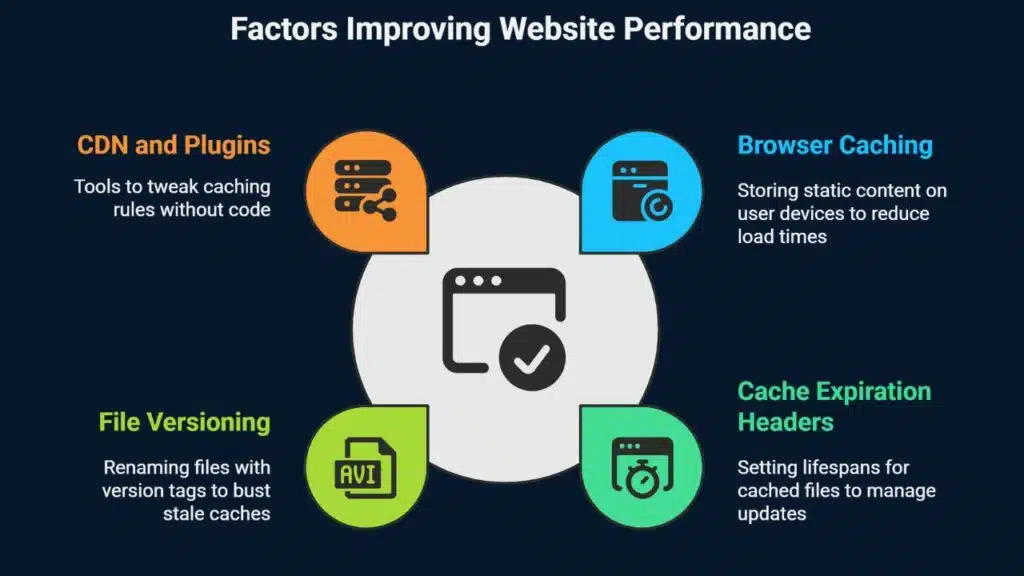
Sites lean on browser caching to store CSS, images, and scripts on user devices, slashing load times and shrinking HTTP requests. Set cache expiration headers that grant static files long lifespans, while giving dynamic pages shorter spans.
Rename files with version tags to bust stale caches after updates.
Pages that load faster drive mobile optimization and improve Core Web Vitals like largest contentful paint and first input delay, according to Google PageSpeed Insights. Users hit back buttons less often when content appears instantly, and conversion rates climb.
Many CDNs and WordPress plugins let you tweak caching rules without code.
Optimize Hosting for Core Web Vitals Metrics
A strong hosting provider cuts time to first byte and speeds LCP. Fast TTFB makes pages load in under two seconds on mobile. A network cache like a CDN sends assets from local servers.
It lifts mobile optimization and trims page load time.
A swift host curbs layout shifts to keep CLS low and lifts search rankings. It boosts INP and cuts interaction delays on buttons. CrUX reports show real-world metrics each 28 days.
Test each site with PageSpeed Insights or Lighthouse.
Implement Lazy Loading for Images and Videos
Lazy loading cuts initial page weight. It defers off-screen images and videos until needed. This method speeds up mobile page speed with fewer HTTP requests. Developers add a loading attribute in markup tag or lean script code.
Script code can swap placeholders for main media like a magic trick. Google PageSpeed Insights shows faster largest contentful paint (lcp) and lower cumulative layout shift (cls).
Users scroll, the site then fetches only media in view. Content delivery network storage still serves your assets from the nearest node. Browser caching stores placeholders and script outputs for repeat visits.
Image compression plus a light image format keep file sizes slim. Many mobile browsers support lazy loading out of the box. This move helps conversion rates by cutting load time pains.
Use a Lightweight and Mobile-Friendly Framework
Pick a front-end toolkit that drops heavy scripts and CSS. A utility-first style library can cut your CSS file in half. These grids adapt to any screen size and support mobile-first design.
Work with a WordPress theme and plugins coded for speed.
Swap out exotic font families for system fonts. Fewer character sets shrink page weight. Run scans in Google Lighthouse or Google PageSpeed Insights. You will spot slow code, fix render-blocking resources, and boost mobile optimization.
Regularly Monitor Hosting Performance
You need to track your server speed to keep mobile users happy. Fast hosting boosts conversion rates and cuts bounce rates.
- Run Google PageSpeed Insights tests daily to check lab metrics, page load time, mobile page speed, and time to first byte.
- Schedule Pingdom real user checks every 28 days to capture field metrics on first input delay and largest contentful paint in live traffic.
- Use GTmetrix audits to spot broken redirects or redirect chains that slow down mobile friendly design and spike time to first byte.
- Watch cumulative layout shift in PageSpeed reports to avoid janky page shifts that harm user experience on small screens.
- Log each page’s time to first byte in a shared sheet so you can spot sudden spikes in server response time.
- Compare mobile page speed scores across regions with the content delivery network map to see if you need more edge server nodes.
- Check browser caching rules weekly in Google PageSpeed to keep static assets in cache and cut down on HTTP requests.
- Set alerts for any drop in a key Core Web Vitals metric, like first input delay or largest contentful paint, so you can fix issues fast.
Schedule Hosting Environment Updates
Keep your server and site software fresh. Set a clear update calendar.
- Pick a slow hour, like 2 AM local, for server maintenance. This timing cuts mobile traffic dips.
- Schedule automated patch scans weekly via your hosting dashboard. Alerts deliver bug fix notices fast.
- Run WordPress core updates every two weeks with a site command interface. Software patches boost security and fix bugs.
- Test each update in a staging site before going live. Staging checks catch plugin and theme conflicts early.
- Back up your files and database before each update. Admins get safe restore points on demand.
- Automate database and file backup with an automation script. Scripts upload data to cloud buckets.
- Track site speed in a speed test tool after updates. Metrics like first input delay and largest contentful paint show gains.
- Check time to first byte with a performance test tool. Lower TTFB lifts core web vitals.
- Purge your CDN cache on update day. Browsers fetch fresh files and speed through mobile browsing.
- Update gzip compression settings in your server config monthly. Compressed files cut HTTP requests and shrink data size.
- Rotate SSL certs and TLS keys 30 days before they expire. Renewals keep your HTTPS status strong.
- Review cumulative layout shift scores after major updates. Stable layouts boost user experience on mobile.
Choose Hosting with Built-In Security Features
A hosting plan with built-in security stops many attacks on your site. Cloudflare offers DDoS and bot protection in its network. This shield cuts downtime and keeps uptime high. You get peace of mind, and the site keeps mobile page speed fast.
A firewall, malware scanning, and a TLS certificate guard your content. You also lower first input delay, and Google PageSpeed Insights scores will climb. Safe hosting frees you to focus on UX and core web vitals.
Packed servers slow down sites. Shared plans host dozens of domains on one machine. Mobile traffic spikes make page load time soar. HTTP requests pile up and time to first byte climbs.
That harms server response time and core web vitals.
Switch to a VPS or dedicated solution. Linux VPS with Nginx handles heavy loads. Dedicated servers deliver consistent speed under pressure. Google PageSpeed Insights will log faster load times.
You cut down on slowdowns and keep users happy.
Utilize Edge Servers for Localized Content Delivery
Edge servers sit near users. They cut travel time for data. A major content delivery network runs nodes in 330 cities. That setup slashes time to first byte, lifts mobile page speed, and boosts core web vitals like largest contentful paint and first input delay.
Sites tap local servers for quick content delivery. A user in Tokyo sees pages load in a blink. The node caches CSS, JavaScript, and images in WebP or PNG form. This method cuts HTTP requests and shrinks cumulative layout shift.
Visitors surf faster and bounce rates fall.
Test Hosting Speed with Tools Like GTmetrix
GTmetrix is a free online speed checker that uses waterfall charts and speed visualization to map each page element. Servers run tests from over 30 points worldwide and simulate slow networks for realistic mobile page speed checks.
Reports flag missing gzip compression and track time to first byte, largest contentful paint, and cumulative layout shift.
If your site crawls like a snail, the speed tester will call it out. The analysis highlights picture compression, browser caching, and minify JavaScript tips. Some owners run Google PageSpeed Insights or a Lighthouse audit next, then tweak hosting or pick a faster service.
Maintain Regular Backups for Hosting Reliability
Regular backups boost hosting reliability and disaster recovery. Scheduled copies protect sites from data loss due to server or security issues.
- Automate daily snapshots with time-based scheduler to remote storage for quick recovery.
- Keep three backup versions and rotate them to guard against disk failure.
- Test restore operations monthly to confirm data integrity.
- Store database dumps and site files in separate folders to speed rollback.
- Encrypt backup files with TLS or SFTP to block unauthorized access.
- Monitor backup logs via email notifications or control panel alerts.
- Archive old copies for 30 days to meet compliance and audit needs.
- Use remote sync tool for off-site copies across multiple data centers.
Takeaways
Fast hosting and a smart content delivery network fire up site speed. Activating Gzip and HTTP/2 slashes load times. You cut time to first byte and tame first input delay with browser caching.
You run a testing tool or an audit tool to spot slow bits. It feels like rocket fuel for mobile browsing.
FAQs
1. What is a CDN and how does it speed up my mobile site?
A content delivery network, or CDN, stores your files on servers around the world, it cuts server response time, it shrinks the distance to your mobile user, it handles mobile traffic fast, your pages load in a snap.
2. How does browser caching cut load time on smartphones?
Browser caching lets phones save your site files, on return the browser loads from local storage, it cuts HTTP requests, it trims page load time, it makes mobile browsing smooth, kind of like hitting a fast lane, I once watched a friend close a slow page, we lost a reader in seconds.
3. What is TTFB and why does it matter for core web vitals?
TTFB means time to first byte, it shows how fast data starts to arrive, a low TTFB speeds up your largest contentful paint, it keeps core web vitals green, it helps users see your site right away.
4. Why should I enable gzip compression and minify CSS or JavaScript?
Gzip compression zaps extra bytes out of your files, minify CSS and minify JavaScript strips spaces and comments, these steps slash file size, they cut render-blocking resources, they make your site feel like a race car when it loads.
5. How does lazy loading improve mobile page speed?
Lazy loading holds off loading images that sit below the fold until you scroll, it saves mobile data, it speeds up above-the-fold content, it makes your pages feel snappy, and it keeps image files from slowing things down.
6. What else can I do to boost my SEO and UX on mobile?
You can use site add-ons on wordpress.org, responsive web design, media queries, or accelerated mobile pages, these steps lift mobile-first design, they boost mobile SEO, they help you score high in Google PageSpeed Insights, they improve UX and even land you featured snippets.