

For digital nomads and expatriates, Dubai offers a tax-free haven with a luxury lifestyle, but it comes with a unique set of infrastructure quirks. You might expect a futuristic city to have flawless connectivity, and while speeds are world-class, the structural reality of the buildings often tells a different story. The challenge isn’t finding fast internet; it’s making it usable inside your home.
Creating a reliable Dubai remote work setup requires more than just signing a contract with an ISP. It requires navigating thick reinforced concrete walls, understanding specific VoIP restrictions, and mitigating thermal throttling during the intense summer months. This guide breaks down exactly how to build a 99.9% uptime office in the UAE, ensuring you never drop a critical client call.
Key Takeaways
-
Fiber is Essential: 5G is fast, but Fiber-to-the-Home (FTTH) is non-negotiable for stability.
-
Defeat Concrete Walls: Standard routers fail in Dubai apartments; a Mesh Wi-Fi 6 system is mandatory.
-
VoIP Awareness: WhatsApp calls are blocked. Rely on Zoom, Teams, or Google Meet for work.
-
Power Protection: Use a Mini DC UPS for your router to bridge “micro-cuts” and prevent disconnects.
-
Redundancy: Always have a 5G wireless backup ready for the rare fiber outage.
The Dubai Paradox: High Speed vs. Concrete Reality
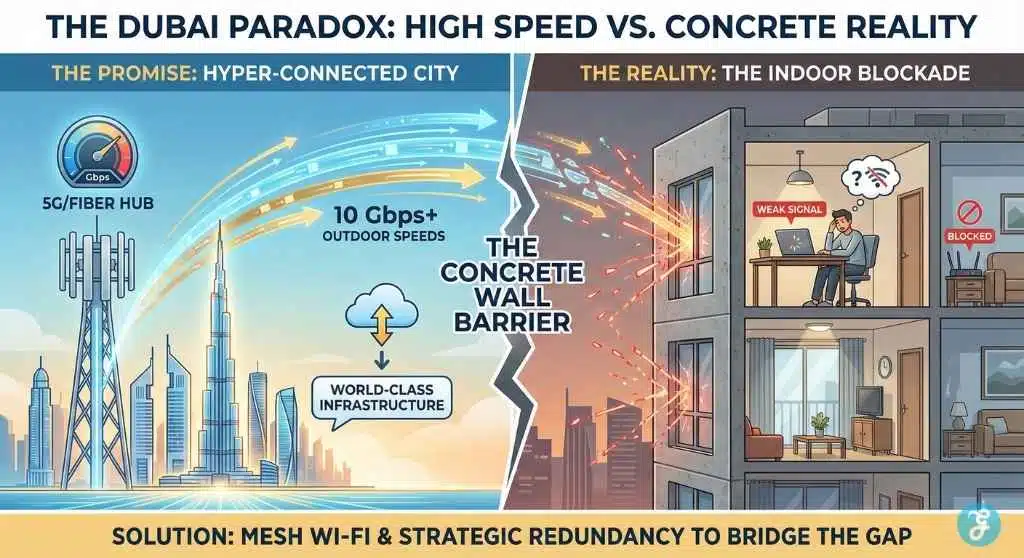
Before you start ordering hardware, it is crucial to understand the unique “terrain” of the UAE’s digital landscape. Dubai frequently ranks #1 globally for mobile internet speeds and boasts an incredibly advanced fiber infrastructure. You aren’t dealing with a developing nation’s shaky grid; you are dealing with a hyper-modern Smart City.
However, this modernity creates a paradox for the Dubai remote work setup. The same high-quality construction standards that make buildings energy-efficient and soundproof—thick reinforced concrete, thermal blocks, and heavy glazing—act as effective “Faraday cages.” They block radio signals, including Wi-Fi and 5G, from traveling between rooms. In Dubai, you can have a 1Gbps connection at your front door, but a dead zone at your desk just 10 meters away. The challenge isn’t getting fast internet to your building; it’s distributing it effectively inside your home.
Your Strategy: Defense in Depth
A standard home office setup that works in London or New York often fails here because it relies on assumptions that don’t apply to the UAE. To build a truly resilient workspace, you need to stop thinking about “internet speed” and start thinking about “redundancy.”
This guide categorizes your setup into three critical defensive layers:
-
Hardware Defense: Overcoming physical barriers (concrete walls) to ensure the signal reaches your device.
-
Software Defense: Navigating the regulatory landscape (VoIP policies) to ensure you remain communicative.
-
Power Defense: Protecting your uptime against invisible “micro-cuts” that can reset your connection without warning.
By addressing these three pillars, you move from a fragile setup that “usually works” to a professional-grade system that always works. Let’s start with the most critical physical barrier: the walls.
Part 1: Connectivity – Beating the Concrete Walls
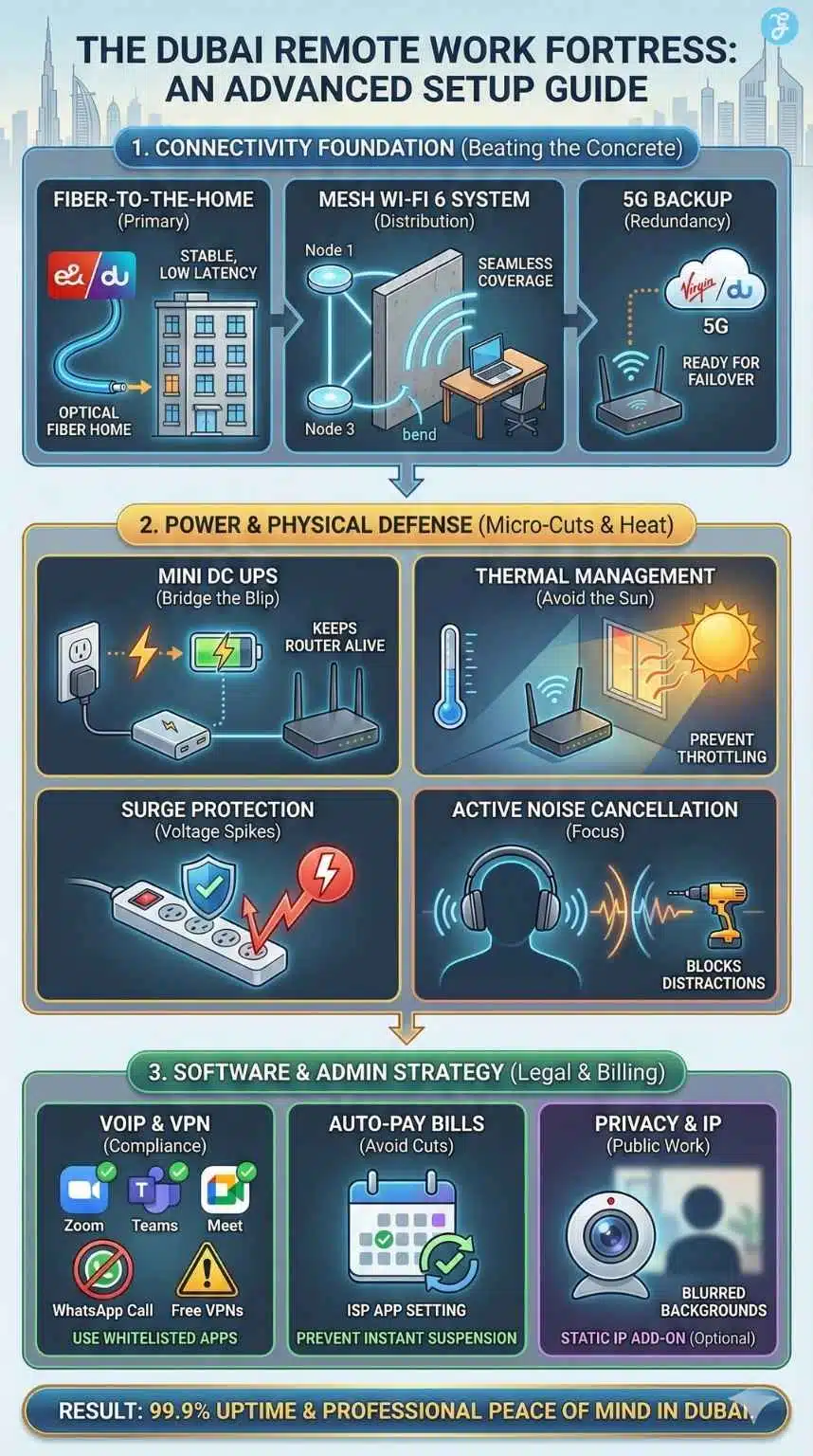
The first thing you will notice in any Dubai high-rise is the build quality. To keep the heat out, buildings are constructed with heavy reinforced concrete and blockwork. While great for insulation, this is a nightmare for Wi-Fi signals.
1. Fiber is King, 5G is the Prince
Dubai has some of the fastest 5G mobile networks in the world, with outdoor speeds often exceeding 1Gbps. However, do not be tempted to use a 5G router as your primary connection. The same thermal glass that keeps your apartment cool also degrades cellular signals significantly.
For a professional Dubai remote work setup, you must prioritize a Fiber-to-the-Home (FTTH) connection. The two main providers, Etisalat (branded as e&) and du, both offer excellent fiber infrastructure.
| Feature | Etisalat (e&) | du |
| Stability | Excellent (lower jitter) | Very Good |
| Coverage | Nationwide | Strong in New Dubai (Marina, Hills) |
| Best For | Heavy Int’l Traffic | Bundled Value & Entertainment |
| Contract | Usually 24 Months | usually 24 Months |
Pro Tip: If you are a heavy gamer or day trader, Etisalat generally offers slightly better routing to European servers, shaving off crucial milliseconds of latency.
2. The “Concrete Rule”: Why Single Routers Fail
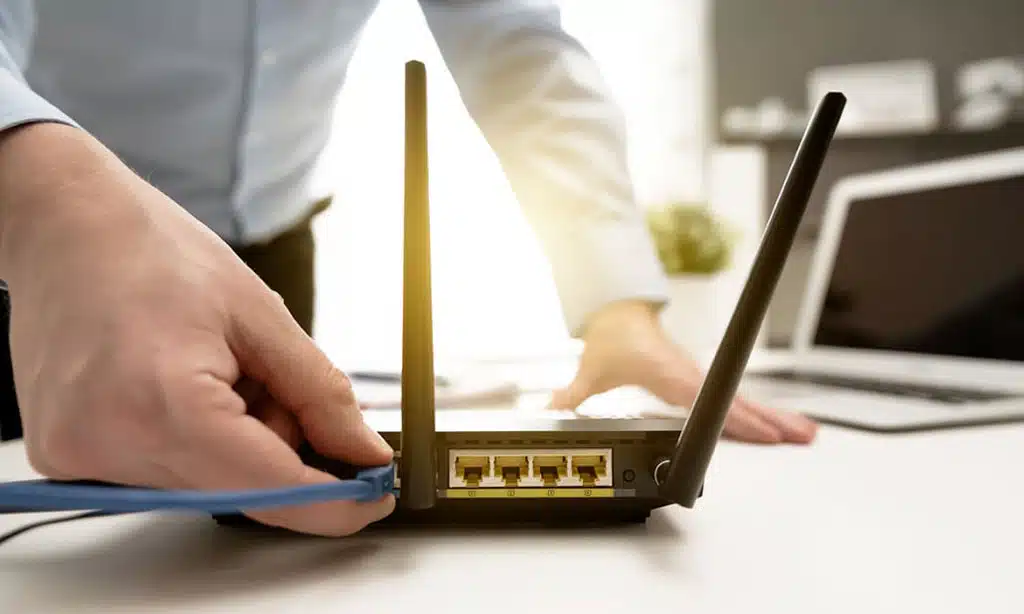
This is the most common mistake new arrivals make. They install the ISP-provided router in the living room and expect it to reach the bedroom office. In many Western countries with drywall partitions, this works fine. In Dubai, a signal trying to pass through two concrete walls will degrade to almost unusable speeds.
You need a Mesh Wi-Fi System. Unlike a simple extender (which halves your speed), a Mesh system uses multiple nodes to create a seamless blanket of coverage.
-
The Setup: Place the main node next to your fiber modem. Place the second node in the hallway, ensuring it has a direct “line-of-sight” to the first node. This allows the signal to “turn the corner” around the concrete walls rather than trying to punch through them.
-
Recommended Spec: Look for Wi-Fi 6 (AX) or Wi-Fi 6E systems. Brands like TP-Link Deco, Netgear Orbi, or Linksys Velop are widely available on Amazon.ae and Noon.
3. Managing Latency for International Work
Most remote workers in Dubai connect to servers in London (approx. 130ms ping), Frankfurt, or New York. Because your base latency is already high due to physics (distance), you cannot afford local interference.
If your desk is near a Mesh node, connect your laptop via an Ethernet cable (CAT6 or CAT7) rather than using Wi-Fi. This eliminates local “jitter”—the variance in ping that causes robotic voice audio during Zoom calls. Even if you have 500Mbps speed, high jitter will ruin a meeting.
4. The 5G Failover Strategy
While fiber cuts are rare, construction is constant in Dubai. A digger hitting a line can take a building offline for hours. Redundancy is the hallmark of a professional Dubai remote work setup.
-
The Solution: Purchase a “Home Wireless” 5G plan from Virgin Mobile or du. These are plug-and-play routers that require no installation.
-
The Tactic: Keep this router powered off in a cupboard. If your fiber drops, plug it in. Virgin Mobile is particularly popular for this as they operate on the du network but offer flexible app-based management, allowing you to pause or activate data as needed without long-term contracts.
One of the most confusing aspects for newcomers is the Telecommunications and Digital Government Regulatory Authority (TDRA) policy on Voice over IP (VoIP).
5. What Works (And What Doesn’t)
You may be used to calling clients via WhatsApp or FaceTime Audio. In the UAE, these services are generally blocked or heavily throttled to the point of being unusable. This is not a glitch; it is a regulation.
However, business-grade communication tools are whitelisted and work perfectly without issues:
-
Zoom
-
Microsoft Teams
-
Google Meet
-
Webex
For personal calls to family back home, residents often use Botim or GoChat, which are locally approved apps (though they are ad-heavy unless you pay a subscription).
6. The VPN Conversation
Many remote workers use Virtual Private Networks (VPNs) to access geo-restricted content or secure their connection. While VPNs are widely used, it is important to use compliant, paid services.
-
Warning: Free VPNs are often aggressively blocked by UAE ISPs. If you leave a free VPN running during a Teams call, you will likely experience packet loss or a total drop.
-
Best Practice: For the most stable connection, disable your VPN during Zoom/Teams calls unless your company strictly mandates it for security. The direct connection will always be faster and clearer.
Part 3: Power Continuity – The “Micro-Cut” Defense
Dubai’s power grid (DEWA) is incredibly stable compared to many parts of the world. However, “micro-cuts”—power blinks lasting less than a second—can occur, often due to building load switching.
7. You Don’t Need a Generator, You Need a Mini UPS
If the power blinks for 0.5 seconds, your lights might just flicker, but your router will reboot. A router reboot takes 3 to 5 minutes—an eternity if you are presenting to a client.
-
The Fix: Invest in a Mini DC UPS. These small devices look like power banks and sit between the wall socket and your router.
-
How it Works: When the power cuts, the Mini UPS instantly switches to battery power with zero interruption. It can keep your Wi-Fi running for 4+ hours, which is enough to finish your day even during a rare extended outage.
8. Summer Surge Protection
During the peak of summer (July–August), air conditioning usage spikes, putting a heavy load on building transformers. This can occasionally cause “dirty power” or voltage fluctuations.
-
Action: Do not plug your expensive MacBook or monitor directly into the wall. Use a high-quality Surge Protection Strip (brands like Belkin or APC) with a high Joule rating. This is cheap insurance for expensive hardware.
9. Voltage and Plug Compatibility
If you are relocating from the US, Canada, or Japan, be careful. The UAE uses 220-240V and the Type G (British style) rectangular three-pin plug.
-
Check Your Bricks: Look at the fine print on your monitor and laptop power bricks. If they say Input: 100-240V, you just need a plug adapter.
-
The Danger Zone: Kitchen appliances, laser printers, and some high-end audio gear from the US are often 110V only. Plugging these into a Dubai wall will destroy them instantly. You need a heavy-duty Step-Down Transformer for these, not just a travel adapter.
Part 4: The Physical Workspace
Optimizing your physical environment is just as critical as the digital one.
10. Thermal Throttling Prevention
Electronics hate heat. In a Dubai summer, the area near a window can reach temperatures that are dangerous for hardware, even with the A/C on.
-
Placement: Never place your router, modem, or backup drives on a windowsill or a balcony table. The direct solar radiation will cause the devices to overheat and “thermal throttle,” significantly slowing down your internet speed to protect their internal chips.
-
A/C Noise: When choosing a room for your office, listen to the A/C. In some older buildings, the central A/C can be quite loud (white noise). While this helps focus, it can be audible on calls. Use noise-canceling software like Krisp if your building has noisy airflow.
Sourcing Your Gear (Local Insights)
Knowing what to buy is half the battle; knowing where to get it in Dubai can save you time and money. Unlike in the US or Europe, where Amazon is the default for everything, Dubai has a mix of online giants and specialized brick-and-mortar hubs.
Amazon.ae vs. Noon vs. Computer Plaza
-
Amazon.ae: The go-to for Mesh systems, cables, and branded peripherals (Logitech, Belkin). If you have Prime, next-day delivery is reliable.
-
Noon.com: Often faster for mobile phones and 5G routers. Their “Noon Minutes” service can sometimes deliver small electronics (like cables or adapters) in under 15 minutes in certain areas.
-
Al Ain Center (Computer Plaza): This is Dubai’s hidden gem for techies. Located in Bur Dubai, this multi-story mall is dedicated entirely to computer hardware. If you need a custom PC build, specific thermal paste, or a high-end gaming monitor that isn’t in stock online, go here. You can often haggle for a better price on big-ticket items.
The “Dubizzle” Option
For expensive items like Herman Miller chairs or high-end 4K monitors, check Dubizzle (the UAE’s version of Craigslist/eBay). Dubai has a high turnover of expats, which means you can often find barely-used premium office gear for 50% of the retail price from someone who is leaving the country.
The “Noise” Factor & Plan B
In a rapidly developing city like Dubai, construction is a constant. Even in established neighborhoods, a neighbor might decide to renovate their apartment, leading to weeks of drilling noise that travels through the building’s concrete structure.
Active Noise Cancellation (ANC) is Mandatory
A good pair of ANC headphones is not a luxury here; it is part of your essential Dubai remote work setup.
-
The Reality: Construction hours are generally 7:00 AM to 8:00 PM. If a tower is being built next door, the background hum is persistent.
-
The Gear: Invest in Sony WH-1000XM5 or Bose QC45. Their ability to cancel out the low-frequency drone of construction machinery and A/C units is superior to standard earbuds.
Have a “Third Place” Ready (Letswork)
Sometimes, the internet works, but the drilling is unbearable. You need an escape route.
-
The App: Download Letswork. It is a subscription app that gives you access to dozens of coworking spaces, hotel lobbies, and cafes across Dubai with unlimited coffee and high-speed Wi-Fi.
-
Why it helps: Instead of hunting for a cafe with a plug socket, you have a guaranteed professional environment ready as a backup. Having a “Plan B” location pre-selected reduces stress when your home environment becomes temporarily unworkable.
Frequently Asked Questions (FAQ)
Can I use Starlink for my Dubai remote work setup?
As of now, Starlink is licensed in the UAE, but for a standard apartment or villa, it is generally overkill and less stable than local Fiber. Starlink is excellent for remote desert camps or offshore work, but for a city apartment, the obstruction from other skyscrapers makes Fiber (Etisalat/du) a superior and cheaper choice.
What is the best internet speed for a couple working remotely?
A 500Mbps plan is the sweet spot. While 1Gbps is available, 500Mbps is more than enough for two people on simultaneous video calls while streaming 4K content. Focus your budget on a better Mesh Wi-Fi system rather than raw speed you might not use.
Do I really need a VPN to work in Dubai?
For general work (Zoom, email, Slack), no. These tools work natively. You only need a VPN if you need to access geo-blocked content (like certain streaming libraries) or if your company requires it for accessing internal servers. Always use a corporate or paid VPN for reliability.
My internet is fast, but Zoom keeps freezing. Why?
This is likely “Jitter” or packet loss caused by Wi-Fi interference, not low speed. The thick walls in Dubai apartments cause signals to bounce. Try connecting your laptop directly to your router with an Ethernet cable. If the problem stops, you need to upgrade your Wi-Fi to a Mesh system.
Is public Wi-Fi in Dubai cafes reliable for work?
Yes, generally. Cafes in areas like DIFC, Dubai Marina, and JLT offer excellent free Wi-Fi. However, they are public networks. For security, always use a VPN when on public Wi-Fi, and have your phone’s 5G hotspot ready as a backup if the cafe gets crowded and speeds drop.
The Bottom Line: Reliability is a Choice
Building a robust Dubai remote work setup is about anticipating the unique environmental factors of the city. It is not enough to simply pay for the fastest internet package; you must engineer a solution that bypasses thick concrete walls, navigates local VoIP rules, and insures against micro-power cuts.
By combining a high-speed Fiber line with a Mesh Wi-Fi system and a Mini UPS, you create a layer of redundancy that rivals a corporate office. With this setup, you can enjoy the freedom of the digital nomad lifestyle in Dubai without ever worrying about the “Can you hear me now?” nightmare.






























