

Ever stared at a pile of sensors and thought, “Is this really going to keep my place safe?” This guide, 16 DIY Vs Pro-Installed Security Picks: What’s Right For Your Home?, helps you choose without guessing.
I’ll walk you through real costs, setup effort, and the everyday “gotchas,” so you can pick the Home Security setup that fits your home or rental.
What Are DIY Home Security Systems?
DIY home security systems let you install your own cameras, door/window sensors, and Alarm Systems, then manage everything from an app. Most DIY Systems are wireless systems that use stick-on sensors and battery-powered cameras, so you can often get basic coverage set up in an afternoon.
DIY has surged because it keeps Installation flexible. You can start small, add devices room by room, and switch Monitoring levels when your budget or schedule changes.
Overview of DIY security options and their rising popularity.
If you like control, DIY feels simple. You decide where cameras go, how loud alerts should be, and who gets Security Alerts when something happens.
The biggest tradeoff is that you become the installer and the “first responder.” If you miss an alert, your system still recorded the moment, but you may react late.
How DIY systems actually “talk” to each other
Here’s a detail many shoppers miss during System Evaluation: not every device uses your Wi-Fi.
For example, Ring Alarm sensors use Z-Wave to communicate with the base station (on different frequencies than Wi-Fi), which can be helpful if your Wi-Fi gets spotty at the far end of the house.
16 DIY Vs Pro-Installed Security Picks: What’s Right For Your Home?
These 10 DIY picks give you a real spread of CostEffectiveness, Safety Features, and Flexibility.
| Pick | System | Type | Best For | Typical Monthly Cost To Plan Around | Key Note |
|---|---|---|---|---|---|
| 1 | SimpliSafe | DIY | Optional pro monitoring without feeling locked in | Standard $22.99/mo, Core $32.99/mo | Self-monitor anytime, upgrade to pro monitoring when travel or schedules get hectic |
| 2 | Ring (Ring Alarm + Cameras) | DIY | Alexa households and shared family alerts | Basic $4.99/mo, Standard $9.99/mo, Standard + Alarm Pro Monitoring $19.99/mo | Easy to start with cameras, add alarm later to control upfront costs |
| 3 | Wyze | DIY | Budget, “good enough” multi-room coverage | Cam Unlimited $9.99/mo (or annual billing) | Great for scaling cameras, but weigh cloud features vs local storage needs |
| 4 | Arlo | DIY | Higher-end camera features and smarter detections | Single-camera $7.99/mo (annual billing), Unlimited $17.99/mo (annual billing) | Better filtering can cut down on “nothing happened” alerts |
| 5 | Google Nest (Google Home Premium) | DIY | Google Home users who want better history and search | Standard $10/mo, Advanced $20/mo | Excellent clip search, but subscription becomes a steady line item |
| 6 | Eufy | DIY | Local storage and fewer ongoing fees | Pro monitoring subscription $29.90/mo | Keep more footage local for privacy, add monitoring later if needed |
| 7 | Blink | DIY | Simple, battery-first camera coverage | Basic $3.99/mo, Plus $11.99/mo | Match your plan to how often you truly need saved clips |
| 8 | abode | DIY | Smart home fans who want flexible monitoring | Standard $6/mo, Pro $20/mo | On-demand style monitoring works well for vacations or busy seasons |
| 9 | Frontpoint | DIY | DIY with a more premium monitoring feel | Ultimate Monitoring $49.99/mo | Priced like a pro service, best if you will use the advanced features |
| 10 | Cove | DIY | Value shoppers who want pro monitoring without a long contract | Basic $19.99/mo, Plus $29.99/mo | Predictable monitoring while you build out devices over time |
| 11 | ADT | Pro-Installed | Nationwide pro install and structured monitoring | Pro monitoring starts at $49.99/mo (pro install) | Confirm what is included vs add-ons in your exact quote |
| 12 | Vivint | Pro-Installed | High-end smart home feel with pro install | Monitoring starts at $24.99/mo (often higher with cameras) | Confirm the three-year monitoring contract and how financing affects commitment |
| 13 | Brinks Home Security | Pro-Installed | Packaged pro monitoring service | Varies by package and promos | Confirm contract length, post-promo monthly total, and service visit costs after warranty |
| 14 | Vector Security | Pro-Installed | Larger homes and complex layouts | Quote-based | Ask how they plan driveway, side gate, and detached garage coverage, plus upgrade path |
| 15 | CPI Security | Pro-Installed | Regional provider with ongoing service support | Quote-based | Confirm coverage area, response process, and what happens if you move mid-contract |
| 16 | Guardian Protection | Pro-Installed | Pro install with monitoring and smart add-ons | Quote-based | Confirm whether equipment is owned or leased, plus cancellation and return terms |
Pros and Cons of DIY Security Systems
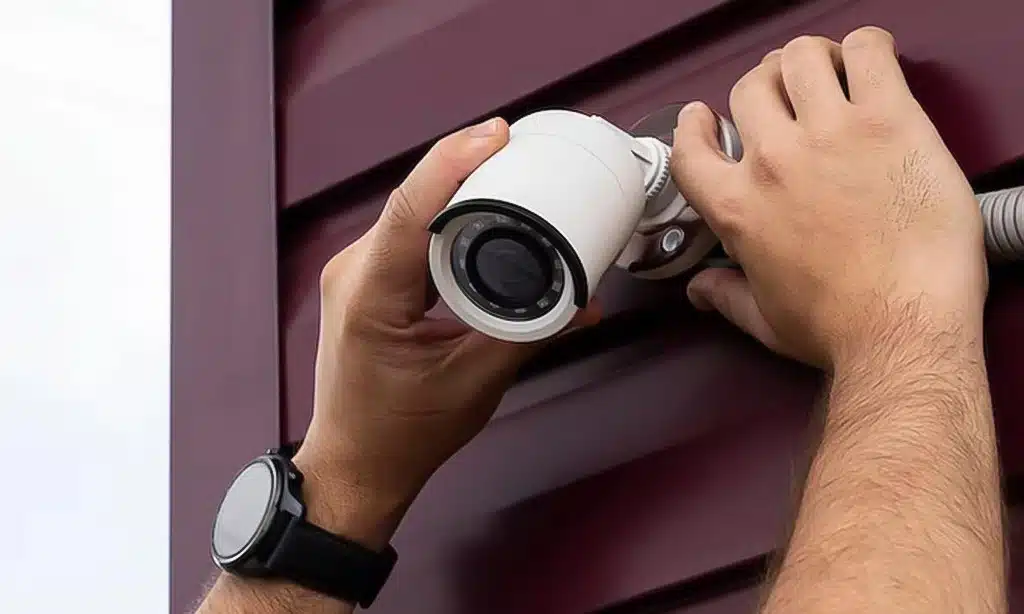
DIY systems can be a great Home Security fit when you want Flexibility and lower upfront cost. The downside is simple: your system is only as reliable as your setup and your habits (updates, battery changes, and alert response).
Advantages: Cost-effectiveness, flexibility, and portability.
- Lower Installation cost: you skip technician labor and schedule hassles.
- Easier to move: adhesive sensors and wireless systems are renter-friendly.
- Build-as-you-go upgrades: start with doors and motion, then add Surveillance where you actually need it.
- Self-monitoring control: you decide who gets alerts, and you can keep monthly costs lower.
- Smart home wins: DIY Systems often pair quickly with Home Automation routines like lights that turn on when a door opens.
Disadvantages: Potential setup errors and lack of professional monitoring.
- Placement mistakes: a camera pointed into sunrise glare or a motion sensor facing HVAC vents can crush Accuracy.
- Missed alerts: self-monitoring fails if your phone is on silent, out of service, or you’re simply busy.
- Wi-Fi weak spots: cameras far from your router can lag or drop, especially outdoors.
- More false alarms if you rush setup: the Security Industry Association’s CP-01-2019 standard exists specifically to reduce false alarms, and user-friendly alarm cancel and delay features are part of that idea.
Pros and Cons of Pro-Installed Security Systems
Pro-installed security is built around Convenience and consistent Monitoring. You pay more, but you also offload a lot of work and reduce the odds of “we set it up wrong, so it didn’t help when it mattered.”
Advantages: Expert setup, professional monitoring, and strong systems.
- Better device placement: techs usually map entry points and set camera angles to reduce blind spots.
- 24/7 Monitoring: a staffed center can dispatch help even if you miss an alert.
- Cleaner install: fewer dangling cables, better mounting, and more dependable power planning.
- Ongoing support: you typically get troubleshooting and service options without becoming your own help desk.
Disadvantages: Higher costs, contracts, and less flexibility.
- Higher monthly spend: pro Monitoring commonly costs more than DIY subscriptions.
- Contracts can be real: NerdWallet reports Vivint commonly uses a three-year Monitoring contract, and financing can extend commitments.
- Harder to change layouts: moving cameras or adding sensors may require a service call.
- Moving gets complicated: if you relocate, you’ll want to know what transfers and what gets replaced.
Key Features to Compare: DIY vs. Pro-Installed
If you only compare “camera quality,” you miss the real decision drivers. The smart way to do System Evaluation is to compare Monitoring, Installation, total cost, and how the system behaves on your worst day (power outage, internet outage, hectic schedule).
| Feature | DIY Systems | Professional Installation |
|---|---|---|
| Monitoring | Self-monitoring is common, with optional paid Monitoring for some brands. | 24/7 Monitoring is usually the default, with dispatch handled for you. |
| Cost Comparison | Lower Installation cost, and you can keep monthly bills low if you self-monitor. | Higher ongoing fees, and many plans bundle Monitoring plus service. |
| Contracts | Often month-to-month, easier to pause or cancel. | More likely to involve multi-year commitments, especially with financed equipment. |
| Flexibility | Easy to move sensors and swap devices, which is great for rentals. | Changes may require service visits or re-quotes. |
| Accuracy and false alarms | Depends on your setup habits, updates, and careful placement. | Better initial setup can reduce false alarms, plus monitoring teams often help confirm events before dispatch. |
| Local rules and fees | You still may need permits and may face false alarm fees if police respond. | Same local rules apply, and dispatching through Monitoring can trigger those rules faster if your system false-alarms. |
Monitoring: Self-monitoring vs. professional monitoring
Self-monitoring works best when you know you’ll actually respond. If you travel often, work long shifts, or have kids home alone, professional Monitoring can be the difference between “alert received” and “help on the way.”
A smart compromise is to choose a system that lets you switch Monitoring modes without replacing hardware.
Cost: Upfront and ongoing expenses
Don’t just look at the kit price. The real Cost Comparison is: equipment + Installation + monthly Monitoring + video storage subscriptions.
A quick sanity check: price out a three-year total, because that’s a common timeframe for many households before they move, remodel, or switch platforms.
Contracts: No-contract flexibility vs. multi-year agreements
If you’re leaning pro-installed, read the cancellation rules before you pick camera specs. NerdWallet reports Vivint commonly uses a three-year Monitoring contract, and financing can push contract terms out longer.
If you prefer DIY, look for month-to-month billing so you can adjust when your budget changes.
Customization: DIY freedom vs. pro-optimized designs
DIY Systems win on customization. You can reposition devices when you notice real-life patterns, like a side door that gets used more than you expected.
Pro-installed systems win when you want someone else to design the layout, then be accountable for making it work.
Who Should Choose DIY Security?
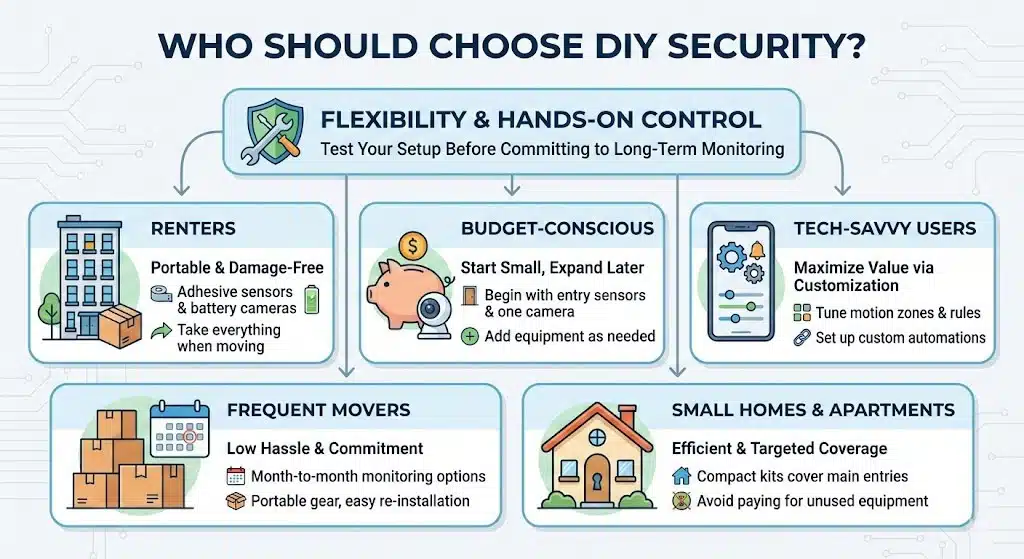
DIY is a great fit when you want Flexibility and you’re comfortable being hands-on. It’s also a strong option if you want to test your Home Security setup before paying for long-term Monitoring.
Best for renters, budget-conscious homeowners, and tech-savvy users.
- Renters: choose adhesive sensors and battery cameras, then take everything with you when you move.
- Budget-focused households: start with entry sensors and one well-placed camera, then expand after you see what you actually need.
- Tech-comfortable users: you’ll get more value because you’ll tune motion zones, notification rules, and automations.
- Frequent movers: month-to-month Monitoring and portable gear keeps Installation headaches low.
- Small homes and apartments: a compact DIY kit can cover the main entry points without paying for unused equipment.
Who Should Choose Pro-Installed Security?
Pro-installed home security is built for households that want hands-off protection. If your home has multiple floors, many entry points, or you simply want someone else responsible for Installation Accuracy, this is where pro systems shine.
Best for larger homes, families, and those desiring hands-off convenience.
- Larger homes: pros can design coverage so you don’t end up with expensive gaps.
- Busy families: 24/7 Monitoring reduces the “Did you see that alert?” stress.
- People who hate troubleshooting: you get a clearer support path when devices drop offline.
- Homes where false alarms would be expensive: for example, the City of Los Angeles lists false alarm fees effective October 20, 2025 starting at $219, and it also lists a $45 initial alarm permit fee.
- Households in permit-heavy cities: Dallas states police may refuse response if you don’t have a valid alarm permit, and it lists escalating false alarm service fees after multiple false alarms.
Final Decision: DIY or Pro-Installed?
Here’s the decision shortcut I use with friends: pick the option that still works on your busiest week of the year.
- Count entry points: if you have many doors, ground-floor windows, and a garage, pro Installation can improve coverage fast.
- Decide how you want alerts handled: if you can’t reliably answer alerts, lean toward professional Monitoring.
- Price a three-year total: include video storage, Monitoring, and any Installation charges.
- Check local requirements: permits and false alarm fees can change your Cost Comparison more than you’d expect.
- Pick your “non-negotiable” Safety Features: cellular backup, battery backup, and clear Security Alerts matter more than fancy app extras.
If you want lower upfront cost, flexible wireless systems, and quick setup, DIY Systems usually win.
If you want hands-off Convenience, tighter Installation Accuracy, and 24/7 Monitoring, professional Installation is usually worth the higher monthly cost.
Takeaways
The best choice is the one you’ll actually use consistently. DIY systems give you Flexibility, fast setup, and easier moves, while pro-installed systems deliver hands-off Monitoring and expert Installation.
If you take one thing from 16 DIY Vs Pro-Installed Security Picks: What’s Right For Your Home?, let it be this: compare your real-life schedule, your budget, and your tolerance for troubleshooting, then pick the setup that helps you feel safe at home.
FAQs on DIY Vs Pro-Installed Security
1. What is the difference between DIY and pro-installed security picks for my home?
DIY kits put you in charge, you buy gear, install cameras and sensors, and manage alerts. Pro-installed picks add professional setup, live monitoring, and a service plan, they cost more but cut setup time and worry.
2. Which should I pick for my home, DIY or pro-installed?
If you like to tinker, want lower cost, and can handle tech, pick a DIY kit; if you want fast setup, reliable monitoring, and support, pick a pro-installed system.
3. Are pro-installed systems better for monitoring and response?
Yes, pro-installed plans often include 24/7 monitoring, a dispatch team, and a clear incident log. They link alarms to local responders, which speeds response and trims false alarms.
4. Will DIY systems protect my home as well as pro-installed ones?
They can, if you choose solid hardware, place sensors right, and keep firmware up to date. Think of DIY as a home cook who follows a good recipe, you can make a fine meal. Pro-installed systems act like a chef and staff, they add training, service, and fast fixes for complex homes.






























