
Work piling up can feel like being stuck in quicksand. Emails, reports, and to-do lists often grow faster than they can be managed. A smarter approach is needed to save time and stay productive. Using a smart assistant can make a significant difference. Claude AI is transforming how businesses handle daily tasks and improve efficiency.
This guide explains how to use Claude AI for business productivity with simple, practical steps. Grab a cup of coffee and explore how artificial intelligence can be integrated into everyday workflows.
What Is Claude AI?

Claude AI is a smart conversational model built for professional use by the team at Anthropic. It writes text, answers questions, and summarizes long documents in plain language.
For professional teams, the newest versions like Claude 3.7 Sonnet act as powerful business solutions. You can set how Claude thinks about your work by picking the right operating modes.
Paid users in the US even get coding help. They can fix bugs or write scripts straight from the command line using the Claude Code tool. Need quick decision support? Ask Claude in simple English. It sorts out complex data fast so businesses can automate tasks and keep teams moving forward.
- Massive Memory: It features a 200,000-token context window, which equals about 500 pages of text.
- Live Workspaces: You can preview code and documents instantly right next to your chat.
- Deep Reasoning: It features an extended thinking mode to solve complex math and logic problems.
Key Features of Claude AI for Businesses

This artificial intelligence can quickly take on heavy lifting in your business tasks. It cuts down hassle and saves you time. Packed with handy professional tools, it fits right into daily work life.
Document Drafting and Editing
Tired of re-reading business emails or fixing typos in reports? Claude AI can write, edit, and polish documents fast. You can ask the AI to draft professional memos, create meeting summaries, or even help with legal contracts. With natural language skills, it quickly understands your request.
The standout feature here is called Artifacts. When you ask Claude to generate a text document or a website design, it appears in a dedicated window next to your chat.
This lets you edit the content in real time. Professionals save time by letting AI handle repetitive document handling while they focus on big-picture ideas.
Workflow Automation
Claude AI steps in to handle time-consuming tasks like data entry. Businesses can automate file analysis or schedule job runs easily. Small teams use Claude to automate database queries, making reporting faster. Paid users tap into the Claude Code terminal tool for software updates.
Here are a few common tasks you can automate today:
- Sorting hundreds of daily emails based on urgency.
- Drafting replies using your past messages for reference.
- Formatting messy spreadsheet data into clean tables.
With clear prompts, you set the rules and see work get done almost instantly. This boosts efficiency without a sweat.
Team Collaboration Tools
Business teams use Claude AI to boost teamwork and save time on group tasks. Team members share documents or project details. The AI model then summarizes key points or assigns action items. In 2024, Anthropic launched the Projects feature for Claude Pro and Team users.
This creates a dedicated workspace where you can upload your company style guides or past work. Multiple users collaborate on ideas at once and track updates. This software integration means fewer emails back and forth. You get less confusion over project status or deadlines.
Advanced Data Analysis
Claude AI takes spreadsheets and large sets of business data, then pulls out trends fast. Just upload files or connect databases. It reads thousands of rows in seconds, finds patterns, and gives summaries. Many companies use it to spot sales dips or predict customer needs.
An Anthropic study from late 2025 showed incredible results for data work. Using Claude for complex tasks speeds up individual task completion by about 80 percent.
Time saved with these data analysis tools means more focus on growing your business. It means less time managing weekly reports.
How Claude AI Enhances Business Productivity
Claude AI rolls up its sleeves to help teams work smarter. It opens the door to sharper choices every single day.
“Using Claude for complex workflows can reduce task completion time by up to 80 percent, freeing up hours of your workweek.”
Reducing Time on Routine Tasks
AI assistance trims hours from daily work. Claude AI helps draft emails, summarize reports, and fill out spreadsheet data in seconds. People set up workflow integration to push files or handle simple questions for their teams. Companies upload business documents so the model extracts key points.
You can upload up to 20 files per chat on the standard plans. Productivity jumps as repetitive chores get automated. This leaves workers more time for important projects. It stops you from wasting hours on scheduling calls or running database queries.
Improving Decision-Making with Insights
Claude AI scans big sets of business data in seconds. It pulls out patterns and clear numbers that might slip by tired human eyes. For example, sales teams can upload spreadsheets with hundreds of rows. Claude will quickly spot which products sell best.
If you use Claude 3.7 Sonnet, you can unlock even deeper insights. This model uses an extended thinking feature to solve hard problems.
- It shows its step-by-step reasoning before giving you a final answer.
- It catches logical errors in financial projections automatically.
- It compares quarterly data accurately without hallucinations.
Leaders get decision support without waiting for a long report. Better choices start making profits grow faster.
Streamlining Communication and Collaboration
Coworkers can now save time by letting Claude AI summarize meetings and shared files. Teams work smarter because the tool finds key points fast. Professionals analyze documents together from anywhere. This helps groups stay on the same page.
You can integrate Claude directly into your company Slack to track conversations. Need an answer? Just ask the bot in your channel. By cutting out extra noise, this tool keeps efficiency high. It makes collaboration as easy as pie.
High-Impact Use Cases for Claude AI
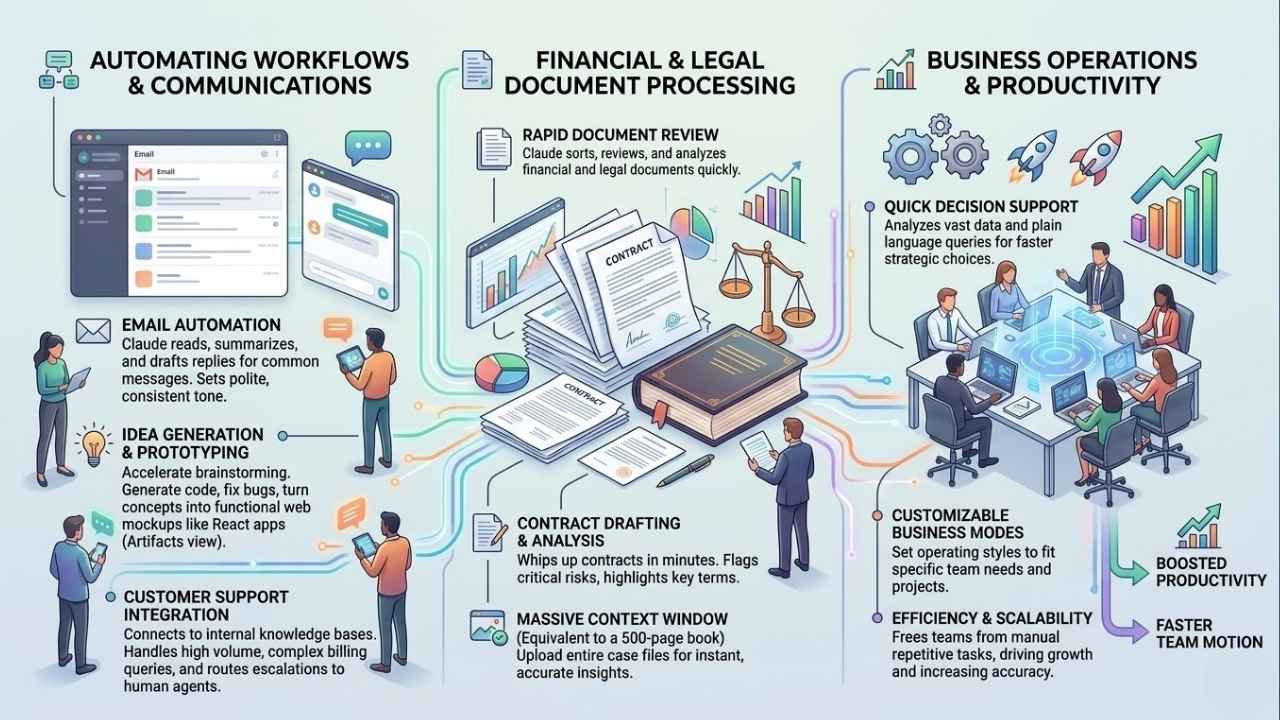
Businesses are already putting Claude AI to work in ways that make a real difference. With the right setup, you can help teams move faster. Let’s look at a few examples.
Automating Email Responses
Claude reads incoming emails, pulls out the most important details, and drafts quick replies. Teams set up simple rules to sort messages or send meeting times. The AI can even check attached files and grab facts needed for accurate answers. Users define how Claude should respond based on their needs.
Try these email automation tricks:
- Set custom instructions so your bot always replies in a polite tone.
- Use prompt caching to save money on repetitive customer queries.
- Have the AI automatically send product sheets to new sales leads.
No code skills are required. This cuts hours spent sorting through crowded inboxes each week.
Prototyping and Idea Generation
Prototyping takes less time with Claude. The tool writes code, fixes bugs, and explains new features in plain English. Use it to turn rough ideas into working mockups within minutes. Developers can run Claude from the command line for quick tests.
The Artifacts feature is perfect for this task. You can ask for a React application, and Claude will build a fully functional web app. You can test this app right in your browser. This speeds up brainstorming while reducing stress.
Financial and Legal Document Processing
Claude sorts, reviews, and drafts financial or legal papers fast. Need to draft a contract? Claude whips one up in minutes. Teams upload files for instant analysis. The AI pulls out key terms or flags risks for you.
Because Claude can remember the equivalent of a 500-page book in one prompt, lawyers can upload entire case files at once. Important paperwork is ready in seconds while accuracy remains high. Business professionals spend less time on manual review.
Customer Support Automation
Customer support teams can work faster using these tools. The model reads customer messages and drafts polite replies in seconds Businesses use this automated help to handle high volumes of requests. The AI sorts tickets by urgency and helps agents find answers.
Customer support integration offers several benefits:
- It connects directly to your internal policy documents.
- It answers complex billing issues automatically at any time.
- It escalates angry complaints to human managers instantly.
Teams save time for more complex cases. They maintain excellent service around the clock.
Tips for Maximizing Productivity with Claude AI
You can get more value from Claude AI by changing how you use it each day. Little tweaks make the tool work smarter for your business needs.
Customize Claude to Fit Your Workflow
Set Claude to think about your business goals and project needs. Adjust the AI’s operating modes so it works just how your team likes. Integrate Claude AI into your software stack for smooth task management. Create a specific Project folder for each department.
Marketing gets one folder for idea drafts, while finance gets one for data checks. You can add specific custom instructions to each folder. Everyone can save time on routine jobs with a few quick prompts. No extra training wheels are needed.
Train Teams on Best Practices
Teams work faster with the right training. Show staff how to use key features like document drafting and workflow automation. Run a quick session on automating spreadsheets or database queries. Teach everyone how to define request styles so they get better answers.
It is very helpful to review the subscription plans together so your team knows their limits:
- The Free plan offers basic chat and web search.
- The Pro plan costs $20 a month in the US for heavy individual users.
- The Team plan is $30 per user monthly and unlocks shared workspaces.
Make sure folks know that clear requests help Claude deliver the best results.
Monitor and Refine AI Usage
Track how Claude AI performs in your daily workflow. Check if automation speeds up routine tasks or if it stalls. Pay close attention to areas like coding help and file analysis. If you spot mistakes, fix them fast so they do not slow you down.
Use the feedback to tweak your custom instructions. Users can define exactly how Claude should approach requests. Regular checks keep efficiency high. They help catch small issues before they become big headaches.
Real-World Examples of Claude AI Success
A fast-growing law firm put Claude AI to the test with their contract work. They had hundreds of legal documents full of tiny details. Using Claude, paralegals automated proofreading and fixed errors in drafts. Document handling took half the original time.
At a busy retail company, customer support teams struggled with floods of emails. With AI automation tools, agents focused on complex issues instead.
| Industry | Challenge | Claude Solution | Result |
|---|---|---|---|
| Legal | Slow document review | Uploaded 500-page contracts into Projects | Review time cut by 50 percent |
| Retail | High email volume | Automated replies using custom instructions | Response times fell by 40 percent |
| IT & Tech | Buggy software code | Used Claude Code terminal tool | Fixed errors instantly without switching screens |
Teams across finance and IT now use task management shortcuts. This boosts efficiency without extra training sessions.
Everything fits right into their current workflow platforms. They get things done without complicated software integration.
Final Thoughts
Claude AI helps businesses save time, simplify daily tasks, and boost teamwork. You can draft documents, automate emails, or crunch numbers in one spot. By using these professional tools in your workflow, you will speed up boring chores. This gives you room to focus on big-picture goals. Make today the start of smarter work. Figuring out how to use Claude AI for business productivity could lead your team to incredible success!