

Google Introduces Blue Check Verification for Gmail

Google Blue Checkmark Verification to Gmail

Listen to the Podcast:

Last year saw an increase in the number of cyberattacks and phishing scams, leaving organizations and individuals vulnerable to malicious activity.

To protect their users, companies have been introducing a number of workarounds, including the much-rumored blue check.

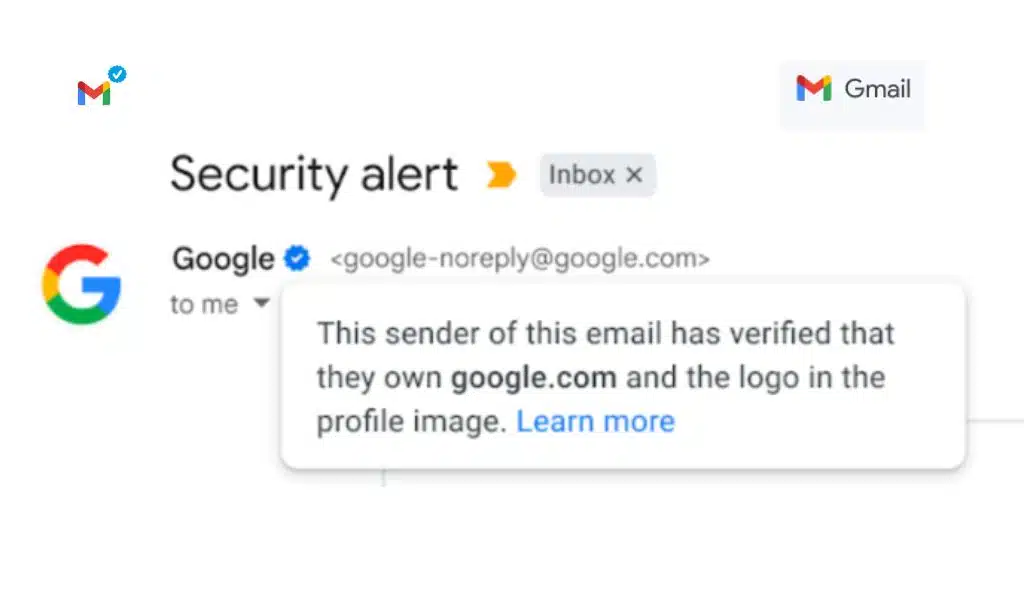
Google recently announced the arrival of the blue check verification to Gmail, so that users no longer have to worry about ending up in phishing traps. As Google explains on its blog, verified accounts that have used BIMI validation will automatically receive the blue checkmark.

What is the Blue Check?

The blue check is a verification symbol currently used by the main social networks and platforms. It guarantees that the user has been verified by the company and that it is a legitimate account.

As you can see in the image above, the blue tick appears next to the account name. When touched with the finger or the mouse, a message appears indicating that the sender of the mail has been verified.

Advantages of Blue-check Verification

With its new feature, when a new email from a verified business arrives in your Gmail inbox and is opened, a confirmation element is displayed next to the contact’s name, providing an extra layer of security.

Blue-check verification protects users from falling for fake scams by immediately displaying authenticated contacts. In addition, it helps make the detection of malicious accounts more efficient.

How is the Blue Check Different from the one on Twitter?

Twitter created quite a stir with the launch of its blue check mark, ushering in many changes to its policy.

Unlike Twitter, Google will not charge anything for the verification badge. Also, verifications appear automatically, as long as the user has used BIMI to verify their accounts.

But just like on Twitter, users will still be able to report suspicious accounts for verification.

Google’s Efforts to Fight Cyberattacks

Gmail’s blue checkmark system is part of Google’s efforts to reduce the number of scams that hit millions of people’s mailboxes every day.

This system will allow organizations and other users to verify their identities, adding an extra layer of security with the blue check mark.

Google has continued to introduce security measures into its products and services, such as the Gmail Driverkit, in response to the increasing number of attacks.

The last function guarantees total security for the accounts that send emails, whether they are individuals or companies.

So now that the blue check mark is here, our emails and online accounts can be a little calmer.

As we have seen, the blue check mark is becoming more than just a social media exclusive feature; however, Google is taking the lead by introducing its own product.

It will be interesting to see if Google or other brands replicate or adopt this security policy in the future. Until then, let’s keep our online accounts and data safe and secure.


Subscribe to Our Newsletter

Related Articles

Top Trending

best gaming mice for every hand
The 11 Best Gaming Mice That Suits the Hands of All Sizes
Frehf
The Secrets of Frehf: Your Complete Guide to Understanding Frehf
Best Gaming Monitors Compared
9 Best Gaming Monitors Compared: Unlock Next Level Gaming
AI Animation Styles Explained
AI Animation Styles Explained: The Smart Way to Make AI Videos Feel Professional
On This Day May 30
On This Day May 30: History, Famous Birthdays, Deaths & Global Events

Fintech & Finance

HONOR 600 Pro vs HONOR 600 Lite 5G
HONOR 600 Pro vs HONOR 600 Lite 5G: Full Comparison with Expected India Pricing
How to Dispute a Credit Card Charge Successfully
How To Dispute A Credit Card Charge Successfully
How to Protect Yourself from Financial Scams
Financial Scam Prevention Tips to Protect Your Money
The Truth About Buy Now Pay Later Services
best UK current accounts 2026
9 Best UK Current Accounts with the Highest Interest and Best Perks in 2026

Sustainability & Living

Green Hydrogen Fuel
The Rise Of Green Hydrogen As A Clean Fuel Source
energy-efficient LED lights and appliances
Benefits of Using Energy-Efficient LED Lights and Appliances
Wind Power Global Energy Markets
How Wind Power Is Reshaping Global Energy Markets
Circular Economy Basics
Circular Economy Explained: Why Waste Is A Design Flaw
Eco-Friendly Bathroom Plan
Eco-Friendly Bathroom: My 30-day Conversion Plan With Products [Join the Challenge]

GAMING

best gaming mice for every hand
The 11 Best Gaming Mice That Suits the Hands of All Sizes
Best Gaming Monitors Compared
9 Best Gaming Monitors Compared: Unlock Next Level Gaming
Custom Mechanical Keyboard
DIY: Build a Custom Mechanical Keyboard That Feels Like Yours
Best Indie Games Of Recent Years
The 7 Best Indie Games Of Recent Years You Should Not Miss
open-world games done right
The 9 Best Open-World Games Done Absolutely Right

Business & Marketing

The Truth About Buy Now Pay Later Services
Guest Posting In 2026
Guest Posting In 2026: Is It Worth It? And How To Do It Right
New Zealand social media marketing
13 Critical Facts About How New Zealand's Small Market Forces Brands to Be Creative on Social Media
Cold Email in 2026
Cold Email In 2026: What Works, Lands In Spam, And What Converts
Entrepreneurial Spirit Promotes Social Change

Technology & AI

Frehf
The Secrets of Frehf: Your Complete Guide to Understanding Frehf
AI Animation Styles Explained
AI Animation Styles Explained: The Smart Way to Make AI Videos Feel Professional
Check Your Real Internet Speed
How to Check Your Real Internet Speed and Detect ISP Throttling
Custom Mechanical Keyboard
DIY: Build a Custom Mechanical Keyboard That Feels Like Yours
My Image Search Techniques
Mastering Image Search Techniques: Your Ultimate Guide To Reverse Image Search

Fitness & Wellness

beginner home workouts
9 Beginner Home Workouts to Try for Real Results: Start Your Fitness Journey!
setting realistic fitness goals
Setting Realistic Fitness Goals: A Beginner’s Practical Guide That Actually Works
best home workouts guide
39 Home Workout Routines for Every Fitness Level to Get Fit Without a Gym
beginners fitness guide
Beginner’s Complete Fitness Guide: A Practical Beginners Fitness Guide for Real Life
DIY Ergonomic Home Office Setup
How I Changed My Home Office After Three Spine Surgeries



























