


Progressive Web Apps (PWAs) are more than just a passing trend—they represent the future of web development. Combining the best features of web and native mobile apps, PWAs provide users with an app-like experience that is fast, reliable, and engaging.
PWAs are designed to perform well on any device, regardless of network conditions. With increasing mobile traffic and expectations for high-performing, fast-loading apps, businesses and developers are turning to PWAs to improve user retention and reduce development costs.
In 2025, PWAs are set to evolve even further as user expectations continue to grow. This article will explore best practices for Progressive Web Apps in 2025 to help developers stay ahead of the competition, creating fast, secure, and user-friendly PWAs that provide outstanding value.
Let’s dive into the 10 best practices for PWAs and how you can implement them effectively.
Introduction to Progressive Web Apps (PWAs)
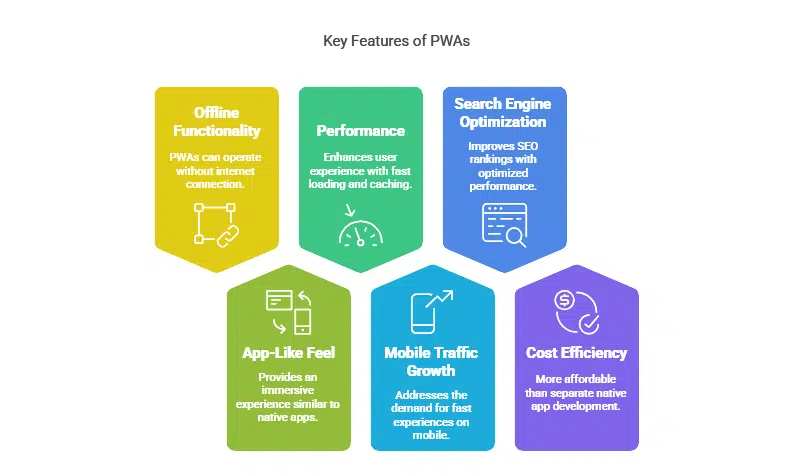
To fully appreciate the best practices for Progressive Web Apps, it’s important to first understand the key features and benefits of PWAs.
What Are Progressive Web Apps (PWAs)?
A Progressive Web App (PWA) is essentially a web application designed to behave like a native mobile app but without requiring separate native app installations. PWAs work across all platforms and devices with a single codebase, making them a cost-effective solution for businesses.
Key characteristics of a PWA include:
- Offline Functionality: Using service workers, PWAs can operate even when there’s no internet connection.
- App-Like Feel: PWAs offer an immersive, app-like experience on the web, including animations, smooth transitions, and full-screen modes.
- Performance: With features like fast loading, caching, and background syncing, PWAs provide a much-improved user experience compared to traditional websites.
Why PWAs Matter in 2025
As we enter 2025, the role of Progressive Web Apps is becoming more prominent. Here’s why PWAs are a vital part of modern web development:
- Mobile Traffic Growth: With mobile traffic now accounting for over 50% of all web traffic worldwide, PWAs help businesses meet mobile users’ demands for fast, reliable experiences.
- Search Engine Optimization (SEO): Google and other search engines prioritize fast-loading, mobile-friendly websites. PWAs, with their optimized performance, naturally boost SEO rankings.
- Cost Efficiency: Developing a PWA can be significantly more affordable than building separate native apps for iOS, Android, and the web. Businesses can reach all platforms with a single codebase.
Best Practices for Progressive Web Apps (PWAs) in 2025
Now that we’ve covered the importance of PWAs, let’s delve into the 10 best practices for PWAs in 2025. These tips are designed to enhance user experience, performance, and security, ensuring that your PWA stands out from the crowd.
1. Enhance Performance with Service Workers
Service workers are JavaScript files that run in the background of a PWA. They allow for essential features like caching, background syncing, and push notifications. Service workers are integral to ensuring that PWAs load quickly, even on slow or intermittent networks.
Key Benefits of Service Workers:
- Caching: Service workers cache assets (e.g., images, CSS, JavaScript files) locally, so the app can load instantly, even when the user is offline.
- Background Sync: Allows data to be synced in the background, ensuring actions taken offline are updated when the connection is restored.
- Push Notifications: They handle push notifications, which keep users engaged and coming back to the app.
Example: Twitter Lite
Twitter Lite, a Progressive Web App, uses service workers to enable fast performance, even in areas with poor connectivity. This feature helps users stay connected without interruption.
| Feature | Benefit |
| Caching | Reduces load time by storing assets locally |
| Background Sync | Ensures data is updated seamlessly when a connection is restored |
| Push Notifications | Increases user engagement by delivering timely, relevant updates |
2. Make PWAs Fully Responsive Across Devices
PWAs should be designed to adapt smoothly to any screen size, ensuring that users enjoy a seamless experience whether they’re on mobile, tablet, or desktop. Mobile-first design is crucial here because the majority of web traffic originates from mobile devices.
Key Tips for Responsiveness:
- Fluid Layouts: Use a flexible grid system that adjusts to different screen sizes and orientations.
- CSS Media Queries: Implement media queries to apply different styles based on the device’s characteristics (e.g., screen width, resolution).
- Touch-Friendly UI: Ensure that buttons and interactive elements are optimized for touch interactions, especially for mobile and tablet users.
| Device Type | Responsive Design Features |
| Mobile | Mobile-first approach, touch-friendly UI |
| Tablet | Larger buttons, adaptable layouts for different orientations |
| Desktop | Full-screen design with enhanced interactivity |
Example: Pinterest
Pinterest’s PWA ensures users experience the same fluid, responsive design across devices, improving engagement and retention. By implementing responsive design principles, Pinterest allows users to seamlessly switch between devices while maintaining an optimized interface.
3. Focus on Fast Loading Times
Speed is a critical factor for any Progressive Web App, as slow load times can cause users to abandon the app. PWAs are optimized to load quickly, but developers must take additional steps to improve loading times further.
Key Strategies to Speed Up Your PWA:
- Lazy Loading: Load resources only when they are needed (e.g., as the user scrolls or interacts with the app). This reduces the initial load time.
- Image Optimization: Compress images and serve them in modern formats (like WebP) to reduce file size and improve performance.
- Minification: Minify JavaScript, CSS, and HTML files to eliminate unnecessary characters and reduce file sizes.
| Strategy | Impact on Performance |
| Lazy Loading | Reduces initial load time by loading assets on demand |
| Image Optimization | Reduces file size and improves rendering speed |
| Minification | Reduces HTTP requests and speeds up app loading |
Case Study: AliExpress
AliExpress, the global e-commerce platform, uses lazy loading to optimize their mobile site. By loading images only when they’re needed, they’ve significantly reduced the time it takes to load product pages, improving the user experience.
4. Prioritize Security with HTTPS and HTTPS-Only Pages
In 2025, security is more important than ever for PWAs. All PWAs must be served over HTTPS to ensure encrypted communication between the server and the client. Browsers like Chrome and Firefox will flag non-HTTPS sites as insecure, which can deter users.
How to Ensure Security:
- SSL/TLS Encryption: Use an SSL/TLS certificate to encrypt data and secure your PWA.
- Mixed Content Prevention: Ensure that all resources (e.g., images, scripts) are loaded over HTTPS to avoid mixed content issues.
| Security Feature | Benefit |
| SSL/TLS Encryption | Secures user data and improves trust |
| Mixed Content Prevention | Ensures all resources are loaded securely, preventing vulnerabilities |
Example: Google Maps
Google Maps serves over HTTPS, ensuring users’ sensitive data—such as locations and search queries—are protected while interacting with the app. This builds user trust and ensures compliance with security standards.
5. Enable Push Notifications for Better User Engagement

Push notifications are one of the most powerful tools for keeping users engaged with a Progressive Web App. They provide timely, relevant updates that encourage users to interact with the app.
Best Practices for Push Notifications:
- Personalization: Send personalized notifications based on user behavior (e.g., cart reminders, news updates).
- Frequency Control: Avoid sending too many notifications, which can lead to users disabling them or uninstalling the app.
- Relevance: Ensure notifications are valuable and relevant to the user’s interests.
| Push Notification Tip | Resulting Benefit |
| Personalization | Increases relevance and user interaction |
| Frequency Control | Reduces notification fatigue and opt-outs |
| Relevance | Increases engagement and retention rates |
Case Study: Starbucks
Starbucks uses push notifications to notify customers of special offers, new menu items, and promotions based on their purchase history, driving significant increases in repeat orders and customer loyalty.
6. Optimize for SEO with Proper Metadata and Markup
SEO is just as important for PWAs as it is for traditional websites. Proper optimization of metadata, structured data, and semantic HTML will help your PWA rank higher on search engines, making it easier for users to find.
Key SEO Strategies for PWAs:
- Metadata Optimization: Ensure your PWA has clear and concise titles, descriptions, and keywords relevant to the user intent.
- Structured Data: Use schema markup to help search engines understand your content better and improve visibility in search results.
- Semantic HTML: Use proper HTML tags to improve the accessibility and readability of your content for search engines.
| SEO Strategy | Benefit |
| Metadata | Improves visibility on search engine results |
| Structured Data | Enhances rich snippets and search rankings |
| Semantic HTML | Boosts search engine understanding of content |
7. Create App-Like Experiences with App Shell Architecture
App Shell Architecture is a design pattern that prioritizes delivering the core structure of your Progressive Web App as quickly as possible, ensuring a near-instant user experience, even on slow or intermittent networks. This architecture allows PWAs to load quickly and feel more like native mobile apps, where static elements (e.g., navigation bar, header) load instantly while dynamic content is fetched in the background.
Key Benefits of App Shell Architecture:
- Faster Load Times: By serving the core shell of your app immediately, you significantly reduce the perceived load time, making your app feel snappy.
- Improved UX: Users experience a seamless, uninterrupted interface, even if the dynamic content takes a few extra moments to load.
- Better Caching: Once the shell is loaded, it is cached for future visits, reducing server load and ensuring fast subsequent page loads.
| Feature | Benefit |
| Fast Initial Load | Static UI elements load instantly |
| Background Content Fetching | Dynamic content loads in the background without blocking UI |
| Caching for Speed | Ensures repeat visits are faster by caching the app shell |
Example: Uber
Uber’s PWA uses App Shell Architecture to load essential app elements like the header, navigation, and footer instantly. The app’s core UI is available right away, even if the data for your ride takes a moment to load.
8. Provide an Installable PWA
One of the standout features of Progressive Web Apps is their ability to be installed directly on a user’s device, just like native apps. This capability allows users to access the app from their home screen, even when they are offline, creating a seamless and convenient experience.
Steps to Enable Installation:
- Web App Manifest: Ensure that your PWA includes a manifest file, which defines the app’s icons, name, background color, and other essential attributes.
- Add to Home Screen: When the user meets certain criteria (e.g., visiting the app a few times), prompt them to add your PWA to their home screen.
- Icon and Splash Screen Design: Create high-quality app icons and splash screens to make the installation process as smooth as possible.
| Action | Benefit |
| Web App Manifest | Defines app behavior and appearance on users’ devices |
| Add to Home Screen Prompt | Increases user engagement and retention |
| App Icons & Splash Screens | Enhances the native-like experience for users |
Case Study: Instagram
Instagram’s PWA allows users to install the app directly on their mobile or desktop device. The process is smooth, with a simple “Add to Home Screen” prompt. This helps users stay engaged without having to download a native app, making the experience more accessible.
9. Leverage Web App Manifests for Seamless UX
The web app manifest is a crucial file that defines the appearance and behavior of your Progressive Web App when installed on a user’s device. This file specifies key elements like the app’s name, icon, theme color, and how the app should appear when launched from the home screen.
Key Benefits of Web App Manifests:
- App-like Behavior: Defines how your app behaves when launched from the home screen, such as appearing in full-screen mode or as a stand-alone window.
- Improved Branding: A manifest file allows you to include custom icons and colors that align with your branding, making your PWA feel like a native app.
- Deep Linking: Use deep links in the manifest to allow users to open specific content directly, which enhances navigation and usability.
| Manifest Field | Purpose |
| name | Defines the app’s full name as displayed on the home screen |
| icons | Specifies app icons in different sizes for various devices |
| start_url | Provides the URL to open when the app is launched |
| theme_color | Sets the app’s theme color to match branding and provide a consistent experience |
Example: Flipkart
Flipkart’s PWA leverages a well-designed web app manifest, which ensures that when users add the app to their home screen, it offers an immersive, native-like experience. The manifest helps set the stage for a consistent user experience by defining app icons, start URLs, and the app’s theme color.
10. Monitor and Analyze PWA Performance Regularly
Ongoing performance analysis is crucial for ensuring that your Progressive Web App remains optimized over time. By using performance monitoring tools, you can identify areas for improvement and maintain a smooth user experience.
Key Tools and Metrics for Monitoring PWA Performance:
- Google Analytics: Track user behavior, engagement, and interactions to understand how users are navigating your PWA.
- Google Lighthouse: An open-source tool that helps measure performance, accessibility, and SEO for PWAs, providing actionable insights.
- Core Web Vitals: Focus on key metrics like loading performance, interactivity, and visual stability to ensure your PWA meets user expectations.
| Tool | Metric | Benefit |
| Google Analytics | User interactions, behavior flow | Helps understand how users engage with your app |
| Google Lighthouse | Performance, Accessibility, SEO | Provides a comprehensive audit of your PWA’s performance |
| Core Web Vitals | Largest Contentful Paint (LCP), FID, CLS | Key indicators of user experience and app speed |
Case Study: The Washington Post
The Washington Post’s PWA leverages Google Lighthouse to continuously monitor and improve its performance. Regularly checking its Core Web Vitals ensures that the app remains fast, responsive, and accessible, leading to higher user satisfaction and retention.
Takeaways
In 2025, Progressive Web Apps are a crucial tool for developers and businesses looking to offer a high-quality, app-like experience to users.
By following the 10 best practices for PWAs, developers can ensure that their apps are fast, secure, responsive, and engaging. These practices not only enhance user experience but also contribute to improved performance, increased user retention, and better SEO rankings.
Embracing these best practices will position your PWA to thrive in an increasingly competitive digital landscape, providing both users and businesses with an exceptional web experience.
As the web continues to evolve, PWAs will remain a cornerstone of modern web development, delivering seamless and engaging app-like experiences across devices.




























