Modern restaurant management in 2026 requires a digital backbone that does more than just process transactions. The right platform acts as a central hub for inventory tracking, staff scheduling, and automated guest engagement. Choosing the Best POS Systems for Restaurants and Cafes ensures that your business stays efficient while protecting your profit margins during peak hours.
Before we dive into the granular details of each platform, it is helpful to see how these industry leaders compare side by side. The following section provides a high-level overview to help you narrow down your search based on your specific business type and budget.
How We Picked Our Picks for 10 Best POS Systems for Restaurants and Cafes
To ensure our recommendations serve the actual needs of modern business owners in 2026, we developed a rigorous selection framework. We moved beyond basic transaction processing to evaluate how these tools handle the complex realities of high-volume hospitality. Our team prioritized platforms that offer more than just a digital cash register.
The following list of criteria represents the benchmarks we used to filter the top ten systems out of dozens of competitors.
-
Offline Reliability: We only selected systems that offer a robust offline mode to ensure your business continues to process payments and send orders to the kitchen during internet outages.
-
Agentic AI Features: Every pick was evaluated on its 2026 AI capabilities including predictive inventory alerts and automated labor scheduling based on historical sales data.
-
Total Cost of Ownership: We analyzed the long-term financial impact of each system by looking at monthly subscriptions and proprietary hardware costs.
-
Third-Party Ecosystem: A top-tier POS must play well with others. We prioritized systems that offer seamless native integrations with delivery apps like UberEats and accounting tools like QuickBooks.
-
Industry-Specific Hardware: We favored vendors that provide specialized equipment like spill-proof kitchen displays and ergonomic handheld terminals for tableside service.
By sticking to these strict standards, we can confidently recommend these systems as the most reliable and forward-thinking options currently on the market.
Complete Guide to the 10 Best POS Systems for Restaurants and Cafes
The following systems have been vetted for their reliability, ease of use, and specific features designed for the hospitality sector.
1. Square for Restaurants
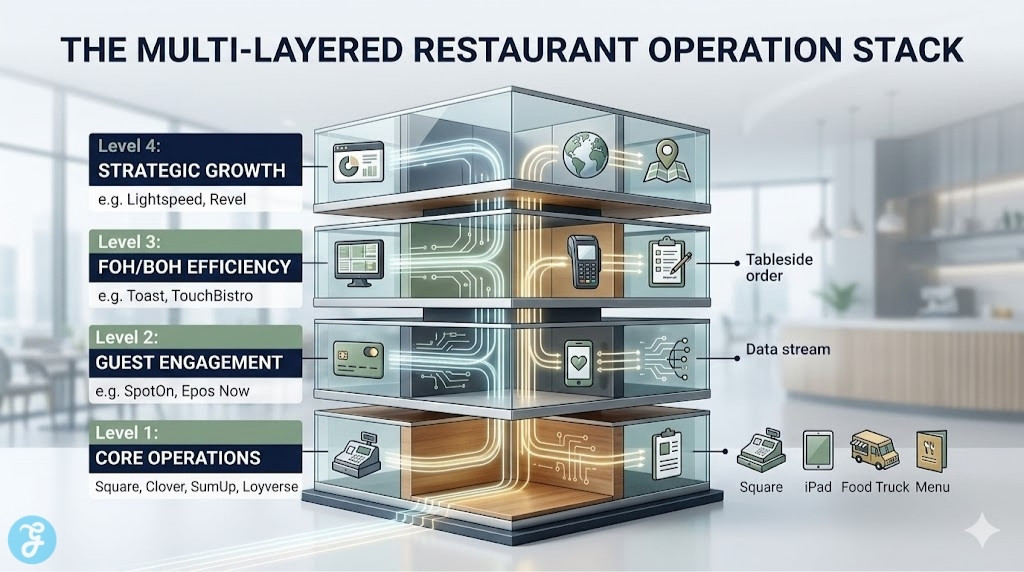
The Review: Square continues to dominate the small business market by offering a sleek interface that requires almost zero staff training. It integrates perfectly with existing iPads which reduces your initial hardware investment significantly.
-
Best For: Independent coffee shops and startup restaurants.
-
Standout Features:
-
Zero monthly software fees for the basic plan.
-
Extremely intuitive menu management.
-
-
Things To Consider:
-
Transaction fees can be higher than competitors.
-
2. Toast
The Review: Toast is a purpose-built system designed exclusively for the hospitality industry. Its Android-based hardware is durable enough for kitchen environments and offers the best tableside ordering experience.
-
Best For: Busy full-service restaurants and diners.
-
Standout Features:
-
Robust kitchen display system (KDS).
-
24/7 dedicated industry support.
-
-
Things To Consider:
-
Requires a multi-year contract for best pricing.
-
3. Lightspeed Restaurant
The Review: Lightspeed excels in backend intelligence by offering ingredient-level inventory tracking that helps managers reduce food waste. Its cloud-based system allows you to manage multiple locations from a single dashboard.
-
Best For: Growing restaurant groups and fine dining.
-
Standout Features:
-
Granular stock management.
-
Excellent offline mode for reliable service.
-
-
Things To Consider:
-
Advanced features come with a steeper learning curve.
-
4. Clover
The Review: Clover offers a range of high-end hardware that looks great on any countertop. Its app marketplace allows you to add specific features like advanced loyalty programs or custom accounting integrations as you need them.
-
Best For: Mid-sized eateries wanting a reliable all-in-one setup.
-
Standout Features:
-
Sleek and professional hardware design.
-
Massive library of third-party apps.
-
-
Things To Consider:
-
Software costs can rise quickly with too many add-ons.
-
5. TouchBistro
The Review: Designed by restaurant professionals, TouchBistro runs on a hybrid local-cloud system to ensure your data stays safe even if the internet goes down. It features a visual floor plan tool that makes table management effortless.
-
Best For: Diners and casual sit-down establishments.
-
Standout Features:
-
Seamless iPad-based ordering.
-
No internet required for local operations.
-
-
Things To Consider:
-
Limited hardware options outside of the Apple ecosystem.
-
6. SumUp
The Review: SumUp focuses on simplicity and portability for businesses on the move. Its mobile readers are small but powerful and they handle contactless payments with impressive speed.
-
Best For: Food trucks, pop-up stalls, and seasonal vendors.
-
Standout Features:
-
Compact and reliable mobile hardware.
-
Transparent pay-as-you-go pricing.
-
-
Things To Consider:
-
Lacks the deep reporting tools of larger systems.
-
7. Revel Systems
The Review: Revel is a robust enterprise solution that handles high transaction volumes without slowing down. It offers deep data analytics and highly customizable security settings for managing large teams.
-
Best For: Large venues and franchise operations.
-
Standout Features:
-
Enterprise-grade security and stability.
-
Advanced employee management tools.
-
-
Things To Consider:
-
One of the more expensive options on the market.
-
8. Epos Now
The Review: Epos Now is a versatile cloud system that works on almost any device including tablets and laptops. It provides excellent integration with third-party delivery apps like UberEats and DoorDash.
-
Best For: Tech-forward owners with high delivery volume.
-
Standout Features:
-
Compatible with multiple hardware types.
-
Strong focus on delivery channel management.
-
-
Things To Consider:
-
The user interface can feel cluttered at times.
-
9. SpotOn
The Review: SpotOn prioritizes guest engagement by integrating reservations and loyalty rewards directly into the payment flow. It helps you collect valuable customer data to drive repeat business through targeted marketing.
-
Best For: Restaurants focused on customer retention and data.
-
Standout Features:
-
Built-in reservation and waitlist tools.
-
Strong automated marketing features.
-
-
Things To Consider:
-
Requires a more involved setup process.
-
10. SkyTab (by Shift4)
The Review: SkyTab provides premium hardware at a very low entry cost by bundling it with their payment processing. It includes features like mobile ordering and QR code payments right out of the box.
-
Best For: High-volume bars and restaurants wanting modern tech.
-
Standout Features:s
-
Excellent hardware-to-price ratioș
-
Built-in guest surveys and feedback tools.
-
-
Things To Consider:
-
Locked into a specific payment processor.
-
Our Top 3 Picks for 2026 (TL;DR)
If you are in a hurry to make a decision, these three systems represent the best value in their respective categories for the current year.
-
Best Overall: Square for Restaurants – It provides a zero-cost software entry point with enough power to handle high-volume cafe workflows.
-
Best Budget: SumUp – This is the ultimate choice for food trucks and kiosks that need a simple pay-as-you-go model.
-
Best Premium: Toast – For established dining rooms, its specialized hardware and deep kitchen integrations are unmatched.
While the top picks give you a great starting point, a truly successful operation requires a system tailored to your unique daily challenges. We have compiled a detailed breakdown of the top ten solutions to help you find the perfect match for your kitchen.
Quick Comparison Table
Here’s a quick comparison table
| POS System | Key Feature | Best For | Price/Rating |
| Square | No Monthly Fees | New Cafes | 4.8 / 5 |
| Toast | Spill-Proof Hardware | Full Service | 4.7 / 5 |
| Lightspeed | Ingredient Tracking | Multi-Location | 4.5 / 5 |
| Clover | Plug-and-Play Setup | Casual Dining | 4.4 / 5 |
How to Choose the Best POS Systems for Restaurants and Cafes?
The transition from a manual system to a digital one requires a clear understanding of your operational bottlenecks. Use the following criteria to ensure your chosen hardware and software can keep up with your growth.
-
Hardware Durability: Ensure the screens and card readers can handle the grease and spills common in a busy kitchen.
-
Inventory Depth: Look for systems that track raw ingredients rather than just finished plates to help you spot profit leaks.
-
Offline Capability: Check if the system can continue to take payments and send orders to the kitchen if your Wi-Fi drops.
Decision Matrix
If you are still undecided, use this simple matrix to align your business needs with the right software category.
| Choose Square or SumUp if… | Choose Toast or Lightspeed if… |
| You want to avoid monthly fees. | You need deep ingredient tracking. |
| You have a simple menu. | You manage complex floor plans. |
| You use existing iPads. | You need specialized hardware. |
The Final Checklist
Before you sign a contract or purchase hardware, verify these five critical points to avoid common pitfalls.
-
Confirm if the system requires a long-term contract or allows month-to-month billing.
-
Test the menu customization speed to ensure your staff can make quick changes.
-
Verify the card processing rates to ensure they do not eat too much of your margin.
-
Check if 24/7 technical support is included in your specific software tier.
-
Ensure the hardware is compatible with your current kitchen layout and space.
Final Thoughts & Recommendations
Selecting a POS is a long-term investment in your operational efficiency. While a free system like Square is perfect for new startups, established venues will find the industry-specific features of Toast or Lightspeed pay for themselves in reduced waste and faster service. Evaluate your current volume and future growth plans before committing to a system.
We recommend requesting a live demo of your top two choices to see how the interface handles a simulated lunch rush.