


You want to build a cool app, but coding feels like climbing a mountain without gear. Many folks face this snag, they have great ideas for mobile apps or web apps, yet the tech side trips them up.
No-code platforms change that game, they let you create without typing a single line of code. Think of it like assembling a puzzle, easy and fun, even if you’re new to app development.
Here’s a fun fact, the r/nocode subreddit buzzes with 78,000 members who swap stories on no-code tools, from drag-and-drop interfaces to API integrations. This post rounds up the top 10 picks for 2025, like Bubble for scalable web apps and Adalo for quick mobile app starts.
We’ll cover key features, pros, cons, and tips on ease of use, integration capabilities, and more to match your needs.
Get ready to pick your winner.
Key Takeaways
- The r/nocode subreddit has 78,000 members who share no-code tool stories.
- In 2025, Bubble tops for scalable web apps with drag-and-drop and API integrations.
- Webflow ranks as the best no-code website builder for responsive designs and CMS.
- Glide builds mobile apps from Google Sheets with push notifications and user authentication.
- Adalo helps create quick mobile apps for Android and iOS using pre-built templates.
How to Choose the Best No-Code App Development Platform
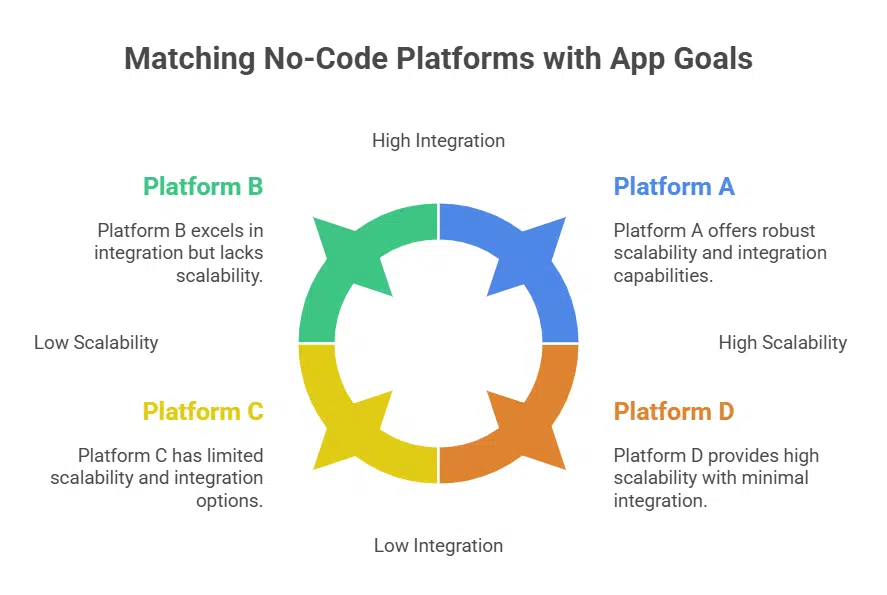
Hey, picking a no-code tool feels like dating apps, swipe right on one that fits your vibe, or you end up with a mismatch that crashes your dreams. Let’s chat about matching your web or mobile app goals with platforms that handle scalability, integrations like API hooks, and easy drag-and-drop fun, so you build without the headaches.
Type of app you want to build (web or mobile)
Think about the app you aim to create first. Do you need a web app that runs in browsers, or a mobile app for phones? Web apps suit desktops and laptops well, like online stores or business dashboards.
Mobile apps shine on Android devices or iPhones, with push notifications and easy access via app stores like Google Play. Pick based on your users’ habits, you know, like choosing the right tool for the job.
Flow Ninja offers web design and Webflow development services, perfect if web applications fit your vision. Webflow ranks as the best no-code website builder, with drag-and-drop interface for responsive design.
This makes building user-friendly web apps a breeze, even for beginners. Imagine turning ideas into scalable backend setups without code, integrating with tools like Google Sheets for data-driven apps.
Complexity and scalability of the app
Pick your no-code platform based on app complexity first. Simple apps need basic tools for quick builds. Complex ones demand strong features like custom logic and database management.
Bubble shines here, folks. It handles scalable web apps with ease. Think of it as a sturdy bridge that grows as your traffic swells. You build once and scale up without sweat.
Scalability means your app grows with users. Check if the platform supports more data and traffic over time. Webflow offers advanced customization and CMS capabilities for that. Imagine crafting a web app like a custom suit, fitting perfectly as needs change.
Look for integration capabilities too. These let you connect with APIs and payment gateways. No-code tools like these speed up development cycles and boost reliability for big ideas.
Integration capabilities with other tools
Integration capabilities matter a lot in no-code platforms. They let your app connect smoothly with other tools you already use. Think of it like plugging in a charger, it powers up your whole setup without extra hassle.
Platforms with strong api integrations can link to payment gateways, crm systems, or even google workspace. Framer stands out here, it integrates with Figma and Sketch for seamless design workflows.
This saves time and boosts your app’s power.
Check how well a platform handles airtable integration or google sheets integration for data-driven apps. Glide excels at this, it builds mobile applications right from Google Sheets and Airtable.
You get automations that flow like a well-oiled machine. Strong integration capabilities also support rest apis, push notifications, and user authentication. Pick one that fits your needs, like tying in marketing tools or inventory management.
It turns your app into a team player, not a lone wolf.
User-friendliness and learning curve
Pick a no-code platform that feels like a friendly chat, not a tough puzzle. Users on r/nocode often hunt for beginner-friendly options, since all those choices can overwhelm you like a crowded market.
Elementor shines here with its drag-and-drop interface, perfect for newbies who want quick wins in app building. This setup cuts the learning curve short, so you dive right into creating web apps without steep hills to climb.
Think about usability as your best buddy in no-code app development. A gentle learning curve means you build faster, like riding a bike with training wheels. Platforms with pre-built templates and simple visual programming let you skip the headaches of code.
For folks starting out, this user-friendliness turns ideas into real apps, boosting your confidence along the way.
Bubble: Best for Scalable Web Apps
Bubble: Best for Scalable Web Apps: Imagine crafting web apps that scale.
Key Features of Bubble
Bubble shines with its visual editor that lets you build full-stack web apps fast. You drag and drop elements to create interfaces, no coding needed. Logic features handle the backend, like user authentication and API integrations.
Picture a toolbox where you snap pieces together for responsive design. This setup supports scalable backend, so your app grows without crashes. Pre-built templates speed up mobile app development too.
Add push notifications or payment gateways with ease.
Folks love the robust customization here, it feels like painting on a blank canvas. Integration capabilities link to tools like Airtable or Google Sheets. Security features keep data safe with role-based access control.
Cross-platform compatibility means your web apps work on any device. Scalability handles big traffic, think thousands of users. Voice assistants or machine learning? Bubble connects those via REST APIs.
You build progressive web apps that feel native.
Pros & Cons of Bubble
Bubble offers strong points and some drawbacks that you should weigh before diving in.
| Pros | Cons |
|---|---|
| Highly customizable for your needs. | Steep learning curve slows you down at first. |
| Scalable for complex applications, like a growing web app. | Customization restrictions limit some tweaks. |
Webflow
Webflow shines with its intuitive design interface. You drag and drop elements to build stunning web apps. The platform offers a built-in CMS for easy content management. Add eCommerce functionality to sell products right away.
Strong SEO features help your site rank high on search engines. Imagine crafting a responsive design that looks great on any device, like a tailor fitting a suit perfectly. It supports integration capabilities with tools like Airtable and Zapier.
Pre-built templates speed up your software development process.
Envision creating progressive web apps (PWAs) without coding a line. Webflow handles built-in hosting and scalable backend for you. Security features keep data safe. Role-based access control lets teams collaborate smoothly.
API integrations connect to payment gateways and REST APIs. This no-code app builder feels like chatting with an old friend, simple and fun. It even automates some workflow automation tasks.
For web services, it excels in rapid prototyping and data-driven apps.
Pros & Cons of Webflow
You know, picking a no-code tool like Webflow means weighing its strengths against a few hurdles, especially if you’re chasing that perfect web app look.
| Pros | Cons |
|---|---|
| Exceptional design freedom lets you craft apps that pop, like a painter with an endless canvas. | Paid plans required for advanced features can hit your wallet hard, right when you need more power. |
| Clean code keeps things tidy under the hood, no messy surprises down the road. | Potentially steep learning curve for beginners might feel like climbing a mountain in flip-flops. |
| Versatile customization fits your vision perfectly, adapting to web design needs with ease. |
Glide
Glide turns your Google Sheets data into native mobile apps, fast and easy. It pulls info straight from those spreadsheets, so you build data-driven apps without coding a line. Your sales team grabs customer details on the go, all synced in real time.
The drag-and-drop interface lets beginners craft responsive designs for Android apps or progressive web apps. Add push notifications to keep users hooked, and throw in user authentication for safe access.
Hey, if you’re juggling Airtable integration too, Glide handles that smoothly.
This no-code app builder shines with its intuitive interface for mobile app development. It supports API integrations, like connecting to payment gateways or REST APIs. Developers love the cross-platform compatibility, letting apps run on multiple platforms, including the Google Play Store.
Security features guard your data, and pre-built templates speed up the process. Imagine automating workflows with Google Sheets integration, turning raw numbers into polished apps.
Plus, it offers built-in hosting for quick launches.
Pros & Cons of Glide
You might wonder about the ups and downs of using Glide for your app ideas.
| Pros | Cons |
|---|---|
| – User-friendly interface makes building easy, even for newbies.
– Quick setup lets you launch apps fast, like a snap of your fingers. – Cost-effective options save money, perfect if you’re watching your budget. |
– Limited to data from Google Sheets, so you can’t pull from everywhere.
– Less customization means your app might feel a bit boxed in, folks. |
Softr
Softr shines as a no-code app builder for web apps. It integrates with Airtable and Google Sheets right out of the gate. Builders love its easy-to-use interface, like a friendly toolbox that simplifies tasks.
Drag-and-drop elements let you craft responsive design without sweat. Add user authentication and role-based access control to keep things secure. Picture turning your data into client portals or internal tools, all with pre-built templates.
This platform handles API integrations and payment gateways too. It supports scalable backend for growing needs. Folks build data-driven apps that feel like a breeze. Integration capabilities extend to Google Sheets integration and Airtable integration, making workflows smooth.
Security features guard your setup, and built-in hosting gets you online fast. No-code tools like this turn ideas into reality, quick as a wink.
Pros & Cons of Softr
You get quick setup with Softr, which shines as a no-code app builder for web apps. It integrates with popular databases like Airtable and Google Sheets, making data-driven apps a breeze. You drag and drop elements to build client portals or internal tools in no time. Pros include strong integration capabilities for API integrations and responsive design. This saves hours on frontend work, especially for SaaS platforms.
On the flip side, limited scalability hits hard for growing needs. Customization options feel tight, like trying to fit a square peg in a round hole. You might miss advanced security features or role-based access control for complex setups. Cons also cover weak support for push notifications and payment gateways in bigger projects. Still, it works well for simple use cases in workflow automation.
Adalo
Adalo shines with its drag-and-drop interface for building mobile apps. You pull elements onto the screen, like widgets for a custom fit. This no-code app builder speeds up the process, perfect for beginners.
Imagine crafting an app as easy as stacking blocks, no coding headaches involved. It supports user authentication and API integrations right out of the box. Plus, push notifications keep users engaged on the go.
Cross-platform compatibility means your app works on Android and iOS without extra fuss. Pre-built templates jumpstart your ideas, saving time.
Folks love how Adalo handles MVPs quickly. Drag components, connect data sources like Google Sheets integration. Add payment gateways for e-commerce vibes. Security features protect your data, a real lifesaver.
Responsive design adapts to any device, smooth as butter. Integration capabilities link with tools like Airtable, boosting workflow automation. Think of it as your sidekick for fast prototypes, turning concepts into apps in days.
Multiplatform support opens doors for wider reach.
Pros & Cons of Adalo
Users love Adalo as a no-code app builder, perfect for starters dipping their toes into app creation. It shines with a drag-and-drop interface that feels like child’s play, letting you whip up mobile apps in no time. Think of it as your friendly sidekick for quick development, packed with pre-built templates and user authentication features. This tool boosts your workflow automation, ideal for building minimum viable products without breaking a sweat. Folks often say it’s like having a magic wand for cross-platform apps, saving hours on android applications and push notifications setup.
On the flip side, Adalo hits a wall with limited scalability, much like a small boat in a big ocean. It lacks some advanced features, so don’t expect heavy api integrations or a super scalable backend for massive growth. You might miss out on robust security features or deep integration capabilities with tools like payment gateways. Picture trying to run a marathon in sneakers meant for a stroll; it works for short sprints but tires out on longer hauls. Still, for beginners chasing quick wins in no-code tools, these cons feel like minor bumps on the road.
Thunkable
Thunkable shines as a no-code app builder for mobile app development without coding. Builders drag and drop elements to create cross-platform apps. They add custom logic with block-based programming, like snapping puzzle pieces together.
This visual programming handles user authentication and push notifications with ease. Picture your app idea coming alive, no code lines in sight. Thunkable supports API integrations and payment gateways for smooth workflow automation.
It even offers pre-built templates to speed things up.
Apps built here work on both iOS and Android, thanks to strong cross-platform compatibility. Security features keep data safe, and integration capabilities link with tools like Google Sheets.
Folks love the responsive design for mobile screens. Thunkable packs in AI-powered tools for smarter apps, plus scalable backend options. Ever tried building an app that sends alerts? This platform makes it simple, fun, and fast.
Pros & Cons of Thunkable
You get customizable logic with Thunkable, a real plus for no-code app builders. You can craft cross-platform apps, and that user-friendly interface feels like a walk in the park. Drag-and-drop interface makes visual programming a breeze, perfect for adding push notifications or API integrations. Pros shine here, folks often say it’s like having a magic wand for mobile app development. Integration capabilities let you connect with REST APIs or payment gateways without sweat. Hey, if you’re into building apps with custom twists, this tool delivers.
Cons hit with limited scalability, which can sting for growing projects. Potential performance issues pop up, like unexpected slowdowns in data-driven apps. You might face hurdles with scalable backend needs, especially for internal tools or client portals. Imagine scaling up, and suddenly, things feel clunky. Security features work fine at first, but for big setups, they fall short. Still, many users push through with workarounds, keeping the fun in no-code tools.
FlutterFlow: Best for High-Performance Mobile Apps
9. FlutterFlow: Best for High-Performance Mobile Apps: Hey, if you’re chasing fast, smooth apps that run like a dream on both Android and iOS, FlutterFlow steps up with its drag-and-drop builder, API connections, and push alerts that make cross-device work feel effortless—want the full scoop on its features and drawbacks? Keep scrolling.
Key Features of FlutterFlow
FlutterFlow shines in high-performance mobile app development. It uses Flutter for robust app creation, like a trusty toolkit that builds strong apps fast. You get drag-and-drop interface for easy designs, plus API integrations that connect your app to rest APIs or GraphQL.
Think of it as piecing together a puzzle with pre-built templates and responsive design. Cross-platform compatibility lets you make apps for iOS and Android without extra hassle. Push notifications keep users engaged, and security features guard your data.
This no-code app builder offers integration capabilities with tools like Airtable integration or Google Sheets integration. Payment gateways handle checkout smoothly for e-commerce needs.
You can add user authentication and role-based access control to keep things safe. Workflow automation speeds up tasks, and scalable backend supports growth. AI-powered tools boost predictive analytics, turning data into smart insights.
Pros & Cons of FlutterFlow
You get high performance with FlutterFlow as your no-code app builder. It packs robust features for cross-platform apps. Imagine building mobile apps that run smooth, like a well-oiled machine. Developers love the visual programming and API integrations. Push notifications come easy, and responsive design shines through. Security features keep things safe, you know?
A steeper learning curve hits users hard, more complex than other no-code tools. Picture climbing a hill when you expected a flat path. Integration capabilities demand extra effort for payment gateways or Airtable integration. Still, it suits those ready to dig in for scalable backend control.
Backendless: Best for Advanced Backend Control
10. Backendless: Best for Advanced Backend Control: If you crave deep control over your app’s server side, like managing user authentication, REST APIs, and scalable backend without writing code, Backendless.
Key Features of Backendless
Backendless shines with its advanced backend management and control. Builders use a drag-and-drop interface to set up scalable backend systems fast. It handles user authentication and role-based access control without hassle.
You get API integration for REST APIs and payment gateways. Workflow automation flows smoothly here, linking tools like Airtable integration or Google Sheets integration. This no-code platform suits complex applications, letting you build data-driven apps with ease.
Picture juggling intricate tasks like a pro juggler; Backendless makes it feel that simple. It offers security features and push notifications for web apps or cross-platform apps. Integration capabilities connect with SaaS platforms and online databases.
Developers craft internal tools or client portals using pre-built templates. The visual programming side supports AI-powered tools and automated testing. As an mBaaS option, it manages Azure Blob Storage and responsive design for software-as-a-service needs.
Pros & Cons of Backendless
Users love the advanced backend features in this no-code platform. You get high customization for your apps, like a tailor fitting a suit just right. Picture building scalable backend with ease, adding API integrations and security features that fit your needs. Role-based access control keeps things safe, and integration capabilities shine with tools like REST APIs. Folks often say it’s like having a powerful engine under the hood, ready for complex tasks.
The steeper learning curve can trip you up, though. This tool may require more technical knowledge than simple no-code app builders. Imagine jumping into visual programming without a map; it feels tricky at first. Customer support helps, but you might need time to grasp the setup for things like payment gateways or data-driven apps.
Zapier Interfaces
Zapier Interfaces shines in workflow automation. It acts like a glue that sticks your apps together. You build custom interfaces with a drag-and-drop interface. This no-code app builder lets you create client portals or internal tools fast.
Picture automating tasks across tools; it handles that with ease. Integration capabilities stand out, connecting to numerous platforms like Google Sheets and Airtable. AI-powered tools add smart touches, such as AI orchestration for complex flows.
You get user authentication and role-based access control built in. Security features keep data safe. API integrations work smoothly with REST APIs. Push notifications alert you in real time.
Payment gateways integrate without hassle.
Think of it as your automation sidekick, always ready to help. Cross-platform compatibility means your apps run anywhere. Built-in hosting takes care of the tech side. Scalable backend grows with your needs.
Pre-built templates speed up starts. Responsive design fits all screens. Data-driven apps pull from sources like Google Sheets integration. Airtable integration flows in naturally.
You automate customer relationship management tasks. Progressive web apps (PWAs) come easy here. SaaS platforms link up without code. Visual programming makes logic simple. No-code tools like this empower beginners.
Pros & Cons of Zapier Interfaces
Users love how Zapier Interfaces powers up workflow automation. It integrates with various tools, making connections a breeze for no-code app builders. Imagine you link your favorite apps like Google Sheets and Airtable without breaking a sweat. This setup shines in AI-powered tools and automation, turning tedious tasks into smooth sails. Folks often say it’s like having a magic wand for integration capabilities.
Costs add up with the subscription, though. Builders face complexity in setting up advanced automations, which can feel like wrestling a puzzle. You pay for that power, and it might sting for small teams eyeing free no-code platforms. Integration with REST APIs and payment gateways works great, but the learning curve hits hard at first.
GoodBarber
GoodBarber shines with its content management and e-commerce features. You build content-rich apps that sell products with ease. Drag-and-drop interface lets you add push notifications and user authentication fast.
Like stacking blocks, you create responsive design for web apps or mobile ones. Integration capabilities link to payment gateways and API integrations. It supports progressive web apps, or PWAs, for smooth cross-platform compatibility.
Pre-built templates speed up your no-code app builder process. Add security features and role-based access control to protect data. GoodBarber fits e-commerce applications, handling scalable backend needs.
Think of it as a toolbox packed for content-driven projects. You get built-in hosting and Google Sheets integration if you need data-driven apps.
Pros & Cons of GoodBarber
GoodBarber shines with its comprehensive content management. You get tools that handle posts, videos, and updates like a pro. It stands ready for e-commerce, so you can set up shops with payment gateways right away. Think of it as your quick ticket to selling online without the hassle. Features include push notifications to keep users hooked, and responsive design fits any screen. Security features protect your data, plus integration capabilities link with other apps smoothly.
Costs come via monthly subscription, which might pinch your budget over time. Advanced users find less customization, like hitting a wall when you want custom logic or deep API integrations. It lacks some scalability for huge projects, so big dreams could need more. Still, for content-driven spots or simple stores, it packs a punch without coding woes.
AppSheet
AppSheet shines in workflow automation for enterprises. It turns data into powerful apps without coding. Users build data-driven apps from spreadsheets. Think of it as a bridge, connecting your team’s tasks seamlessly.
The platform offers drag-and-drop interface for quick setups. It includes user authentication and role-based access control for security. AppSheet supports API integrations and REST APIs.
Enterprises love its integration with Google Workspace, like smooth Google Sheets integration. You get push notifications and responsive design too. Picture automating reports, it feels like magic.
This no-code app builder handles internal tools and client portals. It provides pre-built templates to speed things up. Security features keep data safe. Cross-platform compatibility means apps work on web and mobile.
Payment gateways? Yes, it integrates those. AI-powered tools add smart touches. Built-in hosting and scalable backend support growth. No-code tools like this make complex tasks simple.
Integration capabilities tie in Airtable and more. SaaS platforms benefit from its automation strength.
Microsoft Power Apps
Microsoft Power Apps stands out as a solid no-code app builder for teams deep in the Microsoft world. You build apps fast with its drag-and-drop interface, pulling data from spreadsheets or databases.
It integrates smoothly with Microsoft 365 and Azure, like a well-oiled machine handling your workflow automation needs. You can craft internal tools or data-driven apps without writing a single line of code.
Businesses love it for enterprise applications, thanks to strong security features and role-based access control.
This platform shines in creating custom solutions for big operations. Add API integrations, user authentication, and even payment gateways with ease. It supports web apps and progressive web apps (PWAs), plus cross-platform compatibility for mobile use.
Folks in large firms find it perfect for scaling up, with built-in hosting and scalable backend options. You get pre-built templates to jumpstart projects, making it feel like cheating the system a bit.
Xano
Xano stands out as a no-code tool for building strong backends. It gives you a scalable backend for no-code apps. Like a sturdy engine powering your car on a long trip, Xano handles the heavy lifting.
You can create APIs and manage data without writing code. This makes it great for complex apps that need solid support.
Teams love Xano for its integration capabilities with other tools. It supports API integrations and REST APIs. Plus, it offers security features to keep your data safe. If your project demands a lot, like handling big data or custom logic, Xano fits the bill.
Many builders use it for web apps that grow over time.
Zoho Creator
Zoho Creator shines as a no-code app builder for custom business application development. You build apps fast with its drag-and-drop interface. It handles workflow automation and user authentication with ease.
Picture turning your ideas into real tools, like a custom CRM, without coding headaches. The platform integrates with various Zoho services, boosting your integration capabilities.
Apps get responsive design and role-based access control right out of the box.
Folks love how it supports API integrations and data-driven apps. Zoho Creator fits small teams or big firms, offering pre-built templates for quick starts. It even manages payment gateways and security features.
Imagine scaling your internal tools effortlessly, thanks to its scalable backend. This no-code tool keeps things simple yet powerful, with built-in hosting for web apps.
Takeaways
We explored top no-code platforms like Bubble for scalable web apps, and Adalo for quick mobile builds. These tools make app creation simple with drag-and-drop interfaces and API integrations.
You can skip code headaches and launch apps fast with pre-built templates. What app will you build first? Join the r/nocode community with 78,000 members to share ideas and get tips on workflow automation.
Start today; no-code tools boost your projects like a rocket to the moon.
FAQs on Best Platforms For No-Code App Development
1. Hey, what makes no-code platforms so handy for building apps in 2025?
No-code app builders let you whip up web apps with a drag-and-drop interface, no sweat. Think of it like piecing together a puzzle, where pre-built templates speed things up, and you skip the coding headache. Plus, they pack in workflow automation to keep everything running smooth as silk.
2. Can these tools handle user authentication and security features?
You bet, most no-code tools come loaded with role-based access control and solid security features. They guard your data like a watchdog, keeping hackers at bay.
3. How do no-code app builders deal with API integrations?
They shine with API integration, letting you hook up REST APIs and payment gateways in a flash. It’s like giving your app superpowers, connecting to Airtable integration or Google Sheets integration without breaking a sweat; suddenly, your data-driven apps hum along automatically.
4. Are there options for cross-platform compatibility?
Absolutely, top no-code platforms support cross-platform apps and progressive web apps (PWAs). This means your creation works on any device, no fuss.
5. What about building internal tools or client portals?
No-code tools excel at crafting internal tools and client portals with visual programming. Imagine chatting with a friend who says, “Hey, I built this scalable backend yesterday,” and you reply, “With low-code platforms? That’s genius!” They even toss in push notifications and responsive design to keep users hooked.
6. Do these platforms offer customer support and integration capabilities?
Sure thing, they boast strong customer support and killer integration capabilities for SaaS platforms. You get built-in hosting too, so your apps scale up without a hitch; it’s like having a trusty sidekick that handles the heavy lifting.































