
You pour heart into your online courses. But slow servers and downtimes cost you learners. Many hosts promise fast speeds but drop your site when traffic jumps. Cloud hosting can scale instantly to handle spikes in traffic.
This guide lists the 10 best hosting providers for your elearning platform. We compare shared hosting, managed hosting, VPS, and dedicated servers on uptime, ddos protection, SSL certificate support, domain registration, and LMS integration.
You get clear pros and cons for each host. Pick your perfect host now.
Key Takeaways
- Hosts charge from $1.98 (Namecheap) to $3.50 (Liquid Web) per month and often include free domain registration, SSL certificates, and 30–90 day money-back guarantees.
- Top providers (Hostinger, Bluehost, DreamHost) promise 99.9% uptime and use cloud tools—vCPUs, NVMe drives, and CDNs—to serve spikes of up to 5,000 learners.
- All plans bundle security: free SSL locks, DDoS protection, web application firewalls, and automatic backups to guard student data.
- They support LMS integration with SCORM, xAPI, Moodle, LearnDash, or WordPress and include one-click installs plus cPanel or custom dashboards.
- You get 24/7 support by chat, email, or phone on most plans, though some hosts omit phone support (e.g., Hostinger, DreamHost).
Key Features to Look for in Hosting Providers for Online Learning Platforms
Picking the right host feels like finding a needle in a haystack, but you need one that grows with your class and seals your data, so courses never crash. A clean panel, instant snapshots, and a global network keep you on your toes for the right reasons, not midnight support tickets.
Scalability for growing courses
Course traffic can soar overnight. A host on cloud servers lets you spin up more vcpus with a click. It adds computing power in seconds. It uses CDNs to speed up video lessons. It packs NVMe drives for quick file loads.
It blocks DDoS attacks so students stay connected.
Large scale cloud hosting pumps flexibility and reliability. It handles spikes like 5,000 learners at one time. You expand storage and bandwidth with a slider. It links with LMS tools and web builders.
It adds domain registration and automatic backups. A file manager and email accounts share one dashboard.
Uptime and reliability
Servers must stay online. A 99.9% uptime guarantee keeps your lessons live. VPS hosting, cloud infrastructure and CDNs cut lag. Learners hate spinning wheels. Good web hosting uses status monitors and alerts.
It flags issues fast, so tech teams act before students notice.
Downtime costs cash and frustration. Most shared hosting plans promise near perfect service. Hostinger and DreamHost hold solid records for reliability. SSL certificate auto renewals add a layer of safety.
You get real time status pages on their dashboards. Service level agreements guide payouts if systems slip.
Security features and SSL certificates
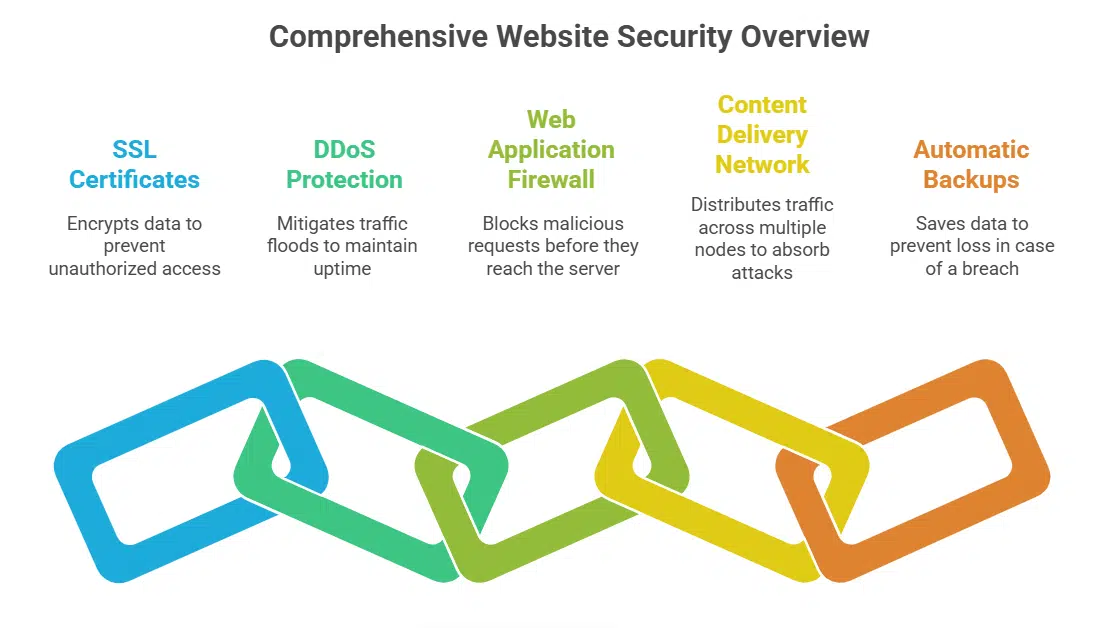
An SSL certificate acts like a lock on your site. It encrypts student info and login details so hackers stay out. Most web hosting services include free ssl certificates from a trusted authority.
Browsers show a padlock icon and a secure label on your course pages.
DDoS protection fights sudden traffic floods that aim to knock your site offline. A web application firewall blocks bots and bad requests before they reach your server. A content delivery network can absorb attack traffic across many nodes.
Automatic backups save your data in case of a breach.
Storage and bandwidth
Hosts pack 10 to 100 GB of disk space. They use solid state drives and hard disk drives for fast reads. A virtual private server stores course files and handles backups in seconds.
Plans include unlimited data transfers so students stream multimedia without hiccups. A content delivery network cuts lag for global subscribers. Simple gzip and cache settings keep load times low.
Integration with LMS platforms
Your hosting must talk to your LMS. LTI tools like SCORM and xAPI link your quizzes, grades and reports. A content management system bridge syncs WordPress sites with courses. You install open source LMS on servers with ssds, PHP and MySQL.
CDN helps push videos to mobile apps and browsers fast. Custom server packages let you tweak CPU, RAM and OS to match peaks in enrollment. Instructors love the user-friendly setup and structured learning flow.
Experts stand ready via customer service teams.
Customer support availability
Many hosting brands run a 24/7 help desk. They use live chat, phone lines, and email to fix urgent issues. Agents guide newbies through domain registration and DDoS protection steps.
Some hosts show how to link a learning management system to the cloud.
User portals let you track each support ticket fast. Agents deploy patches or set up CDN services on demand. Renewal costs may jump after an initial term, so ask about a better price lock or money-back guarantee.
Good customer service can save you hours as you build e-learning courses.
Best Overall: Hostinger
Hostinger leads the pack with rock-solid uptime and a sleek control panel for version control. You get SSH access, a database engine, and CDN support for smooth video streams.
Features & Description (Hostinger)
You pick shared hosting, virtual private server, cloud hosting, WordPress hosting, Linux platform, or Windows server in just a few clicks, no tech sweat. Monthly rates start at $2.24, and you score three months free with code PCMAG10 to trim your budget early.
Site builder tools, domain registration, automatic backups, and a CDN help you launch courses fast, without sweating code lines. It links with Moodle or other LMS platforms, so you can use structured learning, quizzes, and student tracking right away.
Expert support stands by 24/7 via chat, email, or tickets, ready to fight DDoS threats, set up SSL certificates, or fix server hitches. All plans carry a 30-day money-back guarantee, so you can test performance, uptime, and speed without risk.
AI tools help you optimize content delivery, while a user-friendly dashboard makes course management a breeze.
Pros & Cons (Hostinger)
Its low prices on shared hosting help new course creators get started fast. Readers gain access to AI tools that speed up lesson design, a built-in website builder, and gaming servers that handle live classes and rich media.
The plan includes a free SSL certificate, automatic backups, CDN, and domain registration to keep sites secure and fast.
Support comes through live chat and email only; no phone support can frustrate some users. Windows-friendly hosting does not appear; you must stick to Linux servers. The lack of dedicated server hosting may push growing programs toward a VPS or managed hosting provider instead.
Best for Beginners: Bluehost
Bluehost helps you launch courses fast, with its control panel hub and script setup tool for a CMS platform. It adds SSL, free backups, and 24/7 chat support to guard your site.
Features & Description (Bluehost)
At $2.75 per month, Bluehost caters to new course creators with its web hosting service. Free migration moves your site in just a few clicks. The shared hosting setup delivers 99.9% uptime reliability.
Domains come with registration tools and a simple website builder. You get automatic backups and SSL certificates for security.
WordPress hosting powers your learning management system. Plugins like Moodle or LearnDash integrate in seconds. A 24/7 team handles customer service and technical support. Servers run Linux with cPanel for easy control and a user-friendly interface.
DDoS protections shield against traffic spikes. A 30-day money-back guarantee covers change of plans.
Pros & Cons (Bluehost)
Bluehost stands out in WordPress hosting with shared and managed plans. A website builder, automatic backups, and SSL certificates come included. Free domain registration and cdn support arrive at sign up.
The platform links well with learning management systems (LMS) for online teaching and digital education.
Reseller hosting does not appear in its service list. Windows server options do not exist. That might frustrate developers who need ASP.NET or MSSQL. You can upgrade to a virtual private server or dedicated hosting, but the Linux operating system stays the only choice.
Best for WordPress Integration: Kinsta
Your WordPress site runs at full tilt on Kinsta, thanks to its server-level cache and PHP processor. It feels like a pit crew for your course site, so flip ahead for details on its cloud network and content delivery setup.
Features & Description (Kinsta)
Kinsta runs WordPress hosting on Google Cloud Platform servers. It uses a global CDN to speed site delivery. Engineers assign dedicated resources per site to boost performance and avoid slowdowns.
The service gives daily automatic backups and free SSL certificates. Customers get one free migration from shared hosting or another managed hosting provider. Staff monitor sites around the clock with 24/7 real-time performance checks.
Platform fits small business hosting, corporate training, edx.org courses and e-commerce learning. Users pair LMS plugins, ai tools and third party crms to build landing pages and structured learning paths.
Pros & Cons (Kinsta)
Site teams host WordPress courses on Kinsta because it syncs like peanut butter and jelly with WordPress, thanks to a managed hosting plan on Google Cloud network. It includes free domain registration for your first year, plus free SSL to lock down data.
Engineers praise the cdn and automatic daily, weekly backups, and free migration tools speed up the switch. Learners see high uptime and smooth playback, no lag during on-demand lectures, and 24-hour customer service jumps in fast.
Most will find it pricy, rates sit above many shared hosting plans; it targets sites with heavy traffic. New schools might start elsewhere, but big courses glow under its round-the-clock technical support team.
Best for Large-Scale Courses: InMotion Hosting
InMotion Hosting uses robust virtual servers that grow as your student base expands. It pairs a content delivery network with LMS integrations and DDoS protection to speed up video lessons.
Features & Description (InMotion Hosting)
InMotion Hosting offers shared web hosting services at $3.29/month, with 73% off for the first year. The package grants unlimited data transfers and site traffic. You manage servers with cPanel and secure shell.
The package includes a free content delivery network for faster page loads. Learners can upgrade to a virtual private server for more power.
Customers enjoy a 90-day money-back guarantee. The host adds domain registration, automatic backups, and DDoS protection. Customer service teams handle technical support via live chat, phone, and email.
This plan suits online elearning platforms and small business hosting on WordPress or custom CMS.
Pros & Cons (InMotion Hosting)
Diverse hosting plans fit many course sizes. Plans range from shared hosting to VPS and dedicated servers. The control panel uses cPanel to simplify uploads and SSH. Free SSL certs, DDoS protection, and a CDN provider come built in.
Domain registration bundles with automatic daily backups. Live chat and phone support pair with 24/7 customer service reps. AI tools and structured learning modules run smoothly.
Some courses demand a Windows server for .NET and MSSQL. Those needs clash with Linux-only setups here. No Windows hosting plans exist.
Best for Managed Hosting: TMDHosting
TMDHosting keeps your course live with round-the-clock server management and shield network. You launch updates fast with cPanel and Git access in minutes.
Features & Description (TMDHosting)
Educators pick TMDHosting for managed hosting of any online platform. This host runs free daily and weekly backups to secure course material. Legacy sites move free with one click.
Each plan packs unlimited SSL certificates for student data safety.
Support staff stay online 24/7 to help with LMS steps or CSS tweaks. They fix server hiccups fast to keep uptime at 99.99% for structured learning. Automatic backups guard data from ransomware and HDD failures.
Pros & Cons (TMDHosting)
TMDHosting offers strong managed hosting for structured learning and corporate training sites. It runs automatic backups daily or weekly to protect course content. It includes a free domain registration for the first year, a budget boost for new users.
It adds free SSL certificates to secure connections. It scales as student numbers grow. It ranks among top web hosting services with 24/7 customer service and technical support.
TMDHosting plans omit a cdn (content delivery network), so pages load slower for distant learners. Entry packages lack a website builder, so you manage design work yourself. Renewal rates rise after the free domain year, which may hit budgets.
Best for Low-Cost Hosting: Namecheap
Namecheap stands out as a budget host, with free domain registration, cPanel access, and SSL certificates. It also gives you a website builder and automatic backups, and you can add a content delivery network or private server to scale your learning management system on WordPress, without blowing your budget.
Features & Description (Namecheap)
Plans start at $1.98 per month. Learners get 20 GB to unlimited storage plus unlimited bandwidth. They get free domain registration for one year, though .com has some rules. This plan comes with a free unlimited SSL certificate and twice-weekly automatic backups.
cPanel lets you manage websites and email with ease. Packages suit shared hosting, small business hosting, and other web hosting services for structured learning or corporate training.
The host guarantees 100% uptime and offers a limited refund for any downtime. It supports WordPress hosting and LMS tools like Moodle, and it plays nice with calls to action in your course pages.
Pros & Cons (Namecheap)
Namecheap cuts costs with shared hosting starting at $1.98 per month. Users enjoy unlimited bandwidth plus backups twice a week. They get free SSL certificates and site transfers at no charge.
Clients rate service 3.9 out of 5, praising its domain registration and site builder. The host adds ddos protection and tech support too.
Promise of nonstop access does not trigger a full money-back guarantee on outages. Support teams often delay downtime credits.
Best for Eco-Friendly Hosting: GreenGeeks
GreenGeeks powers its servers with wind energy, so it slashes carbon like a silent lawnmower. It offers free network service and SSL certificates, and it buys green credits that keep your LMS course light and zippy.
Features & Description (GreenGeeks)
This host matches 300% of its power use with renewable energy credits. Plans start at $3 per month and renew at $12.95. Shared hosting and managed hosting sit in the same plan. You can register a free domain.
A website builder, automatic backups, and a CDN ship with every tier. DDoS protection and SSL arrive at no extra fee. Platform links with LMS platforms via API for smooth course delivery.
The pack supports CMS hosting and web development with a modern dashboard.
Support staff answer chats and tickets around the clock. A 30-day money-back guarantee covers your first month. You can upgrade to a virtual private server for more power. This solution suits small business hosting and corporate training sites.
Admins can track traffic, manage CDN settings, and handle domain changes. They can use AI tools to add smart features to structured learning courses.
Pros & Cons (GreenGeeks)
GreenGeeks uses renewable energy to power its data centers. The host buys three times more wind credits than it needs. The host gives free domain registration, SSL certificate, and automatic backups.
Users get SSD drives, cPanel access, and Cloudflare CDN. Their shared and managed hosting plans include WordPress tools. Support staff answer tickets 24/7 to fix issues fast.
All plans run on Linux servers only. No cloud or Windows options exist. That rule blocks apps built for Windows Server. Sites that need a VPS or Windows OS see fewer choices.
Best for Customization and Extra Apps: Hostwinds
Hostwinds gives you root access to a VPS, so you can install edge nodes or AI tools in minutes. The custom panel guides you through each add-on with clear steps, letting you tweak your course site fast.
Features & Description (Hostwinds)
Flexible setup lets instructors pick shared hosting, virtual private server (vps), dedicated or WordPress hosting plans. The plan includes a free domain for the first year and free SSL certificates.
Daily and weekly backups protect course files. 24/7 customer service fixes server issues fast. Flexible prices scale as course loads grow.
Scalable packages adapt to rising enrollments with clear pricing. Technical support answers queries by chat and email at any hour. Servers handle video streaming, quizzes, and homework without bandwidth issues.
Migrations between plans occur without downtime, thanks to strong uptime.
Pros & Cons (Hostwinds)
Hostwinds offers strong customization options, so you can tweak every part of your course site. It gives a free domain for the first year and daily or weekly backups to guard your files.
You pick shared hosting, VPS, or cloud plans. It uses an in-house CDN and managed WordPress hosting to speed up load times. You get 24/7 customer service and technical support via chat, phone, or email.
This web hosting service fits like a glove if you build LMSs for structured learning.
Reviews don’t list major drawbacks. No info on flaws shows up in forums or user reviews.
Best for Reliability and Uptime: DreamHost
DreamHost stands guard like a fortress for your course pages. Its SSH access, free SSL certificate, and global CDN keep your site fast and live.
Features & Description (DreamHost)
Your site runs on Linux powered servers. Plans cost $2.59 per month. You get free domain registration with each plan. Unlimited monthly data transfers handle high traffic. A built in CDN speeds up content delivery.
SSL certificates lock down your pages. Automatic backups save your data every day.
You choose between shared hosting and managed hosting. HDDs ensure stable file storage. A website builder or WordPress hosting helps you design courses. AI tools enhance course creation.
AICC modules support structured learning paths. 24/7 customer service and technical support is available. DDoS protection shields your site. A money back guarantee covers new users.
Pros & Cons (DreamHost)
DreamHost packs SMB-friendly cloud hosting into its plans. It works well for small business courses and keeps students connected with reliable uptime. Course creators can add ddos protection, cdn, and domain registration services.
DreamHost hides email services in the Shared Starter Plan. Site owners receive no phone support at any level. They must use chat tickets for technical support.
Best for Advanced Features: Liquid Web
Liquid Web packs its stack like a pro chef, tossing in a content network, secure shell, and version control. You can spin up PHP servers, tweak your database, and use their command interface on the fly.
Features & Description (Liquid Web)
This plan costs $3.50 per month. Host features cover cloud, VPS, reseller and dedicated servers. Each server packs DDoS protection and automatic backups. A CDN speeds up content for global learners.
You can add domain registration and free SSL.
Teams that use WordPress hosting or website builder enjoy easy setup. Courses for corporate training and structured learning run smoothly. A money back guarantee covers 30 days. You get 24/7 technical support via chat or inbox.
The service syncs with AI tools for caching or security scans.
Pros & Cons (Liquid Web)
Liquid Web leads managed web hosting services with robust cdn, ddos protection, and 24/7 technical support. It delivers daily automatic backups and fast data restore. The platform runs Apache, PHP, and MySQL with easy cPanel and SSH access.
It handles wordpress hosting and server scaling for large courses and corporate training.
Liquid Web lacks shared hosting plans for learners on tight budgets. Small business hosting seekers need low-cost shared options. The platform holds a 30-day money-back guarantee, but its prices stay above many best web hosting rivals.
Comparison Table of Hosting Providers
You can scan the grid to compare storage limits, bandwidth caps, and CDN setup in a snap. The chart also flags uptime promises, SSL seal, auto backups, domain perks, Edge shield and DB manager access for quick picks.
Pricing (Comparison)
DreamHost sells its shared hosting plan at $2.59 a month. Hostinger cuts in at $2.99 per month. Budget sites like these suit small business hosting and basic web hosting. Both come with domain registration, money-back guarantee, and cdn access.
They add website builder and automatic backups at no extra cost.
More robust plans cost more. Managed hosting and wordpress hosting ask premium fees. Brands mix in ddos protection, customer service, and technical support. They add ai tools and integrations for udemy style courses and b2b sales portals.
WordPress hosting draws on work by matthew mullenweg. It powers many android friendly sites.
Storage and bandwidth (Comparison)
Bluehost gives your course site 10 to 100 GB of storage for files, video and audio. Storage jumps to 50 GB or more with no cap on growth at DreamHost. That range stands out among web hosting services for small business hosting.
Website builder and cPanel tools help you manage files on SSD storage.
Bandwidth limits shape how fast videos stream. Shared hosting plans might throttle data at times but many hosts add unlimited bandwidth for stable playback. A built-in cdn speeds delivery of slides or images.
Students skip wait times, course flow stays smooth.
Key features (Comparison)
Providers vary by SSL certificate, DDoS protection, and CDN. Shared hosting plans and small business hosting add domain registration and a website builder. Automatic backups add extra safety.
WordPress hosting boosts ease of use for structured learning sites. Some hosts even support AI tools for interactive lessons.
Hosts like InMotion and IONOS offer web hosting services with unlimited traffic. GreenGeeks gives free migration when you switch hosts. Managed hosting supports corporate training and offers strong technical support and customer service.
Many plans back up your data by default. You can pick a money-back guarantee to test hosting risk free.
How to Choose the Right Hosting Provider for Your Online Learning Platform
Choose a hosting plan that supports structured learning, a delivery network, DDoS protection, and easy URL booking, so keep reading to discover more.
Match features to your course needs (Choosing Guide)
Align course goals with hosting specs. Video lessons demand a high-speed CDN, large bandwidth, and a stable web host. Quizzes and documents need automatic backups, secure SSL, and 99.9 percent uptime.
Don’t sweat downtime. 24/7 technical support keeps service smooth. Strong DDoS protection guards against attacks while you grow.
Match budget and scale for small business hosting or managed hosting. A plan with domain registration, a website builder, and a money-back guarantee eases setup. Choose wordpress hosting for LMS plugins like Moodle.
AI tools help filter spam in forums. A global CDN like Amazon CloudFront speeds content for learners worldwide.
Consider future scalability (Choosing Guide)
Your learning site must handle more users as it grows. Flexible VPS servers let you scale memory, CPU, and storage with a few clicks. Large-scale cloud hosting spreads load across data centers, so videos and quizzes load fast.
A CDN and automatic backups keep content safe and load times low. Strong ddos protection and 24/7 technical support stop downtime in its tracks.
You might start with shared hosting, yet you can move to managed hosting or small business hosting as you add courses. WordPress hosting suites mix ease of use with plugin support for AI tools and structured learning paths.
Domain registration and a website builder can stay the same, even if you change the server type. Look for web hosting services with a money-back guarantee and top customer service.
Evaluate customer reviews and support (Choosing Guide)
Reading user feedback helps pick a host. People praise or pan chat and ticket help. Hostinger and IONOS earn high marks for quick replies and solid technical support. A fast chat feels like a lifeline during a course launch.
Watch out for poor ratings on uptime, backup, or SSL certificates. A single bad review on the control panel can hint at a clunky web hosting service.
Scan review sites for comments on customer service and domain registration plus money-back guarantee terms. A user once lost six hours over a shared hosting glitch then fixed it with a clear support guide.
Check if the host offers wordpress hosting plans via a modern control panel or an old command prompt tool. Note free hosting options often limit bandwidth or cut out automatic backups and cdn access.
Spending extra on managed hosting can save you during a DDoS attack.
Frequently Asked Questions
Have you asked if shared hosting can handle video courses or if a network service can cut load times? You will find clear answers on SSL setup, domain setup, platform link, and security tools.
What type of hosting is best for online courses?
Cloud Hosting gives you flexible servers, scalable plans, and reliable 99.9% uptime over the web. Top web hosting services bundle ddos protection, automatic backups, a CDN (content delivery network), ssl, and domain registration.
They support WordPress hosting and apply ai tools to track student progress in structured learning. You pay only for used bandwidth. Most plans include a website builder, 24/7 technical support, and a money-back guarantee.
Beginners can opt for shared hosting to start courses on a budget. Plans start near $2.99 per month. They cover storage, bandwidth, and a basic website builder. You get domain registration and customer service.
Shared hosting suits small business hosting or basic corporate training sites. You upgrade to managed hosting or cloud hosting as traffic grows.
Can I migrate my platform from one host to another?
Many web hosting services offer free migration. You move platforms at no extra cost. Hostinger even handles the transfer for you. They shift WordPress hosting sites in under 24 hours.
Your domain registration and site builder settings move too. The support team guides each step. You get automatic backups before the switch. Some hosts add distributed denial of service protection for safety.
You can tap into a content delivery network or artificial intelligence tools as you settle in.
How does server location affect course performance?
A server near your students cuts load times by reducing lag. Video lessons start fast, and tests pop up right away. A distant server can slow pages and frustrate learners. A content delivery network, or CDN, places copies at many spots, so each student connects nearby and keeps speed high.
Most web hosting services promise 99.9% uptime, which means under nine hours of downtime a year. Courses stay live during peak hours, and learners don’t miss a beat. DDoS protection shields the site from attacks.
Domain registration links your URL to the right data center, boosting performance too.
Is managed hosting worth it for online learning platforms?
Managed hosting drives speed. It gives top performance for structured learning and corporate training sites. It also offers automatic backups, ddos protection, and cdn content delivery network.
It costs more than shared hosting or small business hosting. Some users like to pay for technical support and web hosting services without fuss.
Liquid Web stands out as best for managed hosting. It handles high traffic and scales easily. It offers domain registration, wordpress hosting, website builder tools, and a money-back guarantee.
It suits platforms that need high uptime and strong security.
Takeaway
Now is the time to choose a host that fits your course and your students. A content delivery network makes videos load fast and an SSL certificate locks your pages. Many plans bundle automatic backups and domain registration.
Providers like Hostinger, Bluehost, and Kinsta shine for learning management system setups and structured learning. Pick the host that sparks growth and fits your budget.
FAQs on Best Hosting Providers for Online Learning Platforms
1. What web hosting services suit an online learning platform?
Think of your site as a classroom. You need strong web hosting services that keep everyone in, no matter the crowd. Shared hosting can lift off your first class. Managed hosting takes the weight off your shoulders as you grow. WordPress hosting helps you add lessons, quizzes, plugins in a snap. A CDN (content delivery network), and ddos protection, keep your class running fast and safe. AI tools can tag content, and guide each learner.
2. How do I pick the best web hosting for structured learning or corporate training?
First, think of your lesson plan as a puzzle. You need a website builder that snaps all pieces in place. Look for AI tools to craft quizzes, track progress. Ask about structured learning modules or support for corporate training tracks. Compare small business hosting prices, pick a plan that lets you hit the ground running.
3. Will domain registration and automatic backups cost extra?
Domain registration often comes free for a year, but check the fine print. Automatic backups are standard in many managed hosting plans, they keep your files safe, like a safety net. Some hosts pile on more backups as tiers. Read each plan detail.
4. How good is the customer service and technical support?
It’s like having a 24/7 teaching assistant. Customer service reps, and technical support staff, are on call. They guard uptime, handle errors, fix issues fast, so your course never stalls.
5. Can I pay with Klarna and get a money-back guarantee?
Some hosts let you split fees with Klarna, so you pay in bites. Many include a money-back guarantee, if things don’t pan out, you get your cash back, no sweat.