

Running a law firm involves much more than representing clients in court. Lawyers and legal teams must manage case files, track deadlines, organize documents, schedule meetings, communicate with clients, and handle billing—all while protecting sensitive information. Keeping everything organized can become challenging, especially as a firm takes on more cases. This is where legal practice management software comes in.
In this guide, we’ll explore its key features, benefits, and practical uses to help you understand how the right software can simplify legal workflows and improve law firm efficiency.
What Is Legal Practice Management Software?
Legal practice management software is a category of software that law firms use to manage cases, clients, documents, billing, and deadlines in one place instead of juggling email, spreadsheets, and paper files. It is sometimes called law practice management software or legal management software, and the terms are mostly interchangeable across the industry.
At its core, legal practice management software does four things for a law firm:
- Organizes every matter, contacts, deadlines, tasks, and notes tied to one case file.
- Stores and manages documents, drafts, signed agreements, discovery files, and court filings in a searchable repository.
- Tracks time and billing, so firms invoice accurately and get paid faster.
- Keeps records compliant, including trust accounting ledgers required by most state bar associations.
Firms that ask “what is legal practice management software” are usually comparing it against generic office tools. The honest answer is that generic tools (email, spreadsheets, basic accounting software) were never built for the ethical and procedural rules that govern legal practice, which is why dedicated practice management software exists.
What Does Legal Practice Management Software Do?
Legal practice management software runs the operational backbone of a law firm: intake, scheduling, document management, case management, time tracking, billing, and trust accounting, all connected to the same client record. It replaces a patchwork of disconnected apps with one system attorneys and staff log into every day.
In day-to-day use, the software typically handles:
- Client intake and CRM, capturing new leads, conflict checks, and onboarding.
- Calendaring and task management, court dates, statute-of-limitations deadlines, and staff assignments.
- Document management, version control, templates, and e-signature routing.
- Billing and accounting, time entries, invoices, trust accounting ledgers, and payment processing.
- Reporting, profitability by matter, attorney, or practice area.
A small landlord-tenant firm might use the software mainly for case management and billing. A mid-sized law firm with multiple practice groups will lean harder on document management, matter management, and reporting across departments. The core product does the same job either way; the configuration changes.
How Does Legal Practice Management Software Work?
Legal practice management software works by connecting front-office functions (client intake, communication, scheduling) with back-office functions (billing, trust accounting, reporting) through a shared database, so every action, a new email, a filed document, a logged hour, updates the same client and matter record in real time.
Here is the typical flow inside a firm:
- A new client is entered once during intake; the record feeds the CRM, the case file, and the billing module simultaneously.
- Attorneys and paralegals log time, upload documents, and schedule tasks against that matter.
- The accounting layer applies trust accounting rules automatically, separating client funds from operating funds.
- Invoices generate from logged time and expenses, often with e-payment links built in.
- Dashboards and reports pull from the same data, giving partners a live view of firm performance.
Legal Practice Management Software Features Explained
The features that matter most in legal practice management software are case management, document management, billing and trust accounting, time tracking, client communication, and reporting. Everything else is a bonus layered on top of these core six.
| Feature | What it does | Why it matters |
|---|---|---|
| Case/matter management | Tracks deadlines, tasks, and notes per matter | Reduces missed court dates and dropped tasks |
| Document management | Stores, versions, and searches firm documents | Cuts time spent hunting for files |
| Billing and trust accounting | Logs time, generates invoices, manages client trust funds | Keeps the firm compliant and paid |
| Client CRM | Tracks leads, intake, and communication history | Improves client retention and intake speed |
| Task management | Assigns and tracks staff work | Keeps teams accountable |
| Reporting and analytics | Shows profitability and workload by matter or attorney | Supports better firm decisions |
A good field guide for evaluating vendors asks: does the document management module support version control and e-signatures? Does billing support flat-fee and contingency arrangements, not just hourly? Does trust accounting reconcile automatically against state bar three-way reconciliation rules? If a vendor’s demo skips these questions, keep looking.
Why Legal Practice Management Software Matters for Law Firms Today
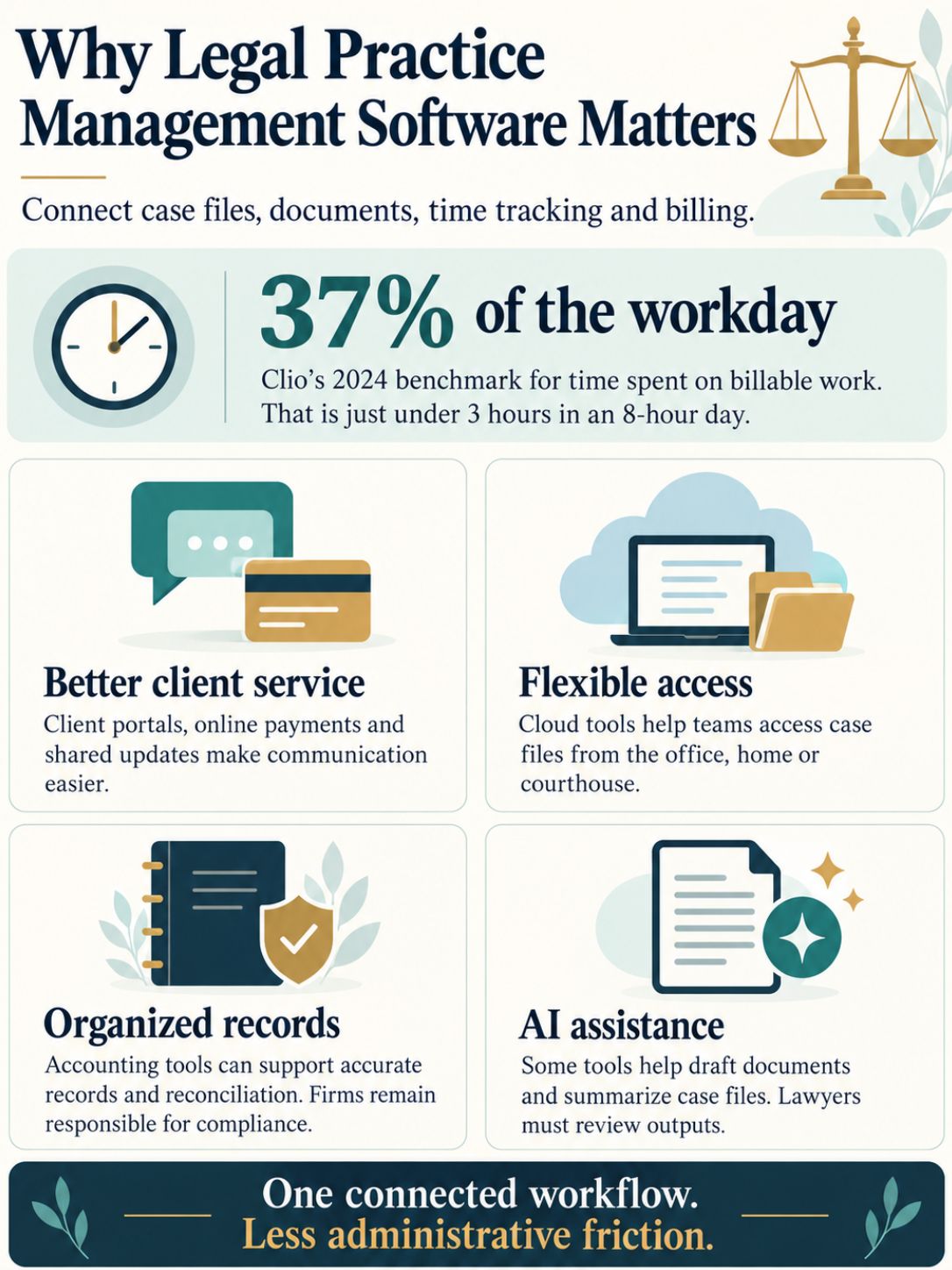
Legal practice management software matters because law firms lose billable time and client trust when case data, documents, and billing live in separate, disconnected tools. Clio’s Legal Trends Report has found for years that lawyers bill well under three hours out of an eight-hour day, largely because administrative work eats the rest.
A few forces are pushing adoption higher in 2026:
- Client expectations have changed. Clients want online portals, e-payments, and status updates, features baked into most modern practice management software.
- Remote and hybrid staffing is normal. Cloud-based software lets attorneys and staff work from the office, a courthouse, or home without losing access to case files.
- Compliance risk is rising. State bars are scrutinizing trust accounting more closely, and manual ledgers increase the chance of error.
- AI features are maturing. Tools from Smokeball, SurePoint, and others now draft documents, summarize files, and flag deadlines automatically.
Legal Practice Management Software vs. Case Management Software vs. Matter Management
Legal practice management software is the umbrella category; case management and matter management are features inside it, though a few vendors still sell case management as a narrower standalone product. The distinction matters mostly for budgeting and vendor selection, not daily use.
- Practice management software: the full suite, case management, document management, billing, trust accounting, CRM, and reporting.
- Case management software: focused on tracking individual case or matter progress, deadlines, and notes; often a module, not a full platform.
Best Legal Practice Management Software in 2026
The best legal practice management software depends on firm size, practice area, and budget, there is no single winner, but Clio, PracticePanther, SurePoint, Smokeball, and MyCase consistently rank among the most reviewed platforms on Capterra and G2 in 2026.
| Platform | Best for | Notable strength |
|---|---|---|
| PracticePanther | Solo and small firms | Simple billing and client portal |
| SurePoint | Mid-sized and large law firms | Full finance suite (Finance Pro, Finance Core, Finance Enterprise) plus CRM |
| Clio | Firms of nearly any size | Large app marketplace and integrations |
| Smokeball | Firms wanting AI document automation | Built-in AI drafting assistant |
| MyCase | Small to mid-sized firms | Client communication and e-payments |
| Kleos | European and international firms | Strong matter and compliance tracking |
| iManage | Large firms and corporate legal | Enterprise document management |
How Much Does Legal Practice Management Software Cost?
Legal practice management software typically costs between $30 and $150 per user per month, with solo-focused products at the low end and enterprise finance suites for large firms at the high end. Annual billing usually saves 10 to 20% compared to monthly plans.
Pricing generally falls into three tiers:
- Solo and small firm tier: $30,$60/user/month, covers case management, billing, and basic document management.
- Growing and mid-sized law firms tier: $60,$100/user/month, adds CRM, advanced reporting, and more document storage.
- Enterprise tier (large firms, multiple offices): $100,$150+/user/month, includes full finance suites, custom integrations, and dedicated implementation support.
Legal Practice Management Software for Solo Practitioners and Small Law Firms
Solo practitioners and small law firms need legal practice management software that is affordable, quick to set up, and strong on billing and client communication, since most solo attorneys don’t have dedicated IT or accounting staff. Complex enterprise features matter far less than ease of use.
Good fits for solo and small firm budgets:
- PracticePanther, simple interface, strong client portal, widely used by solo attorneys.
- MyCase, client communication and e-payments built in.
- CosmoLex, bundles accounting and trust accounting without a separate bookkeeping tool.
- Rocket Matter, straightforward time tracking and billing.
Are There Free Legal Practice Management Software Options?
Free legal practice management software exists but is limited; most vendors offer free trials (typically 7 to 30 days) rather than permanent free tiers, and a handful of products offer a free plan capped at one user or a small number of matters.
What to expect from “free” options:
- Free trials from nearly every major vendor, including Clio and PracticePanther, to test the software before buying.
- Limited free tiers for very small practices, usually missing trust accounting or advanced reporting.
- Legal aid and nonprofit discounts, which some vendors offer on request rather than advertising publicly.
How Does Legal Practice Management Software Integrate With Accounting?
Legal practice management software integrates with accounting by syncing billed time, invoices, and trust transactions either through a built-in accounting module or a connector to outside accounting software like QuickBooks, so firms don’t have to enter the same data twice.
Two common integration models exist:
- All-in-one: billing, trust accounting, and general ledger built into the practice management software itself (common with SurePoint Finance Pro and CosmoLex).
- Connector-based: the practice management software handles case and billing data, then syncs with outside accounting software like QuickBooks Online for the general ledger.
Trust accounting is the detail firms cannot get wrong. Most state bar associations require three-way reconciliation (bank balance, client ledger, and trust ledger must match), and software that automates this reconciliation reduces the single biggest cause of bar complaints tied to accounting errors.
Common Problems With Legal Practice Management Software
The most common problems with legal practice management software are incomplete data migration, low staff adoption, and underestimating the training time needed after go-live. Most of these are implementation problems, not software defects.
Frequent issues firms report:
- Partial data migration, old case files or documents get left behind in a legacy system.
- Staff resistance, attorneys revert to email and spreadsheets if training is rushed.
- Billing errors during transition, time entries split across two systems during cutover.
- Integration gaps, a document management tool or e-signature product that doesn’t sync cleanly with the new practice management software.
Legal Practice Management Software Setup and Implementation
Setting up legal practice management software typically takes two to eight weeks and includes data migration, configuration, integration testing, and staff training; larger firms with multiple finance systems or practice groups should plan closer to the eight-to-twelve-week range.
A practical implementation checklist:
- Audit existing data, case files, documents, billing history, and trust ledgers.
- Pick an implementation owner, one partner or administrator who drives decisions.
- Configure workflows, matter templates, billing rates, and task management rules.
- Migrate data, move documents and case records in batches, verifying accuracy.
- Run parallel billing, overlap old and new systems for one billing cycle.
- Train staff in stages, start with the modules attorneys use daily, then layer in reporting.
- Review after 30, 60, and 90 days, adjust workflows based on real usage, not assumptions.
Legal Practice Management Software Security and Compliance
Legal practice management software should meet baseline security standards including encryption in transit and at rest, SOC 2 compliance, and audit logging, because firms handle privileged client data subject to bar association ethics rules, not just general data privacy law.
Security and compliance checklist for law firms:
- Confirm the vendor publishes a SOC 2 report or equivalent independent audit.
- Review the vendor’s data encryption standards, both at rest and in transit.
- Check alignment with NIST Cybersecurity Framework practices, even if not formally certified.
- Ask how the vendor supports trust accounting compliance tied to your state bar’s rules.
- Read the vendor’s Terms of Service and Privacy Policy before signing, not after.
The American Bar Association’s Model Rules of Professional Conduct place confidentiality duties directly on attorneys, meaning the firm, not just the software vendor, remains responsible for a data breach involving client files. Choosing software with a visible security page and a plain-language Terms of Service, Privacy Policy, and Security practices document is a reasonable baseline before trusting it with client data.
Final Thoughts
Legal practice management software has become a valuable tool for law firms looking to simplify daily tasks, organize case information, manage deadlines, and deliver better client service. By bringing essential legal workflows together in one platform, it can reduce repetitive administrative work, improve team collaboration, and give lawyers more time to focus on their clients and legal matters.
However, choosing the right legal practice management software requires careful consideration of your firm’s size, workflow, budget, security requirements, and integration needs. Before making a decision, compare available features, ease of use, pricing, and data protection measures. The right solution should fit your firm’s needs today while supporting its future growth. Ultimately, effective legal practice management is not just about adopting new technology—it’s about building a more organized, efficient, and client-focused legal practice.
Frequently Asked Questions
1. What is legal practice management software?
Legal practice management software is a digital tool that helps law firms manage cases, client information, documents, appointments, billing, and other daily operations from one centralized platform.
2. How does legal practice management software work?
It works by bringing essential law firm tasks into a single system. Lawyers and legal staff can organize case files, track deadlines, schedule meetings, manage client communications, record billable hours, and generate invoices without switching between multiple tools.
3. What are the main features of legal practice management software?
Common features include case and matter management, document management, calendar and deadline tracking, time tracking, billing and invoicing, client communication, task management, reporting, and secure data storage.
4. What are the benefits of legal practice management software?
Legal practice management software can improve productivity, reduce repetitive administrative tasks, minimize missed deadlines, organize client records, simplify billing, and support better collaboration across legal teams.