
You want to set fair prices for your software, but the numbers can feel overwhelming. Picking a price too high might scare off buyers, while going too low could shrink your profits fast. It is a balancing act that keeps many founders up at night.
Here is a quick fact that might change your perspective: adding transparent pricing, like a calculator, can increase conversion rates by 20% to 30% according to 2025 industry benchmarks. That is why using a B2B SaaS Pricing Calculator matters more than you might think.
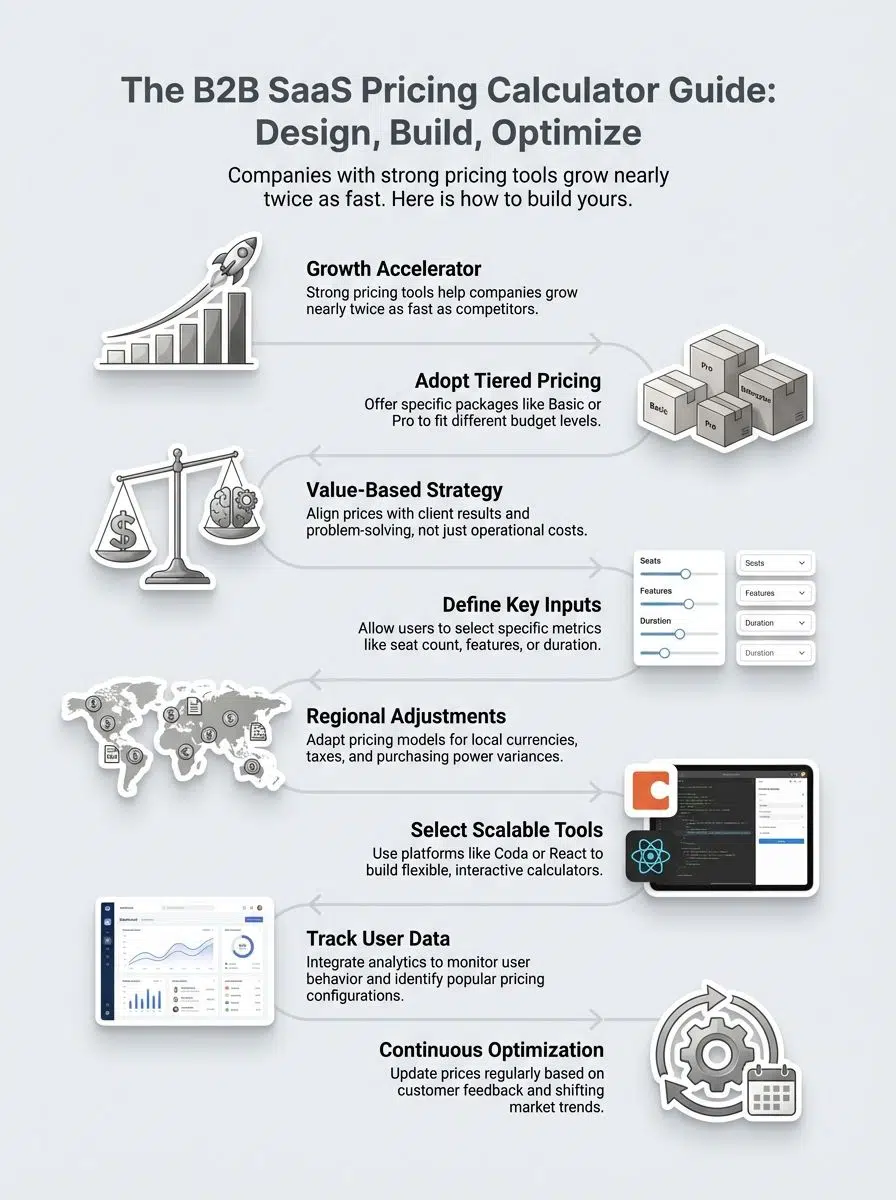
Companies with strong pricing tools do not just guess; they grow almost twice as fast. This guide will show you simple steps to design, build, and improve one of these calculators for your own business needs. Let’s walk through exactly how to build a tool that reduces stress and boosts results.
What Is a B2B SaaS Pricing Calculator?
A B2B SaaS pricing calculator is an interactive tool that helps potential customers figure out the exact cost of a software subscription in real-time. Instead of waiting for a sales quote, users enter their specific data, like the number of seats, required storage, or contract length, and get an immediate answer.
Think of the AWS Pricing Calculator by Amazon. It allows IT managers to input complex server requirements and get a clear estimated monthly bill. This level of self-service removes friction from the buying process.
Sales teams love these tools because they act as a 24/7 SDR (Sales Development Representative). They qualify leads by showing them realistic numbers before they ever book a demo.
“Price is what you pay; value is what you get.” – Warren Buffett
This kind of calculator makes things easy for both sellers and buyers. It supports many pricing models such as tiered pricing, value-based pricing, or cost-plus pricing strategies. Recent data from Demand Metric shows that interactive content like calculators converts at 70%, compared to just 36% for passive static pages.
The Role of Pricing in SaaS Business Success

After understanding what a pricing calculator does, it is key to see why setting the right price matters so much. Pricing affects your revenue model, profit, and how customers view your software’s value. Even small changes in subscription pricing can lift conversion rates significantly. For example, a study from ProfitWell found that improving your monetization strategy by just 1% can increase your bottom line by nearly 12.7%.
Smart pricing strategies use data from market analysis and competitive analysis. You must know where you stand compared to others. Segmenting customers based on size or need lets you offer different prices or features that fit them best.
Value-based pricing means charging for the real worth users get, boosting both sales and loyalty without always cutting prices. A good mix of cost structure awareness with clear communication helps companies build trust and win long-term deals. If your numbers are off target, even strong products struggle to gain traction.
Exploring SaaS Pricing Models: Key Strategies
There’s more than one way to set your prices. Each method shapes how customers see your value, so let’s look at which one fits your goals best.
Adopt Cost-based Pricing
Cost-based pricing starts with what your SaaS product costs to build and keep running. You add up expenses like hosting (AWS or Azure bills), developer salaries, and software tools. Next, add a markup to make a profit, often 10% to 30%. For example, if supporting each user costs $25 per month, you might price the subscription at $35.
Many early-stage B2B software firms use this model because it is safe. It gives a clear revenue model since every sale covers its share of the cost structure. However, be careful: this model often ignores the value you provide, potentially leaving money on the table compared to value-based strategies. Still, always check competitor-based pricing too, so your offer stays both fair and attractive in the market.
Leverage Value-based Pricing
After thinking about cost-plus pricing, the focus moves to value-based pricing. This approach sets prices based on the real benefits your SaaS offers customers. You align price with the value clients see, not just your costs.
Clients pay for results, so highlight how your product saves time or boosts profit. A company like Salesforce uses this effectively; they charge a premium because their CRM is proven to drive revenue growth for their clients.
According to 2025 data from Artisan Strategies, companies using value-based or usage-based pricing grow 10% to 20% faster than those sticking to rigid fixed fees.
“People buy products that solve problems better than anyone else can.”
Test different values in your calculator and watch customer feedback closely. Small tweaks can make a big impact on revenue growth and user satisfaction.
Analyze Competitor-based Pricing
Moving from value-based pricing, it’s time to study what your rivals charge. Start by gathering details on their subscription plans and features. Compare their SaaS revenue models and see if they use tiered or flat pricing.
Services like Crunchbase or G2 Crowd are excellent for getting updated market analysis data. You can also look at “Best Alternative to X” articles to see how users perceive price differences.
Look for gaps in features, user experience, and price points. Some companies bundle extra tools, while others may include cost-plus pricing for specific services. Competitive analysis lets you spot trends fast, and you might notice conversion optimization tricks hidden in their offers.
Study how your competitors set their prices so you can position your software better in the market and attract more customers.
Implement Tiered Pricing Structures
Tiered pricing splits your SaaS product into different packages. Each package gives more features as the price goes up. This setup makes it easy for small startups, growing companies, and big businesses to find a plan that fits.
For example, you might see a basic plan at $19 per month offering limited users and storage. The next tier could cost $49 per month with advanced reporting and extra support. Enterprise customers may pay $199 each month for custom solutions.
Psychologically, this leverages the “Goldilocks Effect,” where most buyers will pick the middle option. Zoom does this famously with its Basic, Pro, and Business tiers. It helps your revenue model grow faster as people upgrade plans over time.
By matching customer segmentation to package options, you boost conversions and make decisions simpler for everyone involved, no guesswork required!
How to Design a B2B SaaS Pricing Calculator
Start by asking simple questions about your product and users. Smart choices here make pricing clear as a bell, which saves both time and headaches.
Define Key Input Metrics
Key input metrics shape any SaaS pricing calculator. These include the number of users, usage limits, desired features, and subscription length. For example, an email marketing tool like Mailchimp uses “number of contacts” as the primary metric.
Feature selection matters too. Think about items like single sign-on (SSO) or advanced analytics. These are high-value features that often push users into a higher tier.
Customer segmentation also counts as a metric. Segment by company size or industry to tailor calculations. Revenue model plays a part too: monthly versus annual billing shifts price outcomes.
Regional adjustments help if you sell across borders; currency and taxes differ from one place to another. Next up is how to organize these pricing models into clear options clients can pick with confidence.
Organize Pricing Models
Group your pricing models in a clear and simple way, so users can pick what fits them best. Place cost-based, value-based, and competitor-based options next to each other for easy comparison.
Mix in tiered structures like Basic, Pro, and Premium if that’s part of your revenue model. Each section should show key benefits, price points, and target customer segments.
- Keep layouts clean: Use whitespace generously so the numbers stand out.
- Use interactive sliders: These are more engaging than typing numbers into a box.
- Show savings clearly: If they pick “Annual Billing,” show exactly how many dollars they save right next to the total.
A good organization helps customers feel at home as they move through the calculator steps. Now it is time to define the main input metrics needed for smart price calculation.
Apply Regional Pricing Variations
After organizing your pricing models, the next step is to factor in regional pricing differences. Markets do not always value software products the same way. What works in the United States may fall flat in Southeast Asia or Western Europe.
This concept is often called Purchasing Power Parity (PPP). Companies like Adobe and Microsoft often set different subscription prices based on country to maximize global reach.
A B2B SaaS Pricing Calculator should let businesses adjust their revenue model for each region with ease. For example, you might price your entry-level tier at $20 per user in Canada but only $12 per user in Brazil due to varying local costs and demand levels.
Using a tool like Paddle can help automate these localized currencies and tax compliance. This flexibility makes it easier to optimize conversion rates across markets while staying competitive everywhere you operate.
Building a B2B SaaS Pricing Calculator
Building a B2B SaaS pricing calculator takes the right tools, smart planning, and a dash of creativity. Here is how to make it shine.

Select Appropriate Tools and Platforms
Pick software that fits your technical skills and budget. You do not always need a developer to build something powerful.
| Need Level | Recommended Tools | Best For |
|---|---|---|
| Simple / Low Code | Outgrow, involve.me, Calcapp | Marketing teams want a quick lead-gen tool without coding. |
| Flexible / No-Code | Bubble, Make (formerly Integromat) | Building custom logic and connecting to your CRM. |
| Custom / Developer | React.js, Vue.js | Fully branded, complex calculators embedded directly in your app. |
Stripe API or Paddle makes it easier to link payments directly from your calculator. Focus on user experience by selecting platforms with clear layouts and mobile support.
Popular analytics plugins track what users do inside the calculator so you can improve conversion rates and spot customer segmentation trends quickly. Picking the right tool saves time and boosts your revenue model’s accuracy.
Integrate Analytics for Enhanced Insights
Analytics tools track how users interact with your SaaS pricing calculator. These insights can show which pricing model, subscription option, or revenue model draws the most attention and clicks.
For example, Google Analytics 4 (GA4) helps you see if visitors spend more time exploring value-based pricing or switch quickly between tiers. You can set up specific “events” to track every time someone moves a slider.
Heatmap tools like Hotjar or Crazy Egg highlight where people get stuck or drop off. Using this data sharpens your pricing strategy and boosts conversion rates. Spot trends in customer segmentation and user behavior without lifting a finger.
Simple graphs tell clear stories about what works best for your market positioning efforts. Up next is making sure your B2B SaaS Pricing Calculator grows smoothly as demand and needs change over time.
Ensure Calculator Scalability and Adaptability
Once you draw valuable insights from integrated analytics, focus shifts quickly to scaling and adapting your pricing calculator. Growth does not wait for slow software updates or clunky platforms.
Built with flexibility at the core, so the tool fits startups adding their first hundred users and enterprise SaaS companies onboarding thousands. With clear coding practices and modular design, upgrade features without breaking things that already work.
Plan for new subscription models or different revenue streams down the road. Maybe next year, you roll out value-based pricing in a fresh market segment; perhaps regional taxes change overnight.
A scalable calculator lets you add new tiers, update cost structures, switch currency displays, or even test localized discounts—fast and without fuss. That way, conversion rates do not stall as customer needs shift or markets expand faster than anyone expects.
Optimizing Your SaaS Pricing Calculator
Tweak your calculator often, like a gardener watering plants, growth takes care. Spot trends early, use those fresh insights to keep your pricing sharp as a tack.
Collect Customer Feedback
Ask users what they think about your pricing calculator. Some people might find the subscription options confusing, or maybe a feature feels missing to them.
Use survey tools like Qualaroo or Typeform to trigger a quick question right after they use the calculator. Keep it friendly and simple, like “Did this pricing make sense to you?”
Users can help spot bugs faster than any bot ever could, and their comments often shine a light on real-life struggles. Say thank you, show that you listen, and track which suggestions come up most often. This input will shape smarter pricing strategies and boost conversion rates in the long run.
Analyze Trends in Pricing Data
After gathering real customer feedback, focus shifts to the numbers behind user actions. Check your SaaS pricing calculator data often. Spot patterns in which price points customers pick the most.
Notice if certain subscription plans drive higher conversion rates or repeat signups. Keep an eye on changes over weeks and months. According to Invesp, 4 out of 5 SaaS companies change their pricing at least once a year to keep up with inflation and new feature releases.

If value-based pricing attracts more users from a certain region or business size, mark that trend for deeper market analysis later. Use analytics tools to pull clear reports fast; look for spikes during special promotions or after feature launches.
This boosts your ability to tweak your revenue model and outshine competitors with smart, timely moves in your software pricing framework.
Refine and Iterate the Calculator
Study how users interact with your SaaS pricing calculator. Watch for spots where they pause, exit, or return to change answers. Tools like Hotjar offer helpful recordings here.
Adjust the layout if people tend to get lost or confused; update tooltips with clearer text based on real questions you receive. Use feedback from customer surveys to fix problems fast.
Update cost-based, tiered, and value-based models as your product evolves. If a competitor changes its pricing structure, review your own setup right away. Test new features in small steps first so you can spot errors quickly without confusing everyone at once.
Test again whenever you tweak numbers or add subscription options; even tiny updates affect conversion rates and user experience more than most expect.
Common Mistakes to Avoid in SaaS Pricing
Many teams trip over confusing price setups or lose sight of what matters to customers. Staying alert for these stumbles can save headaches, and maybe a few dollars, too.
Simplify Complex Pricing Structures
Complex pricing structures can confuse customers and slow down the sales process. This is often called “Analysis Paralysis.” Stick to clear, easy-to-understand subscription options like tiered pricing or value-based pricing.
For example, group features into simple packages so businesses see what they get right away. Make your calculator show costs using real numbers and examples. Use plain language for features and benefits, not technical terms from software engineering textbooks.
Keep input steps short, cutting out any that do not help your revenue model or customer segmentation goals. This smooth approach improves user experience and helps boost conversion rates by making choices quick and stress-free.
Focus on Customer Value Perception
People want to see a fair deal. They often judge your SaaS subscription pricing by what they get for their money. If customers feel the value is clear, you earn trust and boost the conversion rate.
For example, show how each feature helps solve daily problems or saves time in plain language. Listen to customer feedback and watch pricing trends closely.
Use simple charts or numbers in your calculator to highlight cost-benefit analysis. By showing results clearly, like “Save 80 hours per year,” you make your value proposition stand out from competitors and support better market positioning.
Regularly Update Pricing
Software pricing should never stay frozen in time. SaaS markets keep changing fast; costs jump, new features appear, and rivals change their pricing strategies overnight.
If your subscription pricing stays stuck, you risk losing out to sharper competitors or missing profit. Inflation in the SaaS sector hit nearly 9% in 2025, according to SaaStr, meaning your costs are likely rising too.

Update your revenue model often to match changes in cost structure and customer needs. Fresh numbers help with conversion optimization. Your customers notice value and fairness straight away if prices reflect the real market situation, not last year’s guesswork.
Use analytics tools, check trends from competitive analysis, and review feedback every quarter if possible—many top enterprise SaaS companies do this monthly for an edge. Tweak those numbers as needed so that your software pricing framework always fits real demand and keeps users comfortable moving forward.
Advantages of Using a SaaS Pricing Calculator
A SaaS pricing calculator gives people clear prices and helps them choose faster, so click ahead to find out why many trust this simple tool.
Boost Pricing Transparency
Clear pricing makes life easier for both sellers and buyers. Subscription-based companies, like SaaS providers, use pricing calculators to show how much each feature costs in real time.
This gives customers confidence while exploring different subscription options or revenue models. A report by TrustRadius revealed that 72% of buyers are more likely to make a purchase when pricing is fully transparent.
No more guesswork or hidden fees means fewer surprises at checkout. People know exactly what they will pay, which helps them trust your brand and speeds up their decision-making process. Conversion rates often rise because users feel more informed and supported every step of the way.
Aid Customer Decision-Making
A B2B SaaS pricing calculator makes choices simpler. It sorts costs and benefits up front, so users do not feel lost or unsure. Customers can compare each subscription plan side by side.
They see clearly how different features affect the price. This helps set real expectations about value and cost. Seeing quick, accurate numbers gives buyers confidence to move forward.
Quick data cuts down on second-guessing and stress for everyone involved in the purchase process. Clear options also help sales teams answer questions fast, improving user experience at every step. Up next is a look at how these tools boost conversion rates for your company.
Improve Sales Conversion Rates
Clear pricing helps buyers make decisions faster, so fewer leads drop off. A well-built SaaS pricing calculator lets people see costs upfront and compare plans side by side. Think of it as a helpful market analysis tool, quietly doing the heavy lifting for your sales team.
Sales teams spend less time answering common cost questions and more time closing deals. Tools powered by value-based pricing guide users straight to the plan that best matches their needs.
In 2024 and 2025, software companies using interactive calculators saw conversion rates jump significantly compared to static price lists. That extra transparency turns clicks into signups and demos into paying customers in record time, trimming friction all along the way.
Who Can Benefit from a SaaS Pricing Calculator?
Many people find these tools helpful, from fresh startups to seasoned companies. Anyone aiming for clearer pricing or smoother sales can see big gains here.
Startups and Small Businesses
Startups and small businesses often run on tight budgets. A SaaS pricing calculator helps them pick the best subscription plan for their money. Clear pricing shows every cost, stopping surprise charges from popping up later.
For example, a local bakery picking an inventory tool can see at a glance which tiered pricing option fits its needs. This builds trust and makes decision-making faster.
Quick answers about value-based or cost-plus pricing mean less time spent doing math and more time growing the business. Customers can sort by features that matter to them, like user count or storage size.
Small teams want simple steps, so they choose quickly without getting lost in endless choices or confusing rates. Better choices boost conversion rate and keep those customers happy month after month.
Enterprise SaaS Companies
Large SaaS companies handle many users and complex needs. Teams track costs, user counts, and pricing tiers. These firms use a solid revenue model to stay ahead in the market. Pricing strategy often includes tiered pricing or value-based pricing.
With a B2B SaaS Pricing Calculator Guide, these organizations can test what works best for each customer segment. Tools like this can reveal which features customers choose most or help find gaps in their current cost structure. Combining data from analytics boosts conversion rate and sharpens their competitive analysis over time.
Wrapping Up
Clear pricing helps customers make choices faster. A good B2B SaaS pricing calculator gives a boost to your conversion rate and builds trust. Simple tools can lift user experience and support strong decision-making. Using the right subscription pricing model shapes your revenue stream.
Companies find more value with well-segmented offers, smart cost structure planning, and ongoing market analysis. Stay sharp by reviewing results often, asking for feedback, and tweaking as markets shift. Sometimes small changes spark big growth.